SEO Audit
Free White Label SEO Audit Tool: What Agencies Actually Get
You’ve found a potential SEO client, reviewed their website, and identified several problems worth fixing. Now you need a professional audit report that explains…
Your website has hundreds of pages, organic traffic is declining, and you’re not sure what’s causing the problem.
Is Google struggling to crawl important URLs? Are internal links pointing to broken pages? Are indexing problems preventing key landing pages from appearing in search results?
Or is your website simply too slow?
An SEO audit tool helps identify these problems before you decide what to fix.
The Ahrefs SEO Audit Tool, officially called Ahrefs Site Audit, is one of the established options for technical website analysis. It crawls websites, checks for more than 170 SEO issues, and organises findings into reports designed to help marketers and developers investigate problems.
You can even use it for free if you verify ownership of your website.
However, identifying technical problems is only part of the process. A report containing hundreds of warnings doesn’t necessarily tell you which changes will have the greatest impact on your business.
This guide explains how Ahrefs Site Audit works, what you can access for free, how much the paid plans cost, and how alternatives such as Digimetrics compare when you need actionable SEO recommendations.
Ahrefs Site Audit is a technical SEO crawler that examines websites for issues affecting crawling, indexability, website structure, and other aspects of search performance.
Instead of manually inspecting every page, users can configure a website crawl and review the findings in a central dashboard.
The tool checks more than 170 potential issues across categories including:
Ahrefs also generates an overall Health Score based on the errors detected during the crawl.
This provides a convenient summary of technical website health, although it should not be interpreted as a Google ranking score.
Yes. Ahrefs provides free Site Audit access for websites you own and can verify.
According to the Ahrefs free account documentation, eligible verified websites receive 5,000 crawl credits per project each month.
This allows website owners to investigate technical issues without purchasing a full Ahrefs subscription.
| Feature | Free Access |
| Website SEO audit | Yes |
| Website ownership verification | Required |
| Crawl credits | 5,000/month per verified project |
| 170+ SEO issue checks | Yes |
| Overall Health Score | Yes |
| Issue categories and affected URLs | Yes |
| Technical SEO recommendations | Yes |
| Larger crawl allowances | Requires a suitable paid plan |
| Audit of unverified competitor sites | Not included in the same free access |
The free allowance is particularly useful for smaller business websites, blogs, and other sites that do not require extensive crawling.
One detail worth understanding is how Ahrefs counts crawl credits.
According to its documentation, internal HTML pages returning a successful 200 HTTP response generally consume crawl credits. Redirects, error pages, external links, and resources such as images and CSS files do not consume credits in the same way.
That means the number of URLs discovered during a crawl may differ from the credits consumed.
For businesses with larger websites, paid plans provide greater crawl capacity.
Running an initial audit is straightforward.
Create an Ahrefs account and add your website as a project.
If you’re using the free version, verify website ownership through one of Ahrefs’ supported methods.
This establishes that you have permission to audit the site under the free account.
Choose the website scope and relevant crawling settings.
Depending on your requirements, you may need to consider JavaScript rendering, crawl depth, robots.txt restrictions, and URL parameters.
For smaller websites, the default configuration may provide a useful initial assessment.
Larger websites often require more deliberate crawl settings to avoid spending resources on unnecessary URLs.
Ahrefs crawls the selected website and collects technical SEO information.
The time required depends on the number of pages, server response, and crawl configuration.
Once complete, the dashboard displays the website’s Health Score and groups detected problems into categories.
Start with errors that could prevent important pages from being crawled or indexed.
Examples include accidental noindex directives, critical server errors, and broken links affecting important commercial pages.
Then review lower-priority issues according to their relevance and likely business impact.
Implement the necessary changes and repeat the audit.
Compare the new results with the previous report to verify whether the problems have been resolved.
A technical issue should not be considered fixed simply because a task has been marked complete.
Ahrefs provides several capabilities that make it useful for technical SEO specialists.
Ahrefs automatically identifies numerous technical and on-page issues.
This can save considerable manual investigation, particularly on websites with many pages.
Instead of reviewing each URL individually, an SEO specialist can identify recurring issues affecting entire sections of a website.
Ahrefs provides reporting tools for investigating individual pages, internal links, and technical conditions.
Its Site Audit documentation describes access to hundreds of page-level data points.
This is useful when a problem affects only a specific template, directory, or page type.
For example, a developer may need to determine whether missing canonical tags are affecting the entire website or only pages generated by a particular template.
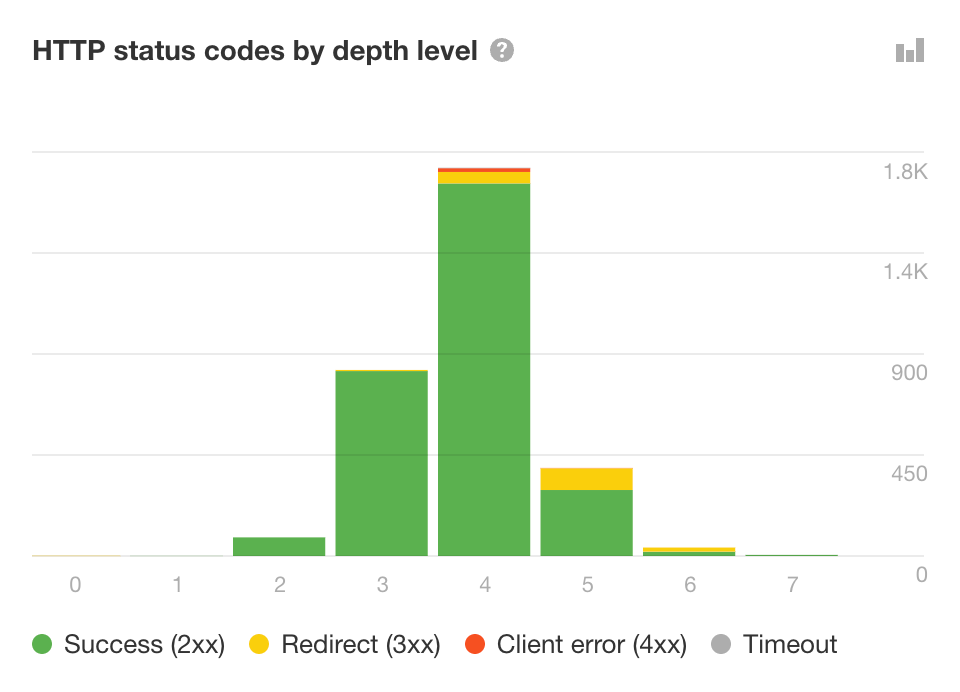
Some websites rely on JavaScript to display content.
Ahrefs supports JavaScript rendering, helping users investigate technical issues that may not be visible from the initial HTML alone.
This can be particularly relevant to websites built using modern frontend frameworks.
Advanced users can configure crawl rules, segmentation, and other settings.
These capabilities are useful for enterprise websites, ecommerce platforms, and large content sites where default crawling may not be sufficient.
Repeated audits help teams monitor website changes.
For example, if a recent deployment introduces broken links or indexing problems, comparing crawl reports can help identify the affected areas.
Ahrefs provides considerable technical information.
However, a detailed report still requires judgement.
A website may have hundreds of warnings, but only a few might materially affect its most important pages.
A marketer without technical SEO experience may struggle to distinguish critical indexing problems from relatively minor optimisation opportunities.
That’s where a more guided audit workflow can be useful.
Ahrefs and Digimetrics both help businesses evaluate website health, but they approach the process differently.
Ahrefs Site Audit is designed for detailed technical investigation, with extensive crawl configuration and granular reporting.
Digimetrics Full Site Audit focuses on translating website findings into an organised improvement plan covering SEO, speed, and AI-related readiness.
| Feature | Ahrefs Site Audit | Digimetrics |
| Technical SEO analysis | Yes | Yes |
| SEO health score | Yes | Yes |
| Crawl and indexability checks | Yes | Yes |
| Detailed technical issues | Extensive | Available through Technical SEO Crawler |
| Advanced crawl configuration | Extensive | Guided crawl settings |
| JavaScript rendering | Supported | Confirm for specific requirements |
| Issue prioritisation | Severity and configurable importance | Prioritised recommendations |
| Plain-language guidance | Available | Central to the reporting workflow |
| SEO and speed evaluation | Yes | Yes |
| AI-related website readiness | Not the primary focus of Site Audit | Included in broader audit workflow |
| Free access | Ongoing for verified sites within limits | Seven-day free trial |
| Starting paid price | $129/month for Ahrefs Lite | $31/month billed annually |
Neither product is automatically better for every website.
Ahrefs may be more suitable for technical teams requiring advanced crawl configuration and extensive investigation.
Digimetrics may be more suitable for marketers who want a clearer explanation of website problems and a prioritised list of next steps.
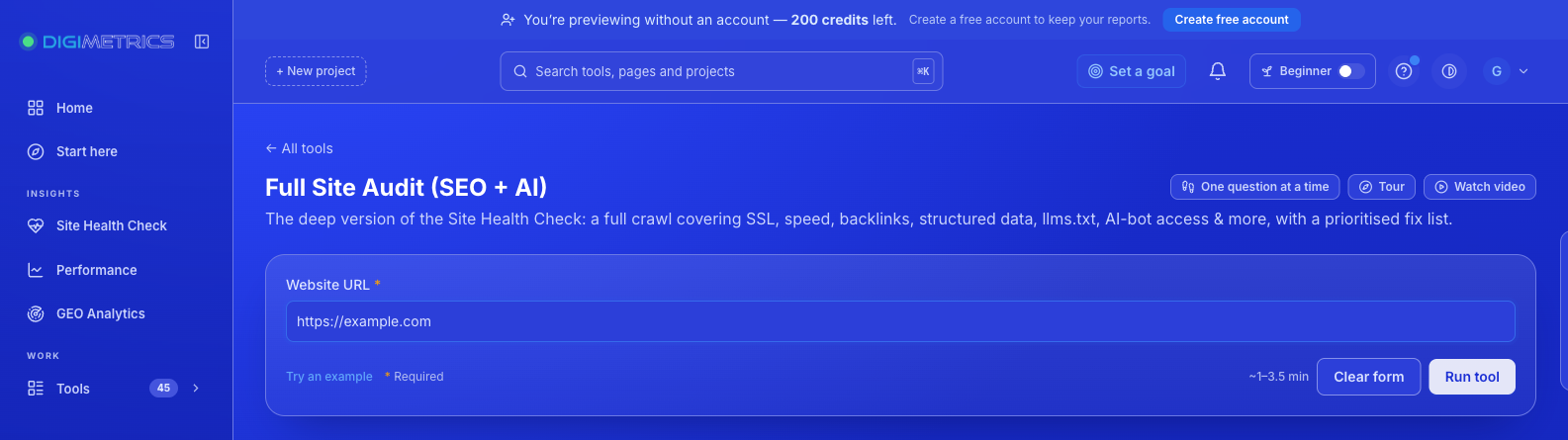
The Digimetrics Full Site Audit (SEO + AI) is designed to help marketers identify website problems without manually interpreting multiple technical reports.
Users enter a website address and receive an assessment covering SEO, speed, and AI-related signals.
According to Digimetrics’ documentation, an audit typically takes between 1 and 3.5 minutes.
The report includes an overall health score, key website signals, and a prioritised list of recommended fixes.
| Report Component | What It Provides |
| Health Score | Overall website assessment out of 100 |
| SEO Signals | Relevant technical and search-related information |
| Speed | Website performance findings |
| GEO Readiness | AI-related website signals and potential issues |
| Authority and Backlinks | Supporting website authority indicators |
| Prioritised Fix List | Recommended actions in priority order |
| Category Tags | SEO, speed, or GEO classification |
The main benefit is how the findings are presented.
Instead of requiring users to interpret every technical warning independently, Digimetrics groups recommendations by priority and explains the problems in accessible language.
Imagine a business website with these hypothetical findings:
| Issue | Pages Affected | Priority |
| Important service pages marked noindex | 4 | Critical |
| Broken internal links to commercial pages | 12 | High |
| Slow image-heavy landing pages | 18 | Medium to high |
| Duplicate meta descriptions | 75 | Context-dependent |
| Missing optional social metadata | 30 | Low for organic SEO |
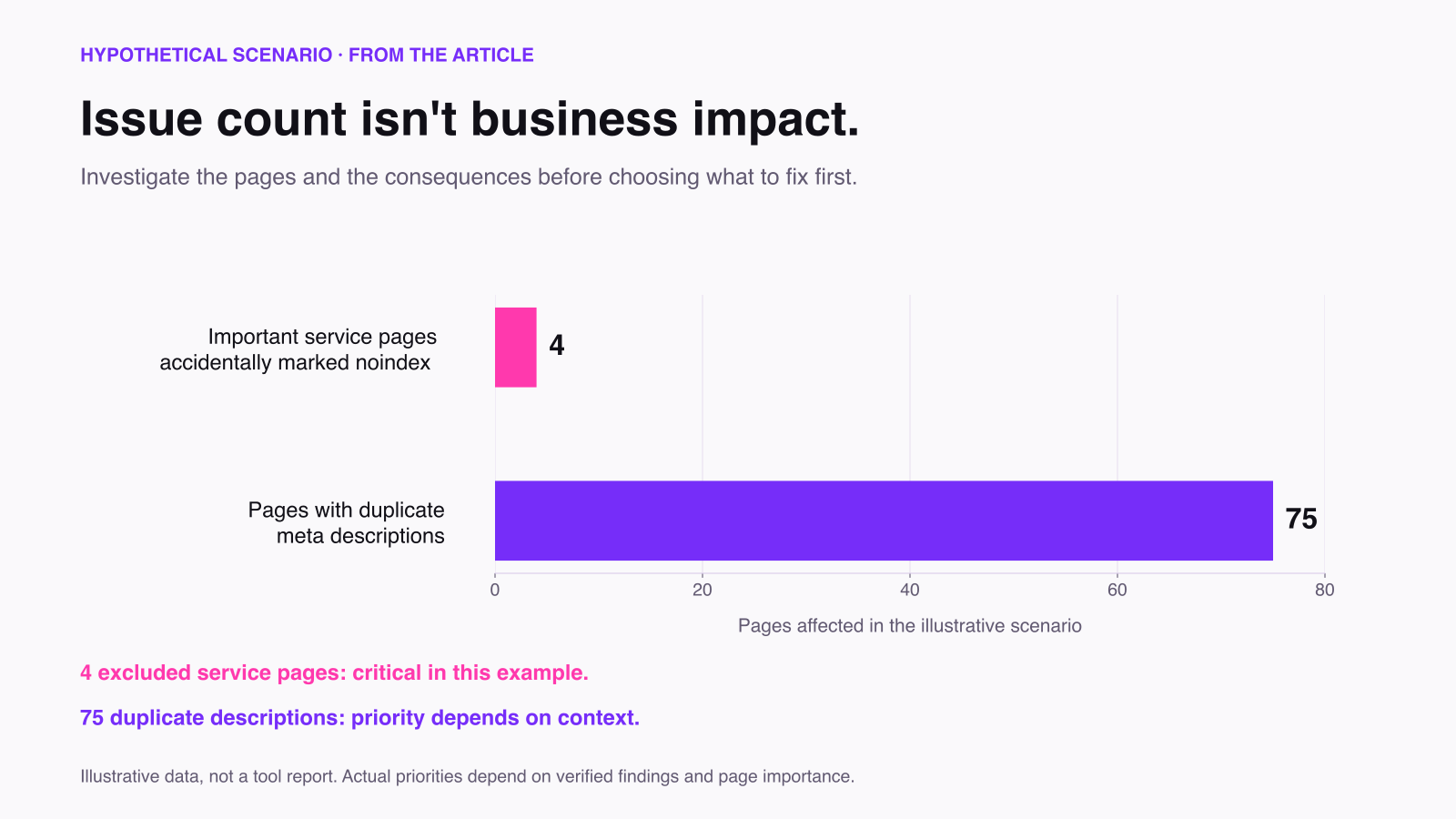
The website has more duplicate meta descriptions than indexing problems.
However, the four accidentally excluded service pages may deserve attention first because they could prevent important content from appearing in search results.
This illustrates why the number of SEO warnings is not necessarily the best measure of their importance.
Digimetrics’ prioritised reporting is designed to help users make those decisions.
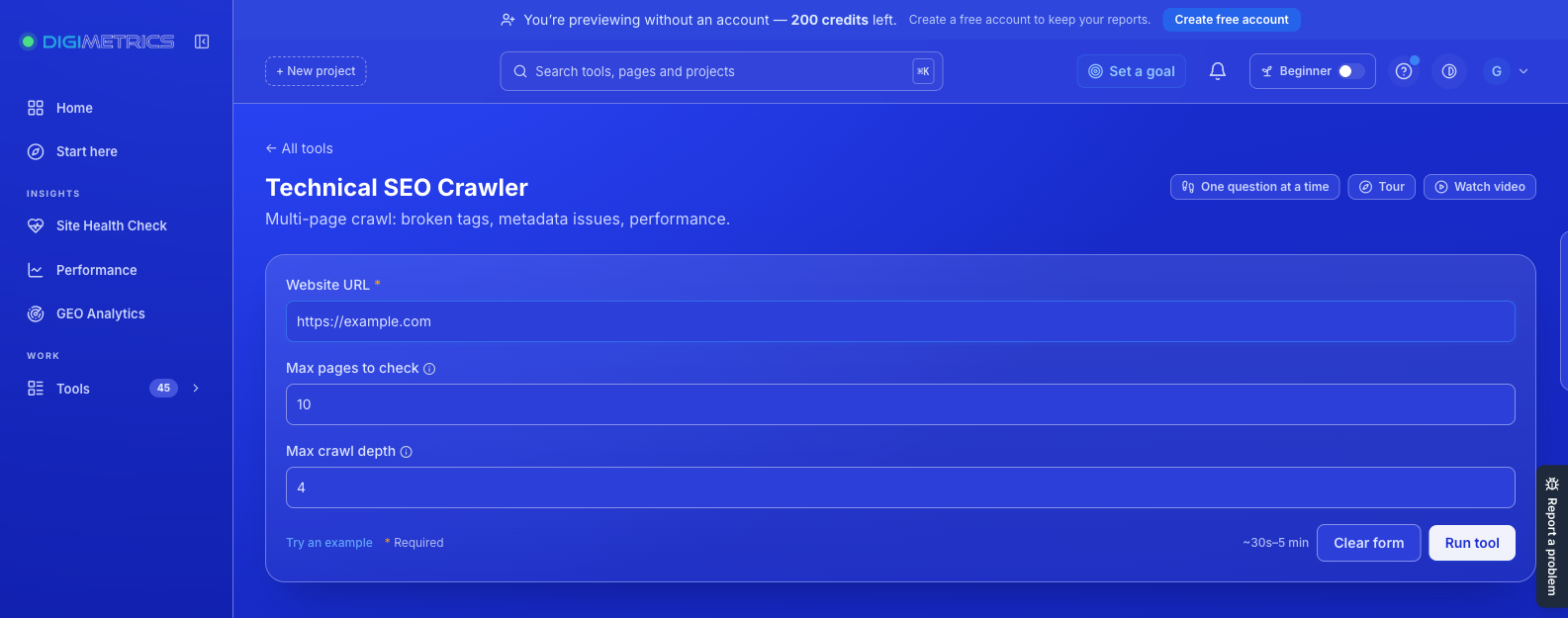
For users who need additional technical information, Digimetrics also offers a Technical SEO Crawler.
The crawler examines website pages and reports detected issues with descriptions, severity levels, and affected-page counts.
Its documented features include:
The default configuration starts with ten pages, and a crawl depth of four is recommended for many websites.
A starter crawl is included in the seven-day free trial.
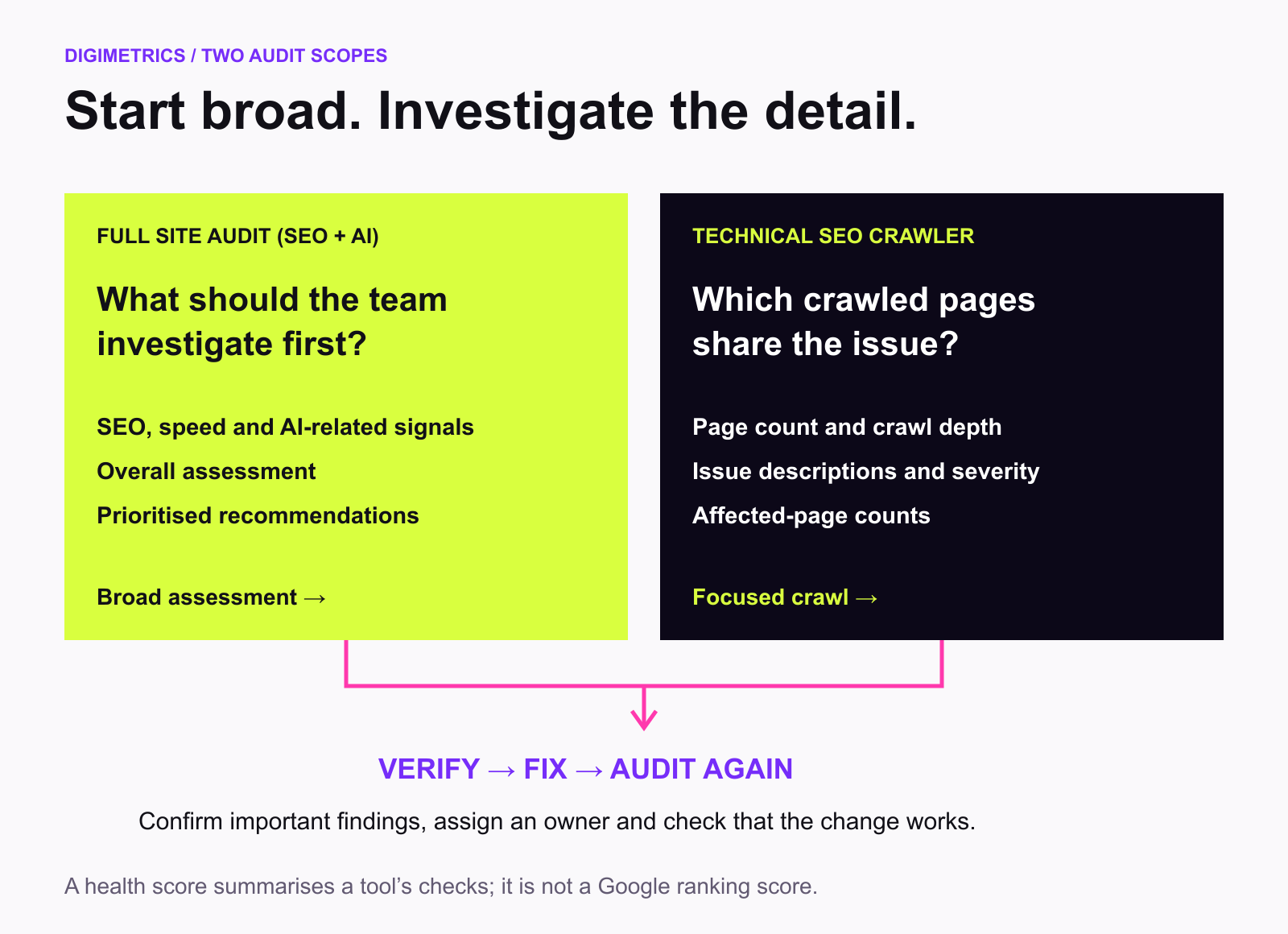
Use the Full Site Audit when you want a broader website health assessment, including SEO, speed, and GEO-related signals.
Use Technical SEO Crawler when you want to investigate technical issues across crawled pages.
For a faster initial assessment, the Digimetrics Site Health Check provides another starting point before running more detailed tools.
Ahrefs offers free verified-site access alongside subscriptions that include Site Audit and additional SEO tools.
Its current published paid plans start at $129 per month.
| Ahrefs Plan | Price per Month (USD) | Site Audit Crawl Credits per Month |
| Free | $0 | 5,000 per verified project |
| Lite | $129 | 100,000 |
| Standard | $249 | 500,000 |
| Advanced | $449 | 1,500,000 |
| Enterprise | Custom quotation | From 5 million |
These prices are the advertised monthly rates before applicable taxes. Annual billing may offer discounts.
The paid subscriptions also include other Ahrefs tools, so the price should not be interpreted as a standalone Site Audit fee.
You can review the latest plan allowances and subscription costs on the Ahrefs pricing page.
Digimetrics provides a seven-day free trial with access to its tools and no credit card requirement.
After the trial, businesses can choose from three paid plans.
| Digimetrics Plan | Annual Billing (Monthly Equivalent) | Monthly Billing | Projects |
| Starter | $31 | $39 | 3 |
| Pro | $87 | $109 | 10 |
| Expert | $159 | $199 | 25 |
All plans include access to Digimetrics’ 43 tools, with different monthly credits, project allowances, and usage limits.
The Expert plan also includes white-label PDF reporting and API access.
For businesses that want SEO audits alongside keyword research, content tools, and AI visibility monitoring, the broader toolkit may provide additional value.
You can compare the current allowances on the Digimetrics pricing page.
The most useful comparison depends on the problem you’re trying to solve.
| Your Main Requirement | Recommended Starting Point |
| Audit a website you own without paying | Ahrefs Free Site Audit |
| Investigate complex technical SEO problems | Ahrefs Site Audit |
| Crawl large websites with advanced settings | Ahrefs Site Audit |
| Get a prioritised SEO, speed, and GEO report | Digimetrics Full Site Audit |
| Run a focused technical crawl | Digimetrics Technical SEO Crawler |
| Start with a quick website health assessment | Digimetrics Site Health Check |
| Combine SEO audits with AI visibility and content tools | Digimetrics |
Ahrefs is particularly relevant when technical depth and crawl configuration are essential.
Digimetrics is worth considering when the priority is turning website findings into a manageable improvement plan.
One of the most common SEO mistakes is treating every warning as equally important.
A practical audit should consider technical severity, affected pages, business impact, and implementation effort.
Start with issues preventing important pages from being discovered or indexed.
Examples include accidental noindex directives, critical server errors, and inappropriate canonical tags.
If a valuable landing page cannot be indexed, improving its meta description is unlikely to be the first priority.
Review broken internal links, redirect loops, and pages that are difficult to reach through navigation.
These problems can affect both search engine discovery and user experience.
Prioritise the issues affecting commercially important pages.
Investigate slow page templates, oversized images, unnecessary scripts, and rendering problems.
Use appropriate performance tools and real-user data where available.
Not every performance warning has an equally meaningful impact.
Review title tags, headings, internal links, content quality, and duplication.
A repeated title across several pages may require correction if the pages target different topics.
However, automatically rewriting every short meta description may provide little value.
Evaluate legitimate technical barriers affecting automated access and content understanding.
Some AI-related conventions are still emerging, so their importance should not be overstated.
For example, an llms.txt file may be included in certain readiness checks, but its absence is not a confirmed Google ranking problem.
Treat these recommendations according to the evidence available rather than assuming every AI-related warning is critical.
An SEO audit can help identify problems that may affect organic search performance.
However, running an audit does not automatically improve rankings.
The benefit comes from identifying meaningful issues, implementing appropriate changes, and evaluating the results.
For example, correcting an accidental indexing restriction on an important service page may restore its eligibility to appear in search results.
Fixing broken internal links may improve navigation and help search engines discover relevant pages.
Improving page performance may also benefit the user experience.
But none of these changes guarantees a specific ranking increase.
Search performance depends on many factors, including content quality, relevance, competition, website authority, and technical accessibility.
A strong audit helps inform decisions. It does not replace a complete SEO strategy.
If you’re looking for a more guided process, Digimetrics provides a straightforward starting workflow.
Begin with the Site Health Check to review the current condition of your website.
Look for significant problems affecting search accessibility, performance, or AI-related readiness.
Enter your website address into the Full Site Audit tool.
Review the health score, key signals, and prioritised recommendations.
Focus on the individual findings rather than the score alone.
If the report identifies crawl-related issues, use Technical SEO Crawler for more detail.
Select an appropriate page count and crawl depth based on the website’s size.
Review issue descriptions and affected URLs before implementing changes.
Cross-check critical indexing problems using appropriate sources, such as Google Search Console.
A crawler’s findings and Google’s indexed state are not always identical.
For performance problems, consider laboratory measurements alongside real-user performance data where available.
Create a task list with clear priorities, assigned owners, and affected pages.
Separate development work from content improvements and other SEO tasks.
Run another audit after making changes.
Confirm whether the identified issues have been resolved and monitor relevant search performance over time.
Digimetrics also supports scheduled Full Site Audit runs, making repeated website health checks easier to manage.
A technical health score summarises the issues detected by a particular tool.
It is not a Google ranking factor.
A website with a score of 95 is not automatically more successful than one scoring 85.
Focus on meaningful technical problems and actual business outcomes.
Some warnings require context.
A short meta description is not necessarily harmful, and some duplicate-looking pages may serve legitimate purposes.
Verify the issue before changing the website.
A problem affecting a high-converting service page may deserve more attention than the same issue affecting an old, low-value page.
Prioritisation should account for business importance.
Technical SEO helps search engines access and understand website content.
It does not replace useful information, relevant products, strong services, or credible expertise.
A technically healthy website can still struggle in search if it fails to meet users’ needs.
Always confirm that an implemented change works as intended.
A task marked complete does not necessarily mean the underlying problem has been resolved.
Yes. Ahrefs Site Audit is a capable technical SEO crawler, particularly for businesses and specialists who need detailed website analysis, configurable crawling, and extensive issue reporting.
Its free access for verified websites also makes it a useful option for smaller site owners.
However, not every business needs an advanced technical auditing environment.
If your goal is to identify website problems, understand which deserve attention first, and review both traditional SEO and AI-related readiness, Digimetrics provides a different approach.
Its Full Site Audit delivers a health score and prioritised recommendations, while its Technical SEO Crawler supports more focused technical investigation.
The platform also includes related SEO, content, and AI visibility tools, allowing marketers to work across multiple areas without relying exclusively on a dedicated crawler.
The best SEO audit tool isn’t necessarily the one that produces the most warnings. It’s the one that helps your team find and fix the problems that matter.
Your website may have technical issues affecting search visibility, user experience, or content accessibility.
Digimetrics helps identify those problems through a guided SEO audit, with findings organised by category and priority.
Try the Digimetrics Full Site Audit (SEO + AI) to review your website’s health and discover what to investigate first.
Start with a seven-day free trial. No credit card required.
Yes. Ahrefs provides free Site Audit access for websites whose ownership you verify. Its free account includes 5,000 crawl credits per verified project each month.
Ahrefs checks more than 170 SEO issues across crawling, indexability, internal links, metadata, duplicate content, structured data, website performance, and other categories.
Yes, within the limits of its free verified-site access. Larger crawl requirements and additional features may justify a paid plan.
Ahrefs Site Audit is included in its free account and paid SEO subscriptions. Paid plans currently start at $129 per month for Lite, with larger crawl allowances on higher tiers.
The best alternative depends on your requirements. Digimetrics is worth considering if you want a prioritised audit combining SEO, speed, and AI-related readiness, while Ahrefs remains a strong option for detailed technical crawling.
Yes. Digimetrics offers a seven-day free trial that includes Full Site Audit access within applicable trial limits. No credit card is required.
Yes. Its Technical SEO Crawler identifies technical issues on crawled pages and reports severity levels, affected-page counts, and descriptions.
Ahrefs offers extensive crawl configuration and granular technical reporting. Digimetrics emphasises accessible reporting, prioritisation, and a broader SEO-plus-AI workflow. The better option depends on website complexity and the team’s expertise.
Monthly or quarterly audits can be appropriate for relatively stable websites. Frequently updated websites may benefit from more regular checks, particularly after redesigns, migrations, or major technical changes.
No. Audits identify potential problems and opportunities. Improvements depend on implementing appropriate changes and their effects on search accessibility, user experience, and content quality.

Tom is the CEO of MediaOne, a leading digital marketing agency. He is a business-experienced SEO consultant as well as a Google Gold Search Expert serving the international community. He has consulted for MNCs like Canon, Maybank, Capitaland, SingTel, ST Engineering, WWF, Cambridge University, as well as Government organisations like Enterprise Singapore, Ministry of Law, National Galleries, NTUC, e2i, SingHealth. His articles are published and referenced in CNA, Straits Times, MoneyFM, Financial Times, Yahoo! Finance, Hubspot, Zendesk, CIO Advisor. Under his stewardship, MediaOne has won dozens of prestigious digital marketing awards.
Run a free Digimetrics audit across SEO, AI search, content and technical health, and get a plan you can act on today.
Start free →You’ve found a potential SEO client, reviewed their website, and identified several problems worth fixing. Now you need a professional audit report that explains…
The best SEO software for a small business is not necessarily the product with the most features. It is the tool that tells you…
The best SEO tool stack helps an agency deliver better work without wasting money or hours switching between dashboards. This practical guide explains which…