SEO Audit
Competitor SEO Analysis Tool: How to Choose One and Use It to Outrank Rivals
Contents hide 1 Key Takeaways 2 How to Choose a Competitor SEO Analysis Tool 3 Introduction: Why a Competitor SEO Analysis Tool Matters in…
Our recommendation: For most working professionals, start with Google Keyword Planner because it is free, draws on Google’s own data, and requires no new subscription to test an idea.
These picks depend on your budget and workflow. Check the current quotas and prices on each vendor’s pricing page on the day you decide, as free-plan quotas and prices may change.
A keyword research tool answers three questions: how often people search for a phrase, how hard it is to rank for, and what else people search for alongside it. Tools differ in their data sources, packaging and confidence levels, so know what a tool gives you before you choose.
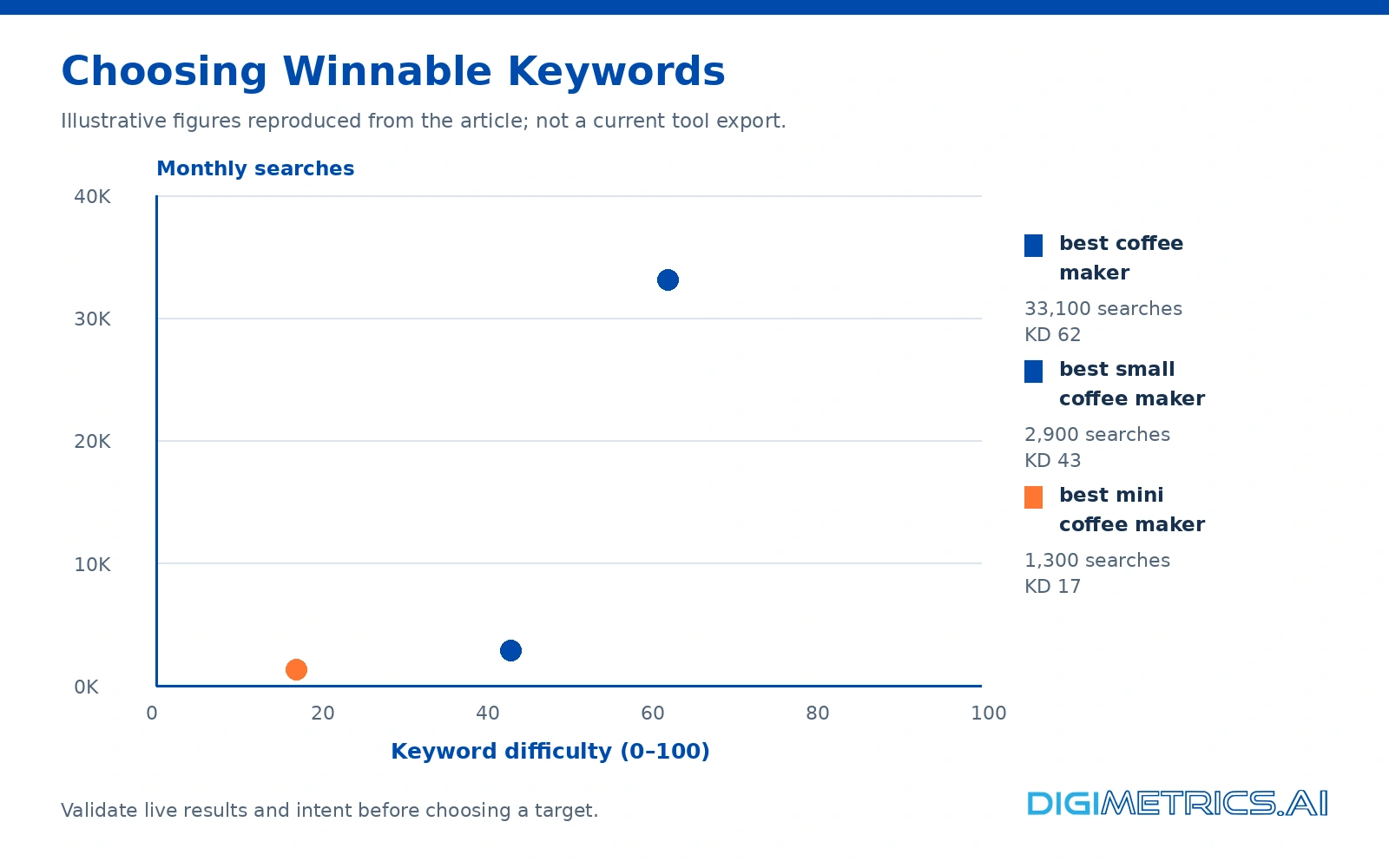
Contrary to common advice, the figure a small site should ignore is the exact volume a tool shows for a head term. A tool may show 33.1K searches for “best coffee maker,” but a new domain cannot realistically capture that demand from page 2 of the results. The more useful number is the difficulty combined with a volume you can actually win, as the worked comparison later in this article shows.
Free keyword tools are where most professionals should start, but each one has a quota that shapes how you work. The useful question is how many searches you can run in a week before the limit stops your work.
Google Keyword Planner is free with a Google Ads account and draws on Google’s own data. Unless the account runs paid campaigns, it shows broad ranges such as 1K or 10K rather than exact monthly volumes, as WPBeginner’s keyword tool review notes. Treat its output as a range to plan around, not a figure to report. Use the related keywords and keyword suggestions it returns as a starting list rather than a final one.
Google Trends does not give volume, so it cannot replace a volume tool. It shows direction: whether interest in a term is rising, falling or seasonal. Check the trend line before committing a month of content to a topic, as a rising trend can indicate future ranking potential.
Question tools surface how people phrase problems, which often maps more closely to search intent than head terms do. Use them at the idea stage to find subtopics, then validate the best ones in a volume tool. The questions you find here can shape the headings of your content.
Paid tools with free tiers are often more useful than standalone free tools, but their limits are tight. The table below shows the main published constraints, based on figures from Zapier’s review of keyword tools. Limits may change, so confirm them on each vendor’s pricing page.
| Tool | Free plan limit | Paid plan starts at |
|---|---|---|
| Semrush | 10 Analytics reports per day, 10 tracked keywords | $139.95 per month |
| KWFinder | 5 keyword searches per day | $61 per month |
| Allintitle KW Explorer | 10 tokens per month (1 per general search, 2 per Keyword Explorer search) | Free tier only listed here |
Plan the quota before you start. With Allintitle KW Explorer, 10 tokens cover roughly 10 general searches or 5 Keyword Explorer lookups. Spend them on seed topics you cannot resolve elsewhere, and use Google Keyword Planner for bulk expansion. You’ll know it’s time to upgrade when you consistently hit a quota ceiling.
Paid tools can justify their cost when you run keyword research every week, because larger databases and deeper competitor data save hours of manual work. They are not automatically better. The useful question is which tool fits your daily work and the budget you can defend, and how well each tool’s keyword data matches the market you are targeting.
Semrush suits marketers who want keyword research, rank tracking and site audits in one login. Its free keyword plan allows 10 Analytics reports per day and 10 tracked keywords. Paid plans start at $139 per month, with up to 10,000 results per report and 500 tracked keywords, according to Semrush’s own pricing page. Confirm current pricing on Semrush’s pricing page before you budget, as these figures change.
Its strength is breadth. The Keyword Magic Tool returns large keyword lists with volume, difficulty and search intent, and bulk exports can save more time than the plan costs. Its related keyword suggestions help widen a topic quickly. You’ll find its features grouped by workflow, which makes the tool easier to evaluate.
Ahrefs is built around backlink and organic search data. Its keyword explorer is strongest when you are judging how hard a page is to outrank: which sites link to the pages ranking here, and how much authority you would need to beat them. Ahrefs’ full plan is cheaper than Semrush’s ($129/mo vs $199/mo), so the decision often comes down to which dataset you trust for your niche. Often the best keyword is the one you can rank for, not the one with the highest volume. Pair it with Search Console data to check what your site already earns.
| Your situation | Likely fit |
|---|---|
| Freelancer doing occasional research | Start on a free plan and upgrade only when quota limits block work |
| In-house marketer running a monthly content plan | A mid-tier plan with bulk export and rank tracking |
| Agency managing many domains | A plan with higher result limits and multi-project reporting |
| Link-building or authority-led SEO | Prioritize backlink and competitor depth |
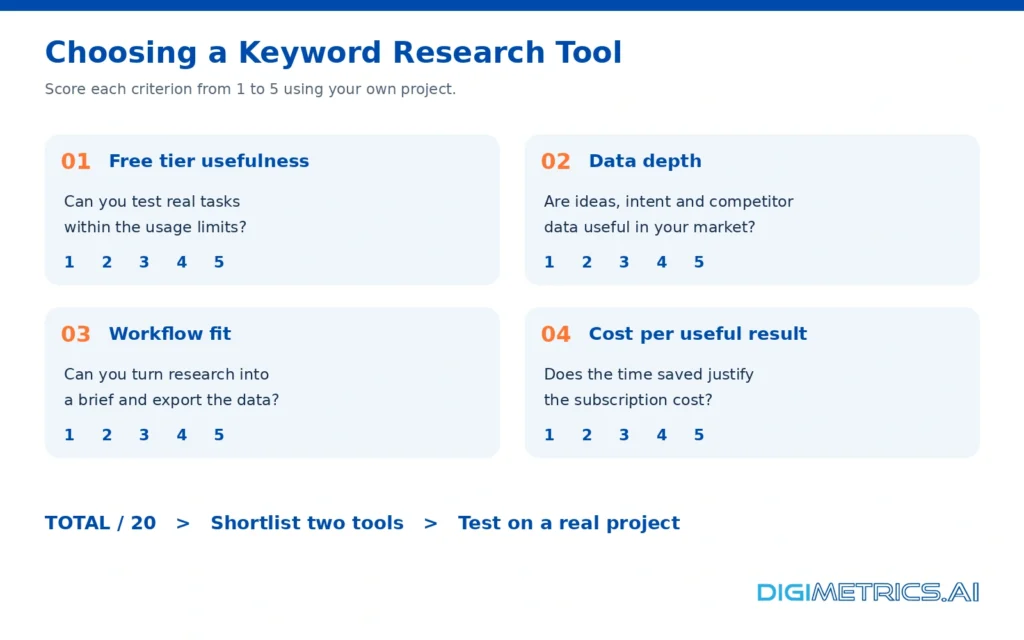
Before paying, rate each candidate from 1 to 5 on free-tier usefulness, data depth, workflow fit and cost per useful result. Watch the search per day cap on any free plan, since it sets how much you can test before you commit.
The table below shows a filled example for three named tools.
| Tool | Free-tier usefulness | Data depth | Workflow fit | Cost per useful result | Total (out of 20) |
|---|---|---|---|---|---|
| Semrush | 4 | 5 | 4 | 3 | 16 |
| Ahrefs | 2 | 5 | 4 | 3 | 14 |
| Serpstat | 4 | 3 | 3 | 4 | 14 |
Scores reflect the writer’s judgement against the free-tier limits above and should be re-scored for your own project. Shortlist the top two and trial each for 14 days on a live project.
Paid tools don’t agree with each other, so you need to compare their figures. The next section explains why, and how to resolve the gaps.
Short answer: tools disagree because each estimates volume from its own data, and Google does not publish exact counts. Treat any single number as an estimate and cross-check it before you plan around it.
Google Keyword Planner shows broad ranges such as 1K or 10K unless the account runs paid ads, so a free account gives a band, not a count. WPBeginner notes this same limit. A band of 1K to 10K is too wide to rank options against each other, so use the band to rule out terms that are clearly too small, then check more precise figures elsewhere. Working professionals who build content plans should treat these bands as a first filter only.
Check whether a tool has data at all before comparing numbers. In a Backlinko database comparison, 3.82% of keywords were “not found” in Google Keyword Planner, 18.22% in Serpstat, and 1.78% in Semrush. A “not found” result often means the tool has not indexed the term, not that nobody searches it. Treat a zero as a prompt to check elsewhere, not a verdict.
In Semrush’s own study, Google Keyword Planner scored 40.94% against Semrush’s 59.06%. A separate comparison put Mangools at 39.53% against Semrush’s 60.47%. These studies come from vendors with a stake in the result, so treat them as evidence of spread, not a market ranking. A side-by-side check of your own terms will tell you more about the research tools you rely on.
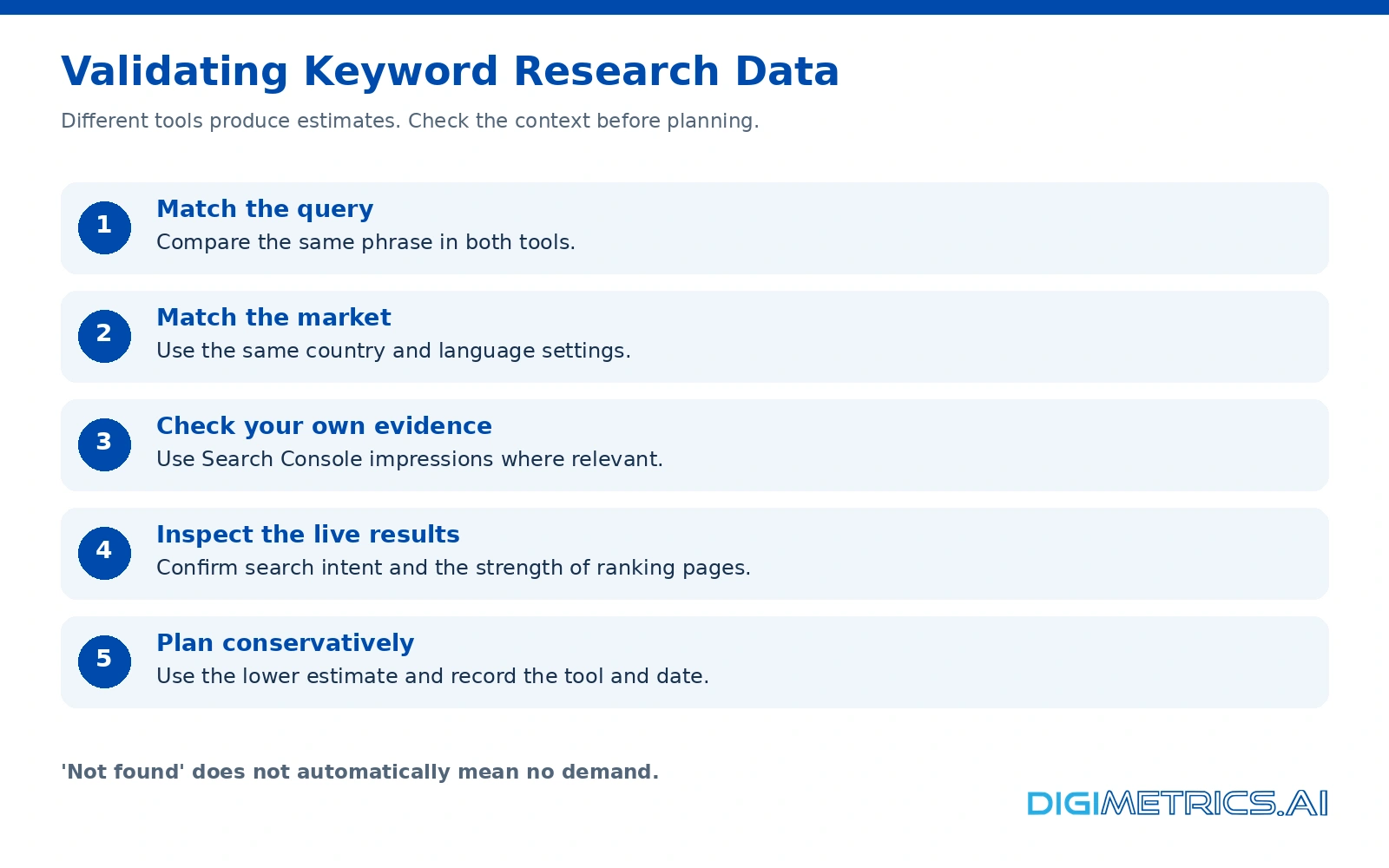
Record which tool you used for each decision. Consistency across a project matters more than finding one “correct” figure. Quotas and prices quoted in this article were checked on 26 October 2026 and change often, so confirm them on each vendor’s pricing page before you rely on them. Before you commit budget, make sure you’ll have a repeatable method for the content you publish.
A page that already ranks has matched a query. Most keyword research tools show the terms a domain ranks for, with estimated traffic and position. Pull that list for two or three rivals, then remove terms that only match their brand or product pages. What remains is a short map of topics you could realistically contest, and the content of those ranking pages shows what each query is really asking for. Keyword suggestions from the same tools can then expand that map with related queries you haven’t considered yet.
Free plans make this easy to test first. Serpstat lets you extract keyword data from over 230 Google databases, which helps when your audience spans several markets.
Head terms are short, high-volume and dominated by established sites. Long-tail keywords are longer, lower in volume, easier to rank for and often closer to a purchase decision. Judge the trade-off between volume and difficulty, not volume alone. Good keyword research weighs what a searcher is asking about, not just the raw query count.
Backlinko’s worked case shows the pattern. “Best coffee maker” gets 33.1K monthly searches at a keyword difficulty of 62. “Best mini coffee maker” gets 1,300 monthly searches at difficulty 17. A modifier such as “mini” thins the field. These figures are Backlinko’s illustrative examples and should be checked in your own tool before you act on them.
The risk is a modifier that ranks easily but attracts the wrong searchers. Check the live Google results for the narrower phrase. If the top results are product comparisons that answer the buyer’s question, the variant is worth targeting. If they are unrelated articles, the low difficulty is misleading.
Take the seed term “best coffee maker” and run it through two tools. In the first, record the volume band and difficulty. In the second, record the same term’s volume and difficulty. Where they disagree, apply the practical rule above, then note the lower volume for planning. Comparing the two outputs side by side shows which tool’s estimate you can rely on for this niche. Treat this as part of your best keyword research process, since no single tool’s numbers are definitive.
A freelance marketer briefed to write one page targeting “best coffee maker” faces 33.1K searches at difficulty 62, which a new site would struggle to contest. The marketer records volume and difficulty for each candidate, so the content choice rests on data rather than instinct:
| Phrase | Monthly searches | Keyword difficulty | Decision |
|---|---|---|---|
| best coffee maker | 33.1K | 62 | Skip for a new site |
| best small coffee maker | 2.9K | 43 | Possible with supporting content |
| best mini coffee maker | 1,300 | 17 | Target first |
The marketer then checks the live results for “best mini coffee maker” and finds product comparison pages that match a buyer’s question, confirming intent. You’ll see the same pattern in any niche: pick the highest-volume variant whose top results are weak sites you can realistically beat and whose results match buyer intent.
The right keyword research tool fits your workflow and budget, not the biggest database. Volume and difficulty figures differ across tools, so pick one, learn its metrics, and check its estimates against live Google search results before committing. Start with free keyword research options before paying for a full plan.
Score each candidate from 1 to 5 on these criteria, then add the scores to compare two tools:
Shortlist the top two and run a 14-day trial on a real project. Keep the one that produces briefs faster, since the tool whose features match your daily process will pay off most in ranking gains over time.
Yes, but free usually means limited. Google Keyword Planner costs nothing with a Google Ads account, though it shows broad search volume ranges such as 1K or 10K unless you run paid campaigns. Free tiers of paid tools add depth but cap daily use. Semrush’s free plan includes up to 10 Analytics reports per day and 10 tracked keywords. KWFinder has no free option, though it offers a 10-day free trial with 5 lookups per day. Allintitle KW Explorer’s free plan includes 10 tokens per month. Quotas change often, so confirm current limits on each tool’s pricing page before you rely on them.
Each keyword research tool builds its estimate from its own clickstream data, sampling and regional models, so no two tools share one source of truth. Treat any single number as an estimate, compare trends across tools rather than exact counts, and use the same tool consistently over time to track changes in search demand.
For a site with little authority, target keywords where the top ten results are weak sites, such as forums, small blogs or thin pages, even if the difficulty score looks high. Difficulty is a relative estimate, so compare scores only within the same tool. Pursue harder terms after you rank for easier ones.
No. Start with Google Keyword Planner, Google Trends and a free-tier tool for validation. Move to a paid plan only when free limits slow your weekly research. Semrush’s entry paid plan is $139 per month, and it suits daily research or managing several clients.
Long-tail keywords are more specific phrases with lower search volume and lower competition, so a new site can often rank for them, while established sites may dominate head terms. For example, “best mini coffee maker” has about 1,300 monthly searches at difficulty 17, compared with 33,100 searches at difficulty 62 for “best coffee maker,” according to Backlinko’s keyword research examples. These searches also tend to show clearer buying intent, which makes them useful for leads and sales.

Tom is the CEO of MediaOne, a leading digital marketing agency. He is a business-experienced SEO consultant as well as a Google Gold Search Expert serving the international community. He has consulted for MNCs like Canon, Maybank, Capitaland, SingTel, ST Engineering, WWF, Cambridge University, as well as Government organisations like Enterprise Singapore, Ministry of Law, National Galleries, NTUC, e2i, SingHealth. His articles are published and referenced in CNA, Straits Times, MoneyFM, Financial Times, Yahoo! Finance, Hubspot, Zendesk, CIO Advisor. Under his stewardship, MediaOne has won dozens of prestigious digital marketing awards.
Run a free Digimetrics audit across SEO, AI search, content and technical health, and get a plan you can act on today.
Start free →Contents hide 1 Key Takeaways 2 How to Choose a Competitor SEO Analysis Tool 3 Introduction: Why a Competitor SEO Analysis Tool Matters in…
Multi-location businesses can get a misleading picture from a rank tracker that checks keywords from one central point. Customers in other neighborhoods may see…
A competitor backlink gap analysis finds domains that link to your competitors but not to you, turning “get more links” into a ranked list…