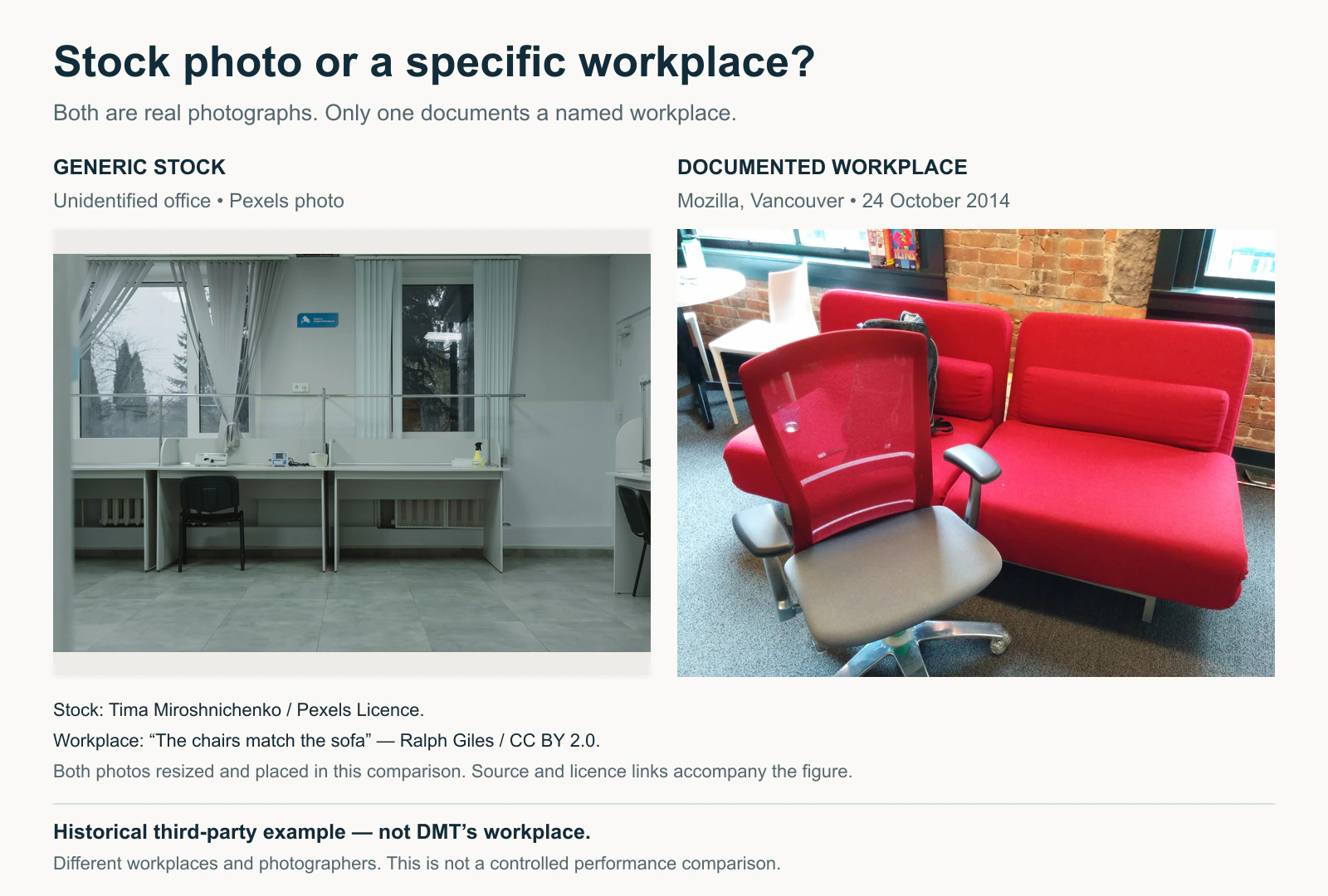
You’ve probably seen the same stock photo dozens of times: three smiling employees gathered around a laptop, someone pointing at an imaginary chart, or a perfectly dressed business owner standing in an office that looks nothing like a real workplace.
There’s nothing technically wrong with these images. They’re affordable, professionally composed, and easy to download. The problem is that they rarely tell visitors anything about your actual business.
If a potential customer wants to see your products, team, software, or work, a generic stock photo doesn’t answer their questions.
Research from the Nielsen Norman Group has shown that people often overlook decorative stock imagery while paying more attention to images that provide relevant information.
That doesn’t mean every stock photo is ineffective. A carefully chosen licensed image can still support an article or campaign. But when your visuals are supposed to demonstrate something unique about your business, generic imagery becomes a poor substitute for evidence.
The good news is that you don’t necessarily need an expensive professional photoshoot to improve the situation.
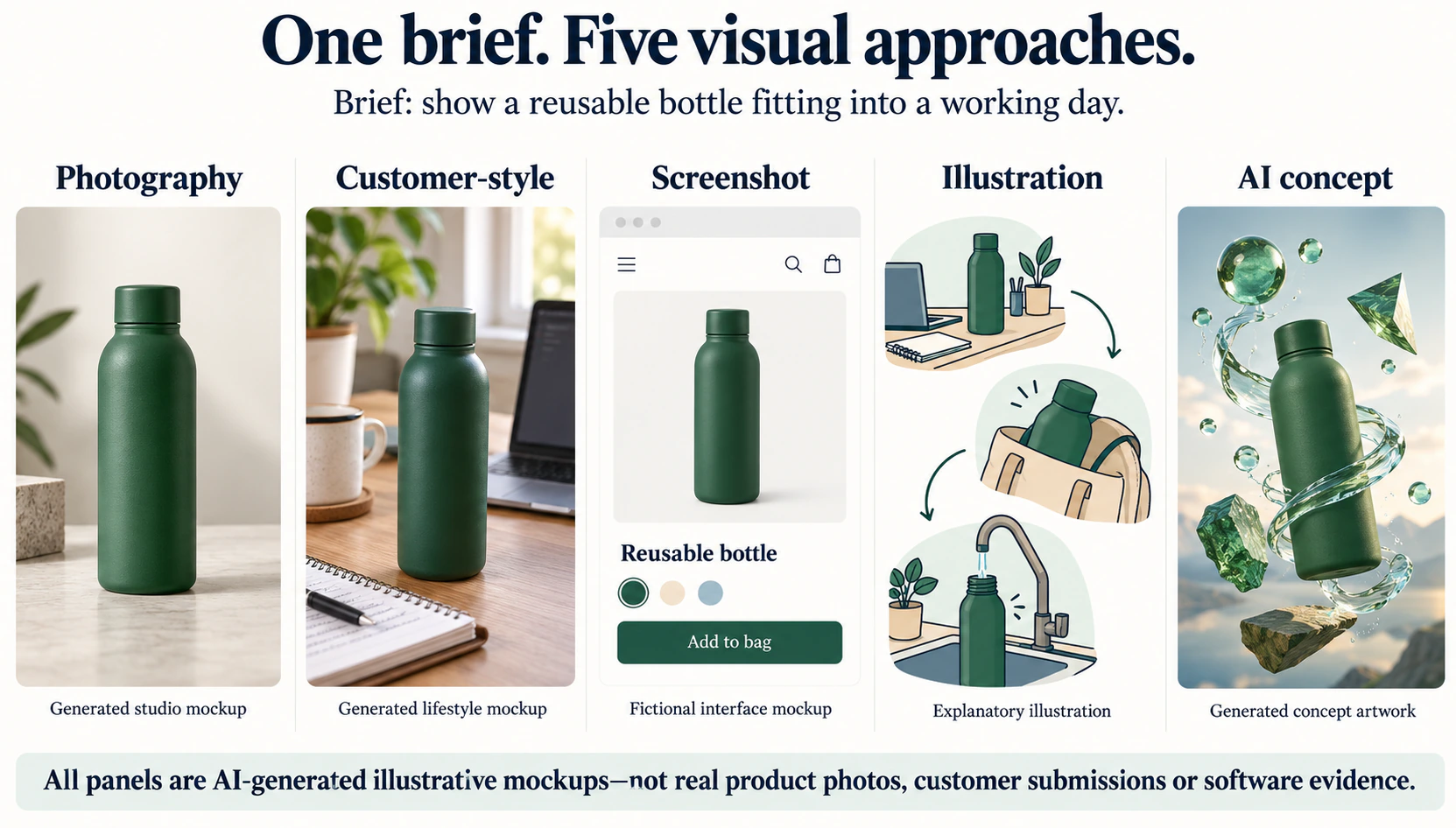
In 2026, businesses have several alternatives, including smartphone photography, customer-generated content, original screenshots, branded illustrations, and AI-assisted image creation.
Some are free to start. Others require design software or occasional specialist help. The important thing is choosing an approach that produces images your audience finds useful and that your team can reproduce consistently.
Here are five stock photo alternatives worth considering, along with their strengths, costs, limitations, and best use cases.
Variable; can use existing customer content with permission
3. Real screenshots and demonstrations
SaaS, tutorials, case studies, and software comparisons
Built-in screenshot tools, Canva, Figma
Free tools available
4. Custom illustrations and infographics
Educational articles, technical topics, and consistent branding
Canva, Figma, Adobe Express
Free plans available; paid plans add features
5. AI-assisted branded imagery
Abstract concepts, campaign artwork, and creative variations
Adobe Firefly, Canva AI, other generators
Limited free access or credit-based subscriptions
Costs describe starting options, not a guaranteed cost per finished asset. Time, revisions, permissions, equipment, and paid features can change the actual expense.
The right choice depends on what the image needs to communicate.
If customers need to see a real product, original photography is usually the strongest option. If you’re explaining a complicated concept, an original diagram may provide more value. If you need a creative editorial illustration for something that can’t easily be photographed, AI generation may be appropriate.
Let’s look at each option.
1. Original Smartphone Photography: Best for Showing the Real Business
Best for: Local businesses, product retailers, restaurants, service providers, and team pages.
Before buying another stock subscription, look at what you already have.
A modern smartphone can produce useful website photography when the lighting, composition, and subject are handled properly.
You don’t need to recreate a professional advertising campaign. In many cases, the most valuable images are simply accurate photographs of things your customers want to see.
For example, a restaurant could photograph its actual dishes, seating areas, and staff preparing food. A repair business could document its workshop, equipment, and completed work. An online retailer could show products from different angles rather than relying exclusively on manufacturer-supplied images.
These photographs provide information that generic stock images cannot.
How to Create a Reusable Photo Library
Start with a small shot list covering your most important website pages.
For a local service business, that might include the storefront, team, equipment, work process, and examples of completed projects. For an e-commerce store, it could include product details, packaging, scale comparisons, and real-world use.
Choose one or two consistent locations with good natural light. Use similar backgrounds, framing, and editing settings so the images feel like part of the same brand.
You can use your phone’s native editor or tools such as Snapseed and Adobe Lightroom for colour correction and cropping.
The aim isn’t to make everything look artificially perfect. It’s to keep the images clean, recognisable, and consistent.
Costs and Limitations
The software cost can be negligible if you already own a suitable phone.
However, your time still has value. Preparing products, finding suitable lighting, taking photographs, selecting the best shots, and editing them all contribute to the production cost.
Original photography also requires more planning than downloading an existing image.
If you’re photographing employees or customers, confirm you have appropriate permission to use their likenesses in marketing.
Our recommendation: Use original photography first when the image is supposed to prove something about your business. A real photograph of your product, location, or team is usually more informative than a visually impressive but unrelated stock image.
2. Customer-Generated Photos: Best for Showing Real-World Experience
Best for: E-commerce, hospitality, consumer products, community businesses, and customer testimonials.
Sometimes the most useful marketing images aren’t created by your team.
They’re photographs taken by customers using your products or experiencing your services.
Consider an online furniture business. Its polished product photos show what a sofa looks like in a studio, but customer photographs can show how that same sofa fits inside an apartment.
Both types of images are valuable, but they answer different questions.
A studio image shows product details under controlled conditions. A customer image can help buyers understand scale, everyday use, and realistic surroundings.
How to Collect Customer Photos
You can invite customers to submit photographs after a purchase or completed service.
Keep the request simple. Explain what kinds of images you’re looking for, where they may appear, and whether any incentive is offered.
For example, a clothing retailer might request photographs showing fit and styling. A hotel could invite guests to share images of rooms or facilities. A home improvement company might ask customers for permission to feature completed installations.
The most useful submissions usually show the product or service clearly, rather than simply featuring an attractive background.
Avoid over-editing these images until they lose the qualities that made them valuable.
Rights and Permissions Matter
A customer posting an image publicly does not automatically grant your business permission to reuse it in advertising.
Ask for appropriate permission, including the intended usage channels and duration. If other identifiable people appear, consider whether additional consent is necessary.
If you compensate customers or creators, make sure relevant advertising disclosures are handled appropriately.
Keep a record of permissions alongside the final image files.
Costs and Limitations
Customer content may be inexpensive to acquire, especially if people are already sharing positive experiences. However, incentives, licensing agreements, creator fees, and moderation time can increase costs.
Quality will also vary. Some submissions may have poor lighting, low resolution, or distracting backgrounds.
Our recommendation: Use customer-generated content when real-world context matters. Don’t use it as a complete replacement for clear product photography, especially when customers need accurate colours, dimensions, or details.
3. Real Screenshots and Product Demonstrations: Best for Showing Evidence
Best for: SaaS websites, tutorials, product comparisons, software reviews, and case studies.
If you’re writing about software, screenshots are often more useful than stock photography.
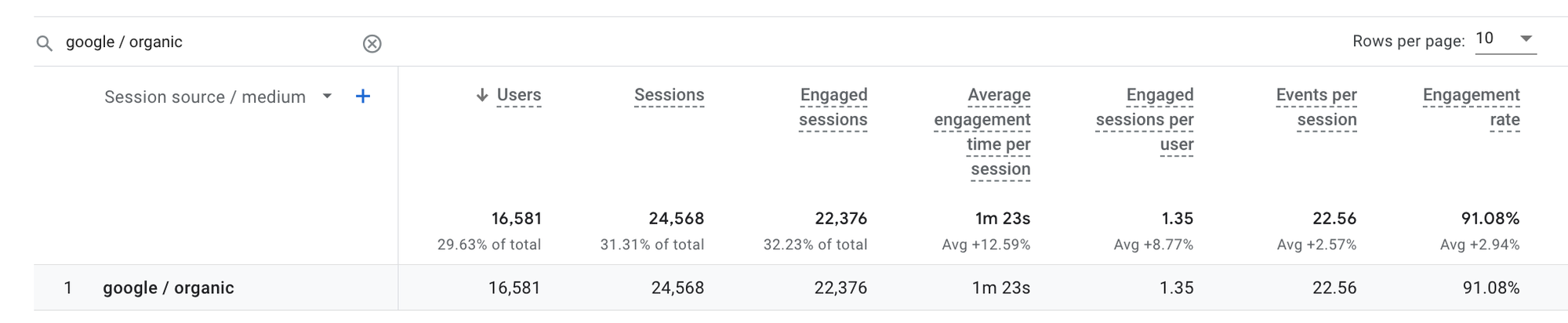
Imagine reading an article explaining how to configure Google Analytics 4.
Would you rather see a decorative photograph of someone using a laptop, or an actual screenshot showing the relevant report and settings?
The second image helps you complete the task.
The same applies to product comparisons, technical tutorials, website audits, and case studies.
Screenshots can show what a tool actually does, where to find a feature, and what users should expect from an interface.
Turn Screenshots Into Useful Visuals
A raw screenshot isn’t always enough.
For example, a full-screen image of a complicated analytics dashboard may contain too much information for the reader to understand.
Instead, crop the screenshot around the relevant feature. Add a subtle highlight or numbered annotation showing exactly where the reader should look.
You can do this using your operating system’s screenshot tools, Canva, or Figma.
Use a consistent treatment across the article: similar annotation styles, spacing, and image widths.
A good screenshot should be understandable even before the reader studies every sentence around it.
What About Data Visualisations?
The same principle applies to original charts.
If you’ve collected data comparing three software tools, a chart based on your actual findings provides more information than a stock image of a business meeting.
However, the numbers must be genuine, clearly labelled, and traceable to their source.
Don’t create fictional analytics screenshots or present illustrative data as real campaign results.
Costs and Limitations
Most operating systems include free screenshot tools. Canva and Figma also provide free entry-level options for design and annotation.
The main cost is preparing and maintaining the visuals.
Software interfaces change, which means screenshots may need to be updated when the product is redesigned.
You should also check privacy, confidentiality, and applicable product usage rights before publishing screenshots. Remove personal data, customer information, and sensitive account details.
Our recommendation: For software and educational content, prioritise screenshots and original diagrams over decorative stock imagery. Images should help readers understand the subject, not merely make the page look less text-heavy.
4. Custom Illustrations and Infographics: Best for Brand Consistency
Best for: Educational content, B2B websites, technical explanations, blog graphics, and recurring marketing campaigns.
Not every idea can be photographed.
How do you illustrate an SEO audit process, an AI content workflow, or the relationship between several marketing channels?
A generic stock photo usually doesn’t explain the concept.
This is where custom illustrations, flowcharts, and infographics become useful.
Instead of searching for a photograph that vaguely represents your topic, you can design a visual specifically around the information you’re communicating.
Precise layouts, reusable components, collaborative editing and design systems
More setup and design knowledge may be needed
Custom illustrations, diagrams, repeatable brand systems
Canva’s official US pricing page lists a free plan and Pro at US$144 annually for one person, although regional prices and features can differ.
Figma also offers a free Starter plan, with paid options for more extensive design workflows.
The important question isn’t which editor has the most templates. It’s which one allows your team to create repeatable graphics that look recognisably yours.
Build a Small Visual Design System
Choose a limited colour palette, two or three typography styles, consistent illustration techniques, and a small set of reusable layouts.
For example, a digital marketing publication could use one visual style for comparison charts, another for tutorials, and a third for conceptual featured images.
That creates consistency without forcing every article into the same composition.
A common mistake is using the same gradient background, cartoon character, and laptop illustration for every topic.
The images look consistent, but they gradually become interchangeable.
The better approach is to maintain consistent typography, colours, and overall quality while changing the actual subject and composition according to the article.
Costs and Limitations
Once you’ve created the templates, producing additional variations can become relatively inexpensive.
However, the first set of illustrations takes planning, and not everyone will have the design skills needed for more advanced work.
If you use templates or stock elements inside Canva, review Canva’s licensing conditions, particularly for standalone resale, trademarks, or redistribution.
Our recommendation: Use custom diagrams and illustrations when the visual’s main job is explanation. Prioritise clear information over decorative complexity.
5. AI-Assisted Branded Images: Best for Creative Concepts
Best for: Editorial illustrations, conceptual campaign graphics, background artwork, and subjects that are difficult to photograph.
AI image generators make it easier to create visuals for ideas that don’t exist as physical scenes.
You can generate an illustration of an AI-powered search system, a futuristic technology environment, or an abstract visual metaphor for cybersecurity.
That flexibility is useful when stock libraries don’t have anything specific enough for your content.
However, AI generation introduces a different problem: creating one attractive image is much easier than producing a consistent collection of publishable images.
You might generate a convincing illustration for one blog post, then struggle to reproduce the same lighting, colours, character design, or overall composition for the next ten articles.
Tools Worth Considering
Adobe Firefly provides image generation and editing capabilities, with usage controlled by plan features and generative-credit allowances.
Canva AI provides AI-assisted creation within a broader design environment, which may be more convenient for teams already using templates and brand kits.
Other generators may offer greater stylistic flexibility or different model options, but the important selection criteria remain the same: control, consistency, export quality, licensing, and production cost.
Adobe’s generative credits documentation explains how usage limits work and describes commercial-use conditions for different Firefly features.
Because pricing, included models, and credit consumption can change, don’t calculate costs based only on a product’s headline monthly fee.
Use a Brand Brief Instead of an Open-Ended Prompt
A generic prompt such as “professional business illustration” will often produce generic-looking results.
Instead, define the visual system before generating.
For example:
Create an editorial illustration explaining AI search visibility. Use a restrained navy, teal, and warm-white colour palette, clean geometric forms, subtle depth, and precise information hierarchy. The focal point should be a network of cited sources connecting to an AI-generated answer. Avoid generic office workers, laptops, invented dashboards, and decorative charts. Leave space for a short headline.
That gives the generator much clearer creative direction.
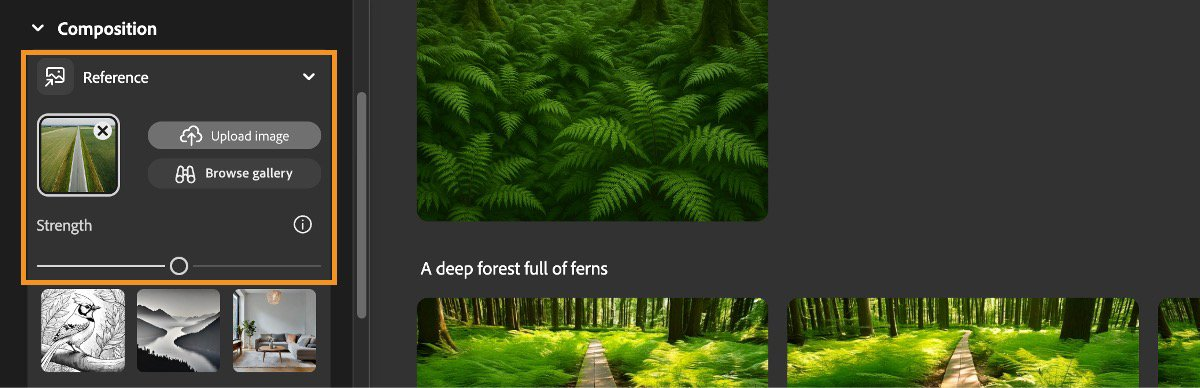
If the tool supports reference images or controlled editing, use those features to maintain continuity across a campaign.
Where AI Images Shouldn’t Replace Real Evidence
AI-generated visuals are not a suitable substitute for authentic photographs when you need to show a specific product, identifiable employee, client project, physical premises, or real event.
An attractive generated image of a restaurant’s dining area does not establish what the restaurant actually looks like.
Likewise, an AI-generated software dashboard shouldn’t be presented as a genuine screenshot of a product.
Generated images can support an explanation or marketing concept, but they must not invent evidence.
The Nielsen Norman Group’s 2026 research on AI-generated and stock images found no general perception penalty for AI-generated imagery compared with conventional stock imagery in the specific study conditions. That doesn’t establish that AI images always perform better or replace authentic product photography.
Costs and Limitations
AI image generation can be inexpensive for occasional conceptual illustrations, but repeated revisions may consume credits and production time.
You also need to inspect outputs for inaccurate details, unintended brand elements, malformed text, and misleading representations.
Our recommendation: Use AI generation for concepts and creative compositions, not for pretending that something real was photographed or tested.
Which Stock Photo Alternative Should You Choose?
The simplest approach is to match the image source to the job.
If You Need To…
Start With…
Avoid…
Show your actual business
Original photography
Generic office imagery
Demonstrate a customer experience
Permissioned customer photos
Unlicensed social media reposts
Explain a software feature
Real annotated screenshots
Invented or unrelated dashboards
Teach a concept
Custom diagrams and illustrations
Decorative images with no informational value
Illustrate an abstract idea
AI-assisted branded imagery
Generated images presented as real evidence
You don’t need to choose only one method.
A useful website might combine real team photography on its About page, customer images on product pages, screenshots in tutorials, diagrams in educational articles, and occasional AI-generated featured artwork.
The common thread is relevance.
Every image should either help the reader understand something, show something real, or reinforce a recognisable visual identity.
How We Would Test These Alternatives on the Same Project
A list of tools is useful, but a controlled comparison is more revealing.
Rather than judging one impressive image from each option, evaluate how each approach performs across a small set of actual marketing requirements.
Here’s a repeatable test you can run with your own assets. This is a recommended evaluation framework, not a claim that we independently tested every product mentioned above.
Step 1: Define Ten Real Image Requirements
Create an image brief containing ten assets your business genuinely needs.
For a typical marketing team, that could include a homepage visual, product or service image, team image, testimonial visual, tutorial graphic, comparison chart, two blog featured images, a social media graphic, and an email campaign image.
Not every production method should be used for every type of asset. For example, AI generation should not be tested as a replacement for an authentic employee photograph.
Instead, compare each approach only on tasks it can appropriately perform.
Step 2: Establish a Visual Baseline
Choose existing approved brand assets and write a short description of what makes them consistent.
Include typography, colour palette, photographic treatment, illustration style, background choices, spacing, and image proportions.
Use that baseline when reviewing new images.
A good visual should fit the brand without looking identical to every other asset.
Step 3: Measure Production Time and Revision Effort
For each applicable image, record when production starts, how many attempts are required, and when the asset receives final approval.
Separate generation or editing time from review time.
A tool that produces its first draft in 20 seconds but requires an hour of corrections may not be faster than a method that takes 20 minutes to produce a usable result.
Step 4: Score the Finished Assets
Use the same five criteria across applicable tasks.
Criterion
What to Check
Maximum Score
Relevance
Does the image show or explain what the page needs?
25
Visual identity
Does it fit the brand’s design system?
20
Consistency
Can the approach produce a coherent series, not just one strong image?
20
Production efficiency
How quickly does the team obtain an approved asset?
20
Rights and usability
Are permissions, export quality, and practical publishing requirements satisfied?
15
Total
100
Use the scoring criteria before seeing the results so you don’t unconsciously favour a familiar tool.
Treat missing permissions or unusable licensing as a pass/fail issue. A visually excellent asset shouldn’t receive approval if you cannot legally publish it.
What Does Each Alternative Actually Cost?
The headline subscription fee tells you very little about the real cost of image production.
A free tool can be expensive if someone spends an hour correcting every result. A paid platform may be relatively economical if it allows your team to produce dozens of consistent assets with minimal revisions.
The more useful metric is cost per approved, publishable image.
Calculate the Cost per Approved Image
Use this formula:
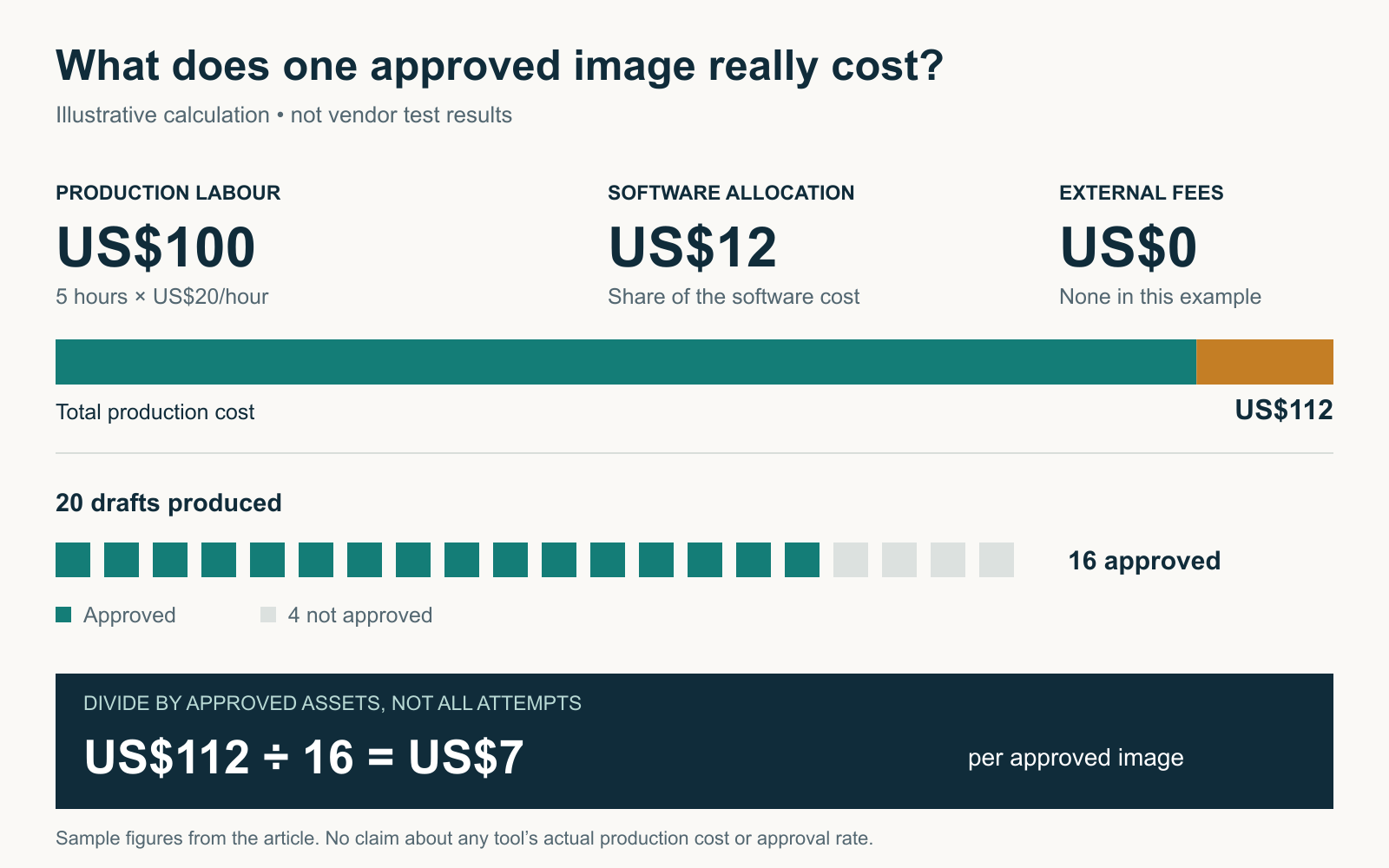
Cost per Approved Image = (Software and Licensing Costs + Production Labour + External Fees) ÷ Number of Approved Images
Here’s a hypothetical example.
A marketing team produces 20 images in one month using a design tool.
Cost Component
Illustrative Amount
Software allocation
US$12
Five hours of production and editing at US$20/hour
US$100
External assets
US$0
Total cost
US$112
Approved images
16
Cost per approved image
US$7
The team created 20 images but approved only 16.
Dividing the cost by all 20 attempts would understate what it actually spent on usable content.
Now compare that with an approach that produces fewer drafts but requires less editing.
For example, if another workflow costs US$90 in total and produces 15 approved images, its cost per approved asset is US$6.
The cheaper software isn’t necessarily the cheaper production method.
These are illustrative calculations, not measured vendor performance results.
Don’t Forget Reuse Value
An original photograph may cost more to produce but remain useful across a website, social channels, product pages, and sales materials.
A custom infographic might also be adapted into multiple formats.
In those situations, cost per approved image isn’t the only useful measure. You should also consider how often the asset is reused and whether it continues to communicate accurate information.
The goal is to find a sustainable production workflow, not simply generate the largest possible number of images.
When Stock Photography Is Still the Better Choice
Stock photos aren’t inherently bad.
Sometimes a high-quality licensed image is the most sensible option.
If you need a neutral background image, an editorial photograph illustrating a broad topic, or a visual for a low-priority page, stock libraries can save time.
Free platforms such as Unsplash and Pexels provide broad collections of images that can be used commercially under their respective licences.
However, these licences still have conditions and do not necessarily cover every possible use of identifiable people, brands, or protected properties.
The key distinction is between using stock photography to support a general idea and using it as a substitute for genuine evidence about your business.
A neutral image of a city skyline might be perfectly appropriate for an article about urban development.
A stock photograph of an unrelated office presented as your company’s workplace is another matter.
You don’t need to eliminate stock photography from your website. You need to stop relying on it when more relevant imagery is available.
How to Make Your Visuals Look Consistent Without Looking Repetitive
Consistency doesn’t mean every image needs the same layout, background, or composition.
In fact, overusing one template can make a website feel just as generic as using stock photographs.
Instead, keep a few elements consistent while allowing the central visual idea to change.
For example, a technology publication could use the same typography, brand colours, border treatments, and image dimensions across its articles.
But one featured image might use a photographic product close-up, another a data visualisation, and another a custom illustration.
The design system creates recognition. The individual composition communicates the topic.
This distinction is especially important when using AI-generated imagery.
Repeatedly generating a cartoon marketer beside a floating software dashboard may produce a consistent-looking collection, but it quickly loses relevance.
Our recommendation: Standardise the visual language, not the visual subject.
Don’t Forget Image SEO and Accessibility
Replacing stock photos is only one part of improving your website’s images.
Your final assets still need to be appropriate for the page, fast enough to load, and understandable to users who cannot see them.
Google’s image SEO documentation recommends descriptive file names, relevant surrounding content, and useful alternative text.
For example, office-photo-123.jpg tells readers and search engines very little.
A descriptive filename such as new-york-electric-bike-showroom.webp is more useful when the image genuinely shows that location.
The alt text should describe the image accurately rather than repeat keywords unnecessarily.
An annotated screenshot might use alt text such as:
“Google Analytics 4 traffic acquisition report with the session source column highlighted.”
Also use suitable dimensions and image formats, avoid unnecessary file weight, and check how the image appears on mobile.
If an original photograph is too small for the intended layout, you can consult our guide to image upscaling tools. Be careful, however, because upscaling cannot recover every detail that wasn’t captured in the original image.
Our Editorial Approach
This guide compares five practical image-production approaches using publicly documented product capabilities and a proposed evaluation framework.
It is not a claim that DigitalMarketingTools.ai independently produced a ten-image benchmark for each option.
Software pricing, commercial rights, and included features should be checked against current official terms before purchase.
Our broader testing and disclosure principles are described on the DigitalMarketingTools.ai Editorial Methodology page.
Disclosure: DigitalMarketingTools.ai is sponsored by Digimetrics.ai. No sponsored placement determines the recommendations in this article.
Frequently Asked Questions
What Are the Best Alternatives to Stock Photos?
The best alternatives depend on what you’re creating. Original smartphone photography works well for real businesses and products, customer-generated photos show everyday use, screenshots provide evidence in tutorials, custom illustrations explain complex ideas, and AI-generated artwork can support abstract concepts.
What Is the Cheapest Stock Photo Alternative?
If you already have a suitable phone or computer, original photographs and screenshots can be created without new software costs. Free design tools can also help you produce simple graphics, although editing and production time still have value.
Can AI Images Replace Stock Photography?
AI-generated images can replace stock photos for some conceptual or decorative uses, but they’re not a substitute for authentic photographs of real products, employees, locations, or customer experiences.
Check image accuracy, consistency, and commercial usage rights before publishing.
Is Canva Better Than Stock Photography?
Canva is a design platform rather than a direct replacement for every stock image. Its main advantage is helping teams combine photographs, graphics, text, and branded layouts into original compositions.
However, using an unchanged popular Canva template can still look generic.
Are Unsplash and Pexels Good Stock Photo Alternatives?
They’re useful alternatives to paid stock-photo subscriptions, particularly when you need affordable, general-purpose imagery. However, the photographs are still stock images that other websites can use.
If your goal is distinctive brand identity, consider combining them with original photography or custom design work.
How Do I Make AI Images Consistent With My Brand?
Start with a documented visual brief covering colours, composition, typography, lighting, and style.
Reuse approved reference assets where supported, keep a consistent editing process, and evaluate several outputs together rather than choosing each image in isolation.
Are Original Images Better for SEO?
Original images can provide useful, relevant information that generic stock photos do not, but originality alone doesn’t guarantee higher search rankings.
Image quality, page relevance, descriptive alt text, surrounding content, and technical optimisation also matter.
How Much Should a Business Spend on Website Images?
There’s no universal budget.
A small business may be able to create most of its imagery using a smartphone and free design tools. A larger company may need photography, illustration, licensing, and dedicated production resources.
Track cost per approved image, revision time, and reuse value to understand which approach is economical for your team.
Final Verdict: The Best Stock Photo Alternative Is One That Actually Shows Something
The problem with stock photography isn’t that the images are poor quality.
It’s that generic images often communicate very little about the business using them.
A real photograph can show what you sell. A customer image can demonstrate how something is used. A screenshot can help readers complete a task. An infographic can explain a complicated idea, and AI-generated artwork can support concepts that don’t exist in the real world.
Those are different jobs, and no single image tool is best at all of them.
For most small businesses, I’d start with original photography and genuine product or process images, then use screenshots, custom design, or AI imagery where they add something useful.
Before paying for a new tool, test it against a real set of image requirements. Measure production time, consistency, revisions, usage rights, and cost per approved asset.
The goal isn’t to make every image look expensive. It’s to make your website look recognisably yours.
About the author
Tom Koh
Tom is the CEO of MediaOne, a leading digital marketing agency. He is a business-experienced SEO consultant as well as a Google Gold Search Expert serving the international community. He has consulted for MNCs like Canon, Maybank, Capitaland, SingTel, ST Engineering, WWF, Cambridge University, as well as Government organisations like Enterprise Singapore, Ministry of Law, National Galleries, NTUC, e2i, SingHealth. His articles are published and referenced in CNA, Straits Times, MoneyFM, Financial Times, Yahoo! Finance, Hubspot, Zendesk, CIO Advisor. Under his stewardship, MediaOne has won dozens of prestigious digital marketing awards.
Your website has 150 published articles. Some attract consistent organic traffic, others haven’t generated a meaningful visit in months, and several cover nearly identical…
Writing a good advertisement sounds simple until you have to create 15 different headlines, stay within character limits, communicate your product’s benefits, and make…
Verifiability matters more than speed when publishing AI-generated content. An AI content generator turns a short brief into draft copy, and its usefulness depends…