SEO Audit
Free White Label SEO Audit Tool: What Agencies Actually Get
You’ve found a potential SEO client, reviewed their website, and identified several problems worth fixing. Now you need a professional audit report that explains…

An SEO audit tells you what is wrong. It rarely tells you what to do first, who should do it, or how you will know it worked. To act on SEO audit report findings, score each one on impact, effort and confidence, group the results by root cause, and defer what falls below the bar. Teams that work this way spend limited engineering time on the changes most likely to move search performance. If you are still choosing the crawlers and reporting tools that generate these findings, our guide to seo tools covers the options, and our overview of the seo audit tool explains what those reports typically contain.
Most SEO audits stall once they are delivered. The report runs to dozens of pages, the findings sit in an unordered list, and the team does not know which item to open first. The audit is praised in a review meeting, then set aside while the work that would move rankings never starts.
An audit is a diagnostic, not a task list. It shows what is wrong with a site at the moment of crawling, but not what to do first, who should do it, or how to confirm it worked. Our position is that audit findings should be ranked by root-cause count rather than by severity label. A single template defect that generates 76 duplicate titles is worth more attention than 76 isolated warnings, because one fix clears them all. The step that turns each finding into ordered, verifiable work is where most organizations fall short.
Severity is undifferentiated. Audit tools label issues as errors, warnings and notices, but those labels describe the defect, not its effect on the business. A missing alt attribute on a blog image and a noindex tag on a product category can carry the same visual weight. The team then fixes whatever is easiest.
Findings are written as symptoms, not owned tasks. A line that reads “76 issues with duplicate title tags” describes a symptom. It does not name the template that produces the titles, the developer who maintains it, or the test that proves the problem is gone.
No one owns verification. The developer closes the ticket, the SEO lead assumes it worked, and a later release can quietly reintroduce the problem. Verification needs a named owner and a defined check.
Each failure has the same cure: score findings, group them by root cause, turn them into owned tickets, sequence them, and verify against a clear done test.
Score every finding before it enters a sprint. Ask three questions: what traffic or revenue is at stake, how much effort the fix takes, and how confident you are that the fix will work. The result is a ranked list that shows what to do this week, what to schedule, and what to watch.
Use a 1 to 5 scale for impact. A 5 means the finding touches pages that already earn significant organic traffic or conversions. A 1 means it affects low-value pages. Score confidence separately on the same 1 to 5 scale, because a high-impact issue with an uncertain fix should not outrank a well-understood one.
Score effort from 1 (a single-line change) to 5 (a change needing cross-team work and a release cycle). Note dependencies. A fix that waits on another team’s release cannot start early, however high it scores.
The writer’s own heuristic is: priority score = (impact × confidence) ÷ effort. This is a custom formula, not a standard framework. Prioritization methods such as ICE (impact, confidence, ease) and RICE (reach, impact, confidence, effort) follow the same logic, and a team can adopt either.
The table below is an illustrative example with hypothetical values, not data from a real audit:
| Finding (illustrative) | Pages affected | Impact (1-5) | Confidence (1-5) | Effort (1-5) | Score | Bucket |
|---|---|---|---|---|---|---|
| Duplicate title tags on category template | 76 (hypothetical) | 4 | 5 | 1 | 20.0 | Fix now |
| Missing alt text on archived blog images | 40 (hypothetical) | 1 | 4 | 3 | 1.3 | Monitor |
| Redirect chain across a retired section | 12 (hypothetical) | 3 | 3 | 4 | 2.3 | Schedule |
Applying the formula to a single hypothetical finding shows how the bucket is set. A duplicate title issue scored 4 for impact, 5 for confidence and 1 for effort gives (4 × 5) ÷ 1 = 20.0, which places it in fix now. In this illustrative audit, scoring the list this way moved one finding into fix now and two into schedule and monitor, and set the rest aside with a recorded reason. The numbers are placeholders for the reader’s own data.
A longer audit does not mean better guidance. Scoring a short list well beats cataloguing a long one. A tool that reports more issues can simply produce more work to defer.
Root cause clustering means tracing many separate findings back to the single template, rule or process that produced them, so one fix clears them all. A thousand missing meta descriptions usually come from one page template, not a thousand separate errors.
| Symptom cluster | Likely root cause | Fix location |
|---|---|---|
| Many pages share one title | Template outputs a fixed title | Template or CMS field |
| Redirect chains across sections | Successive rule changes | Redirect rules file |
| Thin pages with no internal links | Missing navigation rule | Site navigation config |
Crawler tools such as Screaming Frog let you filter results by HTML and then export the data to a CSV file via the Advanced Report menu. Filtering by issue type before export makes clustering far easier.
Some findings are isolated. Score them individually and keep them if the score justifies it, or defer them with a recorded reason.
Each ticket should contain the finding, the affected scope, the proposed fix, an owner, the acceptance criteria, and a re-audit date.
A useful ticket states the root cause in one sentence, lists the affected URL pattern, and names the change to make. It does not describe the symptom alone.
Write criteria a crawler can verify, such as “every product category page returns a unique title tag of 30 to 60 characters.” Avoid vague criteria like “titles improved.”
| Fix | Done test |
|---|---|
| Change the category title template to pull the unique page name and a modifier | Re-run the same crawl filter (‘Title 1 duplicate’) on the same URL set and confirm zero flagged URLs |
Sequence work by dependency first, then by score. A high-scoring fix blocked by a release should wait for the release, not stall the queue.
Place dependency-free, high-score fixes first. Schedule blocked fixes behind their dependencies.
Assign the owner who controls the system that needs changing, such as the developer for templates or the content lead for copy. Do not assign by which line item appeared first in the report.
Record each deferred finding with the reason for deferral and a date to revisit it. Silent deletion erases the evidence needed at the next audit cycle.
Sequencing is never fixed. Re-score the list after each sprint, because a new release or traffic change can shift a finding’s impact.
Most audit reports arrive with dozens or even hundreds of line items. Working through them in the order they appear often means a week spent on meta descriptions while a template bug duplicates thousands of title tags. This article argues that findings should be ranked by root-cause count, not by the severity label a crawler assigns. A finding that traces back to one faulty template is worth more than ten isolated errors, because fixing the template clears all of them at once. Group first, then score.
Use a 1 to 3 scale for impact, not a 1 to 5. A five-point scale implies more precision than rough estimates can support.
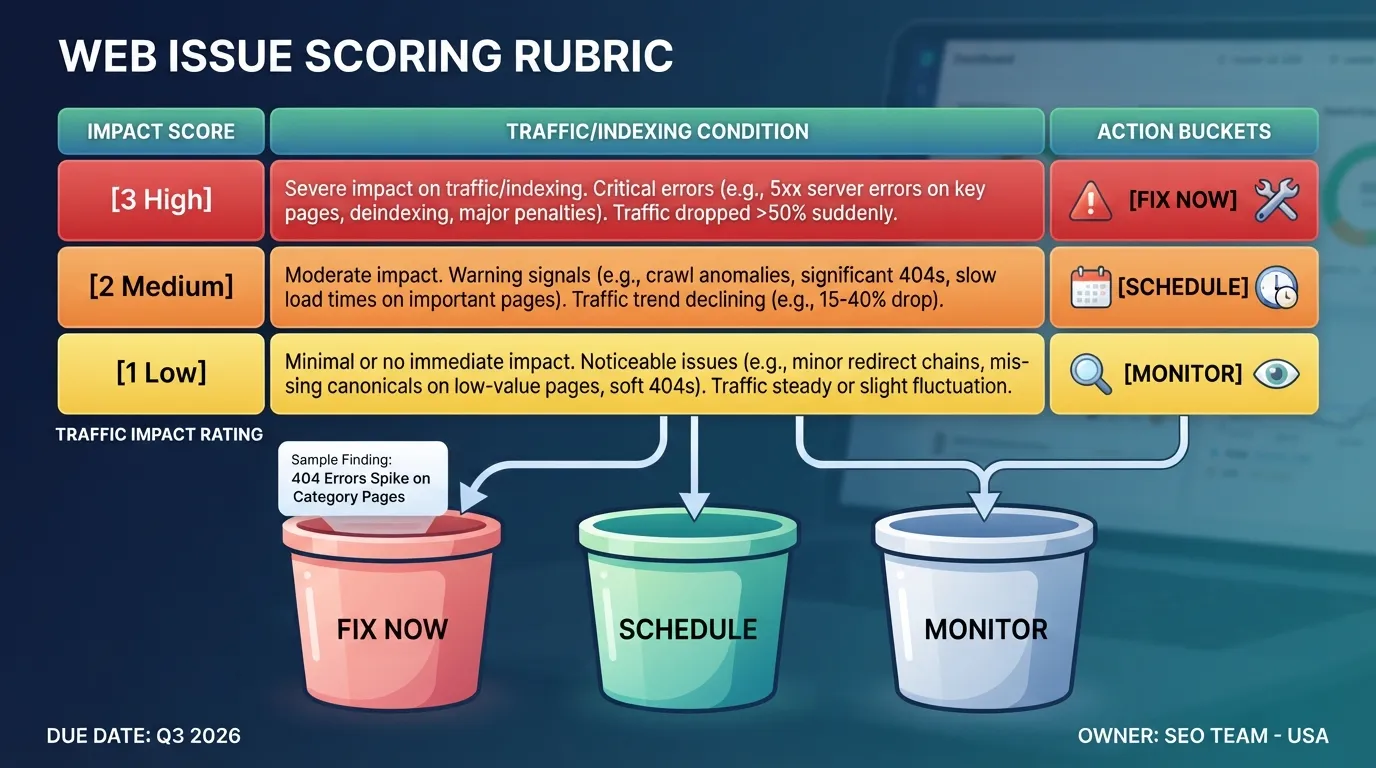
Tie each rating to two numbers from your crawl and analytics, not to a feeling. Count the affected URLs in your crawl export, then check how much organic traffic those URLs received in the last 90 days. A title tag problem on 400 category pages that together earn most of your non-brand clicks is a 3. The same problem on 12 archived blog posts is a 1.
Search Console performance data is the best source for weighting. In the Performance report, filter by page to see clicks and impressions for each affected URL, then sum them. Pages with high impressions but low click-through rate often matter more than their click count suggests, because a small rewrite can lift them quickly. The Search Console Performance report documentation explains the metrics and filters you need.
Once every finding has an impact score, set thresholds for where it lands:
| Condition | Bucket |
|---|---|
| Impact 3, effort 1 or 2, confidence 2 or 3 | Fix now |
| Impact 2 or 3, any effort, confidence 2 or 3 | Schedule |
| Impact 1, or confidence 1 | Monitor only |
These thresholds are a starting point. Adjust them after you have run the process on a real audit and seen how many items land in each bucket. If “fix now” holds half the list, the thresholds are too loose.
Effort is where most fix lists go wrong, because teams estimate it in vague terms like “small” or “large.” State effort in developer days wherever a developer is involved, and in hours where a marketer or content editor can do the work alone. Developer days are the scarce resource in most US teams, so they should drive sequencing.
Separate findings into two groups before estimating:
Then map dependencies. A single template change often resolves dozens or hundreds of findings at once. If the category page template renders duplicate title tags, one template fix clears every duplicate across that page type. Score that as one row with a count of affected URLs, not as hundreds of separate rows. The template fix costs one developer day regardless of how many URLs it touches.
Look for the reverse dependency too. A redirect rule fix may only work after a canonical policy is settled, or a structured data fix may depend on a content field that does not exist yet. Record these as “blocked by” notes on the row, and do not schedule a dependent fix before its prerequisite is done.
The example below is hypothetical and illustrative. The counts and scores are invented to show the mechanics, not drawn from a real audit. Replace them with figures from your own crawl export and analytics.
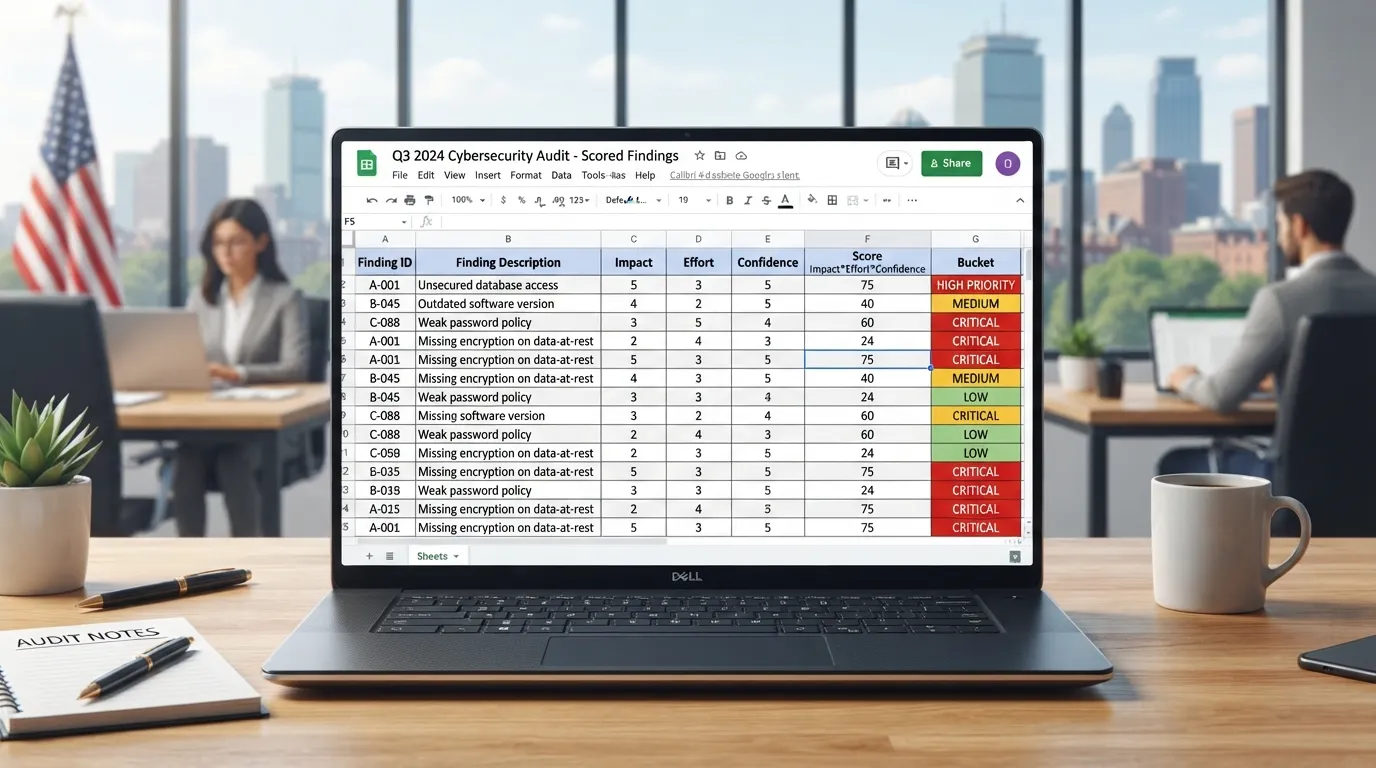
| Finding | Affected URLs (illustrative) | Impact (1-3) | Effort (days) | Confidence (1-3) | Score | Bucket |
|---|---|---|---|---|---|---|
| Duplicate title tags from one category template | 400 | 3 | 1 | 3 | 9 | Fix now |
| Same title issue on archived blog posts | 12 | 1 | 1 | 3 | 3 | Monitor only |
| Redirect chains on old product URLs | 60 | 2 | 3 | 2 | 1.3 | Schedule |
Calculate the score as impact multiplied by confidence, divided by effort. This is a custom heuristic devised for this process, not an industry standard. The first row, rated impact 3, confidence 3 and effort 1, scores 9 and goes straight to fix now. The same finding at effort 3 would score 3, which places it in schedule. The formula rewards high-value, high-confidence work that is cheap to deliver.
In an illustrative run of this method, a 60-row audit moved 4 findings from schedule into fix now after clustering them by root cause, because each cluster’s combined URL count raised its impact rating. Replace this with your own result after you run the process, and record the count and the reason for each move.
Standard frameworks reach similar conclusions with different arithmetic. ICE (Impact, Confidence, Ease) multiplies three scores on a 1 to 10 scale, and RICE adds Reach and divides by Effort. Teams that already use either can keep it, provided effort and confidence are scored separately. The worth of the custom formula here is its simplicity on a three-point scale.
Keep the risk dimension in mind as you score. A change to a high-traffic template can disrupt rankings if it goes wrong, so raise the effort figure to include testing time for those items rather than treating them as quick wins.
A long audit with many findings can look thorough, but it usually means the findings have not been triaged. Forty unranked issues tend to produce paralysis, and teams end up fixing whatever is easiest rather than whatever matters. When you cannot fix everything, start with the highest-scoring items. A shorter list that has been scored, grouped and assigned delivers more change. Triage is what converts the length of the report into a usable plan.
The same handful of causes produce most of an audit’s length. A category template that renders the wrong title, a redirect rule that chains three hops, or a canonical policy that was never written down will each generate a cluster of findings in a crawler export. Treat each cluster as one problem, not many.
Start by exporting every finding into one sheet, with one row per issue. Include the affected URL, the issue type and the crawler’s own severity label. Then sort by issue type and look for patterns. Three checks usually reveal the clusters:
Root cause clustering groups audit findings that share one underlying cause. Each cause is then scored and fixed once, rather than once per affected URL.
Give each cluster a single row in your fix list, with the individual URLs attached as evidence. This matters for scoring. If you score 400 duplicate-title rows separately, a template fix that clears all of them can look like a minor task. Scored as one cluster, it shows its true weight.
Screaming Frog lets you filter results by HTML and export them to CSV from the Advanced Report menu. That export is the starting point for grouping. The Screaming Frog user guide covers the export and filter features in detail. Google’s guidance on duplicate content explains why canonical and duplicate signals need a consistent policy. It is a useful reference when a cluster points to canonicals.
| Symptom in the audit | Likely root cause | Single fix that clears the cluster |
|---|---|---|
| Hundreds of duplicate title tags across category or product pages | Title template ignores the page’s own heading or uses a fixed string | Change the title template to pull the unique page name and a modifier |
| Redirect chains and “redirect loop” warnings on old URLs | Stacked redirect rules added over several site migrations | Consolidate rules so every old URL redirects once, straight to its final destination |
| Conflicting or self-referencing canonicals on filtered pages | No written canonical policy for parameters and facets | Publish a canonical rule for each URL type, then apply it in the template |
| Orphaned pages that exist in the sitemap but receive no internal links | Navigation or related-content module excludes certain page types | Add the page type to the internal linking module |
| Mixed HTTP and HTTPS URLs flagged as non-secure | Hard-coded HTTP links in old template partials | Replace hard-coded links with protocol-relative or HTTPS links and enforce HTTPS sitewide |
Each row resolves to one change. That is what makes a cluster worth more than the sum of its items.
Some findings will not fit any cluster, such as a single weak page or one missing alt attribute on a logo. Leave these as standalone rows. Do not force them into a group to make the list look tidier. They will be scored individually in the next step, and many will end up in the “monitor only” bucket.
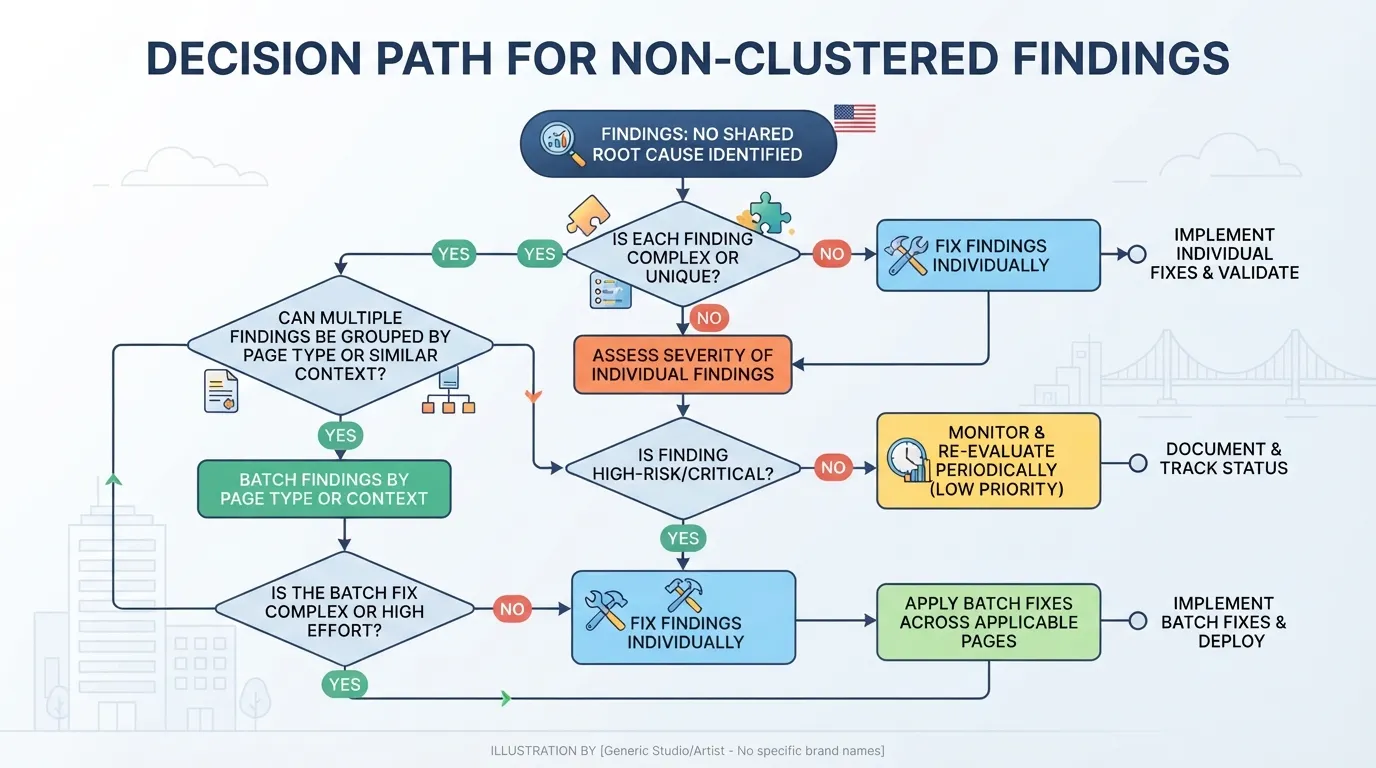
Once clusters are formed, the list is shorter and more honest about effort. That shorter list is what you take into scoring, and it is the basis for the ticketed fix list in the next step. Teams acting on how to act on SEO audit report findings usually find that this grouping step does more to shrink the workload than any scoring rubric.
A scored audit is still a diagnosis. The work starts when each cluster becomes a ticket that someone can pick up, build and check. Teams that close audits fastest write tickets in a fixed shape, so a developer never has to ask what “done” means. The ticket is where the scoring from Step 1 and the root-cause groups from Step 2 become work that moves through a sprint.
Every ticket should carry the same six fields. Consistency matters more than length. A reader scanning twenty tickets should find the owner and the done test in the same place each time.
| Field | What it holds | Example wording |
|---|---|---|
| Problem statement | One sentence naming the defect and its cause | “Category template outputs the same title tag on all paginated pages, so 412 URLs share one title.” |
| Affected URLs | Count plus a sample or a saved crawl filter | “412 URLs matching /category/*?page=*, see crawl export 2026-10-28, filter ‘Title 1 duplicate’.” |
| Acceptance criteria | Checkable conditions, written as pass or fail | See the next subsection. |
| Owner | One named role, not a team | “Front-end developer, category template.” |
| Verification method | The tool and scope used to confirm the fix | “Re-run the same crawl filter on the same URL set after deploy.” |
| Priority and bucket | Score and fix-now, schedule or monitor | “Score 4.5, fix now, sprint 2.” |
Keep the problem statement free of hedges such as “probably” or “may be.” If the cause is still uncertain, the ticket belongs in a discovery task, not a fix task. Put the score and bucket in the ticket so anyone reviewing the backlog can see why the item sits where it does.
Acceptance criteria fail when they describe an outcome nobody can measure, such as “titles are improved.” Write each criterion as a condition that a crawler, log file or Search Console report can return as yes or no.
Three rules help:
Example criteria for the title tag ticket:
The last criterion is worth keeping. It forces the team to decide in advance what evidence closes the ticket, and it sets the expectation that index changes take time. Google’s Search Console help on the Pages report explains how indexed status is reported.
If you run an SEO audit tool that exports findings to CSV, most of these fields can be pre-filled from the export. The owner, done test and sprint still need a human decision, because they depend on your team’s capacity and skills, not on the crawl.
A ranked fix list still stalls if nobody knows when each item ships or who is responsible for it. Sequencing and ownership turn the scoring output into a calendar. Fix what search engines need in order to find and index pages before you touch content and enhancements. A better title tag on a page Google cannot crawl produces no return.
Work in three layers. Do not start a layer until the one beneath it has a verified result:
Inside each layer, order items by the priority score from the scoring matrix. A dependency always overrides the score. If a template fix must land before twenty content tickets make sense, the template goes first regardless of its raw score.
Ownership fails when a single ticket names “SEO” as owner. Name the role that can make the change and the role that signs off on the result:
| Work type | Accountable owner | Executes | Verifies |
|---|---|---|---|
| Robots, redirects, status codes | SEO lead | Developer | SEO lead, via crawl re-run |
| Template title, meta, schema | Developer lead | Front-end developer | SEO analyst, via URL inspection sample |
| Page copy and thin content | Content lead | Writer or editor | SEO analyst, via rank and impression tracking |
| Internal linking | SEO lead | Content or CMS editor | SEO analyst, via crawl depth report |
| Analytics and tracking gaps | Analytics lead | Developer | Analytics lead, via test event |
Each ticket carries one accountable owner. Helpers can be listed, but the accountable owner is the person who chases the ticket to done.
Most US teams run two-week sprints, and developer capacity is usually the constraint. The plan below is written in sprints. Effort is left to the team’s own estimates.
| Sprint | Weeks | Focus | Typical exit condition |
|---|---|---|---|
| 1 | 1 to 2 | Triage, root-cause grouping and fix-now tickets written | All fix-now items have an owner, acceptance test and effort estimate |
| 2 | 3 to 4 | Crawl and indexation blockers (robots, redirects, status codes) | Re-crawl shows blocker count at zero for affected sections |
| 3 | 5 to 6 | Template fixes for titles, meta, headings and canonicals | Sample of URLs passes inspection in Search Console |
| 4 | 7 to 8 | Internal linking and orphaned page repair | Crawl depth and orphan report within agreed limits |
| 5 | 9 to 10 | Scheduled items from the middle bucket, content rewrites started | Rewrite batch published and queued for indexing |
| 6 | 11 to 12 | Monitor-only review, deferred items recorded with reasons | Re-audit date set and results logged against baseline |
Sprint 1 is deliberately planning-heavy. Teams that skip it tend to start content work in week one and discover in week six that the templates were wrong.
A finding that misses the threshold is not deleted. Record a reason beside it, such as “low impact, 40 URLs, revisit after template fix” or “disputed, sent to content lead for review.” Deferred items with a stated reason become the input for the next audit. This stops the same findings reappearing every quarter with nobody sure whether they were ever considered.
Some teams argue that a sprint structure is too rigid for SEO, since rankings respond to market shifts no plan anticipates. That is partly true, and the plan should flex. But a rigid sequence protects the foundation. A team that reorders crawlability work to chase a trend usually ends up re-fixing the same defects. Hold the dependency order firm and let the scores inside each layer move as the data changes.
For the tools that produce the crawl and indexation data this sequencing relies on, see our guide to seo tools, and for the crawl findings that feed the first sprint, the overview of the seo audit tool is a useful reference.
A fix is not finished when the ticket closes. It is finished when the change is live, search engines can see it, and the affected URLs behave as the acceptance criteria say they should. Teams often mark a redirect fix as done after it passes on staging, then find months later that a deployment has reverted it. Verification catches that drift. It is also the step most audit programs skip.
Start with the live site, not the ticket. For each fix, run the same test that generated the original finding, scoped to the affected URLs. If the finding was a missing canonical tag on 340 category pages, crawl those 340 pages and confirm the tag is present, self-referencing where expected, and returning a 200 status. Record the result against the ticket’s acceptance criteria.
Then confirm the fix is visible to search engines. The URL Inspection tool documentation explains how the tool shows the indexed version of a page and whether Google can crawl and render it. Use it on a sample of URLs from each affected template, not just one page, because template fixes can behave differently across page types.
Re-crawl only the sections the fix touched, but use the same crawl settings as the original audit. Changing the user agent, crawl depth or rendering mode between runs makes before-and-after comparisons meaningless. Export the results and compare the finding count for that cluster against the baseline.
A useful rule: re-crawl the whole cluster, then sample two or three unaffected sections to confirm the fix did not break something adjacent. A redirect rule change, for example, can create new redirect chains elsewhere.
Indexation checks show whether the fix changed what Google chooses to keep. In Search Console, use the Pages report to track how many affected URLs move out of statuses such as “Crawled, currently not indexed” or “Duplicate, Google chose different canonical” and into the indexed state. Confirm the exact status labels against the current Search Console help before you build a tracking sheet, because the wording changes over time. These counts move more slowly than crawl errors, so check them weekly rather than daily.
Server log files show what crawlers actually request. Filter logs for Googlebot requests to the affected URLs before and after the fix. If a fix for crawl waste on faceted URLs is working, Googlebot requests to those parameter URLs should fall while requests to priority pages rise. If requests do not move, the fix may be correct but unreachable, for example blocked by an internal link pattern that still points crawlers to the old URLs.
Record these values on the ticket before the change ships, then again at fixed intervals afterwards:
| Metric | Source | When to record |
|---|---|---|
| Affected URL count from crawl | Crawler export | Before, after re-crawl |
| Indexed pages in the cluster | Search Console Pages report | Before, then weekly |
| Impressions and clicks for the cluster | Search Console Performance report | Before, then 28 days after |
| Average position for priority queries | Search Console Performance report | Before, then 28 days after |
| Googlebot requests to affected URLs | Server logs | Before, then 2 weeks after |
| Conversions or leads from landing pages | Analytics platform | Before, then 4 weeks after |
Keep a snapshot of the baseline. Search Console keeps performance data for a limited window, so export it before a fix ships.
Technical fixes move in stages. A correction to a robots directive or a broken canonical can change crawling within days, once Google recrawls the affected pages. How soon indexation follows varies by site and crawl frequency, so measure your own rather than assuming a fixed window. Ranking and traffic changes take longer. For a page whose ranking depends on competitors, the movement may only become clear after a full month or more of data. These are our working observations rather than a published benchmark, so treat them as a starting expectation and measure your own site.
Early signals can mislead in three ways:
The working rule is to call a fix effective only when the verification test passes across the whole scope and the indexation or crawl signal moves in the expected direction. Treat traffic as confirmation, not the first test.
Verification also feeds the next round of work. The results show which root causes were resolved and which findings need a different fix, and that evidence should flow into the SEO audit tool you use for the next cycle. Teams that keep a running record of verified fixes, rather than a one-off report, are the ones that see audit findings translate into lasting results.
An SEO audit gives you a diagnosis, not a plan. The work happens between the report and the first change to a live page, and that is where most audits quietly stall. Knowing how to act on SEO audit report findings means treating the report as the start of a fix list.
Five steps close that gap. First, triage every finding by impact and effort so the list has an order. Second, group findings by root cause, so one template fix clears many line items. Third, convert each cluster into a ticket with an owner, a clear problem statement and acceptance criteria a crawl can check. Fourth, sequence the tickets so crawlability and indexation come before content work. Fifth, verify each fix in production and record the before and after state.
An audit’s value depends on how well its findings become owned, verified work. A forty-item report with no ranking is hard to act on. A short, ranked list tied to named owners and a re-crawl date produces change you can measure. Treat the audit as the start of the fix list, and schedule the next audit so the cycle repeats with fresh data.
Turning an audit into a ranked fix list can take one to two weeks for many teams. Acting on it takes longer. Template and development fixes often need one to three sprints, and the verification crawl can add another week. The timeline depends less on the number of findings than on how many root causes sit behind them. Grouping findings first can cut the work sharply. Confirm your own timings with your developers, since sprint length and capacity vary by team.
No. Treating every warning as critical is one of the fastest ways to stall. Score each finding on impact, effort and confidence, then sort it into fix now, schedule, or monitor only. Defer findings that miss your threshold on purpose, record the reason, and revisit them at the next audit. A shorter list of ranked, owned tasks usually beats a long list nobody has prioritized.
Split ownership by task type. SEO owns the diagnosis, the priority scores and the done test for each fix. Developers own template, redirect and rendering changes, which is often the bottleneck because engineering capacity is limited. Content owners handle copy, titles and internal linking. One named person should be accountable for the whole fix list and its verification, since shared ownership often means no owner at all.
Check the fix in production first. Re-run the crawl on the affected URLs or templates and confirm the defect is gone. Then inspect a sample of URLs in Google Search Console to see whether indexation and the reported issue have updated. How long the indexed status takes to reflect a change varies by site and crawl frequency, so track it across the sample rather than expecting a set number of days. Log file review can confirm that crawlers are requesting the corrected pages. Ranking and traffic changes take longer, and early movement can mislead because of normal fluctuation. Record a before-and-after baseline for each fix.
A finding is a diagnosis: it states that something is wrong, such as duplicate title tags on 400 category pages. A fix is the owned, scoped change that removes the problem, such as correcting the template logic that generates those titles, plus the test that proves it worked. One finding can need several fixes, and several findings can share a single fix when they come from the same root cause.
A tool can help with the mechanical parts: exporting crawl data, grouping duplicate issues by pattern, pulling impact signals from Search Console, and creating tickets. It cannot judge business value, weigh a development trade-off or decide what to defer, because those depend on context the tool does not hold. Use automation to build a first draft of the scoring matrix, then have a person review the ranking, assign owners and confirm the done test.

Tom is the CEO of MediaOne, a leading digital marketing agency. He is a business-experienced SEO consultant as well as a Google Gold Search Expert serving the international community. He has consulted for MNCs like Canon, Maybank, Capitaland, SingTel, ST Engineering, WWF, Cambridge University, as well as Government organisations like Enterprise Singapore, Ministry of Law, National Galleries, NTUC, e2i, SingHealth. His articles are published and referenced in CNA, Straits Times, MoneyFM, Financial Times, Yahoo! Finance, Hubspot, Zendesk, CIO Advisor. Under his stewardship, MediaOne has won dozens of prestigious digital marketing awards.
Run a free Digimetrics audit across SEO, AI search, content and technical health, and get a plan you can act on today.
Start free →You’ve found a potential SEO client, reviewed their website, and identified several problems worth fixing. Now you need a professional audit report that explains…
Your website has hundreds of pages, organic traffic is declining, and you’re not sure what’s causing the problem. Is Google struggling to crawl important…
The best SEO software for a small business is not necessarily the product with the most features. It is the tool that tells you…