SEO Audit
Free White Label SEO Audit Tool: What Agencies Actually Get
You’ve found a potential SEO client, reviewed their website, and identified several problems worth fixing. Now you need a professional audit report that explains…

An SEO audit report is a prioritized document showing what stops a website’s pages from earning organic search visibility, and what to fix first. The most useful reports rank problems by their effect on pages that earn revenue or leads. A typical report covers technical health, content, internal links and experience, with each finding tied to a next step.
This guide treats the report as a budget decision: it shows where limited time and money should go next.
An SEO audit report is a structured record of how well a seo website is set up to be found, crawled, understood and used by search engines and visitors, paired with a ranked set of actions to close the gaps. The audit is the diagnostic. The report turns the diagnosis into a plan.
The report answers one question: which problems stop pages that matter from earning organic visibility? It separates findings that block revenue pages from those that are simply untidy. A noindexed key service page affects far fewer URLs than a template issue across an archive, yet it often matters more. As the SEO audit tool guide on this site puts it, that single page may deserve attention first because it keeps an important page out of Google entirely.
Teams usually commission an audit when organic traffic drops without an obvious cause, after a migration, redesign or platform change, when a new owner or agency needs a baseline, or when the business suspects technical faults are wasting content and link investment.
The trigger shapes the report. A post-migration audit focuses on redirects, canonicals and indexing. A traffic-drop audit starts from Search Console data and works backwards to likely causes, looking first at any drop in keyword rankings.
The main benefit is sequencing. An audit gives the team a justified order of work, so effort goes to pages that can change outcomes. It also sets a baseline for measuring progress and reduces the risk of changing things that already work, since any change to site speed or user experience can then be tracked against the same starting point.
A lighter health check every 3-6 months keeps issues from building up. Larger or faster-changing sites, such as e-commerce catalogs or news publishers, may need monthly crawls. A full audit should follow any major change.
Warning signs that justify an audit sooner include:
If two or more of these appear together, audit before making further content changes.
An SEO audit report usually runs to dozens of pages, but most findings sit in four components: technical, content and on-page, internal linking, and experience. Sort every finding into one of these buckets before reading further. A website audit of this kind is most useful when each finding is clearly assigned to a bucket, and when the report is read as a picture of the whole seo website, not a list of isolated issues.
The crawler checks whether search engines can reach and read your pages. The content review checks whether those pages match the keywords people actually search for. The link review checks how authority and paths flow between pages, including the strength of your backlink profile. The experience review checks speed and mobile behavior.
A good report states its scope: how many URLs were crawled, whether the crawl followed sitemaps or only internal links, and whether Google Search Console data was merged in. A report that does not state its scope cannot be checked. Ask for the scope before trusting any figure.
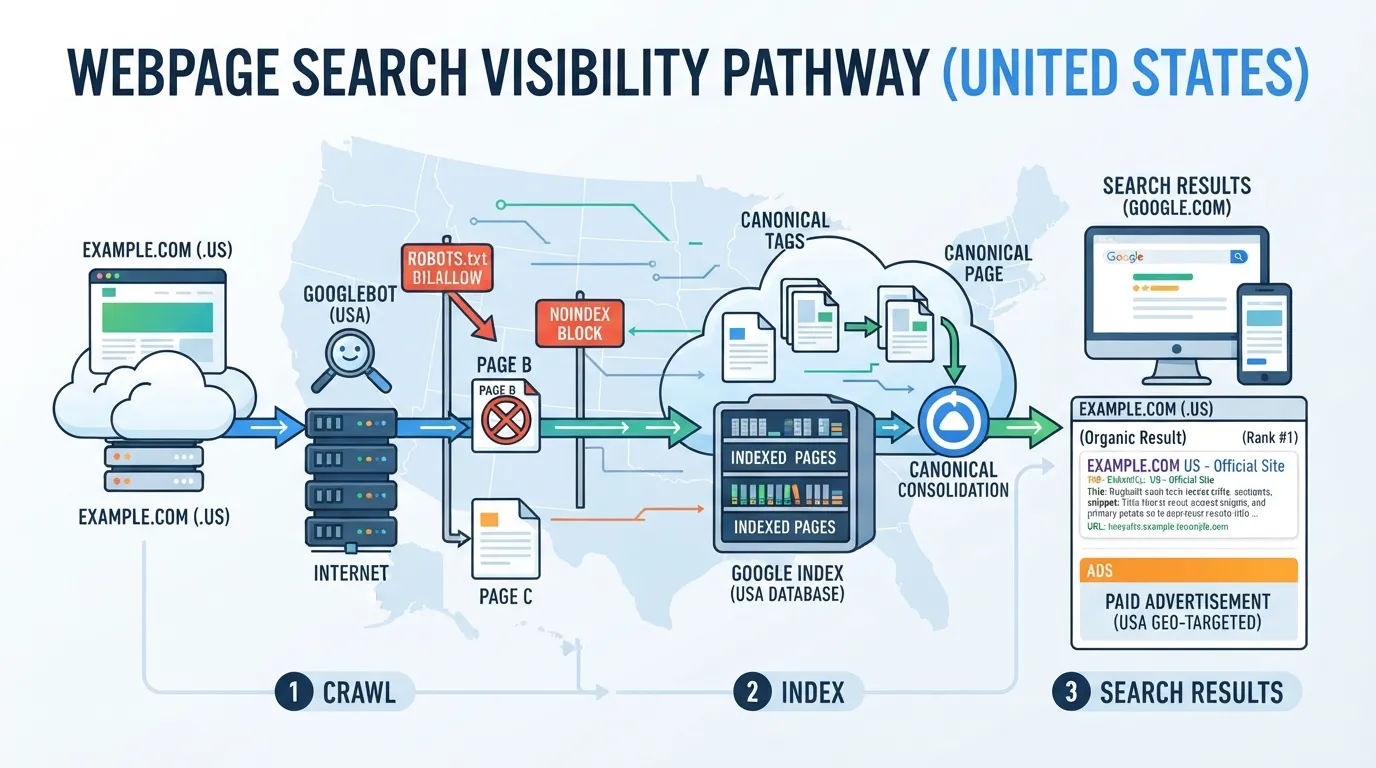
Technical checks decide whether a page can appear in search results at all. Google’s results come from its search index, so an excluded page earns no rankings. Check these items:
Cross-check each technical finding against Search Console coverage data. If the crawler reports a noindex but Search Console shows the page indexed, the crawler may be reading a stale version.
Content findings cover titles, meta descriptions, headings, thin pages, duplicate content and keyword targeting. Missing meta descriptions are usually low impact on their own. A duplicated title across two product pages matters more when both compete for the same query.
Internal linking is the finding most reports underrate. Orphaned pages have no internal links pointing to them, so search engines and visitors rarely find them. An orphaned service page can be well optimized and still never rank. Look for links pointing to redirects or broken URLs, which waste crawl effort. For the tools that surface these findings, see our guide to seo tools.
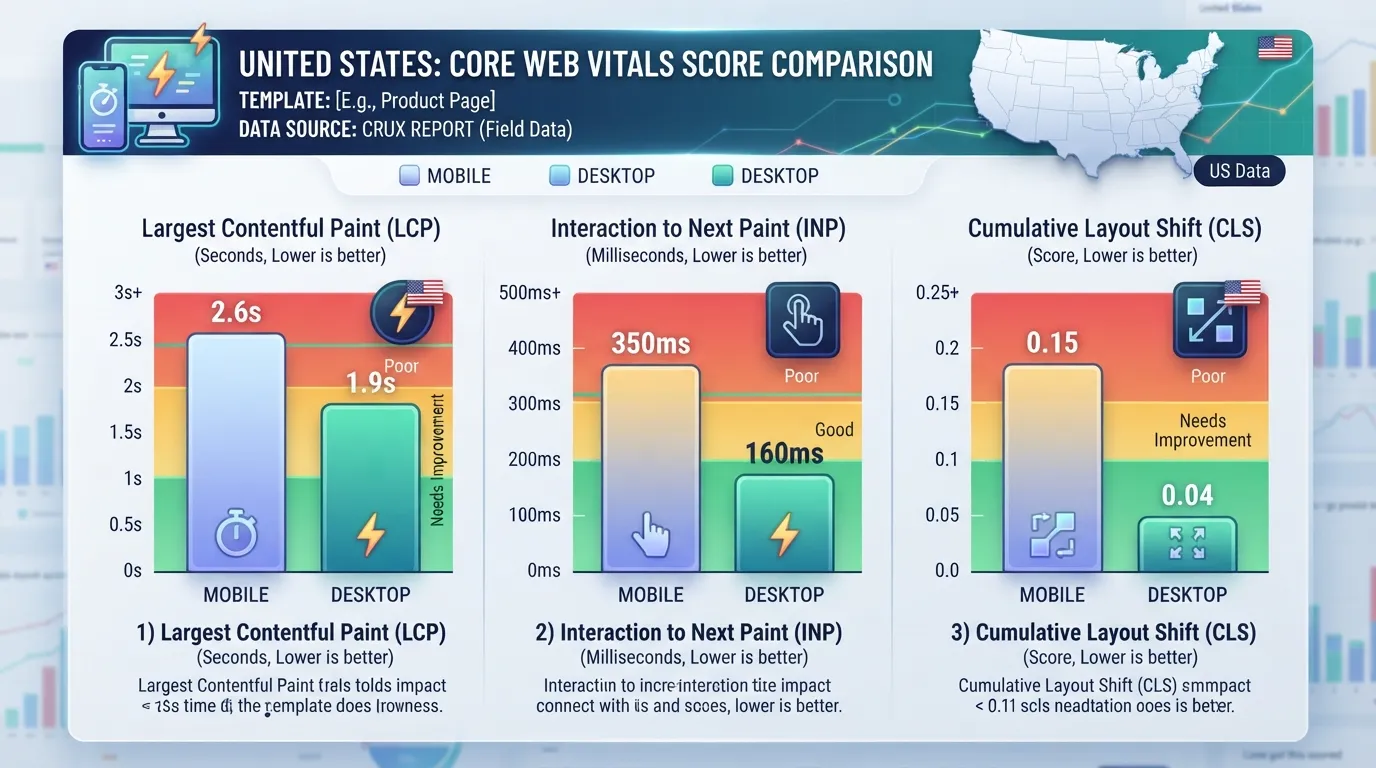
Experience findings fall into two groups: mobile usability and Core Web Vitals. Most US buyers search on phones, so check mobile results separately from desktop.
Core Web Vitals measure loading speed, visual stability and responsiveness. Interaction to Next Paint (INP) has replaced First Input Delay (FID) as the responsiveness metric. If a report still shows First Input Delay, re-run the outdated figures.
Read experience figures per template, not per site. A slow template used by every product page matters far more than a slow blog template.
Crawlers label findings as errors, warnings or notices. Treat these labels as a starting point, not a ranking. An error on a page nobody visits matters less than a warning on your highest-converting service page on your website.
Order every finding with three questions:
Write the answers beside each finding so the report becomes a work queue.
A noindex directive keeps a page out of search results until the tag is removed. If that page is your main service page, the loss is far more costly than a hundred missing meta descriptions on blog posts. The SEO audit tool guide makes the same point: the single noindexed page may deserve attention before a larger issue affecting more elements.
Click depth is how many clicks separate a page from the homepage. Crawl depth is how far a crawler travels from its starting point before reaching a URL. Both show how much weight a site gives a page, which makes them useful for sequencing search engines and your own priorities.
The guide’s rule of thumb is that important pages should be reachable from the homepage within three clicks. This is an editorial heuristic, not a Google requirement, and may not suit large sites with deep category structures. A page five clicks deep may still be a serious problem if it is a major service page. If a high-value page sits deep in the structure, fix the internal links leading to it first.
A single score out of 100 summarizes many checks under the tool’s own weighting. Raising it can mean fixing things with no effect on rankings while a critical problem stays untouched. Focus on the issues that affect how a keyword’s target page is found and shown.
Measure what the score is meant to represent instead:
If these move, the score usually follows. If the score rises while these stay flat, the audit has been used as a checklist rather than a planning tool.
Prioritization advice only goes so far, so this section walks through a hypothetical US regional accounting practice on WordPress with about 400 indexed URLs and three revenue-driving service pages. The website is typical of many small firms, and its findings show how a technical SEO audit becomes a ranked plan for improving search engine visibility.
The crawler returned 214 warnings across 11 categories. Most were low-stakes: 38 pages with missing or duplicate meta descriptions, 27 images without alt text, 19 broken internal links and 6 redirect chains.
Two findings mattered more. The “Bookkeeping Services” page carried a noindex tag left over from a staging template. Google Search Console listed it under “Excluded by ‘noindex’ tag” in the Page indexing report. The page sat five clicks from the homepage and was reachable only through the blog archive.
Check each finding against a second source before acting, such as Search Console coverage data and the live HTML of the page.
Place every finding in an Impact-Reach-Effort matrix. Impact asks whether the issue blocks indexing, relevance or user experience on a revenue-earning page. Reach counts the pages or templates affected. Effort estimates how hard the fix is and who owns it.
| Finding | Impact | Effort | Priority |
|---|---|---|---|
| Noindex on Bookkeeping page | High: blocks a lead page | Low: one template setting | Fix now |
| Advisory page five clicks deep | High: commercial page hard to reach | Medium: add internal links | Fix now |
| 19 broken internal links | Medium: wasted crawl, dead ends | Low | Next quarter |
| Duplicate title tags on 12 pages | Medium | Medium: template logic | Next quarter |
| Missing alt text on 27 images | Low to medium | Low | Batch later |
| Redirect chains on 6 pages | Low | Low | Batch later |
The noindex tag ranks above the larger pile of warnings because it removes a page from search results entirely. Sorting by reach alone would have pushed the 27 alt-text fixes to the top, consuming effort without improving search performance.
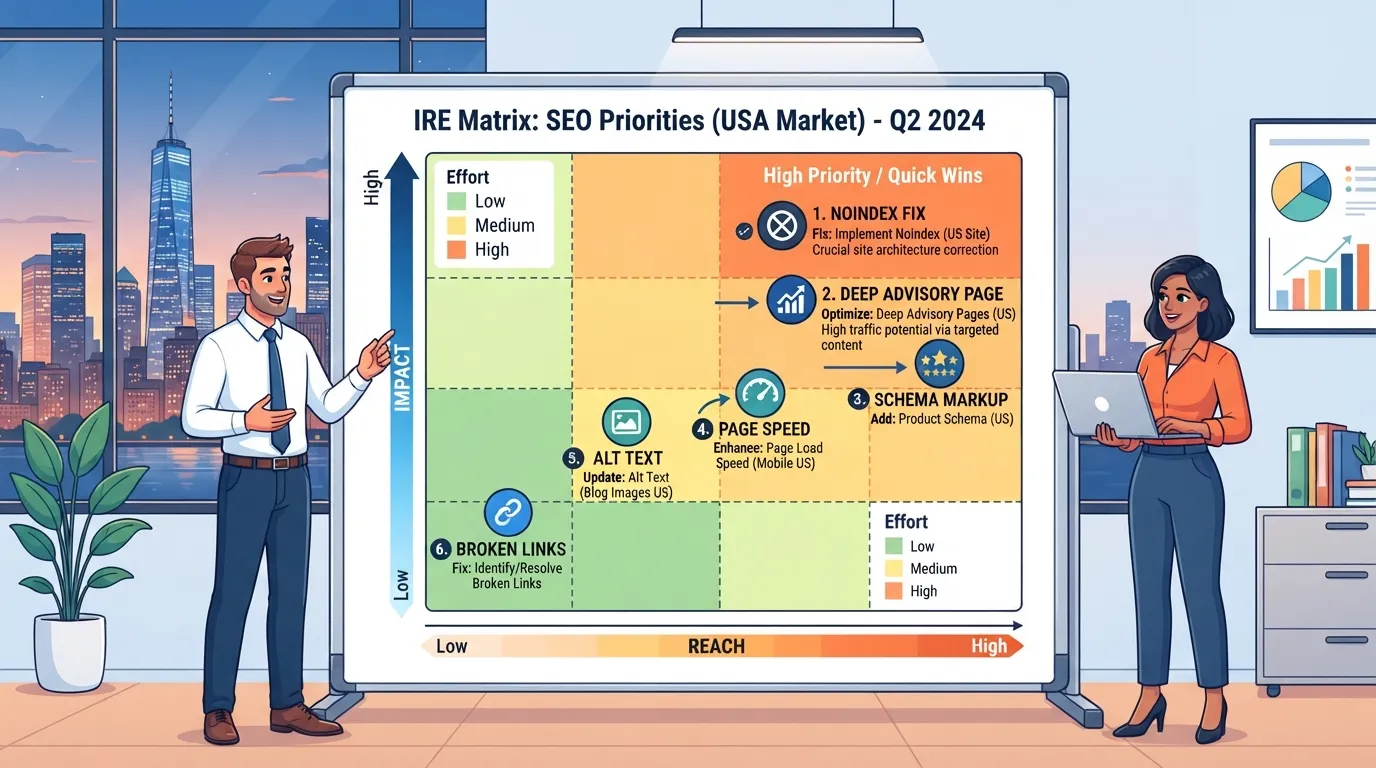
Each fix needs an owner and a rough effort estimate before it enters a sprint.
The working rule used here is that commercial pages should sit within three clicks of the homepage, which justifies moving a medium-effort fix to the top of the list. Keywords on those pages should reflect the services a visitor would search for, so the ranking signals and the page’s purpose point in the same direction. Strong SEO audits also review the backlink profile, since links pointing at a deep page can help it earn a higher place in search engines.
The report’s value came from the sequence, not the count. Two fixes ranked above the rest, and only those two were likely to change what the practice could expect from organic search in the next quarter.
An audit is only useful if it runs the same way every time, so the same questions get asked of every site. The steps below produce the raw findings that the Impact-Reach-Effort matrix then ranks.
Tick each item only after checking it against live data.
No single tool sees everything, so most audits combine a crawler with Google’s own data.
| Tool type | Best used for | Cost |
|---|---|---|
| Google Search Console | Indexing status, search queries, Core Web Vitals field data | Free |
| Google Analytics | Traffic and conversions on commercial pages | Free |
| Desktop crawler | Full-site crawl of links, tags and redirects | Free tier with limits, paid for larger sites |
| Cloud-based crawler | Scheduled crawls and team reporting | Paid subscription |
| All-in-one SEO platform | Crawl, rank tracking and backlink data together | Paid subscription |
Free tools are enough for a small site. Paid tools earn their cost when a site has thousands of URLs, several teams or a need for scheduled monitoring. For a wider survey, see our guide to seo tools.
Choose a tool by the question you need answered, not by its feature list.
The practical rule is one crawler for coverage and Search Console for truth. When they disagree, the disagreement is itself a finding, often revealing a page search engines have chosen not to index or a crawl block nobody intended. Those mismatches are the issues most worth fixing first.
A good SEO audit report names the specific pages and templates that block search visibility, ranks each finding by its effect on revenue or lead pages, and assigns an owner and effort estimate to each fix. Run every finding through the Impact-Reach-Effort matrix before acting.
Start with your most important commercial page and check whether search engines can index it. Then choose your tools: our seo tools guide compares crawling, indexing and tracking options.
Not always, but a report is the fastest way to find the problems that cost you traffic.
The audit is the process of crawling a site and checking pages against technical, content and performance criteria. The report records what the audit found and what to do about it. A good report turns raw findings into a ranked list of decisions, so the report is the audit’s real output.
A basic SEO audit can take a few hours, while a comprehensive audit may take several days, depending on site size. Verifying findings against Google Search Console coverage data adds time.
Yes. Free crawlers and Search Console are enough to start. Export the crawl, check indexing for key commercial pages, and rank each finding by impact, URLs affected and fix difficulty.
Google suggests a lighter health check every 3 to 6 months. Order a new report sooner after a migration, redesign or noticeable traffic drop.
No. An audit score measures technical health, not outcomes. A high-scoring site can still rank poorly if its content does not match search demand. Track indexed pages that drive leads and Core Web Vitals on high-traffic templates instead.
Start with findings that block visibility on revenue-earning pages, such as noindex tags, robots.txt blocks or broken canonicals on key service pages. Confirm each in Search Console, then assign an owner and deadline to every fix.

Tom is the CEO of MediaOne, a leading digital marketing agency. He is a business-experienced SEO consultant as well as a Google Gold Search Expert serving the international community. He has consulted for MNCs like Canon, Maybank, Capitaland, SingTel, ST Engineering, WWF, Cambridge University, as well as Government organisations like Enterprise Singapore, Ministry of Law, National Galleries, NTUC, e2i, SingHealth. His articles are published and referenced in CNA, Straits Times, MoneyFM, Financial Times, Yahoo! Finance, Hubspot, Zendesk, CIO Advisor. Under his stewardship, MediaOne has won dozens of prestigious digital marketing awards.
Run a free Digimetrics audit across SEO, AI search, content and technical health, and get a plan you can act on today.
Start free →You’ve found a potential SEO client, reviewed their website, and identified several problems worth fixing. Now you need a professional audit report that explains…
Your website has hundreds of pages, organic traffic is declining, and you’re not sure what’s causing the problem. Is Google struggling to crawl important…
The best SEO software for a small business is not necessarily the product with the most features. It is the tool that tells you…