SEO Audit
Free White Label SEO Audit Tool: What Agencies Actually Get
You’ve found a potential SEO client, reviewed their website, and identified several problems worth fixing. Now you need a professional audit report that explains…
An SEO audit report looks authoritative, with its score and color-coded problem list. The score shows what the tool measured, not whether it matters for your website or your search engine performance. Before acting on any report, check what it checked, how far it crawled, and where its numbers came from. Treat every score as one input to your analysis, not a verdict on your site’s ranking.
This guide sets out the questions to ask an SEO site audit tool, and a decision matrix you can apply to any audit tool.
An SEO audit report tool crawls a website, checks it against a set of rules, and returns a list of findings with a score. Each page is tested for things like load speed, missing title tags, broken links and crawlability, meaning whether search engines can reach and read the page. Good tools apply the same checklist to every page, and the findings matter most when they cover the full layout of a company’s seo site rather than a sample of pages. A detailed analysis of the crawl results helps prioritise fixes, and the technical seo findings deserve attention first because they control whether search engines can reach the content at all.
The report is only as good as the crawl behind it. Two tools can both return “your site scores 74,” yet one may have checked 50 pages and the other 5,000. Before reading any number, confirm how many URLs were examined and which engine supplied the speed data. Tools built on Google Lighthouse report lab data from a simulated test, while Chrome User Experience Report (CrUX) field data reflects real visitors, and the two can differ. Pair the audit with Search Console to see how Google actually treats your content and how your site’s real-world performance compares. Comparing results across audit tools shows which findings are consistent and which depend on a single engine.
An audit does not raise rankings on its own. It surfaces the problems that stop search engines crawling, indexing and understanding your pages, and the issues it flags are only useful once someone fixes them. Many entry-level options are free seo tools with limited crawl depth. For background on how these tools are categorized, see our seo tools overview.
Most buyers compare feature lists and skip the questions that decide whether a report is usable. Score each candidate on three rows.
| Row | The question | What a good answer looks like |
|---|---|---|
| Goal | Is this a quick page-level check, a full technical crawl or ongoing tracking? | One goal, named in a sentence, that the tool clearly supports |
| Limit | Is the cap per crawl or per month, and does it cover your full URL count? | A limit that fits your site size with room to spare |
| Trust | Are results from a recognized engine such as Google Lighthouse, and can the report be exported? | A verifiable data source and a report you can keep |
A tool is shortlisted only if it clears all three rows for your goal.
Decide what the audit should support before you open a tool. “Find the technical blockers stopping our product pages from being indexed by a search engine” is a usable goal; “improve SEO” is not. The goal sets the tool type and the URL count you need:
Name the keyword research or content group the audit serves, so the report can be judged against that target. Pick the best-fit tool for that target, not the one with the longest feature list, and make sure the report is judged against the ranking goal you set. Run the audit against each page of your website that carries that target, so the findings map to real pages rather than a generic sitewide score.
A page cap and a crawl cap are different constraints. A monthly allowance limits how many pages you can audit across all runs, while a per-crawl limit caps a single run. Some free plans limit audits to 100 pages per month, which covers a small brochure site but not a catalog.
A worked example shows why this matters. Suppose a shortlist includes Screaming Frog and a tool with a 100-pages-per-month allowance, and your site has 400 pages. Screaming Frog’s 500-URL per-crawl limit covers all 400 pages in one pass, so it stays on the list. The monthly tool would need four full runs to cover the same site, and it would drop off the list for a full crawl. A site of 800 pages passes the 500-URL check, but 300 pages would go unexamined, so you would need a higher-limit tool. Before trusting a report, confirm which limit applies and whether the crawl covers your full URL inventory.
Ask whether the score is the tool’s own invention or a recognized standard. Tools built on Google Lighthouse report performance metrics from the same engine Google uses, so you can re-run the test yourself. Confirm that the report can be exported, because a view you cannot save is a one-off impression rather than a working record.
Look at what is checked, not how many checks are advertised. At minimum, confirm the tool tests page speed, crawlability (broken links, redirects, blocked pages) and on-page SEO elements such as titles, meta descriptions and headings. A tool that skips crawlability is unlikely to surface the issues that stop pages being indexed. Read the Depth results alongside the user experience results the site audit reports, and tie each finding back to the goal you set.
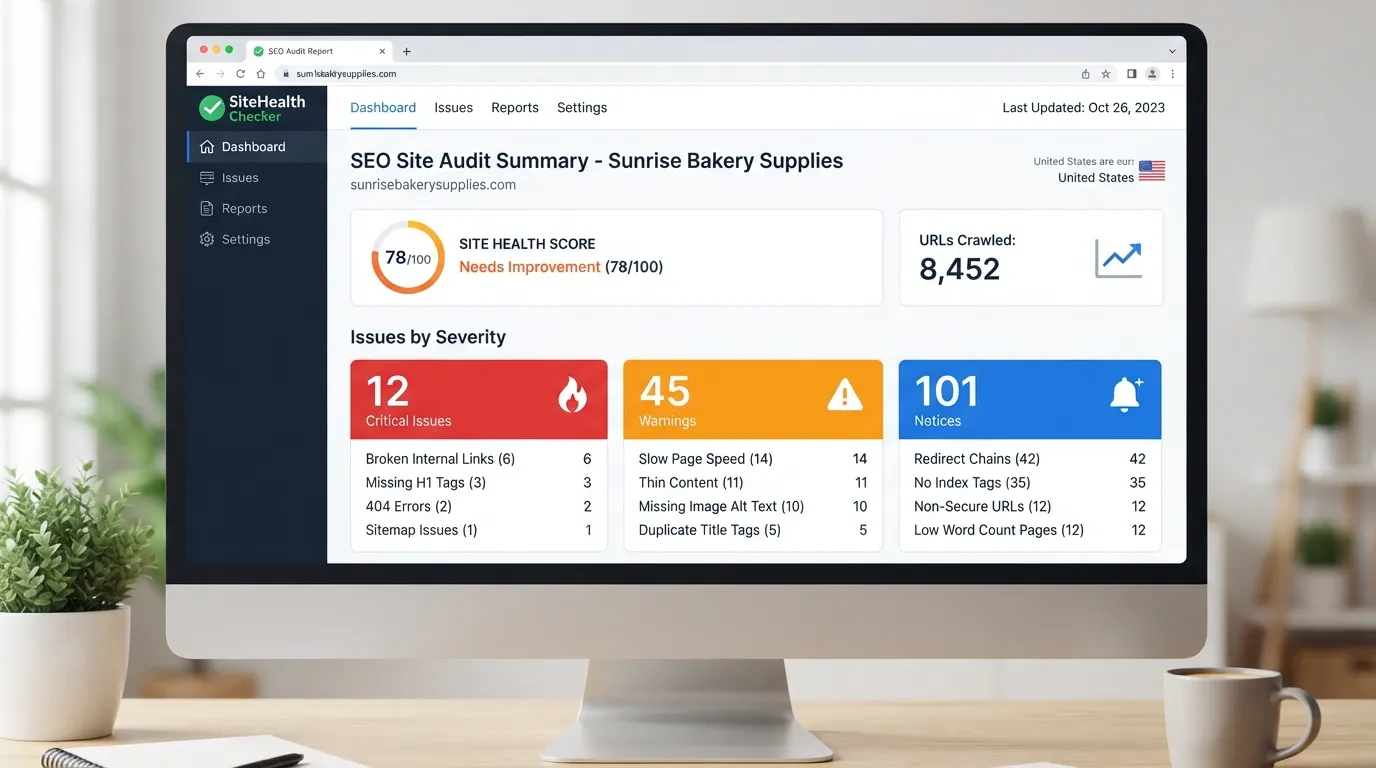
Most SEO audit reports open with a single headline number, and most readers treat it as a verdict. The headline score is the least useful number on an audit. It summarizes checks; it does not measure search performance, so know what feeds it before acting on it. Read the number as a diagnostic signal from the site audit, not a grade. A best practice is to read each finding behind the number before deciding what to change.
Consider two sites that both score 82. Site A scores 82 because its titles and speed are strong but 40 pages return broken links, which blocks crawling. Site B scores 82 because every page has a minor meta description length warning. Site A has a crawling problem that can cost it visibility; Site B has cosmetic noise. The number is identical, but the fixes are not, and a closer analysis of each finding shows that.
On-page audits score the elements you control on a page, such as titles, meta descriptions, heading structure, image alt text and page speed signals, then roll them into a single number. Each check carries a weight, so a missing title tag costs more points than a slightly long meta description.
The score does not measure rankings, traffic or conversions. A page can score 95 and still attract no visitors. For traffic and query data, pair it with Google Search Console.
Check first for issues that block crawling or indexing: broken internal links, error-code pages, noindex tags on pages you want ranked, and missing or duplicate titles on key templates. Prioritize the findings that affect how a search engine reads and understands each page.
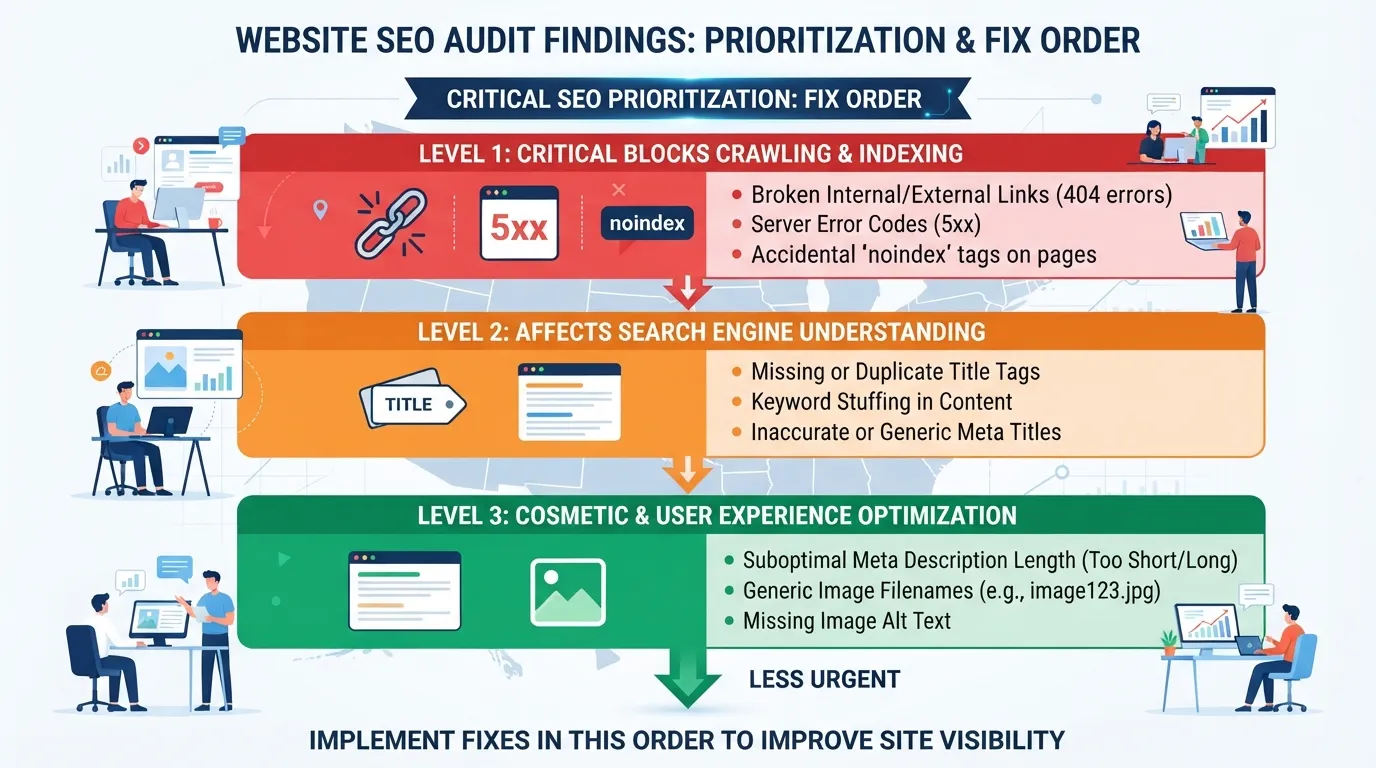
Cosmetic findings, such as a meta description one word over the length guide, rarely move results on their own. Fix anything that stops a page being crawled, indexed or understood, then batch the rest. Run a quick audit checklist review after each batch to confirm nothing critical was missed. Many teams start with a free SEO tool before investing in paid software.
Across more than 100,000 websites audited on the SEOmator network in 2026, the median SEO score was 71/100. A score of 60 suggests a closer look; a score of 85 suggests remaining gaps are probably specific rather than systemic.
Use the median as a starting reference, then track your own score over time. Your trend across repeated audits tells you more than any single comparison.
A free audit covering on-page basics, crawlability and page speed catches most problems on a small site. Pay only when limits or depth shape your decisions; until then, fix the findings you already have.
A free audit is only useful if you know what you want from it before you start. Decide whether you need a quick page-level check, a full technical crawl or ongoing monitoring, because that choice determines which free SEO audit tools are worth your time. Name the content and performance question you are answering first, so the findings map to a decision. Write down the target website and the primary keyword each page should rank for, so the findings map to a decision.
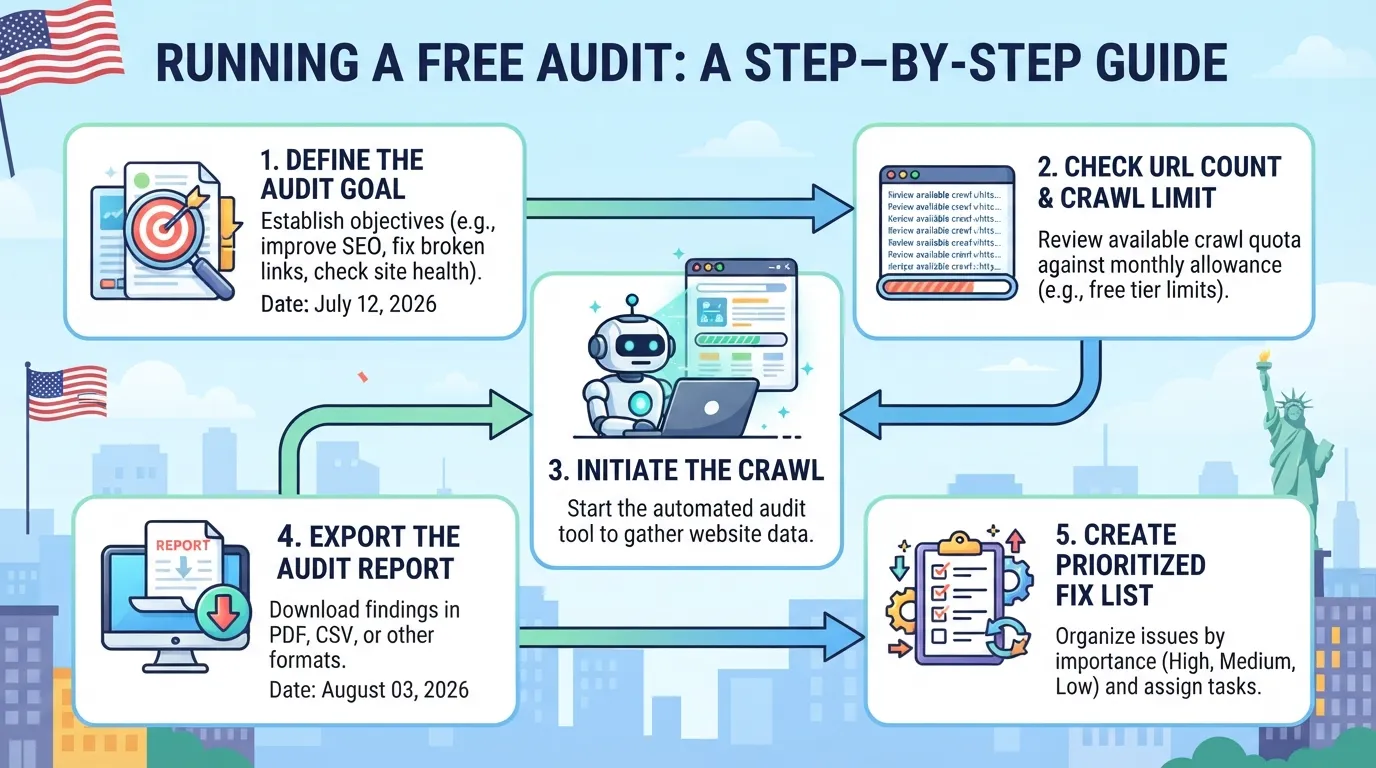
How often you audit should follow how fast your site changes, not a fixed calendar. A brochure site that changes twice a year needs a check every quarter at most. A store adding products weekly, or a blog publishing several posts a week, needs a crawl at least monthly, plus a quick page-level check after any major template or CMS change. WordPress runs 32.9% of small business websites, so many sites share plugin-driven templates that can create duplicate or broken pages a crawl will catch. Review your Google Search Console data alongside each crawl to confirm which technical SEO issues affect how pages appear in search, and whether they affect your ranking. Running a full site audit each month keeps these checks consistent across cycles, and a well-documented seo site makes each cycle easier to repeat.
A simple cadence works for most sites:
Your free allowance sets the ceiling. A 100-page monthly allowance cannot fully cover a 300-page site. Plan which sections you sample, such as top landing pages and recent posts, and keep a short checklist so each cycle covers the same ground.
Move to a paid tool when the free limit starts to shape your decisions:
When you do upgrade, weigh the cost against the goal. The entry plans of the four big suites cost $99 to $139 a month, so $99 is a sensible benchmark for a small US business. If your free audits already fit your cadence and you act on their findings, the upgrade is not yet worth it. Compare what the seo tools on offer include before committing, and check whether they support keyword research and user experience analysis. Choosing the best option means matching features to your actual cadence, not to the longest feature list.
Traditional audits check whether search engines can read a page. They rarely check whether AI answer engines find and cite it. An AI visibility audit reveals whether your brand is recommended in relevant AI-generated answers, and a site can score well on classic metrics while remaining absent from those answers. Treat AI visibility as a separate line in your report. For an overview of audit tool types, see our guide to the seo audit tool category.
An SEO audit report is worth only as much as the decision it supports. Match a tool’s crawl limit, data source and reporting depth to your goal, or you risk paying for unused capacity or hitting a page cap mid-crawl.
Use the Goal-Limit-Trust matrix: confirm the goal, check the limit, then check trust. Shortlist only tools that clear all three.
For a site with a few dozen pages, usually yes. A free audit covering on-page basics, crawlability and page speed surfaces the most important problems. It stops being enough as the site grows, when you need recurring checks, or when you need more depth than a free allowance gives.
It depends on the tool and how the cap is counted. Some free plans limit audits to 100 pages per month, while the free version of Screaming Frog allows up to 500 URLs per crawl. Check both limits before assuming a site fits.
Run a full technical audit after any major change, such as a redesign, migration or CMS switch, and at least quarterly for an active site. A lighter monthly page-level check catches broken links and new on-page issues early.
Each tool runs different checks, weights them differently and uses its own crawler or data source. Compare scores only within the same tool over time.
Increasingly, yes. Traditional audits do not show whether AI answer engines can find and cite your content, so treat an AI visibility check as a separate item alongside your standard report.
Sort findings by impact and effort. Fix anything blocking crawling or indexing first, then broken links and major on-page errors. Record each fix and re-run the audit to confirm it worked.

Tom is the CEO of MediaOne, a leading digital marketing agency. He is a business-experienced SEO consultant as well as a Google Gold Search Expert serving the international community. He has consulted for MNCs like Canon, Maybank, Capitaland, SingTel, ST Engineering, WWF, Cambridge University, as well as Government organisations like Enterprise Singapore, Ministry of Law, National Galleries, NTUC, e2i, SingHealth. His articles are published and referenced in CNA, Straits Times, MoneyFM, Financial Times, Yahoo! Finance, Hubspot, Zendesk, CIO Advisor. Under his stewardship, MediaOne has won dozens of prestigious digital marketing awards.
Run a free Digimetrics audit across SEO, AI search, content and technical health, and get a plan you can act on today.
Start free →You’ve found a potential SEO client, reviewed their website, and identified several problems worth fixing. Now you need a professional audit report that explains…
Your website has hundreds of pages, organic traffic is declining, and you’re not sure what’s causing the problem. Is Google struggling to crawl important…
The best SEO software for a small business is not necessarily the product with the most features. It is the tool that tells you…