Most link building tool comparisons rank software by how many domains it indexes. That approach misses what actually moves rankings. A few links from relevant, authoritative websites usually outperform dozens of weak ones, so the better question is which tool helps you find, qualify and protect those few links at a price you can justify. This guide compares the main categories of link building software on pricing, team fit and the jobs each tool does well. It also shows how a smaller stack used with disciplined outreach can beat a larger platform used for bulk prospecting. Prices are listed in US dollars per month, and each figure is tied to a source you can check.
Decisions matter most. A tool is only as good as the choices it supports. Index size matters less than how well it helps you find, qualify and protect links.
Relevance comes first. A link from a DA 60 site that is unrelated to your industry often does less than a link from a DA 30 site your audience reads. Domain Authority (DA) is a Moz metric that estimates how strong a site is overall.
Labor savings vary. Integrated platforms can cut prospecting labor time by 40 to 60 percent, according to figures reported on Digital Marketing Tools. The saving depends on how consistently your team uses them.
Personal outreach still wins. Automated email without personalization often gets reply rates of 1% to 5%, which many industries consider acceptable. Use tools for research and tracking, then write outreach a real person would send.
Monitor lost links. Alert on any lost link from a DA 30+ domain. Digital Marketing Tools suggests knowing within 24 hours.
Start from your budget. Entry tools from about $49 per month suit freelancers. Ahrefs and Semrush suit agencies and full SEO programs, according to ClickFast’s comparison of backlink tools.
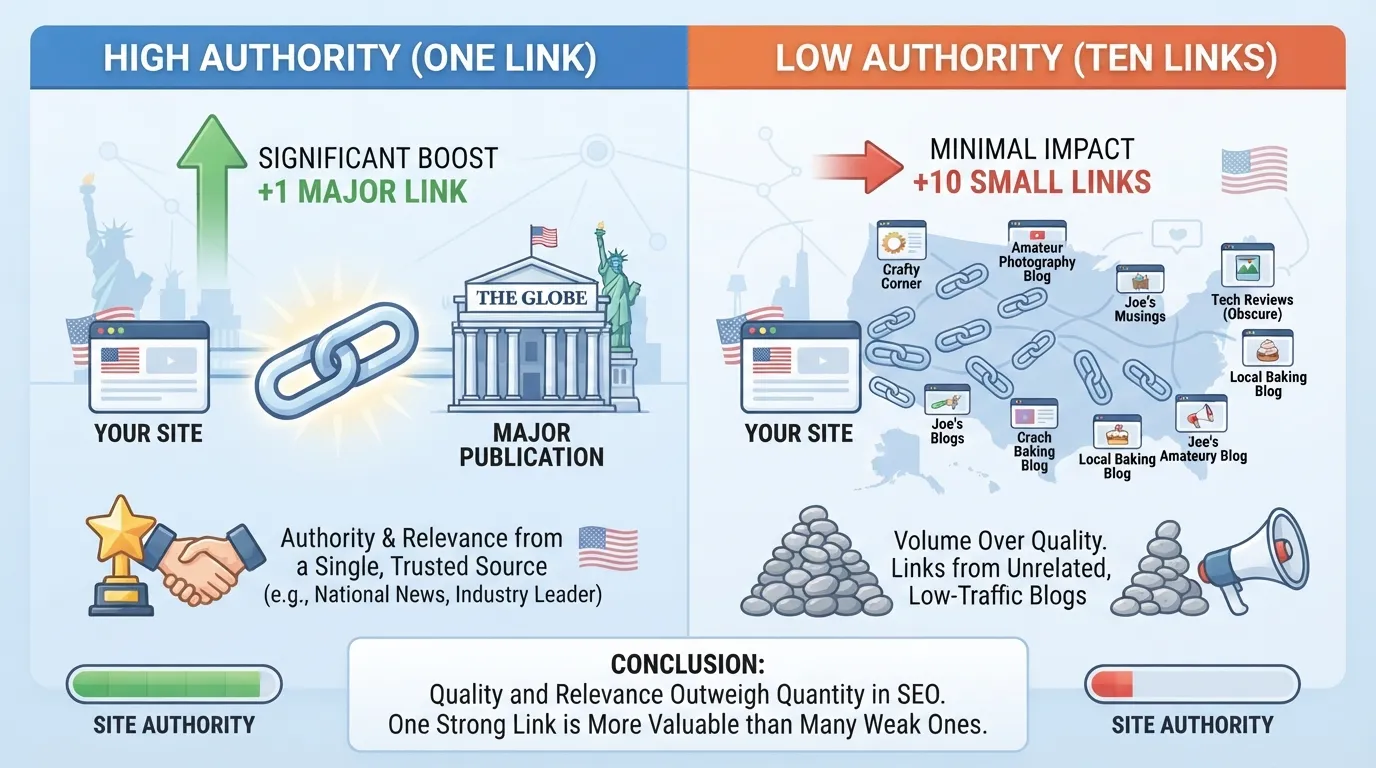
Why a Single Link from a Major Publication Often Beats Ten Small Blog Links
A link audit typically starts by asking where links come from, not how many a site has. A single editorial mention from a major publication tends to do more for rankings than a pile of links from small, unrelated blogs. Search engines weigh the source of a link heavily. A link from a trusted, topically relevant site signals that a wider audience vouches for the page.
A link from a major publication carries authority the publication has built over years of editorial work. It also tends to send referral visitors who already care about the subject, which can lead to further mentions and brand searches. Ten links from thin blogs in unrelated niches rarely produce those effects. If they arrive in a suspicious pattern, they can even look like manipulation.
A link building tool should therefore help you rank opportunities by quality before volume. A tool that reports thousands of new referring domains says little about whether any of them matter. The practical test is simple: would a reader of that site find your page useful enough to click through? If not, the link is unlikely to justify the time spent winning it.
For a small team, the implication is clear. Spend outreach hours on a short list of publications where one placement would be realistic and valuable. Use your tool to check topical fit first, then authority, and only then decide whether the pitch is worth writing.
Table of Contents
The Main Categories of Link Building Tools
Side-by-Side Comparison: Pricing, Best Fit, and Trade-Offs
Building a Link Building Workflow with the Right Stack
Guest Posting and Listicle Outreach: Contributor Requirements and Submission Norms
Conclusion and Summary
Frequently Asked Questions
The Main Categories of Link Building Tools
Most link building work runs on four kinds of software. Each category does a different job, and the price gap between them is wide. Knowing which job a tool does best is the fastest way to avoid paying for features you will never use.
Backlink Research Tools: Ahrefs, Semrush, Moz, and Majestic
Backlink research tools crawl the web and report which domains link to a site, which pages those links point to, and how authoritative those linking domains appear. They are the starting point for finding opportunities, and they are also where most budgets go.
Four main options serve different buyers. Ahrefs starts at $29 per month on its Starter plan, and Semrush Pro is listed at $139.95 per month. Both are priced for agencies and full SEO programs. Moz Link Explorer starts at $49 per month and suits freelancers or teams on lighter budgets. Majestic, from $41.67 per month, appeals to people who prefer metric-driven analysis of link quality. ClickFast’s review of backlink tools lists these starting prices, which are useful for comparing entry points.
Index size matters less than most buyers assume. What matters is whether the tool helps you filter by relevance. A link from a DA 60 site with nothing to do with your industry usually does less for you than a link from a DA 30 site your audience reads. Test each candidate on a niche you know well, and check whether its filters isolate sites in that niche. A tool’s trust in its own index is only as good as the filters that let you judge each linking domain.
Outreach and Prospecting Tools: Pitchbox, BuzzStream, and Hunter.io
Outreach tools handle the stage after research. They help you find the right contact at a site, verify the address, send a sequence of emails and track replies. They are where automation tempts people most, and where it hurts most when used carelessly.
BuzzStream, from $24 per month, targets small and mid-sized outreach teams that want contacts and follow-ups in one place. Hunter.io is best known for finding and verifying email addresses, with a free plan and paid tiers from $34 per month. Pitchbox is positioned for larger outreach operations that run campaigns at volume, including teams managing multiple clients.
Hunter.io may be enough if your work is mostly finding contacts and sending personal emails. BuzzStream or Pitchbox earns its cost when you run ongoing campaigns with many contacts and need follow-up tracking, shared records and reporting. Whichever you choose, the software should save admin time. It should not replace the reason someone would reply to you, which is content built to be genuinely useful and actually worth linking to.
Monitoring and Verification Tools: Google Search Console and Screaming Frog
Monitoring tools answer a question research tools do not: are the links you already have still live, and do they still point where you think? This category is the one most often skipped, and it is inexpensive to cover.
Google Search Console is free. It reports links Google has found pointing to your site, along with the pages they reach. It is a primary source for links Google has discovered, although it does not alert you when a link disappears. Screaming Frog is free for up to 500 crawled URLs and costs £199 per year for the paid plan. That is roughly US$250 at current exchange rates, so confirm the dollar price on the vendor page before budgeting. Its crawl finds broken links, redirects and technical errors that can break a link’s value. Pricing details come from ClickFast’s comparison.
Used together, these tools cover the basics. Search Console shows which links Google sees, and a crawler confirms that the destination pages still resolve. A clean backlink profile depends on checking both regularly, so that broken or lost links are caught before they quietly erode your trust signals. For a deeper alert setup, see the monitoring rules in the workflow section below.
Free Browser Extensions Versus Enterprise Platforms at $300 to $500+ Monthly
Link building tools range from free browser extensions with limited features to enterprise platforms costing $300 to $500 or more per month, according to the link building tools guide on Digital Marketing Tools. Free extensions help with quick checks on a page’s authority and linking domains. Enterprise platforms bundle research, outreach, reporting and team permissions. They make sense only when the labor they save is worth more than their cost.
The decision depends on volume and team size, not prestige. A solo marketer who sends a dozen outreach emails a month rarely needs an enterprise suite. A team running hundreds of outreach contacts across several clients may recover the cost quickly. Count how many hours your current process takes each month, then compare that figure with the subscription price before you move to a higher tier.
Side-by-Side Comparison: Pricing, Best Fit, and Trade-Offs
Each link building tool does one job well, and the price of that job is what matters. A tool that finds links cheaply but cannot verify them only solves half the problem. This comparison is organized by the job each tool performs and what that job costs per month.
Comparison Table of Link Building Tools by Price, Team Size, and Core Function
The prices below are list prices in US dollars from the vendors’ published tiers, as summarized on ClickFast’s backlink tools review. Plans change, so confirm each figure on the vendor’s pricing page before you buy. Each price below links to its source for that reason.
Anyone who needs an email address for a target site
Screaming Frog
Technical and broken-link SEO
Free, paid from £199/year
Monitoring and crawl-based checks
Read the table by job, not by price. Backlink research tools answer “where could a link come from?” Outreach tools answer “who do I contact, and how do I follow up?” Monitoring tools answer “is the link still live?” Many teams buy one tool from each group rather than one platform that claims to do all three. Quality of the research matters as much as its cost, and the right tool helps you actually verify each link before you spend outreach time on it.
Which Tool Fits Freelancers, Small Outreach Teams, and Agencies
Fit depends on how many links you win each month and how much of the work is manual. The three audiences below have different needs.
Freelancers working alone usually need one research tool and one contact finder. A research tool at the $49 tier, combined with a free or low-cost contact finder, covers most needs. Spend the rest of the budget on your own time for personalized outreach.
Small outreach teams of two to five people benefit most from a dedicated outreach tool. BuzzStream’s entry price is low enough for a team that sends regular pitches and needs shared follow-up tracking.
Agencies running many client campaigns need the full research depth of Ahrefs or Semrush. They manage several link profiles and competitor reports at once. The higher monthly cost is justified only when the research is used across multiple clients, and built on a clear process that keeps quality consistent for every client.
The more clients you serve, the more the per-link cost matters. If the research tool saves an agency hours of prospecting on each campaign, the subscription can pay for itself. If it sits unused between campaigns, it is an expense with no return.
Pricing Reality Check: Free Plans, Entry Tiers, and When to Upgrade
Link building tools range from free browser extensions with limited features to enterprise platforms costing $300 to $500 or more per month, as noted in the guide to SEO link building tools. Between those extremes, the practical decision is about timing.
Start with a free plan or entry tier while you learn your workflow. Upgrade when one of these becomes true:
You repeatedly hit export, lookup or report limits and lose working time.
Your prospecting list is consistently larger than a free tool can handle.
You manage more than one client or campaign and need shared access.
You need monitoring, such as alerts when a link from a DA 30+ domain disappears, that the free tier cannot provide.
Do not upgrade simply because a higher tier lists more features. Upgrade when a specific limit costs you time or results. That keeps spending tied to output.
Building a Link Building Workflow with the Right Stack
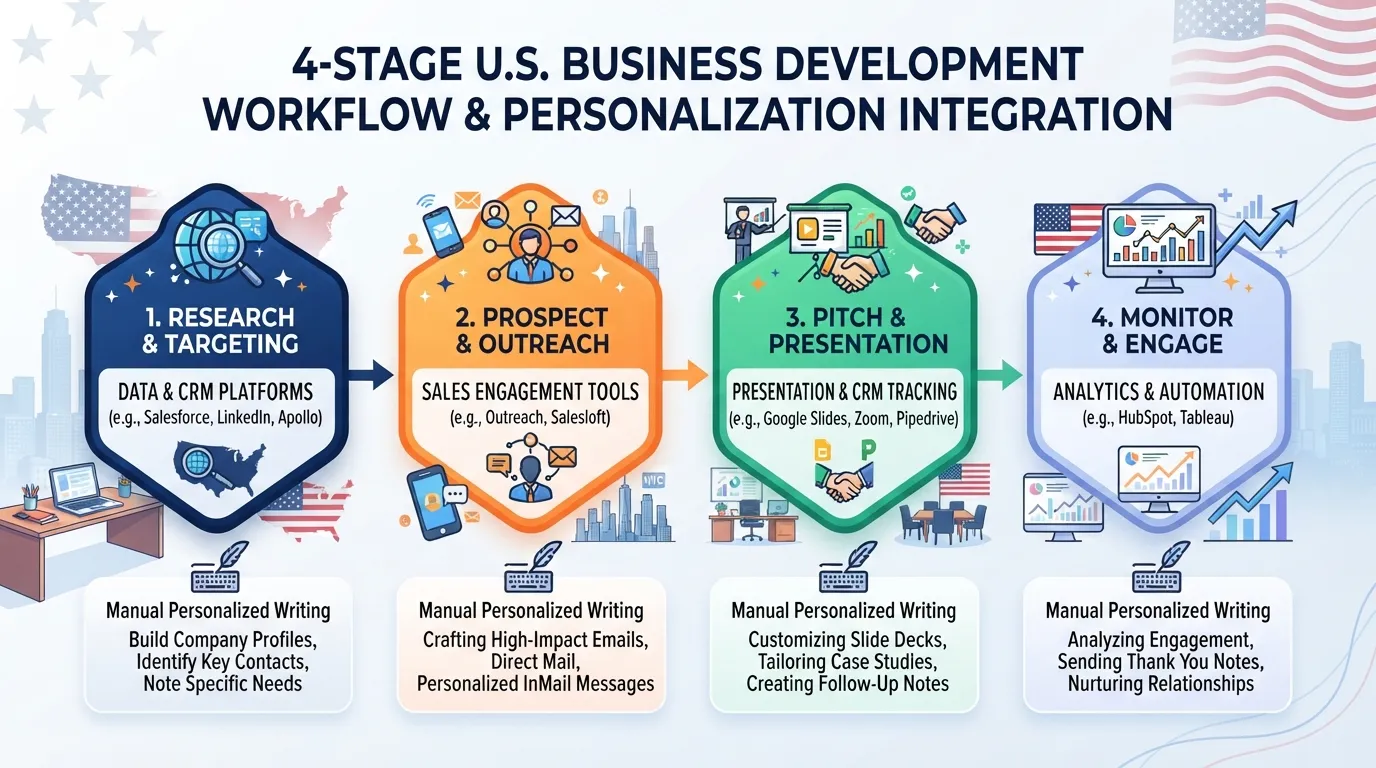
A tool only pays off when it sits inside a repeatable process. Teams that buy a platform and then struggle with results often have the tools but no sequence for using them. The workflow below runs in four stages, and each stage hands a clean list to the next.
Step-by-Step: Research, Prospect, Pitch, and Monitor
Research. Pull the backlink profiles of the pages you want to rank, plus those of two or three competitors. Backlink research tools such as Ahrefs, Semrush and Moz Link Explorer are built for this step. Export the referring domains and sort them by relevance first and authority second.
Prospect. Filter the list to domains that publish on your topic, accept guest contributions or already link to pages like yours. Discard anything that fails the relevance test, even if its authority score is high. Relevance is the first gate. A DA 60 link from an irrelevant site often underperforms a DA 30 link from an industry leader.
Pitch. Find a named contact for each shortlisted site using a contact finder such as Hunter.io, then send a personalized message. Outreach platforms like BuzzStream or Pitchbox keep the sequence, follow-ups and replies in one place. Automation without personalization often gets reply rates of 1% to 5% in many industries, so let the tool handle scheduling while you write the first line.
Monitor. Once a link is live, add it to a tracking list. Check it on a schedule and set alerts for any loss. Monitoring is covered below.
Work through the stages in order for each campaign, and record the outcome of every stage in one spreadsheet. That record shows whether a tool is actually earning its subscription.
How Teams Cut Prospecting Labor Time by 40 to 60 Percent
Teams that move prospecting into an integrated platform report cutting the labor involved by 40 to 60 percent, according to the Digital Marketing Tools guide to link building tools. The saving comes from three places: fewer manual lookups for domains and contacts, one shared list instead of copied spreadsheets, and templated follow-ups that run on a timer.
The saving is real only if the list you feed the tool is good. Automating a weak list simply sends weak pitches faster. Spend the time saved on qualifying prospects and writing the opening line of each email, not on sending more messages. Good content and a trust-building opening line do more for reply rates than volume. The best use of automation is to free time for quality analysis of each prospect, since a well-qualified list is the finding that makes the rest of the workflow pay off.
To test the business case, multiply the hours your team spends on prospecting each month by its hourly cost, then compare that figure with the subscription. If a tool saves ten hours a month at $50 an hour, it covers its cost many times over even at the higher end of the price range.
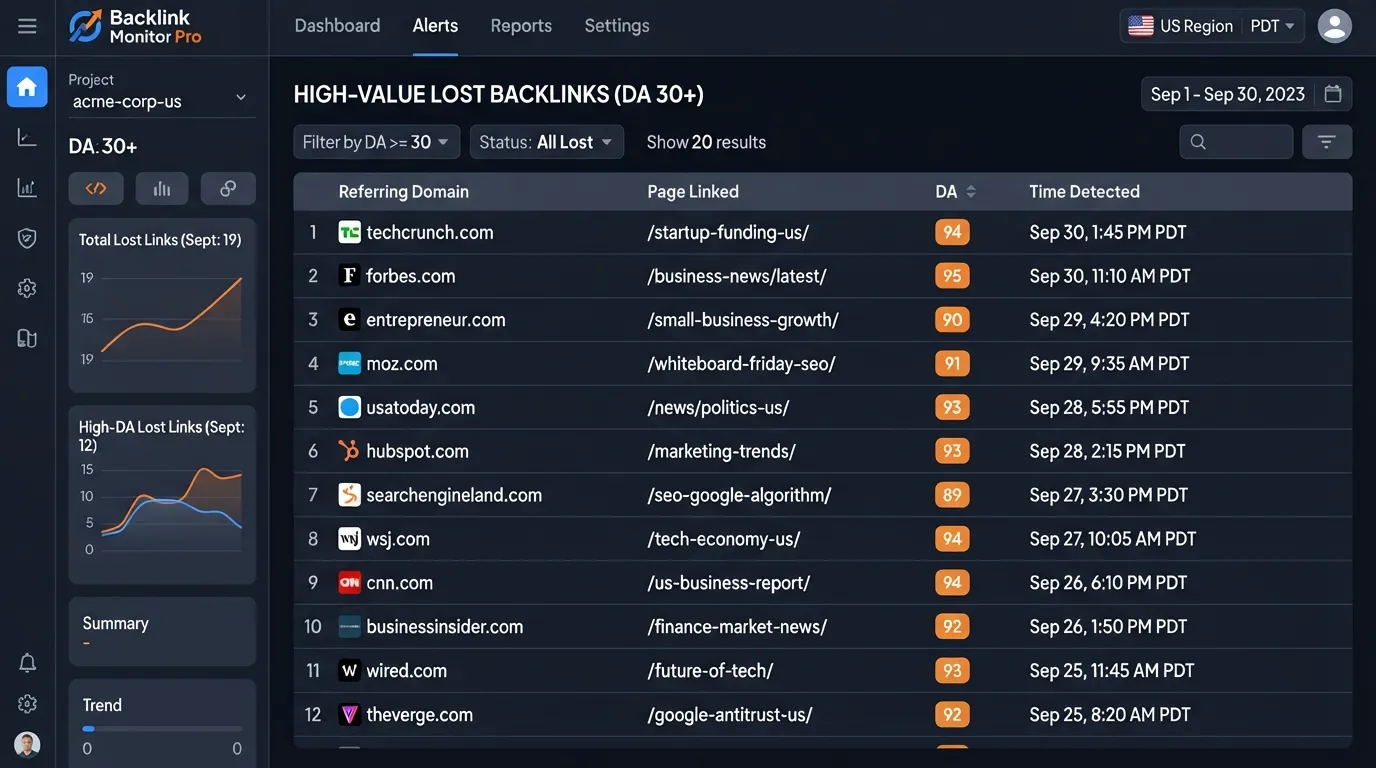
Setting Monitoring Rules: Alerts for Lost Links from DA 30+ Domains Within 24 Hours
Links disappear. Pages get redesigned, writers leave and sites change hands. Without monitoring, you may not learn about a lost link until rankings have already slipped.
A suggested practice is to set a notification for any lost link from a domain with a Domain Authority (DA) of 30 or higher within 24 hours. DA is a score from Moz, a 1 to 100 estimate of how strong a website is in search. Using 30 as the threshold keeps the alert list focused on links that carry real weight. Losses from lower-authority domains can be checked in a weekly batch.
Use this simple policy:
Core list: every link from a DA 30+ domain, checked daily, with alerts on loss.
Secondary list: links from DA 15 to 29 domains, checked weekly.
Everything else: checked monthly, or only when a page is reported as broken.
Google Search Console is a primary source for links Google has discovered, and it flags certain crawl errors. Screaming Frog can crawl your own pages to find broken outbound links and redirected targets. Neither tool replaces a dedicated backlink monitor, so combine them rather than relying on one.
When an alert fires, reply quickly. Check whether the page still exists, whether the link moved to another URL, or whether the writer removed it on purpose. Many losses can be recovered with a short, polite message.
Using Competitor Link Gains as Prospecting Leads
A competitor’s new links are one of the cheapest sources of prospects. A site that has just linked to a rival in your space has already shown it covers your topic and may consider linking to a similar resource.
Run this check every month. Pull the new referring domains for each of your top three competitors and look for patterns. If a competitor picks up five new links from authority domains in your space within a short window, treat that cluster as a prospecting lead. Ask what made those pages worth linking to, whether a study, a tool, a guide or a resource list, and whether you can offer something comparable or better.
Do not copy the competitor’s link wholesale. Pitch the site an improved or more relevant page instead, and mention the specific page the site already links to so the request makes sense to the editor. Competitor gains show you where to look, but a specific, personal pitch is what earns the link.
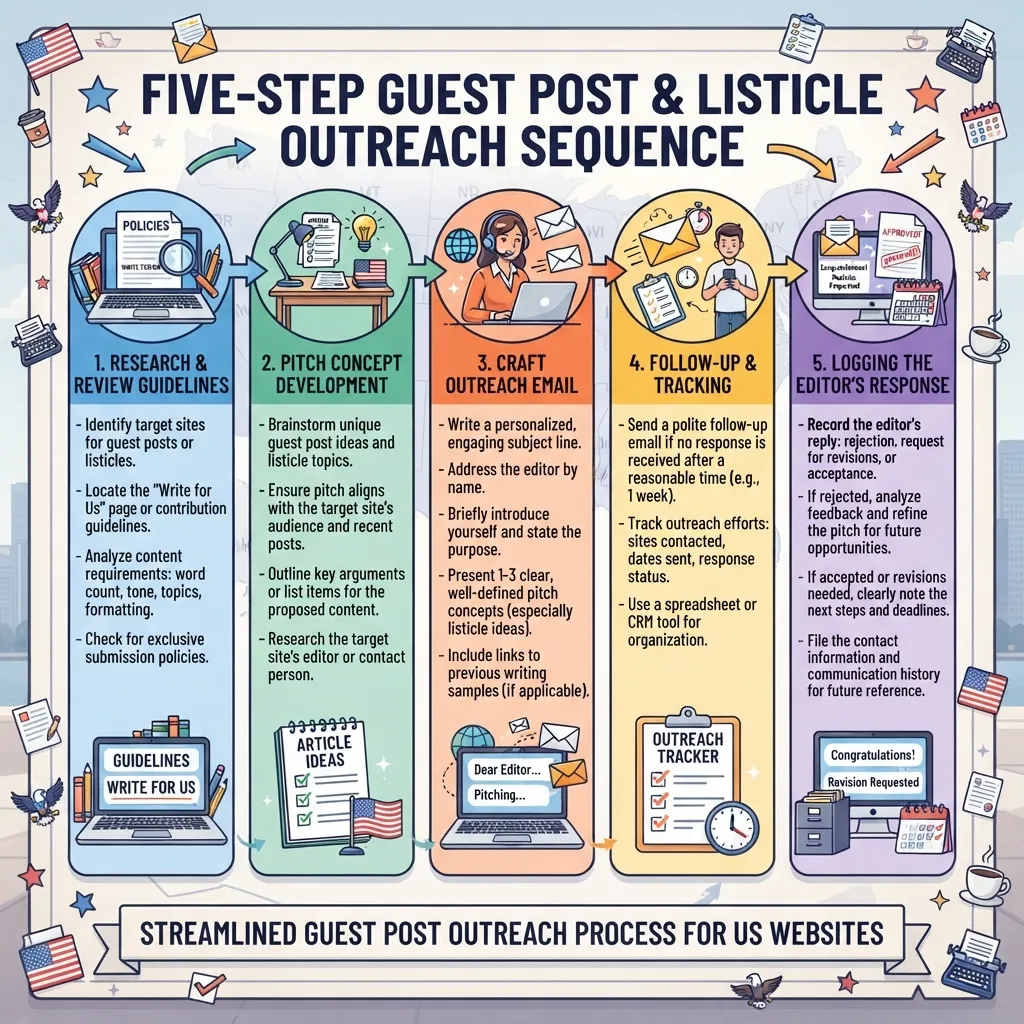
Guest Posting and Listicle Outreach: Contributor Requirements and Submission Norms
Guest posting and listicle inclusion remain some of the most dependable ways to earn editorial links, but the tool you use matters less than the fit between your pitch and the site’s standards. A tool can surface a list of sites that accept content from outside contributors. It cannot tell you whether an editor will read your draft. Editorial linking is judged on relevance and content quality, so a site’s relevance to your topic matters as much as its backlink profile.
Before you pitch, check three things on every target site: whether it publishes contributed content, what the contributor guidelines require, and whether the existing articles show real editorial control. Sites that accept any submission for a fee, or that publish dozens of unrelated posts per day, rarely pass a relevance check. A link from such a site carries little trust, even when its authority score looks high.
Listicle outreach works differently. You are asking an editor to add your product, tool or resource to a list they already maintain. Your pitch needs to show that the item fits the list’s theme, that you have checked the list’s existing entries, and that you can supply a short, accurate description and a usable image if the editor asks for one. Editors who run listicles usually accept a small number of well-matched additions each month. A pitch that asks them to rebuild the list around you will be ignored.
Use this sequence for each target:
Confirm the site publishes contributions or maintains a list that fits your offer.
Read two or three recent pieces and note the tone, length and sourcing style.
Draft one idea tied to a specific gap in the site’s coverage, not a generic topic.
Send a short pitch with a headline, a two-sentence summary and one sample link to your own work.
Log the response, the editor’s name and any deadline in your outreach tracker.
Expect a low reply rate if you send the same pitch to many sites. Personalizing the first line and the topic to each editor is what separates a placed article from a deleted email. The tool supports the research stage. The personal reading and the specific pitch remain your job.
Conclusion and Summary
The right link building tool is the one that helps you win and protect a small number of strong links, not the one with the biggest index. Across the categories covered here, the same pattern holds. A single link from a major publication often matters more than ten links from small, unrelated blogs. Relevant links are even better than domain authority for rankings, search and referral traffic, and maintaining trust. Relevance and authority have to be judged together, and no tool does that judgment for you. Good content earns links only when it is built for the reader, and the best links usually come from sites that already cover your topic.
Here is how to apply the Tool Fit Matrix to your own stack:
Start with the job. Decide whether your bottleneck is finding opportunities, qualifying them, or tracking links after they are won.
Match the tool to your budget tier. Free browser extensions and lighter research tools suit freelancers. Full research suites from Ahrefs, from $29 per month on its entry plan, and Semrush, from $139.95 per month on its Pro plan, suit agencies running full SEO programs. Enterprise platforms sit at $300 to $500+ per month.
Judge the return on labor, not only the subscription. Teams report cutting prospecting labor time by 40 to 60 percent with integrated platforms, so a higher monthly fee can still be the cheaper option. Tools that also support technical SEO work can make this return even stronger.
Keep the human part human. Outreach that is not personalized can get reply rates under 1 percent, while reply rates of 1% to 5% are often considered acceptable in many industries. Tools find and organize prospects. Your outreach has to earn the reply.
Set monitoring rules from day one. Consider alerting within 24 hours if a link from a DA 30+ domain disappears, and watch competitors for new links from authority domains in your niche, since each one is a prospecting lead. Each new link is a chance to review your analysis and adjust your next campaign.
The counterpoint is fair: a large index does help when you are entering an unfamiliar market or auditing a competitor’s full backlink profile. But for most working marketers, the gain comes from better qualification and disciplined follow-up, not from more raw data. Start with the smallest tool that covers your three jobs, measure the links you actually win, and only upgrade when the labor savings clearly justify the cost. If you want a broader view of the software behind this work, see our guide to seo tools and how to build a stronger campaign around your highest-quality sites.
Frequently Asked Questions
Which link building tool is best for a beginner on a small budget?
For a beginner with a small budget, start with a free tier or a low-cost research tool such as Moz Link Explorer, which is positioned for freelancers and lighter budgets from $49 per month. Pair it with a free outreach contact finder like Hunter.io. Upgrade only when you can name a specific job the free version cannot do, such as tracking lost links or managing a larger prospect list.
Is Ahrefs or Semrush better for backlink research?
Neither is better in every case. Ahrefs, from $29 per month on its entry plan, is positioned for agencies and research-heavy work, while Semrush, from $139.95 per month on its Pro plan, suits teams that want backlink data alongside a full SEO platform. Choose by workflow. If backlink research is your main job, test both on a trial and compare how quickly each surfaces relevant, authoritative referring domains in your niche.
Do I need an outreach tool like Pitchbox or BuzzStream, or is Hunter.io enough?
Hunter.io is enough if you mainly need to find and verify email addresses. BuzzStream, from $24 per month, adds the relationship tracking that small outreach teams need once several people share a campaign. Pitchbox suits larger operations. Automation alone rarely works, because outreach that is not personalized can get reply rates under 1 percent, so the tool should support personal messages rather than replace them.
How do I verify that my backlinks are still live?
Check your core links on a schedule and set alerts on the links that matter most. Monitoring should flag any link from a DA 30+ domain that disappears, with notification within 24 hours where your tool allows. Screaming Frog can crawl pages to confirm that a link is still present, while Google Search Console shows the links Google has discovered to your site.
Are free link building tools worth using?
Yes, for limited jobs. Free browser extensions and free tiers are useful for quick checks, such as seeing a page’s authority or confirming an email address. They tend to lack the monitoring, historical data and team features that serious campaigns need, so treat them as a starting point rather than a complete stack.
How much should I pay for a single authority link?
Set a ceiling based on the link’s value to your ranking goals, not on a fixed price. Some agencies report paying up to $100 for a link that they then build on through continued outreach. Compare that cost to the labor saved by your tools. A tool that cuts prospecting time by 40 to 60 percent can justify its price even when the links it helps you win are expensive.
About the author
Tom Koh
Tom is the CEO of MediaOne, a leading digital marketing agency. He is a business-experienced SEO consultant as well as a Google Gold Search Expert serving the international community. He has consulted for MNCs like Canon, Maybank, Capitaland, SingTel, ST Engineering, WWF, Cambridge University, as well as Government organisations like Enterprise Singapore, Ministry of Law, National Galleries, NTUC, e2i, SingHealth. His articles are published and referenced in CNA, Straits Times, MoneyFM, Financial Times, Yahoo! Finance, Hubspot, Zendesk, CIO Advisor. Under his stewardship, MediaOne has won dozens of prestigious digital marketing awards.
Your website has 150 published articles. Some attract consistent organic traffic, others haven’t generated a meaningful visit in months, and several cover nearly identical…
Writing a good advertisement sounds simple until you have to create 15 different headlines, stay within character limits, communicate your product’s benefits, and make…
Verifiability matters more than speed when publishing AI-generated content. An AI content generator turns a short brief into draft copy, and its usefulness depends…