Free link building tools cover most core work for small and mid-sized sites. Finding, verifying and tracking links rarely needs a subscription. Solid keyword research still shapes which pages are worth pursuing. This guide shows which free limits matter, which paid features remove a real bottleneck, and when a paid plan pays for itself. Start free, then upgrade only the job holding you back. For a broader starting point, see our seo tools guide.
The free tier covers most core work. Discovering, verifying and tracking links rarely needs a paid subscription for a small or mid-sized site.
Paid plans pay off only at a bottleneck. Upgrade when prospecting volume, competitor analysis or automation slows you down.
Test each job separately. Score discovery, gap analysis, contact finding, monitoring and audits on their own, and pay only for jobs that fail.
Watch for hard caps. URL counts, row limits and check frequency are what actually stop free workflows.
Monitor lost links. Alerts on lost links from DA 30+ domains cut the need for constant manual checks.
Table of Contents
The Price Gap and the Paid Advantage
Why Link Quality Matters More Than Tool Features
Free Link Building Tools: What You Get and Where They Stop
Paid Link Building Tools: Price Tiers and Capabilities
Building a Stack by Budget and Business Type
Measuring Return on Tool Spend
Monitoring Rules: Alerts for Lost Links and Competitor Wins
Conclusion: Choosing the Right Tool for Your Stage
Frequently Asked Questions
The Price Gap and the Paid Advantage
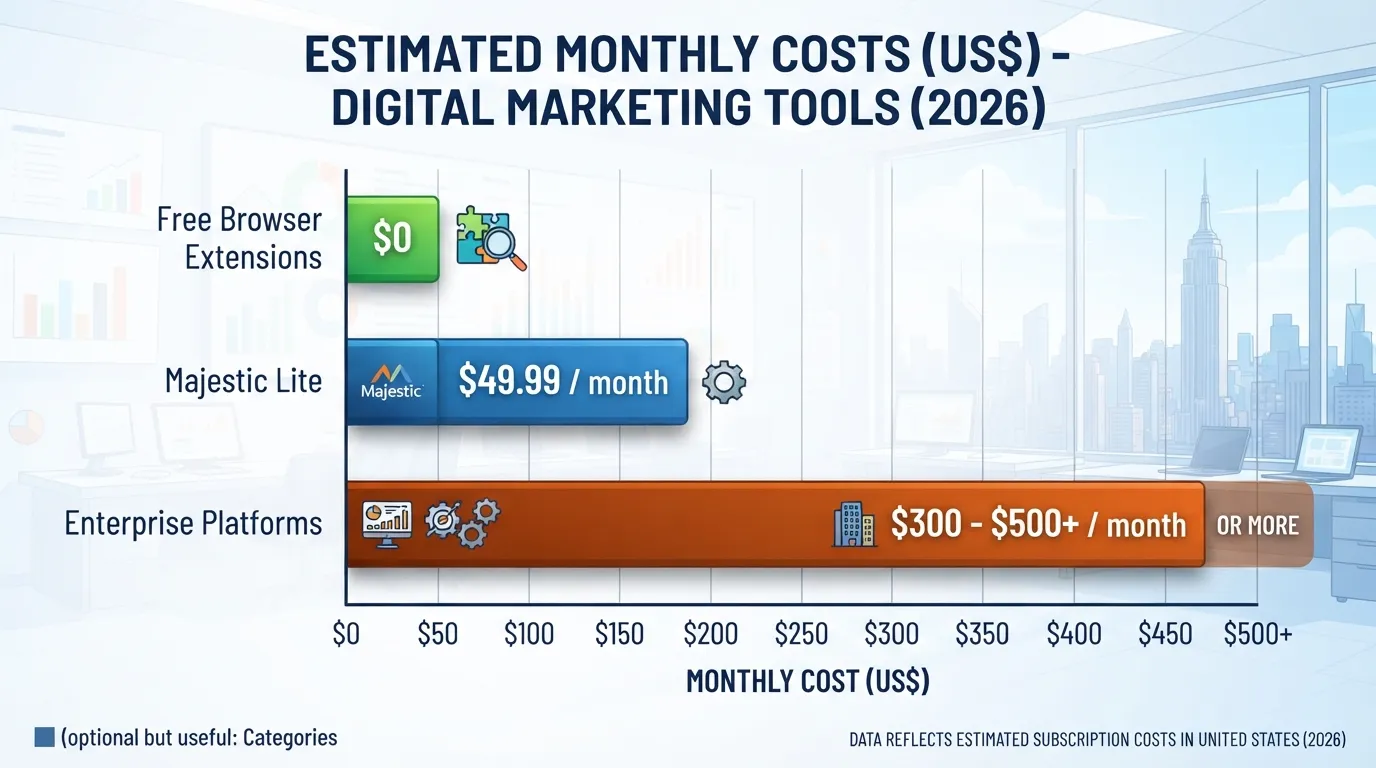
Link building tools range from free browser extensions with limited features to enterprise platforms costing $300 to $500 or more per month, according to the Digital Marketing Tools guide to link building tools. A paid plan only makes sense once your workload outgrows free tools, so test the bottleneck first. Before buying, check whether your website and its key pages can be improved without a new subscription.
Paid tools save time. Teams using integrated platforms cut prospecting labor by 40 to 60 percent, per the same guide. A team sending dozens of outreach emails weekly recovers that cost quickly. A site building a handful of links monthly usually cannot.
Why Link Quality Matters More Than Tool Features
Link quality matters more than tool features. A relevant low-DA backlink can outperform a high-DA irrelevant one. Our SEO tools guide covers how to weigh these signals.
Third-party Domain Authority scores are vendor estimates, not Google metrics, and they differ across tools.
Free Link Building Tools: What You Get and Where They Stop
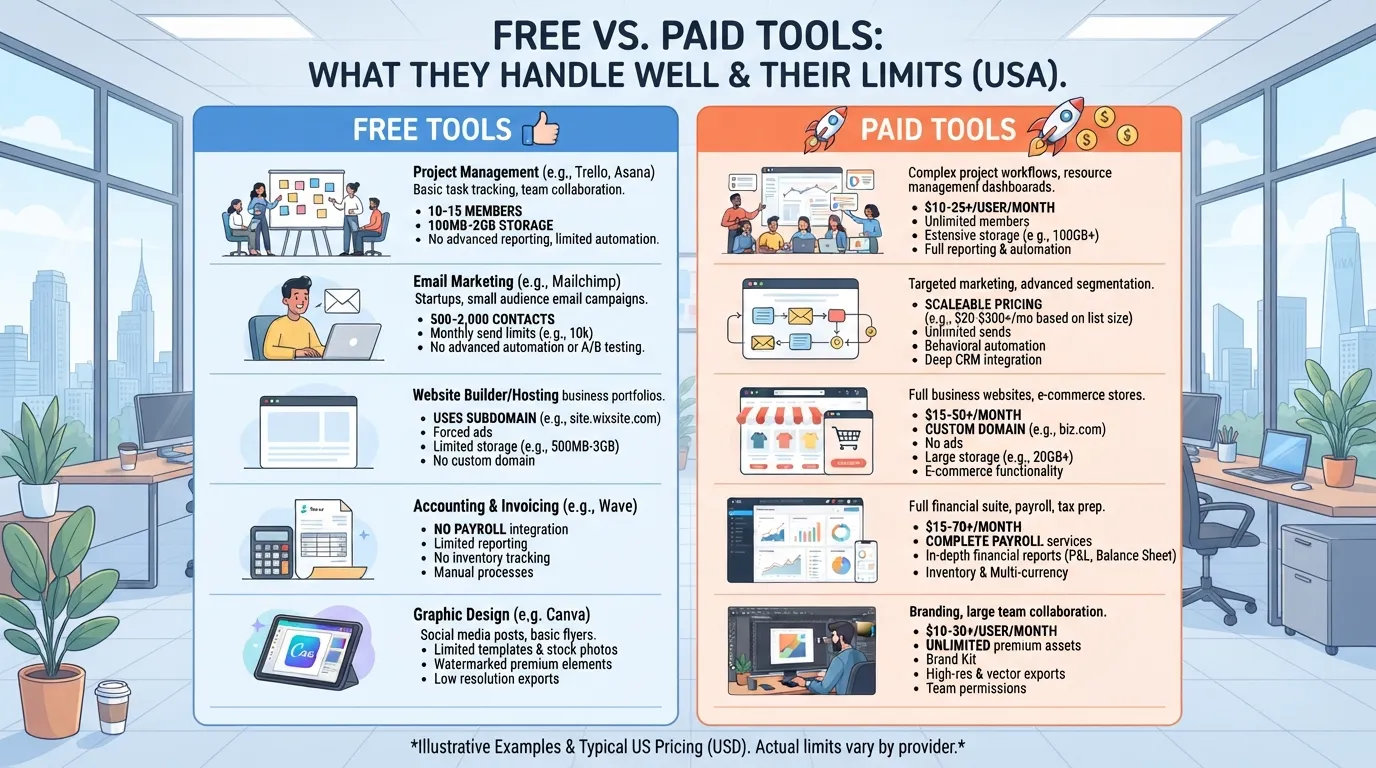
For most small and mid-sized sites, free link building tools cover the core work: finding, verifying and tracking links. The limits show up in volume, not basic capability. Paying only makes sense when prospecting volume or monitoring depth becomes the bottleneck.
Free Tool Caps and Where They Bite
Free options rarely fail on accuracy. They fail on caps: daily or monthly lookup limits, short backlink histories, or no alerting. Check the cap before building a workflow around a tool.
Google Search Console: free, with no link cap, but it reports only links Google has discovered from your website’s pages.
Hunter.io: a free tier with a monthly search allowance for outreach email addresses.
Ubersuggest: free backlink checks with a daily search cap, useful for a quick look at a site explorer view of any domain’s backlink profile.
Screaming Frog: the free version crawls up to 500 URLs.
Confirm these limits on each vendor’s pricing page, because plans change.
Google Search Console and Search Operators
Google Search Console is the free baseline for your own link profile and the first audit to run. Search operators such as “your niche” “write for us” surface link prospects at no cost, but they return results slowly and need manual checks of each domain’s authority and relevance. Finding the best link for your content usually means reviewing several candidate pages by hand.
Google Alerts and Hunter.io’s Free Tier
Google Alerts catches new brand and competitor mentions, often revealing unlinked citations you can convert into links. Hunter.io’s free tier finds outreach email addresses within its monthly allowance. Both suit a small campaign but become constraints at scale, since search engines index new content faster than a manual alert workflow can track it.
Paid Link Building Tools: Price Tiers and Capabilities
Paid link building tools range from free browser extensions to enterprise platforms that cost $300-500+ per month. Most small sites never need that top tier. The useful question is which paid capability removes a real bottleneck in building and managing content across your website, and how that capability affects your overall backlink profile.
Backlink Analysis Platforms
Majestic’s Lite plan, from $49.99 per month, analyzes up to 1 million backlinks and includes 5,000 Site Explorer data rows. Its Pro plan, at $99.99 per month direct, is the practical minimum for serious link work, extending analysis to 20 million backlinks and 15,000 rows. Check current limits on Majestic’s pricing page before you commit. For tracking a few competitors, Lite is usually enough.
Each backlink index uses its own crawler, so one may show links another misses. Compare two indexes on the same domain before trusting either for gap analysis.
Site Crawling and Auditing with Screaming Frog
Screaming Frog earns its licence when the bottleneck is technical rather than prospecting. The free version caps crawls at 500 URLs, while the paid licence removes that cap for auditing broken outbound links and redirect chains on larger websites. Confirm current terms on Screaming Frog’s pricing page before you buy. Clean technical signals also help search engines interpret your site accurately.
Free vs. Paid Comparison
Tool type
Typical cost
Main limit on the free tier
Upgrade when
Backlink analysis (Majestic Lite)
From $49.99/month
Limited link data
You track more than a few competitors
Site crawler (Screaming Frog)
Paid licence
500-URL crawl cap
Your website exceeds 500 URLs
Enterprise platform (including Ahrefs)
$300-500+/month
Not applicable
Prospecting volume exceeds manual capacity
A paid plan pays off when the hours it saves are worth more than its price. Divide the monthly subscription by your hourly rate to find the break-even point.
Ubersuggest, SEMrush and Moz Free Backlink Tools
Moz’s Link Explorer offers a free version allowing up to 10 queries per month, and Ubersuggest and SEMrush offer limited free checks. These suit spot checks on a single domain, but repeated competitor comparisons need a paid tool, especially when you are reviewing content from several websites at once.
Building a Stack by Budget and Business Type
The right stack depends on your monthly link target and how much of your week goes to manual prospecting. Score each job against three inputs: your monthly link target, the number of domains you track, and whether manual work exceeds about 10 hours a week. A job that passes all three on free tools stays free. A job that fails two or more earns a paid upgrade for that job alone. Before paying for any tool, check whether its free trial covers the volume you need.
Job
Monthly link target
Domains tracked
Manual work over 10 hours a week
Example result
Backlink discovery
Under 10 links
Under 5
No
Pass: stay on free Search Console and operators
Competitor gap analysis
Over 10 links
Over 5
Yes
Fail: upgrade to a paid backlink index
Outreach contact finding
Under 20 prospects
Not applicable
No
Pass: Hunter.io free tier
Link monitoring
Any
Over 5
Yes
Fail: paid alerting for lost links
Technical audit
Not applicable
500 URLs or fewer
No
Pass: free Screaming Frog
Link Building Strategies by Business Type
A local service business rarely needs enterprise scale. Free tools cover the directory and community links it usually needs. Ecommerce brands and publishers hit limits first on competitor analysis and prospect volume, so favour tools that help you judge topical fit and the quality of each linking page’s content, and that show the full backlink profile of each competitor.
Using AI Tools in Prospecting
ChatGPT and Perplexity can draft prospect lists, summarise target sites and suggest outreach angles. They are weak at verifying contact details and link status, so treat their output as a starting list. Automated outreach without personalization tends to produce response rates under 1%, so use AI to speed up research, then write each pitch yourself. Check that the anchor text you request reads naturally in the linking sentence.
Four-Week Step-by-Step Link Building Playbook
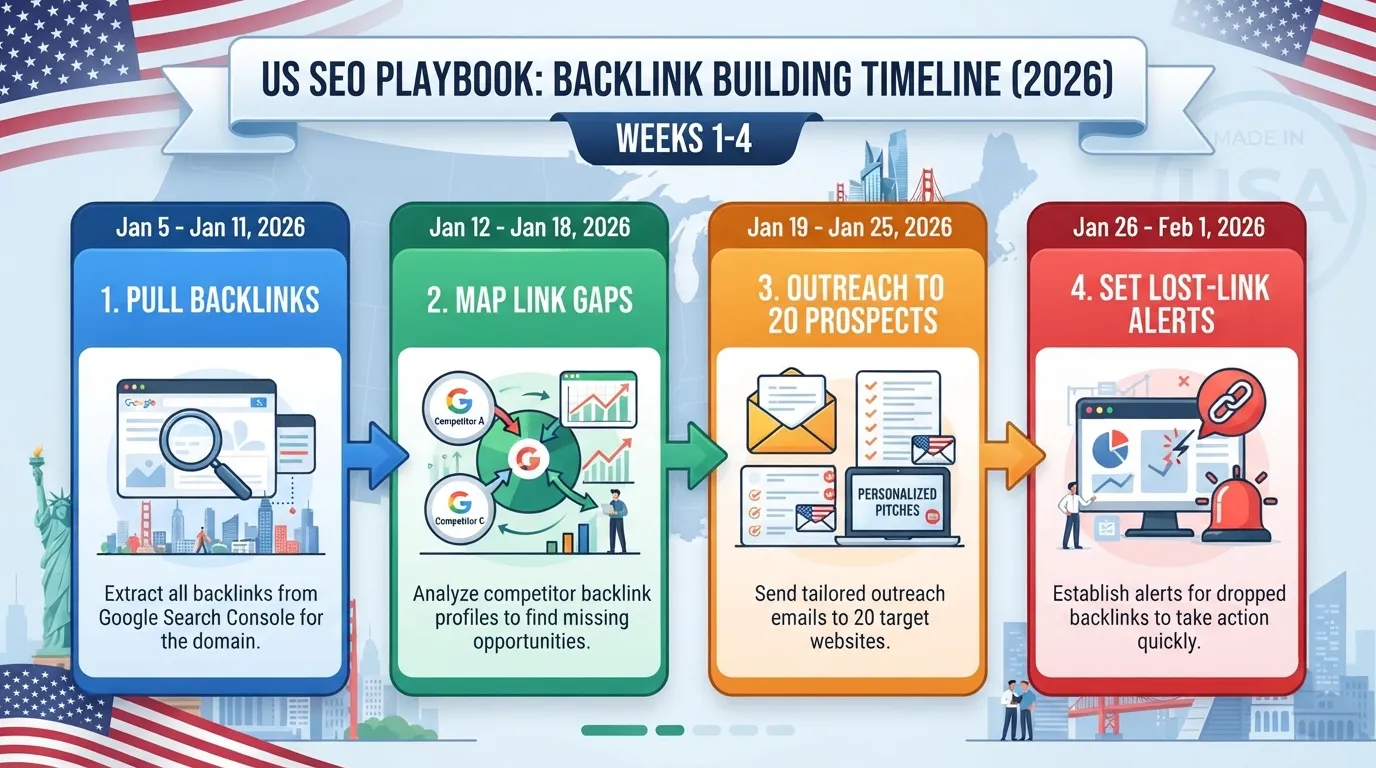
Week 1: Pull your current backlinks from Google Search Console and note the referring domains that already link to you.
Week 2: Identify five competitors and find the domains linking to them but not to you. Track status in Google Sheets, and log which search engine results each linking domain ranks for.
Week 3: Verify contacts and send personalized outreach to the strongest 20 prospects.
Week 4: Set alerts for any lost link from a DA 30+ domain, with notification within 24 hours, and review responses. Use a building tool such as Ahrefs if your monitoring volume goes beyond what free tools can track.
Measuring Return on Tool Spend
Tie tool spend to links won. Divide the monthly subscription cost by the links it helped you acquire to get a cost per link. A US$49.99 plan that helps win five links costs about US$10 per link.
Labour matters too. Teams using integrated platforms report a 40-60% reduction in prospecting labour time. Free tools cost no cash, but a workflow that consumes ten hours a week still carries a real cost.
Monitoring Rules: Alerts for Lost Links and Competitor Wins
Set alerts so you learn within 24 hours if a link from a DA 30+ domain disappears. Review competitors’ new links too; authoritative domains they win are prospects for you.
Conclusion: Choosing the Right Tool for Your Stage
For most small and mid-sized websites, the free tier of a free link building tools stack covers the core work: finding, verifying and tracking backlinks across your key pages. Pay only when prospecting volume, competitor analysis depth or automation becomes the bottleneck.
Score each job against three inputs: monthly link targets, domains tracked, and whether manual work exceeds about 10 hours a week. Jobs that fail two or more earn a paid upgrade for that job alone.
Pay for the bottleneck, nothing more. Keep relevance central, since a relevant backlink from a modest Domain Authority site can outperform a high-DA irrelevant one. Third-party DA scores are vendor estimates, not Google metrics, so treat them as a shortlist filter rather than a verdict. Review your overall link profile and the best anchor text variety before you commit to a paid plan.
Frequently Asked Questions
Are free link building tools good enough to start with?
For most small websites, yes. The free tier covers the core work: finding who links to your pages through Google Search Console, spotting opportunities with search operators, and watching for new mentions with Google Alerts. Free tools hit their limit when you need deep competitor data or large-scale monitoring.
When should I upgrade from a free tool to a paid platform?
Score each job against three inputs: your monthly link targets, the number of domains you track, and whether manual work exceeds about 10 hours a week. A job that fails two or more criteria justifies a paid upgrade for that job alone.
How much should a small business spend on link building tools?
Compare the subscription with your own time. Majestic’s Lite plan starts at $49.99 a month, while its Pro plan starts at $99.99. At $40 an hour, a $50 plan breaks even once it saves about 1.25 hours a month. Teams report 40-60% less prospecting time with integrated platforms, according to Digital Marketing Tools.
Can AI tools replace paid link building software?
Not for data. ChatGPT and Perplexity can draft outreach and summarize a prospect’s site, but neither reliably provides a verified backlink index or live monitoring alerts. Use them for writing and research, and keep a dedicated tool for the data.
Why does personalization matter more than automation in outreach?
Automation without personalization yields response rates under 1%, according to Digital Marketing Tools. A short message that cites a specific article gets far more replies. Automate the contact lookup, then write each message by hand.
How do I know if a backlink is worth pursuing?
Check relevance before authority. A low-DA but relevant backlink can outperform a high-DA irrelevant one. Ask whether the linking site covers your topic and whether real readers would click through. Only then look at domain authority, which is a third-party estimate, not a Google metric.
About the author
Tom Koh
Tom is the CEO of MediaOne, a leading digital marketing agency. He is a business-experienced SEO consultant as well as a Google Gold Search Expert serving the international community. He has consulted for MNCs like Canon, Maybank, Capitaland, SingTel, ST Engineering, WWF, Cambridge University, as well as Government organisations like Enterprise Singapore, Ministry of Law, National Galleries, NTUC, e2i, SingHealth. His articles are published and referenced in CNA, Straits Times, MoneyFM, Financial Times, Yahoo! Finance, Hubspot, Zendesk, CIO Advisor. Under his stewardship, MediaOne has won dozens of prestigious digital marketing awards.
Your website has 150 published articles. Some attract consistent organic traffic, others haven’t generated a meaningful visit in months, and several cover nearly identical…
Writing a good advertisement sounds simple until you have to create 15 different headlines, stay within character limits, communicate your product’s benefits, and make…
Verifiability matters more than speed when publishing AI-generated content. An AI content generator turns a short brief into draft copy, and its usefulness depends…