Many US local businesses never open their Google Business Profile after setup, yet the profile often decides whether a customer calls, visits or chooses a competitor. Research shows 90% of local customers are likely to make a purchase within 24 hours of a local search.
A google business profile management tool is worth paying for when you run several locations or need change approval, review replies and client reporting. A longer feature list does not make a tool the right fit.
Choose a google business profile management tool by profile count and the workflow risks you must control, not feature count.
Single-location businesses often can use the native Google Business Profile interface instead.
Per-profile pricing compounds quickly, so model full monthly cost first.
Test approval workflows with a deliberate stray edit before relying on them.
Respond to reviews quickly, since most local searchers act within 24 hours.
Plan your exit before signing up, including access, review history and reports.
Table of Contents
What a Google Business Profile Management Tool Does
Why Local Visibility Justifies the Investment
What the Numbers Mean for Small Businesses and Agencies
The Main Types of Google Business Profile Management Software
Top Management Tools Compared Head to Head
Choosing the Right Tool for Your Situation
Conclusion and Next Steps
Frequently Asked Questions
What a Google Business Profile Management Tool Does
A google business profile management tool connects to Google’s Business Profile API. It lets you read and change business listings from one dashboard. Instead of signing in to each profile, you update hours, categories, photos and posts in one place, and you can see reviews, reply to them and pull reports across many locations at once. Teams that run google ads alongside their listings can also keep profile details consistent with their ad campaigns, which helps managing customer reviews and business profiles across several locations.
Defining the tool category and what it replaces
This tool category ranges from simple profile editors to full agency platforms. Each tool replaces manual, listing-by-listing work with a single queue, shared access rules and an audit trail of changes, so a business can manage many locations without losing track of who changed what.
A tool does not improve rankings on its own, and it cannot make Google accept wrong information. Its real job is to keep accurate information consistent across many business profiles, faster than you could by hand. Customers who find the same details on google maps and in social media posts are more likely to trust them.
A short history of Google Business Profile
Google announced in 2021 that Google My Business would be rebranded as Google Business Profile, and later opened programmatic access, which made third-party tools possible. Check Google’s Business Profile help pages for the current feature set, since the interface changes more often than the underlying concepts.
The basics every profile needs before a tool helps
A tool amplifies whatever state a profile is in, so fix the foundation first. Before you connect anything, confirm that each listing has:
A verified owner, with the business name exactly as it appears on signage and your website.
Accurate primary and secondary categories that match the services your business sells.
A correct address, service areas and a phone number that rings the location directly.
Regular and special holiday hours, entered and checked.
A working website link and current photos.
A tool that spreads a wrong phone number across fifteen locations simply spreads lost calls faster. Use this guide as a checklist before any business-wide rollout.
Why Local Visibility Justifies the Investment
Customer behavior: calls, directions and 24-hour purchase windows
Local searchers act fast. Google’s local search guidance reports that 90% of local customers are likely to purchase within 24 hours of a local search. Wrong hours, an outdated phone number or an unanswered complaint can send a customer to the next result, and the business may never know.
Google also reports that 60% of smartphone users contact businesses directly through their profile using “click to call”. A google business profile management tool keeps each location’s details in sync across online directories. Without scheduled checks, drift goes unnoticed. Managing google profiles through a single guide-based checklist helps teams catch these gaps before customers do, and social media posts can reinforce the same up-to-date details.
Protect these three behaviors:
Calls: the profile number matches the number staff answer.
Directions: the address pin and service area are correct for each location.
Hours: holiday hours are published before the holiday.
What the Numbers Mean for Small Businesses and Agencies
A single US plumber with one business profile can usually keep that Google business listing accurate by hand. A dental group with three offices, or an agency managing fifty client profiles, cannot, without tools.
According to a published review of the category, most Google-focused tools help with anything from one profile to several hundred, and they price per profile. Judge a tool by its total monthly cost at your expected profile count, not its headline price.
For small businesses, a tool is worth it if it prevents one lost booking per month. For agencies, the case rests on time saved and client retention.
The Main Types of Google Business Profile Management Software
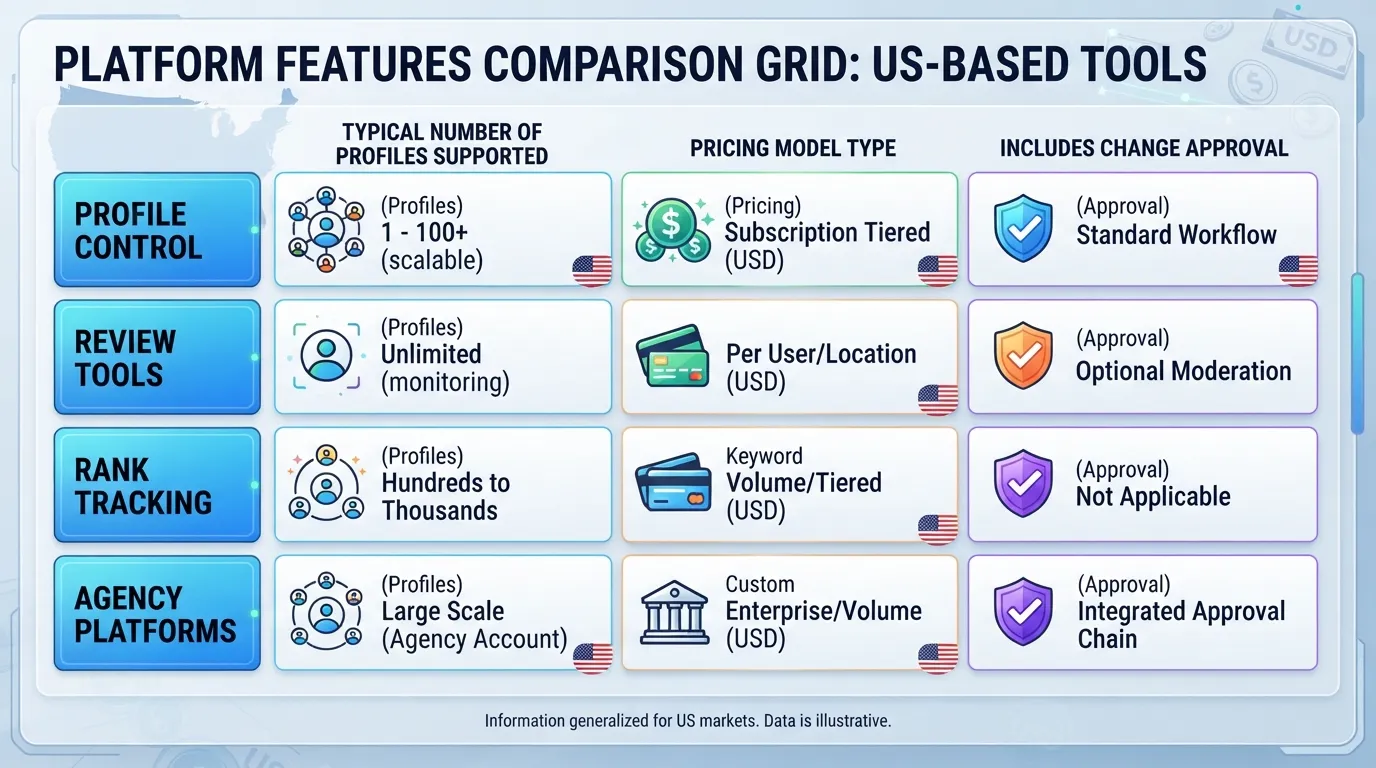
Most tools in this category fall into four groups. A tool built for one job often does another badly, so match the tool to the job, not the feature list.
Profile control, change protection and content workflow tools
These tools manage business information such as name, categories, hours, phone numbers and addresses. They also schedule posts and photos and control who can change what. Change protection routes edits through an approval step before they reach Google, which stops a staff member or contractor from switching off a phone number over a holiday weekend.
Test the approval workflow before you trust it. Submit a harmless change as a low-level user and confirm the tool holds it until an owner signs it off. In our testing, approval queues sometimes failed to hold edits made through a secondary connection, so check every access route.
Review generation and review response tools
Generation tools send review requests by text or email after a visit. Response tools pull in new Google reviews, draft replies and route them to the right person. The value depends on your reply volume. A dental practice getting ten reviews a month can answer them by hand. A three-location restaurant group getting several hundred cannot.
Judge response features against your own tone standard and 24-hour reply target, not the vendor demo. Run ten real reviews, including one negative, through the drafting feature. In our testing, replies drifted toward a generic tone after several weeks, so re-read a sample each month.
Rank tracking and geo-grid reporting tools
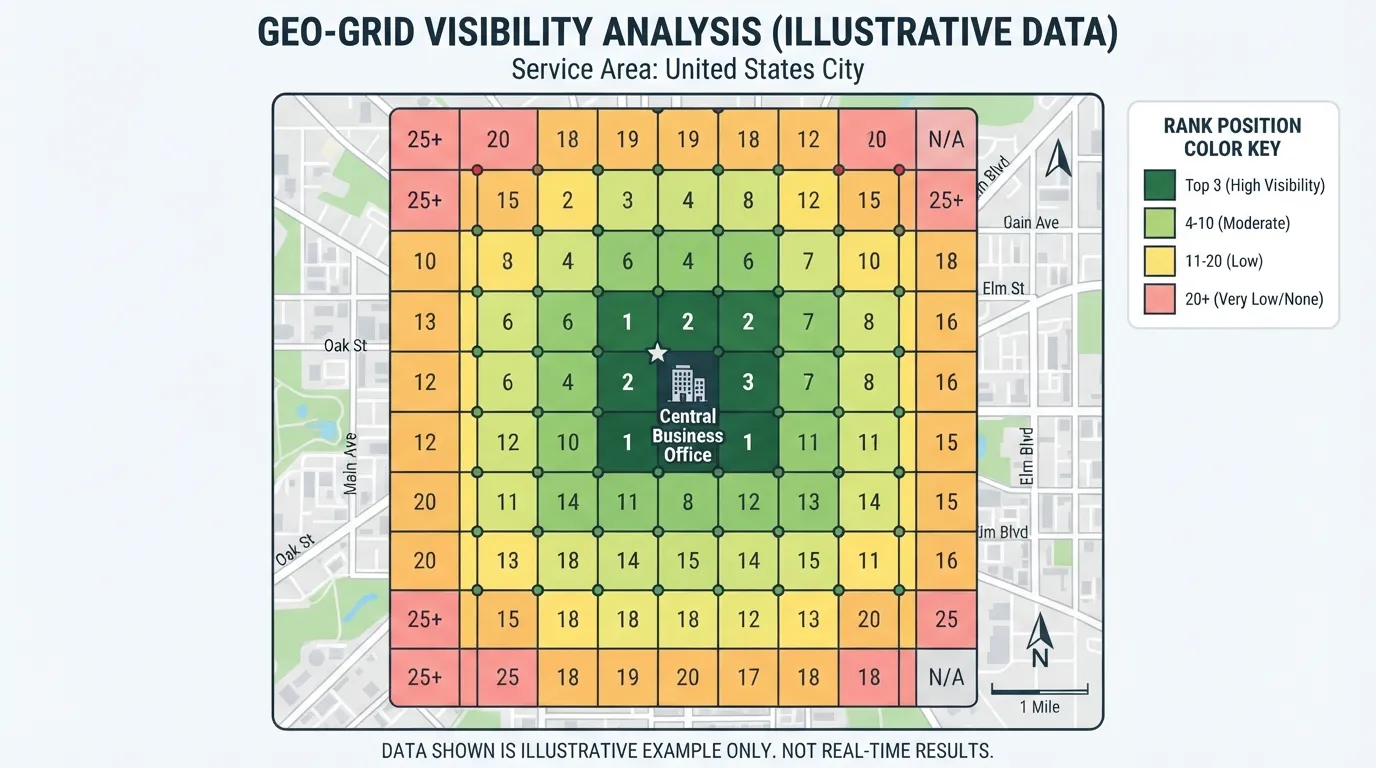
These tools measure where your business profiles appear in google maps results. Rank trackers check a fixed set of keywords from one or more points. Geo-grid tools lay a grid over your service area and record your position from each point, showing how visibility falls off with distance.
Rank data is noisy. Compare several weeks of grid results and treat a drop of a place or two as normal variation until it persists.
Agency and multi-location management platforms
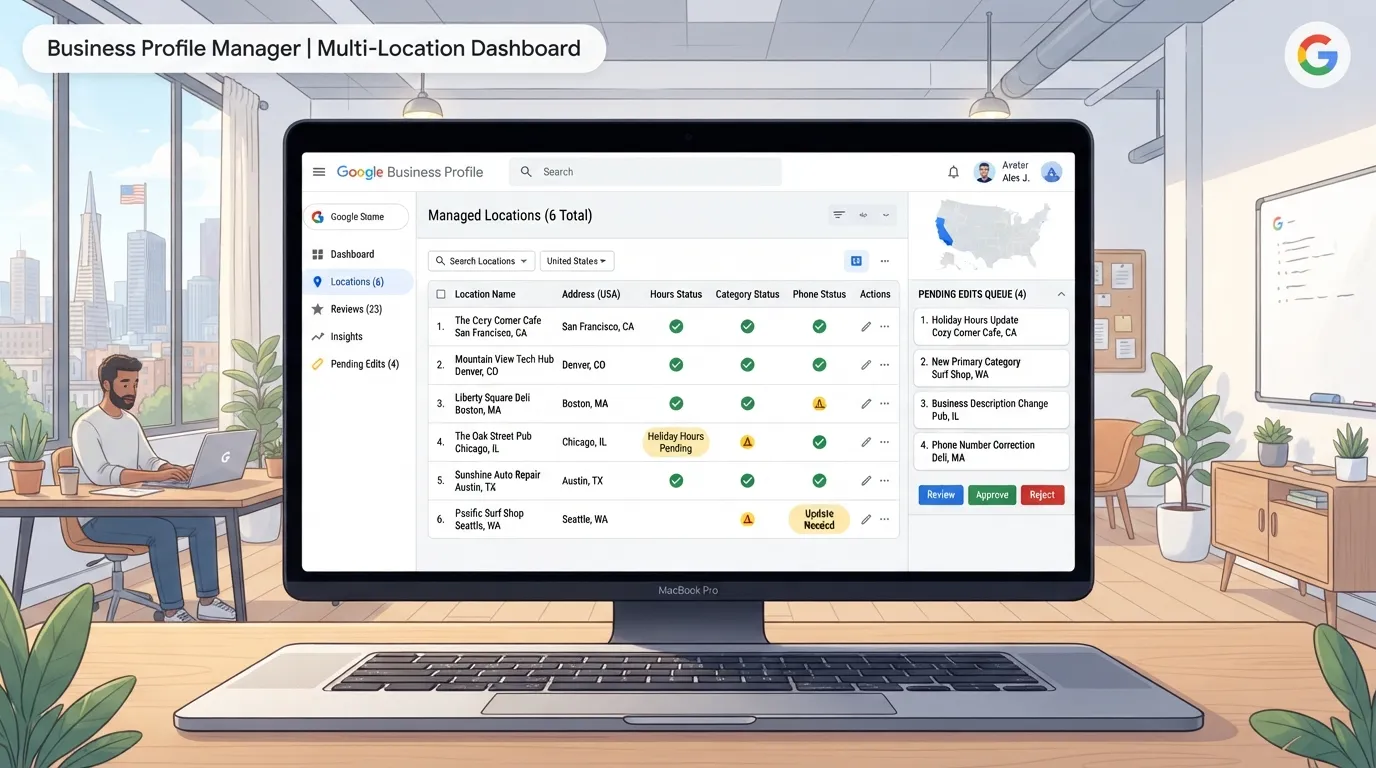
These platforms add user permissions across many profiles, client-facing reports, audit history and bulk editing. Agencies use permission models to give each client’s staff access only to their own profiles. Bulk-edit workflows update hours or categories across many locations in one action, helping managing large portfolios of google listings with less manual effort.
These platforms are priced for agencies and larger brands, often with minimum seat counts or per-profile fees that compound as you add locations. Do not buy this group for features a cheaper single-location tool already provides. Price it at the number of profiles and users you expect in 12 months.
The Best Google Business Profile Management Tools guide, last reviewed August 2026, notes that most Google-focused tools are priced per profile. Confirm live pricing before you commit, since plans change frequently.
Top Management Tools Compared Head to Head
Overview of the leading tools and who each one suits
This roundup of Google Business Profile management tools, last reviewed in August 2026, covers thirteen products used by local businesses and agencies. Most tools price per business profile, so start by asking how many locations you run.
Lightweight profile tools suit a single-location owner who edits hours and replies to Google reviews. Multi-location platforms suit groups that need approvals, shared access and a change record. Agency platforms suit firms running many client profiles, with per-client permissions and reports. Check seat and profile limits against your count for the next twelve months.
Feature comparison table
Compare tools on the features your workflow depends on. The rows below cover the “small multi-location with light approvals” zone.
Capability
Why it matters
What to verify before buying
Change approval
Stops unauthorized edits to hours and phone numbers
Push a stray edit through a trial profile
Review response
Keeps replies inside your target window
Check drafting and tone rules
Audit history
Shows who changed what and when
Confirm the log survives cancellation
Multi-user permissions
Lets staff edit without owning the account
Check the seat cost for each added user
Client or practice reporting
Gives managers a regular view
Confirm which metrics export
Where a vendor does not state a capability clearly, ask in writing before relying on it. Google’s own profile tools may cover basic needs.
Pricing transparency and what tools actually cost
Headline prices hide the real bill. Seat fees, reporting add-ons and agency minimums add up quickly across three or more locations. Build a monthly cost: managing business profiles multiplied by the per-profile rate, plus users beyond included seats, plus any reporting module. Repeat the sum for your expected count in twelve months.
Plans change frequently, so confirm live pricing on each vendor’s page before budgeting. If the monthly total outweighs the value of the accuracy and review management it protects, the tool is oversized for your business. Customers notice inaccurate hours faster than most owners expect, so weigh that risk against the cost.
Choosing the Right Tool for Your Situation
Fit and control decide the choice far more than feature count. Score each candidate on four criteria before comparing features.
Evaluation criteria: fit, control, evidence and support
Fit asks how many profiles you manage today and how many you expect in 12 months. Per-profile pricing can cost far more than the headline rate once you add locations, users and reporting seats.
Control asks which workflow risks you must prevent: unauthorized edits to hours or phone numbers, slow review replies, no record of who changed what, and no clean handoff to clients.
Evidence asks whether the vendor can show a feature working, not just that it exists. Ask for a demonstration of the approval workflow and check the change history yourself.
Support asks how quickly a person responds when a profile is suspended or an edit is stuck in review. Those are the moments a tool earns its fee.
A step-by-step selection checklist
Count your profiles now and in 12 months.
Place yourself in one zone: single-location self-managed, small multi-location with light approvals, or agency with many clients needing permissions and reports.
Drop any tool whose minimum seat or plan structure does not match your zone.
List your three biggest workflow risks, such as unauthorized hours changes or review replies that sit for days.
Ask each remaining vendor to show how its approval workflow stops a stray edit, then test it with a harmless change on a spare profile.
Estimate the real monthly bill: profiles, users and reporting add-ons, multiplied over 12 months.
Check the offboarding terms. Confirm you keep profile access and can export review history and reports if you cancel.
Trial the tool for two weeks with real review volume, and measure how many replies meet your tone rules.
Prices change often. A comparison of current tools, last reviewed in August 2026, sets the market scope, but confirm every price on the vendor’s own page before you commit.
When a bundled service beats a standalone tool
A standalone tool suits an in-house team that wants control. A bundled service, where an agency or local SEO provider handles the work, often wins when you have one to five locations and nobody to own it. Paying for software you still have to operate is a false saving in that case.
Bundles also suit businesses that need strategy as well as administration. A standalone tool will not tell you which categories to add or how to respond to a rating drop. If your constraint is staff time, buy the service. If your constraint is control and cost per profile, buy the tool.
Responding to customer reviews with a repeatable process
Review responses are where many small businesses lose ground. A reply that arrives three weeks late, or one that reads like a template, does little for the reader comparing you with the next listing on the map. Write the process down before you configure any platform.
Start by counting the reviews your locations received in the last three months, then divide by the number of weeks. That tells you whether you need alerts, a shared inbox or a drafting assistant. An agency with two hundred profiles needs routing rules, owner assignments and an audit trail.
Next, set tone and content rules in writing:
Response window. For example, within 24 hours for ratings of three stars or below, and within 72 hours for everything else.
Sign-off style. Who signs, and whether replies use the owner’s first name.
Forbidden content. Full customer names, health details and billing disputes should never appear in a public reply.
Test the workflow before relying on it. Pick ten real reviews from the last quarter, including one negative review that names a staff member, run them through the drafting feature, and score each draft against your rules. If more than one in ten needs substantive rewriting, the drafting feature will cost you time rather than save it. Keep a named human approver for replies posted under your business name during the first month, and loosen approval for routine five-star replies only once drafts pass your spot checks consistently.
Reading rank tracking and geo-grid evidence without overreacting
A geo-grid places points across a map area and records where your listing appears for a search term from each point. One dip in one cell is noise. A sustained pattern across many cells over several weeks is a signal.
Before acting on any change, check three things:
Same settings. Confirm the search term and grid size match in both reports.
Real-world events. Look for a competitor opening nearby, a holiday closure or a category change you made yourself.
Parallel factors. Review velocity and profile completeness often move alongside visibility, so check them for the same period.
Set your decision threshold in advance. A workable rule is to wait four weeks before changing the profile in response to a grid movement, unless the listing is suspended or hours and phone numbers are visibly wrong. A geo-grid shows where your listing appears, not why, and it cannot measure the calls and directions customers make from the map. Pair it with call and direction counts from your profile insights to see whether visibility is turning into action.
Conclusion and Next Steps
The right tool depends on how many profiles you run and which workflow risks you must control, not on which product lists the most features. A single-location business may need only Google’s own interface. A multi-location practice needs change approval and a review reply process. An agency needs permissions and client reports. Match the tool to that zone before comparing features.
Start with three actions this week:
Count your profiles today and 12 months from now, then place yourself in one zone.
List the two workflow failures that would hurt most, such as an unauthorized hours change.
Shortlist only tools whose pricing fits your zone, then test each approval workflow before you pay.
Verify live pricing before you commit, since per-profile fees multiply as you add locations. The best Google Business Profile management tools roundup, last reviewed August 2026, gives a useful market overview. Accurate hours matter, since 60% of smartphone users contact businesses directly through their profiles. For wider local visibility work, see our guide to best local seo tools.
Frequently Asked Questions
Is a Google Business Profile management tool worth paying for?
It depends on how many profiles you run and how much risk you carry on them. A single-location business can usually manage the native Google Business Profile interface for free. A business with several locations, staff or a steady flow of Google reviews gets more value from a tool, through approval controls, an audit trail and faster review handling. If a slow reply or an unapproved edit would cost you calls or bookings, the tool is likely worth its fee.
Can I manage my Google Business Profile without a tool?
Yes. Google’s own dashboard lets you edit business information, publish posts, add photos and reply to reviews at no cost. Gaps appear as the operation grows, since the native interface lacks change approval for multiple editors, consolidated reporting and bulk actions.
How much do Google Business Profile management tools cost?
Most tools charge per profile, so the monthly bill grows with each location. Some vendors gate reporting, extra users or review features behind higher tiers. Multiply the headline price by your real location count, add the seats your team needs, and check which features sit in your plan.
Confirm live pricing on each vendor’s site, because listed prices change. The Best Google Business Profile Management Tools (2026) review was last reviewed in August 2026, so check current figures before budgeting.
Do these tools guarantee higher rankings?
No tool can guarantee a ranking position. Google decides rankings using signals such as relevance, distance and prominence, and no vendor controls them. A good tool helps you keep information accurate, respond to reviews promptly and track performance. Treat any promise of a guaranteed position as a warning sign.
How do I choose between a tool and a managed service?
Choose a tool if you want control and have someone in-house to run it. Choose a managed service if you lack the time or staff to handle reviews, updates and reporting. For a small multi-location business, compare the hours your team would spend on the tool against the service fee, then decide which cost you would rather carry.
About the author
Tom Koh
Tom is the CEO of MediaOne, a leading digital marketing agency. He is a business-experienced SEO consultant as well as a Google Gold Search Expert serving the international community. He has consulted for MNCs like Canon, Maybank, Capitaland, SingTel, ST Engineering, WWF, Cambridge University, as well as Government organisations like Enterprise Singapore, Ministry of Law, National Galleries, NTUC, e2i, SingHealth. His articles are published and referenced in CNA, Straits Times, MoneyFM, Financial Times, Yahoo! Finance, Hubspot, Zendesk, CIO Advisor. Under his stewardship, MediaOne has won dozens of prestigious digital marketing awards.
Your website has 150 published articles. Some attract consistent organic traffic, others haven’t generated a meaningful visit in months, and several cover nearly identical…
Writing a good advertisement sounds simple until you have to create 15 different headlines, stay within character limits, communicate your product’s benefits, and make…
Verifiability matters more than speed when publishing AI-generated content. An AI content generator turns a short brief into draft copy, and its usefulness depends…