An AI captioning tool can transcribe a polished American English voiceover almost perfectly and still struggle with a customer interview recorded in Manila, Mumbai, Lagos, or Glasgow. Both recordings are in English, but differences in pronunciation, vocabulary, pacing, and recording conditions can expose weaknesses that a polished product demonstration never reveals.
For marketers producing webinars, customer testimonials, educational videos, or social media content, these errors create additional editing work. A captioning tool might confuse a product name, remove a negation, or turn an important number into something entirely different. The resulting captions can look professional while communicating the wrong information.
The problem is that advertised transcription accuracy doesn’t necessarily reflect how well a tool handles the people appearing in your videos. A vendor might publish an impressive accuracy figure without explaining which accents, audio conditions, or transcription conventions were included in its evaluation.
Word error rate (WER) provides a way to measure transcription accuracy against a human-verified reference.However, it is only one part of evaluating captioning software. Captions also need appropriate timing, readable segmentation, speaker identification, and relevant non-speech audio information.
This guide explains how WER works, why accented English deserves separate testing, which captioning tools are worth evaluating, and how to identify the workflow that produces accurate, publish-ready captions with the least unnecessary editing.
Word error rate measures transcription errors, including substituted, deleted, and inserted words. Lower WER indicates fewer word-level errors against the reference transcript.
Accuracy can vary across English accents. Published speech recognition research has documented performance disparities, making a representative test set essential.
A low WER doesn’t guarantee accessible captions. Timing, speaker identification, sound effects, and readability require separate review.
Test tools with identical audio files. Comparing different recordings creates misleading results because sound quality and speaker characteristics affect recognition.
Measure human correction time alongside WER. A tool with slightly more errors may still be faster to edit, depending on its interface and the errors it makes.
Calculate the cost per finished video minute, including subscription fees and human review, rather than relying only on the vendor’s transcription price.
What Is Word Error Rate in Captioning?
Word error rate is a standard metric for evaluating automatic speech recognition (ASR). It compares the words generated by a transcription system against a reference transcript that has been checked for accuracy.
The calculation counts three types of errors:
Substitution (S): The tool replaces a spoken word with a different word.
Deletion (D): The tool misses a word that was spoken.
Insertion (I): The tool adds a word that wasn’t spoken.
The total is divided by the number of words in the reference transcript.
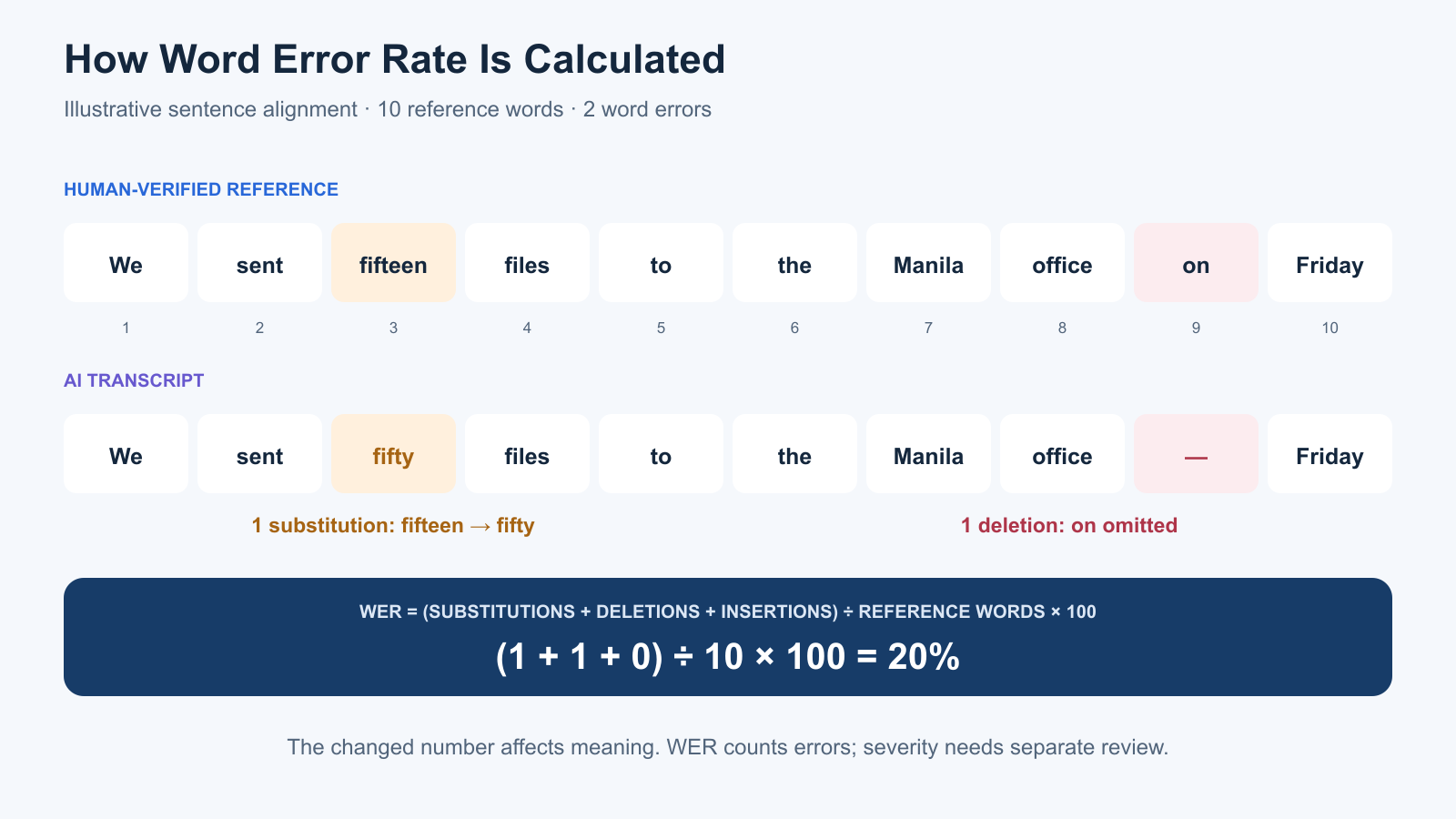
WER = (Substitutions + Deletions + Insertions) ÷ Reference word count × 100
Consider the following hypothetical transcription.
Human-verified reference:
“We sent fifteen files to the Manila office on Friday.”
AI-generated transcript:
“We sent fifty files to the Manila office Friday.”
The reference contains ten words. The generated transcript makes two errors: it substitutes “fifty” for “fifteen” and deletes “on.”
Error Type
Example
Count
Substitution
“fifteen” becomes “fifty”
1
Deletion
“on” is missing
1
Insertion
None
0
Reference words
Total words spoken
10
The result is:
WER = (1 + 1 + 0) ÷ 10 × 100 = 20%
This example is illustrative, not a result from testing any particular captioning product.
The substitution is particularly important because changing “fifteen” to “fifty” alters the meaning of the sentence. By contrast, removing “on” may affect grammatical accuracy without creating the same level of misunderstanding.
WER counts both errors, but it doesn’t tell us which one is more serious.
That distinction explains why transcription accuracy should be accompanied by a review of meaning-changing mistakes.
What Is a Good Word Error Rate?
There isn’t one universally acceptable WER for every captioning workflow.
A lower rate is preferable, but whether the result is suitable depends on the recording and how the captions will be used.
A short promotional video containing a minor transcription error may be easy to correct. An educational video containing incorrect technical terms or a medical explanation with a misheard dosage requires considerably more careful review.
It’s also important to understand that WER isn’t simply the percentage of words a model recognises correctly. Insertions can push WER above 100%, and differences in reference-transcript conventions can affect the calculation.
For meaningful comparisons, evaluate every tool against the same human-verified transcript using consistent scoring rules.
Why Accented English Matters in Speech Recognition
English is spoken with many regional, national, and individual accents. There is no single accent-free version of the language, and a speaker’s accent shouldn’t be treated as incorrect English.
However, speech recognition systems don’t always perform equally across different speaking populations.
Additional research presented at EMNLP 2023 examined accent-specific methods for improving recognition accuracy, reinforcing the importance of testing systems against a wider range of English speech.
These findings don’t establish that every current captioning tool performs poorly on every non-American accent. They do demonstrate why a single published accuracy figure is insufficient to establish performance for a particular audience.
Pronunciation and Vocabulary Differences
Accent-related transcription errors can occur when a system misinterprets how familiar English words are pronounced.
However, pronunciation is only part of the challenge. Speakers may also use regional vocabulary, local place names, abbreviations, technical terminology, or expressions that are uncommon in the system’s training data.
For example, a Philippine business interview might include Filipino company names, local government terminology, or English sentences containing occasional Filipino expressions. A tool could transcribe most of the English correctly while repeatedly misidentifying those terms.
This is why testing should include the actual vocabulary used by the business rather than only generic sample sentences.
Code-Switching and Mixed-Language Speech
Code-switching occurs when a speaker moves between languages or language varieties during a conversation.
This is common in multilingual environments, including workplaces where English is used alongside Filipino, Hindi, or other languages.
A captioning platform may support English transcription and several additional languages without handling mixed-language sentences equally well.
Some products require users to select one source language, potentially leaving portions spoken in another language untranscribed.
When mixed-language speech is common in your content, include it in the evaluation and document whether the tool preserves the original words or substitutes English approximations.
Audio Quality Can Make Accent Comparisons Misleading
Background noise, microphone distance, compression, overlapping speakers, and room acoustics all affect transcription performance.
If American English samples are recorded in a studio while Indian or Filipino English samples come from noisy video calls, the resulting WER difference cannot be attributed to accent alone.
A fair test needs comparable recording conditions, with separate results for clean audio and difficult audio.
YouTube’s automatic captioning documentation specifically warns that accents, dialects, background noise, and overlapping speakers can affect automatic captions.
How to Test Captioning Tools on Accented English
The most useful way to compare captioning products is to process identical recordings through each tool and measure both transcription errors and the work required to correct them.
This approach doesn’t require a large research laboratory. A small marketing team can conduct a useful initial evaluation if it prepares the recordings carefully and records its methodology.
Build a Representative Audio Test Set
Start with recordings that reflect the people appearing in your actual content.
A practical pilot might include 8–12 clips of approximately 60–90 seconds each, with several speakers and more than one recording per relevant accent variety. This is a suggested starting design, not a statistically representative benchmark.
Depending on your audience, the recordings could include Filipino, Indian, Nigerian, Scottish, Australian, and American English. These are broad categories containing considerable variation, so don’t assume that one speaker represents an entire population.
Include a mixture of clear narration, conversational speech, and technically demanding passages. If you work with multilingual speakers, add a separate group of code-switching samples.
Obtain permission to use the recordings and avoid uploading confidential customer or employee audio to services that haven’t been approved for handling it.
Create Human-Verified Reference Transcripts
Each audio clip needs an accurate reference transcript before automated results can be assessed.
Ideally, a reviewer familiar with the relevant accent should transcribe the recording, with a second reviewer checking ambiguous words and terminology.
Agree on transcription conventions before scoring. For example, decide whether to include filler words, how to represent numbers, and how to handle contractions or regional expressions.
This matters because differences in formatting can introduce apparent WER errors even when the recognised speech is substantially correct.
Keep the original transcript for editorial review, and create a consistently normalised version for automated scoring where appropriate.
Process the Same Files Through Every Tool
Upload the same audio files to each captioning platform without manually correcting the transcripts first.
Use comparable language settings, and avoid applying audio enhancements to one tool’s input but not another’s.
Where a product provides optional vocabulary lists or custom dictionaries, record whether those features are enabled. It may be useful to run an initial test without custom vocabulary and a second test using the available configuration options.
Export the generated transcripts or caption files so the results can be evaluated consistently.
Calculate WER for Each Recording
Compare each generated transcript with the corresponding reference using a consistent word-alignment method.
The score should identify substitutions, deletions, and insertions rather than reporting only an overall accuracy percentage.
For larger comparisons, NIST’s SCTK scoring toolkit provides established speech recognition evaluation utilities.
Avoid combining every recording into one overall percentage before examining the individual results.
A tool may perform well on several clean recordings while producing unusually high error rates for one speaker or recording condition. Those differences can be hidden by a single aggregate score.
Review Errors That Change Meaning
WER is useful for counting errors, but its calculation doesn’t distinguish between minor wording problems and mistakes that change the message.
Keep a separate record of meaning-changing errors, including incorrect numbers, negations, names, product references, technical terminology, and instructions.
For example, omitting “not” from a sentence may create more practical risk than several punctuation problems. Likewise, incorrectly transcribing a product name may require repeated corrections across an entire video series.
A human reviewer should classify these errors using the same definitions across all products.
Measure the Time Needed to Finish the Captions
Finally, assign an editor to correct each tool’s output and prepare a publish-ready caption file.
Measure the time from opening the generated transcript to completing the required corrections, including timing, speaker labels, and relevant accessibility details.
This is the stage where differences in the editing interface become important. A platform with slightly higher WER may still require less total work if its errors are easy to locate and correct.
For a fair comparison, rotate editors or use consistent reviewer assignments so individual editing speed doesn’t become the main source of variation.
Captioning Tool Evaluation Scorecard
The following framework separates transcription accuracy from the quality and efficiency of the finished captioning workflow.
Criterion
What to Measure
Why It Matters
Word error rate
Substitutions, deletions, and insertions
Measures transcription accuracy
Accent-level WER
Error rates by speaker group and recording condition
Reveals uneven performance
Critical errors
Incorrect numbers, negations, names, and instructions
Identifies meaning-changing mistakes
Timestamp accuracy
Caption alignment with the spoken audio
Prevents captions appearing too early or late
Speaker identification
Correct attribution of speech
Helps viewers follow conversations
Accessibility completeness
Relevant sounds and speaker cues
Supports viewers who cannot hear the audio
Editing time
Minutes spent correcting captions
Measures practical workflow effort
Export flexibility
SRT, VTT, and required video outputs
Determines compatibility with publishing platforms
Total production cost
Software charges plus human review
Reflects the cost of finished captions
A simple pass-or-fail rating is less useful than retaining these separate measurements.
For example, one tool might produce a lower WER but require extensive manual timing adjustments. Another may transcribe a few more words incorrectly while producing captions that are easier to review and publish.
The better option depends on whether the workflow values raw transcription accuracy, editing efficiency, accessibility requirements, or a combination of these outcomes.
Which Captioning Tools Are Worth Testing?
Several established products support automatic transcription and caption editing. However, their strengths and intended workflows differ.
The comparison below summarises documented product capabilities rather than ranking their accuracy on accented English. A genuine accuracy ranking would require processing the same test recordings through every platform.
AI accuracy, human review requirements, turnaround, finished caption cost
YouTube Studio
YouTube Studio provides automatic captioning for supported languages, including English. Creators can review and correct generated captions directly within YouTube’s publishing workflow.
This makes it a sensible baseline when the video will only be published on YouTube.
However, YouTube acknowledges that automatic recognition may misrepresent speech because of accents, dialects, noise, or overlapping speakers. It also recommends reviewing generated captions before relying on them.
The main evaluation question is whether YouTube’s native workflow provides sufficiently accurate output for your content without requiring additional software.
Descript
Descript generates an editable transcript that can be used for both video editing and caption creation.
Its workflow allows users to correct transcription errors, adjust caption presentation, identify speakers, and export SRT or VTT files. Descript’s subtitle export documentation also describes controls for caption line length and speaker labels.
For teams producing interviews, webinars, or educational videos, transcript-based editing may reduce the number of separate tools needed.
The important test is whether the interface helps editors find and correct accented-English transcription errors efficiently.
Kapwing
Kapwing provides browser-based automatic subtitles with transcript correction, timing controls, caption styling, and export options.
Its documentation describes support for downloadable SRT, VTT, and TXT files, as well as videos with subtitles permanently embedded.
This makes Kapwing worth evaluating for marketing teams producing social clips and promotional videos that need consistent visual presentation.
However, styled captions should not distract from the underlying transcription accuracy. Correct the spoken text before applying templates, animations, or word-by-word effects.
VEED
VEED provides an online subtitle editor where users can correct text, adjust timing, customise appearance, and export caption files or burned-in video.
This approach may work well for marketers who want a browser-based workflow without opening a full video editing application.
VEED’s documentation confirms support for SRT and VTT export, although plan restrictions and watermarks may affect the available output.
Evaluate both recognition accuracy and the amount of manual work required to produce the final caption format.
Adobe Premiere
Adobe Premiere includes Speech to Text functionality for generating transcripts and captions within a professional editing environment.
For editors already cutting video in Premiere, keeping captions on the same timeline can simplify production and revisions.
The main consideration is whether its integrated workflow saves enough time compared with generating transcripts in a separate captioning platform.
Teams should test accuracy using the same recordings and compare how easily captions can be corrected, reviewed, and exported.
Rev
Rev offers both automated and human captioning services.
This distinction is useful when an organisation needs to compare the cost of correcting AI-generated captions against paying for a human-reviewed deliverable.
Rev’s published services currently advertise AI captions from $0.25 per video minute and human captions from $1.99 per video minute. These are vendor prices rather than estimates of the total cost of an individual workflow.
Rev also documents differences between its AI and human captioning services. Its AI caption products do not provide every feature included with human captioning, such as comprehensive speaker identification and sound-effect descriptions.
For accessibility-sensitive content, evaluate the final deliverable rather than assuming the automated service provides everything required.
Why Low WER Doesn’t Guarantee Accessible Captions
A transcript and a caption file are not the same thing.
A transcript records spoken content in text, while captions must synchronise that content with the video and communicate relevant information from the audio.
Under WCAG 2.2 Success Criterion 1.2.2, prerecorded video with relevant audio content must provide captions to meet Level A requirements.
The W3C explains that captions should include dialogue, identification of speakers where necessary, and meaningful non-speech audio such as relevant sound effects.
Consequently, a tool could achieve an excellent WER while still producing incomplete captions.
Timing and Segmentation
Captions need to appear when the corresponding speech occurs.
Even when the words are correct, poor timing can make the dialogue difficult to follow. Captions that appear too late may leave viewers struggling to connect the text with the speaker’s actions.
Segment length also matters. Long blocks of text may be difficult to read before the next caption appears, while extremely short fragments can create a distracting viewing experience.
The appropriate layout depends on the video format, playback environment, and applicable captioning guidelines.
Speaker Identification
In interviews, webinars, and panel discussions, viewers may need to know who is speaking.
A system that transcribes every word but assigns the dialogue to the wrong person can still create confusion.
Review speaker transitions, especially when participants interrupt one another or speak over each other.
Meaningful Non-Speech Audio
An automatically generated transcript may omit important sounds such as an alarm, a door opening, applause, or music that contributes to the meaning of the scene.
These details may be necessary for viewers who cannot hear the audio.
A proper caption review should therefore include a separate accessibility pass rather than ending when the WER is acceptable.
Closed Captions vs Burned-In Captions
Closed captions are provided through a supported caption track or sidecar file, allowing users to turn them on or off in compatible players.
Burned-in captions are permanently displayed within the video image.
Burned-in text can be useful for social media videos, but it doesn’t offer the same level of viewer control as a supported closed-caption track.
For websites and video players that support accessible caption files, an editable, properly synchronised SRT or VTT workflow is often preferable.
Raw transcription speed can be misleading because generating captions is only the beginning of the workflow.
A platform might produce a transcript in seconds, but the editor may then spend twenty minutes correcting terminology, fixing speaker labels, adjusting timestamps, and preparing the final file.
Another platform could take longer to process the audio but save time during review.
This is why marketing teams should measure time to publish-ready captions, not only how quickly a tool generates its first draft.
Example: Comparing the Real Cost of Captioning
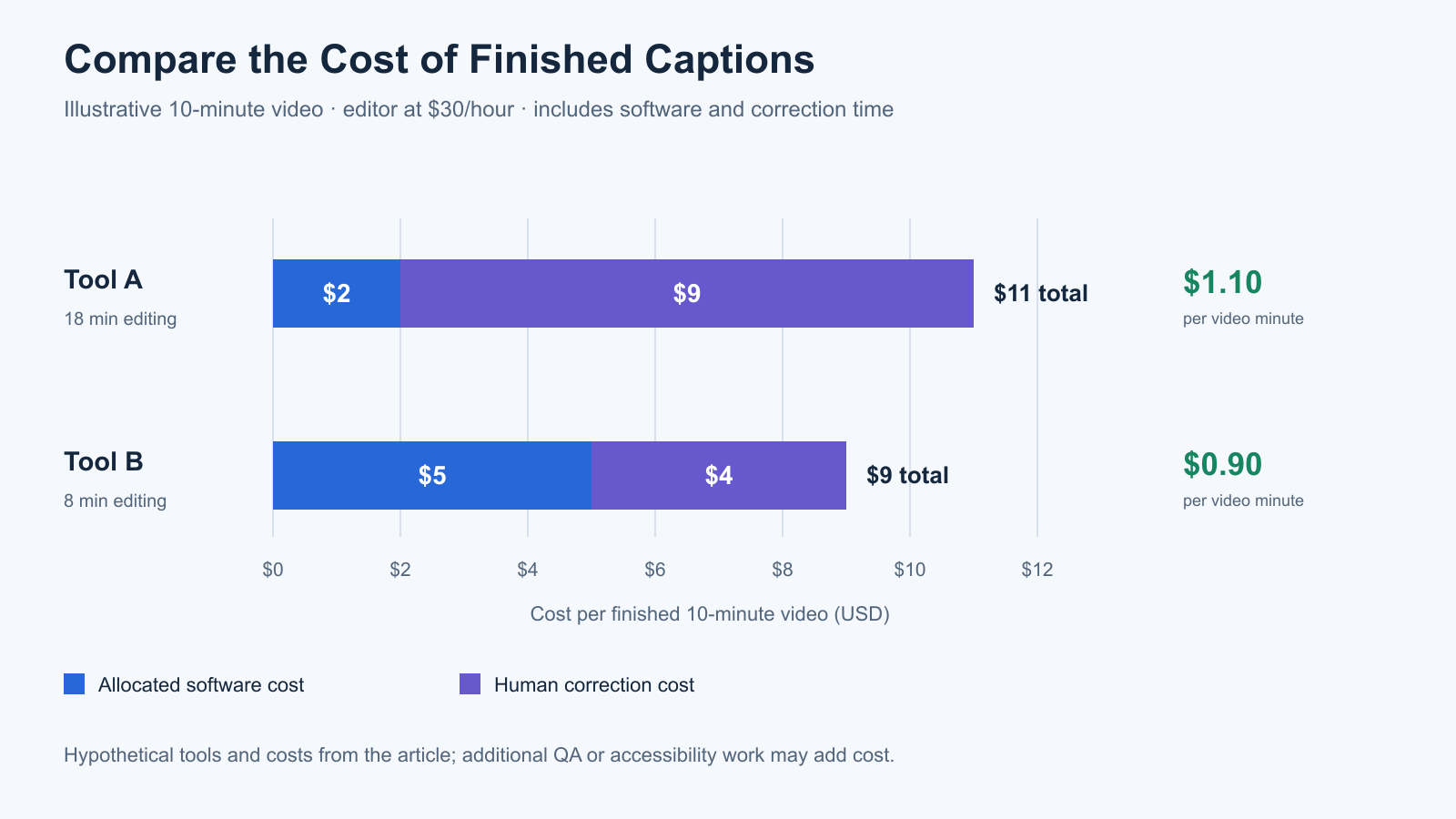
Consider two hypothetical tools used to caption a ten-minute video.
Cost Component
Tool A
Tool B
Allocated software cost
$2
$5
Human editing time
18 minutes
8 minutes
Editor cost at $30/hour
$9
$4
Total finished-video cost
$11
$9
Cost per finished video minute
$1.10
$0.90
These figures are illustrative, not actual test results or vendor prices.
Tool B appears more expensive when comparing software fees alone. However, its lower correction time produces a cheaper finished result in this example.
This calculation can be especially important for agencies processing large volumes of webinars, podcasts, training material, and social clips.
The cost model should also account for quality assurance and any additional captioning work required for accessibility.
How to Reduce Captioning Errors Before Publishing
The best improvement doesn’t always come from switching speech recognition tools. Recording conditions, terminology preparation, and editing practices can make a substantial difference to the finished captions.
Improve the Source Audio
Use a suitable microphone, position it consistently, and reduce unnecessary background noise wherever possible.
For multi-speaker recordings, separate microphones or audio tracks can help make dialogue easier to distinguish.
However, avoid judging accented speakers against a different recording standard. When comparing accent-level performance, the recording conditions should be reasonably consistent.
Prepare Product Names and Technical Terms
If a tool supports a custom vocabulary or terminology list, include important names and specialised terms before transcription.
For example, a software tutorial may contain product names, API terminology, abbreviations, and feature labels that are rarely encountered in everyday conversation.
Even when custom vocabulary is available, inspect whether the platform uses it correctly. Providing a glossary doesn’t guarantee accurate transcription.
Correct Meaning Before Styling
Review numbers, negations, names, and technical instructions before adjusting caption fonts or animations.
A visually attractive caption containing an incorrect product name or misleading instruction is not publish-ready.
Prioritise transcription and meaning, then review timing, speaker attribution, and accessibility. Apply visual styling only after those essential corrections.
Keep Human Review in the Workflow
Automatic captions should be treated as a draft when accuracy matters.
The intensity of review can vary according to the content. A casual internal recording may require less extensive editing than a public training course or a video containing financial, legal, or medical information.
For higher-stakes material, consider specialist human captioning or an additional independent quality check.
If your workflow also involves extracting short videos from longer recordings, our guide to AI video repurposing toolsexplains why automation needs editorial review beyond transcription alone.
How to Choose the Right Captioning Tool
The most suitable captioning platform depends on the content you’re producing and the capabilities already available in your editing software.
For YouTube-only publishing, start by evaluating YouTube Studio’s existing caption workflow. A separate subscription may be unnecessary if the built-in captions are straightforward to correct.
For interviews, podcasts, and educational video production, transcript-based editing in Descript may be worth evaluating. Kapwing and VEED are practical candidates for browser-based video production, while Adobe Premiere may fit teams already using a professional editing timeline.
When caption accuracy or accessibility requirements justify additional expense, compare automated outputs with a human captioning service such as Rev.
These recommendations describe workflow suitability rather than verified differences in accented-English accuracy.
Whatever software you shortlist, the purchasing decision should consider three questions:
How accurately does it transcribe the accents and terminology in your actual recordings?
How much human effort does it take to produce captions that meet your quality and accessibility requirements?
What does that complete process cost per finished video minute?
A platform that performs well across those three areas is more valuable than one offering an impressive accuracy claim without evidence from representative audio.
Final Verdict: Measure the Finished Captions, Not the Demo
Captioning tools have made automated transcription faster and more accessible, but accented-English accuracy remains an important evaluation challenge.
Word error rate offers a consistent way to compare transcription results against a verified reference. However, it doesn’t tell the entire story. A relatively small number of errors can change the meaning of a statement, while correctly transcribed words can still produce inaccessible captions when timing, speakers, or relevant sounds are mishandled.
The most useful evaluation therefore combines WER, critical-error review, accessibility checks, human editing time, and total production cost.
For marketers, the recommendation is straightforward: test the software using recordings that reflect your actual audience. Don’t rely solely on clean demonstration audio or headline accuracy percentages, and don’t assume that a more expensive captioning tool will necessarily handle every accent better.
Choose the tool that produces accurate, accessible, publish-ready captions with the least reasonable amount of correction work. That is a more useful measure of value than transcription speed or vendor-reported accuracy alone.
Frequently Asked Questions
What Is Word Error Rate in Captioning?
Word error rate measures how many words an automatic transcription system substitutes, deletes, or inserts compared with a verified reference transcript. The result is calculated by dividing the total number of errors by the number of words in the reference. Lower WER generally indicates more accurate word-level transcription.
Why Do AI Captioning Tools Make Mistakes With Accented English?
Speech recognition systems can interpret pronunciation patterns, regional vocabulary, and unfamiliar terms differently. Research has documented recognition disparities across accents, although performance varies by system, speaker, and recording conditions. Background noise, overlapping dialogue, and code-switching can introduce additional difficulties.
Is a 5% Word Error Rate Good?
A 5% WER means that the combined word-level error count equals 5% of the reference transcript length. Whether that is acceptable depends on the recording and the importance of the mistakes. Incorrect numbers, negations, and technical instructions may require careful review even when the overall WER is low.
Which Captioning Tool Is Best for Accented English?
No tool can be declared universally best for accented English without testing the same representative recordings across competing products. YouTube Studio, Descript, Kapwing, VEED, Adobe Premiere, and Rev offer different captioning workflows. The most reliable choice depends on your speakers, audio quality, editing requirements, and budget.
Is Word Error Rate Enough to Measure Caption Quality?
No. WER measures word-level transcription errors but doesn’t account for caption timing, reading speed, speaker identification, or meaningful non-speech audio. These elements require separate evaluation, particularly when producing captions intended to support accessibility.
Are Automatically Generated Captions Accessible?
They can contribute to an accessible workflow, but automatic generation alone doesn’t guarantee that the final captions meet accessibility requirements. Editors need to review transcription accuracy, timing, speaker identification, and relevant sound information. The W3C provides guidance on caption requirements under WCAG.
Should I Use Human Captioning Instead of AI?
AI captioning may be efficient when generated transcripts are reasonably accurate and straightforward to correct. Human captioning or additional specialist review may be appropriate for recordings with difficult audio, specialised terminology, or higher accuracy and accessibility requirements. Compare the total finished-caption cost rather than software or service prices alone.
About the author
Tom Koh
Tom is the CEO of MediaOne, a leading digital marketing agency. He is a business-experienced SEO consultant as well as a Google Gold Search Expert serving the international community. He has consulted for MNCs like Canon, Maybank, Capitaland, SingTel, ST Engineering, WWF, Cambridge University, as well as Government organisations like Enterprise Singapore, Ministry of Law, National Galleries, NTUC, e2i, SingHealth. His articles are published and referenced in CNA, Straits Times, MoneyFM, Financial Times, Yahoo! Finance, Hubspot, Zendesk, CIO Advisor. Under his stewardship, MediaOne has won dozens of prestigious digital marketing awards.
Your website has 150 published articles. Some attract consistent organic traffic, others haven’t generated a meaningful visit in months, and several cover nearly identical…
Writing a good advertisement sounds simple until you have to create 15 different headlines, stay within character limits, communicate your product’s benefits, and make…
Verifiability matters more than speed when publishing AI-generated content. An AI content generator turns a short brief into draft copy, and its usefulness depends…