SEO Audit
Free White Label SEO Audit Tool: What Agencies Actually Get
You’ve found a potential SEO client, reviewed their website, and identified several problems worth fixing. Now you need a professional audit report that explains…
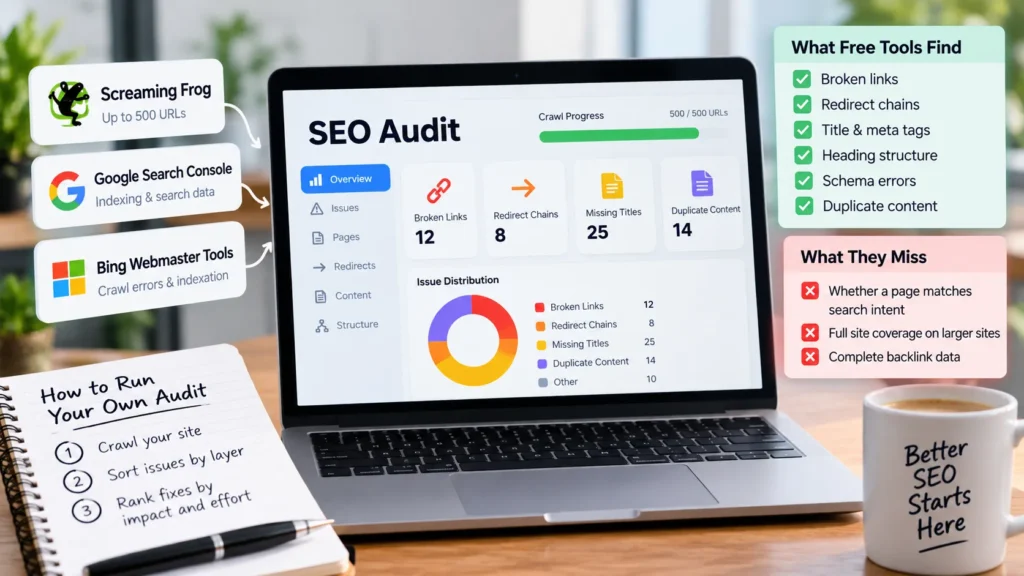
A free website SEO audit is the fastest way for a small site owner to find broken links, redirect chains, missing title tags, and duplicate content. For sites with about 1,000 URLs, the best free audit tools cover most of the mechanical checks. Use Screaming Frog’s free version (up to 500 URLs) for a desktop crawl, and Google Search Console for indexing and search data. Then run the three-step check: crawl, sort each issue into a layer, and rank fixes by impact and effort.
The core thesis of this article is simple: free audits fail mostly on crawl coverage, not on scoring. A tool that reports zero errors on a capped crawl has only checked part of your site. Free tools also cannot judge whether a page answers a searcher’s question, so treat every score as a to-do list rather than a verdict. We checked tool limits on vendor sites on September 29, 2026, and they change often, so confirm them before you start. Each flagged issue should be tied to a target keyword, so you can see which pages matter most to search demand.
Pick the audit tool by your URL count, not by its feature list. The page cap determines whether a clean result matters, and the best free option depends on how many pages a crawl must cover. To review technical SEO performance, start by confirming whether the tool can reach every page.
A free website SEO audit reads your site like a crawler. It reports what is broken and gives a rough order for fixing it, within a defined scope. It does not read pages the way a searcher does.
Every finding sorts into one of three layers:
Tools can score the first two layers. The third needs a manual check, since automated scores cannot judge whether a page answers what a searcher wants.
The method runs in order: crawl, export the issues, sort each into a layer, then rank fixes by traffic impact and effort.
Technical SEO covers crawlability, indexation, redirects, broken links and site speed. A crawler follows internal links from your homepage and records each URL’s status code. Error pages, redirect chains longer than one hop, and pages blocked from indexing are reported here. Free tools such as Bing Webmaster Tools add a second view of indexation and crawl errors.
Core Web Vitals measure Largest Contentful Paint (LCP) for loading speed, Interaction to Next Paint (INP) for responsiveness and Cumulative Layout Shift (CLS) for visual stability. PageSpeed Insights reports these from field data where it exists.
Google removed the Mobile Usability reports, a change discussed in January 2024. Instead, load key templates on a phone-sized viewport and confirm text is readable and nothing requires horizontal scrolling.
Submit your XML sitemap in Search Console and check it lists only indexable pages. Crawl budget matters mainly on large sites.
On-page checks cover title tags, meta descriptions, heading hierarchy and internal linking. Titles should be unique and describe each page’s topic. Use one H1 and descend in order without skipping levels.
Benchmark each URL against its target keyword, noting the title pattern, heading structure and content depth of pages ranking above it. Search Atlas’s Site Auditor offers an on-page audit among its best free options for teams getting started.
Validate the schema with Google’s Rich Results Test and confirm each markup type matches visible content.
The off-page layer reviews backlink profiles and referring domains, and free tiers limit what you can see. A free Semrush account includes Site Audit for one project, with up to 100 pages per audit and 100 per month. A complete link profile for a larger site usually requires a paid plan, and Ahrefs Site Audit follows the same capped free-access pattern.
Most low-quality links do no harm and need no action. Disavow only manipulative-looking patterns you cannot remove.
We checked the vendor limits below on September 29, 2026. Free tiers may change without notice, so please confirm before building a process around them.
| Tool | What it crawls | Page or URL cap | Keyword and backlink limits | Time limit on free tier |
|---|---|---|---|---|
| Semrush free account | Site Audit, one project | 100 pages per audit, 100 per month | Position Tracking for up to 10 keywords | Ongoing monthly allowance |
| Seobility Basic | One project | Up to 1,000 pages | 10 tracked keywords | No time limit |
| Screaming Frog SEO Spider (Free) | Desktop crawl | Up to 500 URLs | Not a keyword or backlink tool | No time limit |
| Google Search Console | Indexing and search performance | No crawl cap | Exports capped at 1,000 rows | No time limit |
| Search Atlas Site Auditor | Site health scoring | Crawls up to 20 pages per second | Site Explorer shows up to 1,000 backlinks and keywords | Free trial, then selected subscription |
A free Semrush account covers one Site Audit project. Seobility’s Basic plan crawls one project up to 1,000 pages with no time limit.
Screaming Frog’s free SEO Spider crawls up to 500 URLs for technical errors, broken links, metadata issues and duplicate content. It is one of the best free options for technical SEO checks on small sites.
Google Search Console has no page cap, but its exports stop at 1,000 rows. One source suggests free checkers cover roughly 70 to 90 percent of audit needs on sites under 1,000 URLs. Treat that as an estimate, not a guarantee.
Verify a domain property through DNS, then open two reports. The Pages (indexing) report shows which URLs are indexed and why others were excluded, such as “Discovered, currently not indexed.” The Performance report shows clicks, impressions, average position and click-through rate by query and by page. Together they give you the search performance data that a crawler alone cannot.
To find pages with impressions but few clicks, open Performance, set a date range, switch to the Pages tab and sort by impressions. Rewrite the titles and descriptions of pages that appear often but earn few clicks. Use Bing Webmaster Tools alongside it for a second view of indexing and crawl data.
On larger sites, apply a folder filter or narrower date range so each export stays under the 1,000-row cap.
Install the free version, enter your homepage URL and confirm the site has fewer than 500 URLs before crawling. If the crawl hits the cap, results cover only part of the site.
After the crawl, check Response Codes (4xx and 5xx errors, redirect chains), Page Titles, Meta Description and Duplicates. Fix 5xx errors and broken internal links first, since they block crawling. Duplicates go last, because many are harmless parameter variants. Flag slow templates for a separate page speed review.
Pick three to five competitors that rank for your target terms, dropping directories and marketplaces unless they are true rivals. Compare each one’s title pattern, H1 to H3 structure and content depth against your page.
For keyword and backlink gaps, use free views rather than paying for full databases. Search Atlas’s free Site Explorer shows up to 1,000 backlinks and keywords at a time for your sites. Run each competitor’s domain through an Ahrefs site checker for a quick backlink snapshot, and use a free SEO checker for a fast on-page pass. Tracking this data over time is central to measuring SEO performance.
Record each gap in a simple sheet with the competitor, page, gap type and layer (technical, on-page or intent fit).
Free audits have four predictable blind spots, and each one can make a clean result misleading.
A capped crawl reports only the URLs it reached. A clean result on a capped crawl is partial, and the gap is often silent. To check for silent truncation, compare the number of URLs the crawler reports against your sitemap count and the URL count from Search Console’s Pages report. If the crawler finds materially fewer URLs than either source, the crawl stopped early, and its clean result covers only that subset.
Health scores measure rule compliance, not whether a page satisfies the searcher. Judge content by reading it against the query and its target keyword, and treat your technical SEO findings as a separate check from content quality.
Search Atlas, for example, offers a seven-day trial, after which the selected subscription begins unless cancelled. Read the terms before starting, especially if you are evaluating the best free option for ongoing SEO performance tracking.
Duplicate content flags often come from parameter variants, pagination and print pages. Verify each flagged group before acting, especially when an Ahrefs site audit report lists them as high priority. Not every flagged item indicates a real issue, so please confirm each one before making any changes.
Move to a paid crawler when the site exceeds the free cap, or when you need historical trend data or full backlink coverage. Hire a specialist when content questions go beyond a checklist. Paid audit tools also tend to surface more issues per site, which is useful once you’ve made the basic fixes.
| Step | Check |
|---|---|
| 1 | URL count recorded, and cap confirmed |
| 2 | Crawl complete, or cap noted |
| 3 | Search Console exported |
| 4 | Every issue assigned to a layer |
| 5 | False positives removed and fixes ranked |
An audit list is only useful once each issue has a rank. Score every issue on two factors: impact (1 to 5, based on how many pages or searches it touches) and effort (1 to 5, where 1 is a quick edit). Teams using the best free audit tools can export these findings as a working list, and a reliable technical SEO review should feed that list directly. Each keyword-related issue should be ranked against the same two factors so the list stays consistent.
Worked example from a 300-page site. The crawl flagged 40 pages with missing meta descriptions, 6 broken internal links and 12 redirect chains. Scored:
| Issue | Impact | Effort | Priority |
|---|---|---|---|
| 6 broken internal links | 4 | 1 | Fix first |
| 12 redirect chains | 3 | 2 | Fix second |
| 40 missing meta descriptions | 3 | 3 | Fix after structural items |
Fix the broken links in an afternoon; each one blocks crawl paths, so they come first. Redirect chains come next. Meta descriptions take longer to write elegantly, so they sit lower despite touching more pages.
Quick wins are low-effort, high-impact edits such as broken links and missing titles. Structural work, such as restructuring internal links or consolidating duplicate templates, takes longer and should be scheduled as a separate project. Please retain the crawl data for each batch so the team can track which issues were resolved and when.
Re-run the crawl after each batch of fixes, and run a full audit on a fixed cadence, such as quarterly. Compare each run against the last to confirm fixes held and no new errors appeared, and use an SEO checker to track SEO performance between full audits.
A free website SEO audit works best as a first pass on a site under about 1,000 URLs. Match the tool to your URL count, check whether the crawl finished, and treat each score as a prompt for a manual review. Start with the five-step run above, then fix the high-impact, low-effort items first.
It is accurate for mechanical checks such as broken links, redirects and missing titles within the crawl cap. It cannot judge whether a page answers the searcher’s question, so pair it with a manual review.
It depends on the tool. Screaming Frog’s free version crawls up to 500 URLs, Seobility’s Basic plan up to 1,000 pages, and a free Semrush account 100 pages per audit. Confirm current limits on the vendor site before you start.
It checks technical issues such as crawlability, indexation, redirects and broken links, plus on-page items such as title tags, meta tags, heading structure and schema validation. It does not measure whether content satisfies search intent.
Yes, for a small site. A free crawler, Google Search Console and the five-step process above cover the basics. Larger sites usually need a paid crawler or specialist help.
Crawl caps. A capped crawl reports only the URLs it reached, so a clean result can hide problems elsewhere on the site.
A free audit ends with a long list, but it’s not a plan. Most flagged items are mechanical defects that carry unequal weight. A duplicate meta description on a low-traffic archive page and a broken link on your top landing page can sit in the same report, yet only one deserves attention this week. Ranking these defects is core technical SEO work, and the best free audit tools help you see the scale of each problem before you decide what to fix first. Sorting findings this way keeps your overall SEO performance focused on the defects that matter most. You should judge each reported issue by its real effect on visitors and rankings, not by its position in the report.
Rank each issue by dividing impact by effort, using scores of 1 to 5 for each. A fix scoring 4 on impact and 1 on effort outranks one scoring 5 on impact and 5 on effort. Score each finding on three questions: does it affect indexing, ranking or click-through? Then weight the total by traffic, using the Performance report in Google Search Console.
Worked example: a title tag on a service page with 5,000 monthly impressions and a low click-through rate scores 4 for impact and 1 for effort, giving a ratio of 4. A duplicate meta description on an archive page with 12 monthly impressions scores 1 for impact and 1 for effort, giving a ratio of 1. Fix the title first, then recheck its impressions and click-through rate 4 to 8 weeks later, and log the before-and-after figures beside the issue. Pages that load slowly or shift during rendering deserve extra weight, since page speed data shows whether a defect affects real visitors, and Core Web Vitals measure those experiences directly. PageSpeed Insights reports these figures for each URL.
Quick wins are single-page fixes that take under an hour, such as fixing a broken internal link or replacing a 302 redirect with a 301. Do these first, since their effect shows in the next crawl.
Structural work covers problems repeated across many URLs, such as faceted navigation generating thousands of near-duplicate URLs. Scope these as projects with an owner and a deadline. If a structural problem is really a cluster of quick wins, such as 40 duplicate titles fixed by one template change, treat it as a single quick win.
Match cadence to how often the site changes: monthly for a site that publishes weekly, quarterly for a brochure site. Log each fix with its URL, issue, date and before-and-after score. Check crawl and index results in your webmaster tools after each batch, and keep each batch’s data so trends are easy to compare over time.
A free website SEO audit is a sound first diagnostic for a site under roughly 1,000 URLs. It reliably finds mechanical, page-level defects: broken links, redirect chains, missing or duplicated title tags, heading problems and schema errors. Frizerly’s review of free checkers reports that many small businesses find the best free audit tools cover 70 to 90% of their audit needs on sites of that size. Free tools stop where judgment begins. No tool can tell you whether a page answers the query it targets, so read the audit alongside your SEO performance data, not in place of it. Technical SEO findings are most useful when you weigh them against that performance data, and you should rank page speed problems alongside every other defect.
Keep the workflow simple: define scope, crawl within the tool’s limit, check indexation in Google Search Console, review on-page elements against ranking competitors, then turn the findings into a ranked fix list. Flag slow pages in your PageSpeed Insights review at the same stage, so you rank load-time problems alongside everything else.
Move to paid tools or an expert when your crawl hits a cap and cannot finish, when you need historical tracking, or when search intent is where you’re losing traffic. Ahrefs Site Audit and Bing Webmaster Tools can supplement a Google-only view, but confirm what each one covers before you rely on it.
Start with your highest-traffic pages. Run the crawl, export the issues, and fix the technical and on-page defects first. Free tiers change, so confirm current limits on each vendor’s site before you begin.
A free audit is reliable for technical and on-page basics, such as broken links, redirects, missing title tags and duplicate content, provided the tool crawls your whole site. It is weak on content quality and search intent. A tool can confirm that a page has a title tag, but not whether that page answers the query it targets. Treat the output as a hygiene checklist, not a ranking verdict.
It varies by tool. Semrush’s free plan caps each project at a set number of pages, with deeper reporting available in its paid Site Audit tool. Screaming Frog’s free version crawls up to 500 URLs. Check current limits on each vendor’s site before you start, because free tiers change. On a site larger than the cap, the crawl is incomplete, so please confirm it covered every section you care about.
A typical free audit checks title tags, meta tags, heading structure, schema markup validation, duplicate content, broken links and redirects. Many tools also report Core Web Vitals, including Largest Contentful Paint (LCP), Interaction to Next Paint (INP) and Cumulative Layout Shift (CLS). Coverage differs between tools, so compare feature lists before relying on one for a specific check.
Yes, for most sites with about 1,000 URLs or fewer. According to a free SEO checker roundup, many small businesses find free SEO checkers cover 70 to 90 percent of their audit needs on sites of that size. Pair a free crawler with Google Search Console, which shows indexing status and search performance, and you cover most basic needs. Reviewing search intent remains a manual task.
The biggest limitation is the caps on pages crawled, keywords tracked, backlinks shown, and rows exported. Google Search Console exports are capped at 1,000 rows, as are the free offerings from Ahrefs and Semrush. Automated scores also cannot judge whether content satisfies searcher intent, so a high score does not mean a page will rank. Pair the scan with a manual check of your priority pages.

Tom is the CEO of MediaOne, a leading digital marketing agency. He is a business-experienced SEO consultant as well as a Google Gold Search Expert serving the international community. He has consulted for MNCs like Canon, Maybank, Capitaland, SingTel, ST Engineering, WWF, Cambridge University, as well as Government organisations like Enterprise Singapore, Ministry of Law, National Galleries, NTUC, e2i, SingHealth. His articles are published and referenced in CNA, Straits Times, MoneyFM, Financial Times, Yahoo! Finance, Hubspot, Zendesk, CIO Advisor. Under his stewardship, MediaOne has won dozens of prestigious digital marketing awards.
Run a free Digimetrics audit across SEO, AI search, content and technical health, and get a plan you can act on today.
Start free →You’ve found a potential SEO client, reviewed their website, and identified several problems worth fixing. Now you need a professional audit report that explains…
Your website has hundreds of pages, organic traffic is declining, and you’re not sure what’s causing the problem. Is Google struggling to crawl important…
The best SEO software for a small business is not necessarily the product with the most features. It is the tool that tells you…