Most small businesses choose a local SEO tool by comparing feature lists and monthly prices. That approach misses the question that matters: can customers in your real service area find you? A single ranking position or an overall visibility percentage can look healthy while entire neighborhoods never see your listing.
This guide is for owners and marketers of single-location and small multi-location businesses building a local SEO tool stack. The best tool is the one that measures your visibility across the geographic area your customers actually search from. We tested the leading options with a geo-grid method. Below, we explain how to read the results, separate Maps performance from organic performance, and match your spending to what you need. You can compare the tools we tested in our best local seo tools review.
Measure the whole service area. One rank check can hide neighborhoods where you are effectively invisible.
Read the spread, not the average. One tested clinic had a 34% overall Share of Local Voice, but its core was above 70% and its northern area was below 10%.
Track Maps and organic separately. An organic #4 can coexist with Maps positions from #2 to outside the top 20.
Compare cost per location. Whitespark’s modular stack and BrightLocal’s Grow plan suit different business sizes.
Check local consistency. Nightwatch’s 95.2% local consistency is the figure to weigh for neighborhood decisions.
Start with a baseline grid scan. Map your service area, score candidate tools on precision and consistency, then choose the cheapest tool that passes.
Table of Contents
What Local SEO Tools Do and Why They Matter
The Leading Tools, Compared
Rank Tracking: Why Grid Testing Beats a Single Position
Conclusion: Match Tools to the Questions You Need Answered
Frequently Asked Questions
What Local SEO Tools Do and Why They Matter
Most local SEO dashboards answer one question well: how do we rank for the terms we track, on average? For a small business, that average is often the wrong number. A plumber or dental clinic earns calls from the streets near its door. An overall score can look healthy while whole neighborhoods never see the business.
Local SEO means earning visibility in the Google Maps pack and in local organic search results when someone nearby searches for what you sell. Most small businesses need help with four jobs: Google Business Profile management, citation and NAP consistency, review monitoring, and rank tracking. Each job affects the others, so a gap in one often shows up in another.
These gaps are easy to miss because they are quiet. A duplicate listing or an unconfigured service area triggers no alert. The business simply gets fewer calls from one neighborhood, and the owner blames the season.
Google Business Profile Management and Optimization
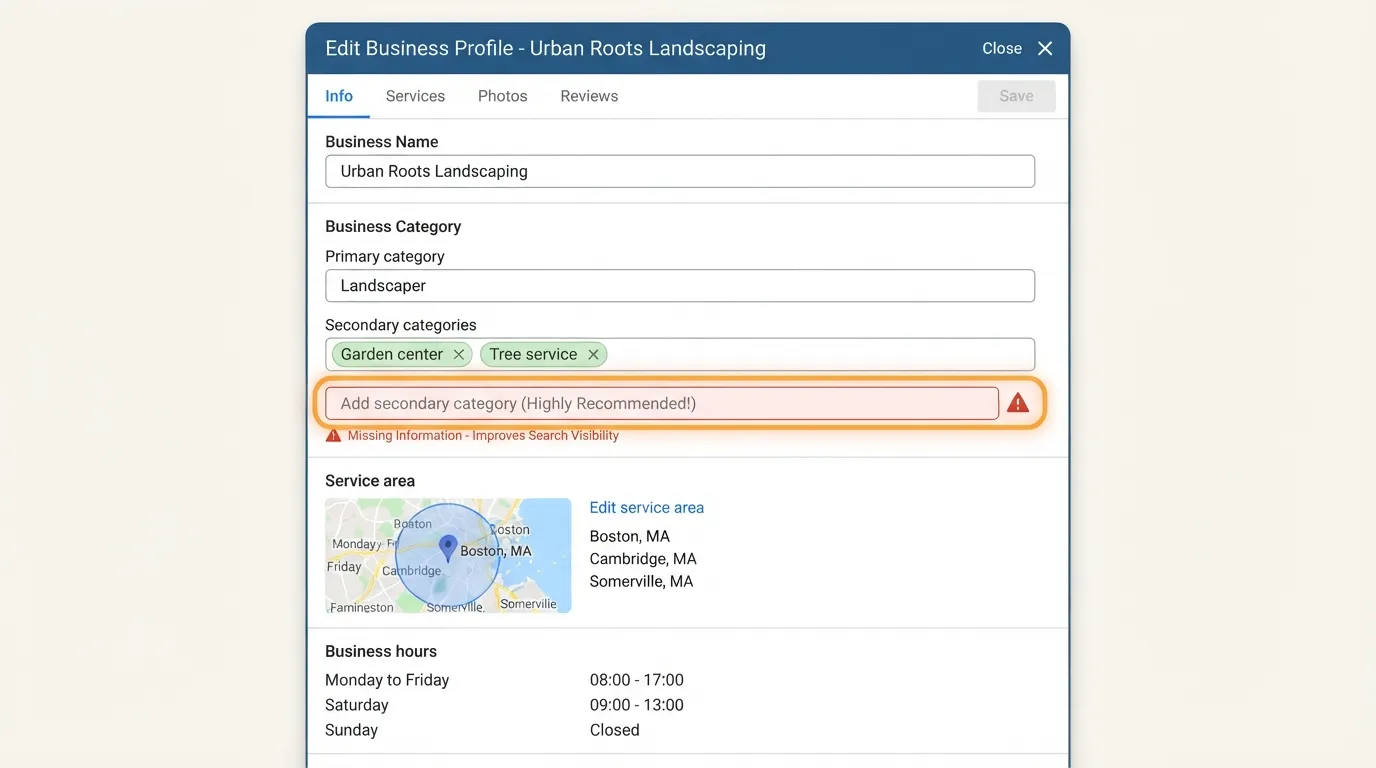
Your Google Business Profile is the most visible local asset you control. The fields that matter most are the primary and secondary categories, service area, business hours, services, description, photos and website link. Missing or vague categories are the most common gap, because they decide which searches your profile can appear for.
A good tool audits these fields against your current setup and flags anything empty, outdated or inconsistent. It should name the specific gap, not just give a score, so you can fix it in the profile itself. The best tools also show which profile features, such as services and booking links, are unused.
Activity may help keep a profile competitive. Google Posts, Q&A answers and review replies are commonly recommended as signs of an active business. Google does not publish a definitive ranking formula, so treat these as good practice rather than guaranteed results. Pick a fixed slot, such as Monday morning, and clear the Q&A and review queues in the same sitting.
Use this audit checklist for your profile:
Confirm the primary category matches your main service.
Add up to the allowed secondary categories that describe other services you offer.
Check that the service area lists every town or neighborhood you serve.
Verify the business hours, including holiday hours.
Write a description that names your services and location in plain sentences.
Upload current photos of the premises, team and completed work.
Confirm the website link goes to the correct local page.
Citation and Listings Management
A citation is any online mention of your business name, address and phone number, usually on a directory, data aggregator or industry site. NAP consistency means those three details match exactly everywhere they appear. Search engines compare these mentions to judge whether a business is real and where it is. An old phone number, or an address written as “Suite 4” in one place and “#4” in another, adds doubt. Citation management tools such as Moz Local help track these mentions across many directories at once.
Here is a worked example. Suppose a directory lists “Maple Dental, 12 Oak Street, Suite 4” with phone 555-0140, while your profile says “Maple Dental Care, 12 Oak St #4” with phone 555-0104. Both listings describe the same clinic, but the name, address format and phone number differ. After a correction, every listing reads “Maple Dental Care, 12 Oak Street, Suite 4, 555-0104.” The before and after versions match, which gives search engines one clear signal.
Duplicate and stale listings cause most of the trouble. A business that moved, changed its phone number or merged with another can end up with several live listings that disagree. Listing distribution tools scan the directory network, find these entries, and either correct them or submit the right data to the directories that matter. When you evaluate a tool, ask whether it finds listings you did not know existed, since those are the ones most likely to be wrong. Free listing checks can be a useful starting point before you commit to a paid plan.
Review Monitoring and Reputation Management
Reviews affect both rankings and conversions. A review monitoring tool gathers reviews from Google, Facebook and the industry sites your customers use into one inbox. Speed matters. Replying within a day or two shows prospective customers that someone reads feedback, and it gives you a public chance to correct a misunderstanding.
A repeatable request process matters more than any single reply. Send a request after a completed job, by text or email, with a direct link to your review page. Track how many requests you send each month and how many become reviews. A tool that automates requests and reports these numbers shows whether the process is working. Reliance on occasional requests you remember to send does not.
The Leading Tools, Compared
BrightLocal Citation and Review Management
BrightLocal combines citation building, review management and local reporting in one dashboard. The one-location Grow plan is listed at $59 monthly on its 2026 pricing page, and annual billing lowers the effective monthly cost. For a single-location business, one invoice covers the listings, reviews and reports you would otherwise assemble from three places, which helps your business stay visible in local search results.
Best fit: small businesses that want citations, reviews and reporting in one place without managing separate subscriptions.
The limitation is that you pay for the whole bundle even if you need only one part. A bundle also cannot show which neighborhoods are invisible. That gap calls for a geo-grid test, which the rank tracking section covers.
Whitespark Modular Stack
Whitespark sells its tools as separate modules. The Local Platform costs $1 per location monthly, Citation Finder starts at $33 monthly, Local Rank Tracker ranges from $14 to $200 per month, and Reputation Builder starts at $199 per location. Per-location pricing scales with the number of sites you manage, which matters most for multi-location operators. Prices change and depend on billing term, so confirm current rates on each vendor’s pricing page before you buy.
Best fit: budget-conscious operators who want to buy only the modules they need.
A single-location business can run the Local Platform for a dollar a month and add Citation Finder when it needs a citation audit, which keeps early spending low. The cost of that flexibility is that you assemble the stack yourself, and you should confirm that the modules you choose cover the same geographic area.
Moz Local and Yext for Listing Distribution
Moz Local focuses on listing management and duplicate cleanup. Choose it when your business appears in several directories with conflicting names, addresses or phone numbers, and you need those records corrected in one pass.
Yext distributes your business data to a large directory network. That reach suits businesses with many locations or a need for wide, consistent presence. For a single neighborhood shop, the scale is often more than you need. You pay for distribution to directories that rarely send a call, and the consistency gain may be small compared with fixing the three or four listings that matter in your area.
Semrush Local SEO Features
Semrush is a broad SEO platform, and its local features sit alongside keyword research, site audits and competitor analysis. If your team already uses it for that wider work, adding local modules means one fewer vendor and one shared login.
The limitation is breadth against depth. A dedicated local tool goes further on listings, citations and map-pack behavior. Semrush covers more of the marketing stack but offers less detail on the local-only questions a small business most needs answered.
Rank Tracking: Why Grid Testing Beats a Single Position
The Problem With Single-Point Rank Checks
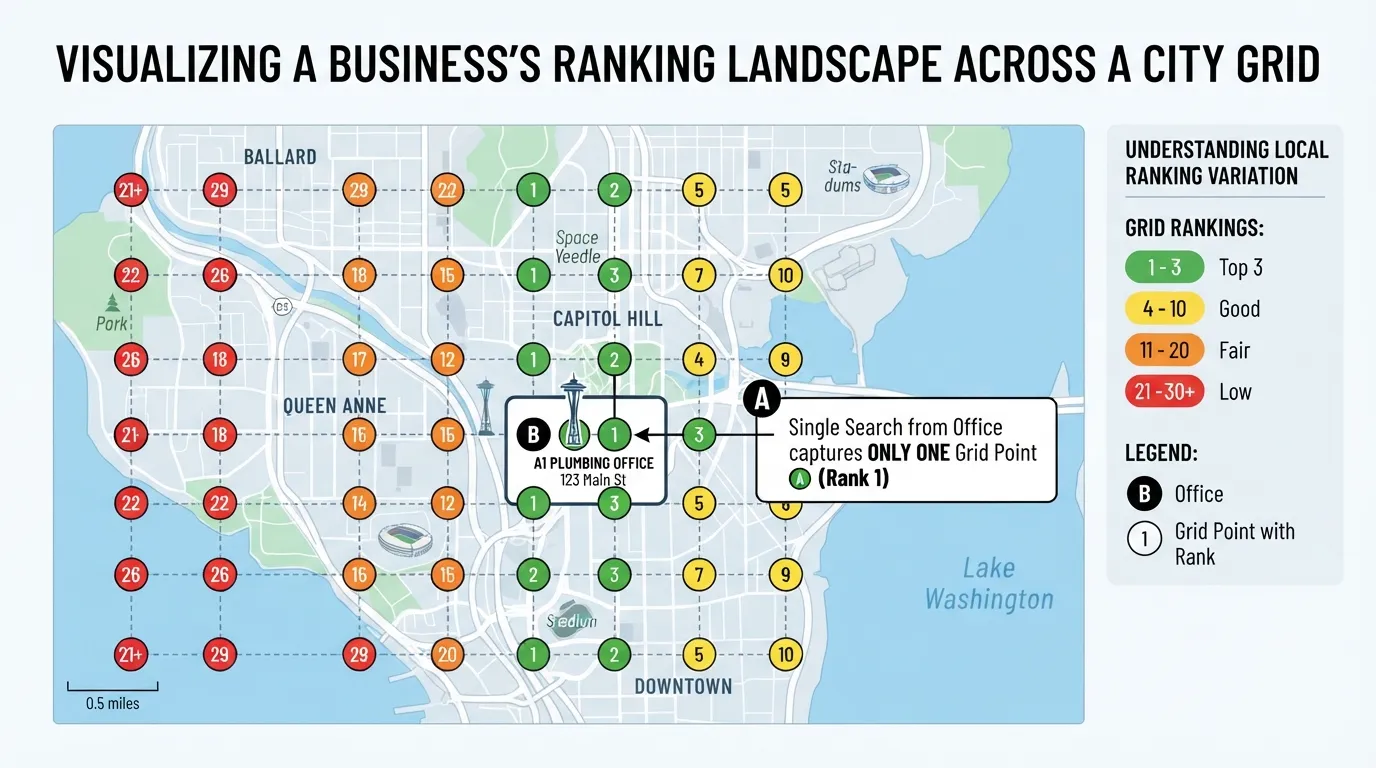
Most small businesses check their local ranking by searching for their own service from the office or home, then noting where they appear. That one result can be badly misleading. In one test, a business’s organic result sat at #4, yet its Google Maps position for the same search ranged from #2 to outside the top 20, depending on where the search ran. The test was reported in Best Local SEO Tools in 2026. A single number tells the owner little about what most customers see, and a free check from one spot shows only one street corner.
Two variables change the result more than owners expect. The first is the location the search comes from. Maps rankings depend on the searcher’s position. A customer two kilometers north may see a different top three than someone standing at your door. The second is the search method. Organic results, Maps pack results and mobile versus desktop views can each rank the same business differently. A tool that reports only one of these gives a tidy number that describes a single street corner. Reviewing local search data across these views, rather than one result, shows what your customers actually see.
Geo-Grid Rank Tracking With Local Falcon
Geo-grid tracking solves this by running the same search from many points at once. Local Falcon places a grid over your service area and records your position from each point. A 9×9 grid using exact GPS coordinates produces 81 measurements per keyword, displayed as a heatmap.
The value lies in what averages hide. In the test clinic case, overall Share of Local Voice was 34%, a figure that suggests a middling presence. The grid showed something else: visibility above 70% within two kilometers of the clinic, and below 10% across parts of the northern service area. The business was dominant near home and nearly invisible in one direction. An owner reading only the 34% would spend money in the wrong places.
Reading a heatmap is a decision exercise. Work through it in three questions:
Where is the strong core? Note the cells where you rank in the top three. These show where your existing content and citations are working.
Where is the dead zone? Mark the cells where you do not appear in the top 20. Look for a shared pattern, such as one direction, a neighboring town or a specific ZIP code.
What is different about the dead zone? Check whether a service page targets that area, whether your Google Business Profile lists the right service area, and whether citations there carry consistent details. Add a locally relevant service page or fix the listing before buying more citations.
Accuracy Benchmarks for Rank Trackers
A grid is only as good as the data behind it, so check a tracker’s accuracy before trusting it. The rank tracking test scored each tool from 0 to 10 across five weighted components: consistency (25%), location and device precision (15%), cost at volume (15%), SERP-feature coverage (10%) and AI visibility (10%).
In the seven-day test, AccuRanker reached 65.4% exact matches and 96.5% within two positions, scoring 9.1/10. SE Ranking scored 62.0% exact matches and 95.1% within two positions (8.8/10). Semrush scored 59.9% and 93.3% (8.6/10), and Nightwatch 59.1% and 94.2% (8.5/10). For local work, the subset matters more. Nightwatch was strongest there, with 95.2% local consistency.
For a small business, local consistency is the figure to check. A tool that returns the same local position on repeated runs gives a trend you can act on. A tool that fluctuates sends you chasing changes that never happened. Ask any vendor for its local consistency score, then run a short trial on your own service area before committing. Starting with a free trial costs nothing and shows whether the tool’s local results hold up for your area.
A Scoring Framework for Small Businesses
Sort the tools you are considering by the question each one answers before you buy. Small businesses often pay for overlapping features because they chose by brand name rather than by the signal they needed.
Tool type
Job it does
Tested pricing (verify before buying)
Signal it gives you
Profile management
Keeps Google Business Profile fields, posts and Q&A current
Often bundled into citation platforms
Whether your listing is complete and active
Citation distribution
Pushes consistent name, address and phone data and finds duplicates
Whitespark Citation Finder from $33/month
Whether the web agrees about your business
Review monitoring
Collects reviews across platforms and tracks response times
Whitespark Reputation Builder starts at $199 per location
How quickly you respond and how sentiment shifts
Geo-grid rank tracking
Tests rankings from many points across your service area
Local Rank Tracker ranges from $14 to $200 per month
Where you are visible and where you are not
Single-point rank tracking
Checks one search location
Included in most general rank trackers
Your position from one place only
The last two rows matter most. A single-point tracker shows where you rank from your office. A geo-grid tracker shows where customers on the surrounding streets can find you. The Local Falcon test found an overall Share of Local Voice of 34% that concealed a 70% core and a sub-10% northern gap. A single average never reveals that pattern.
Symptom-to-Tool Decision Table
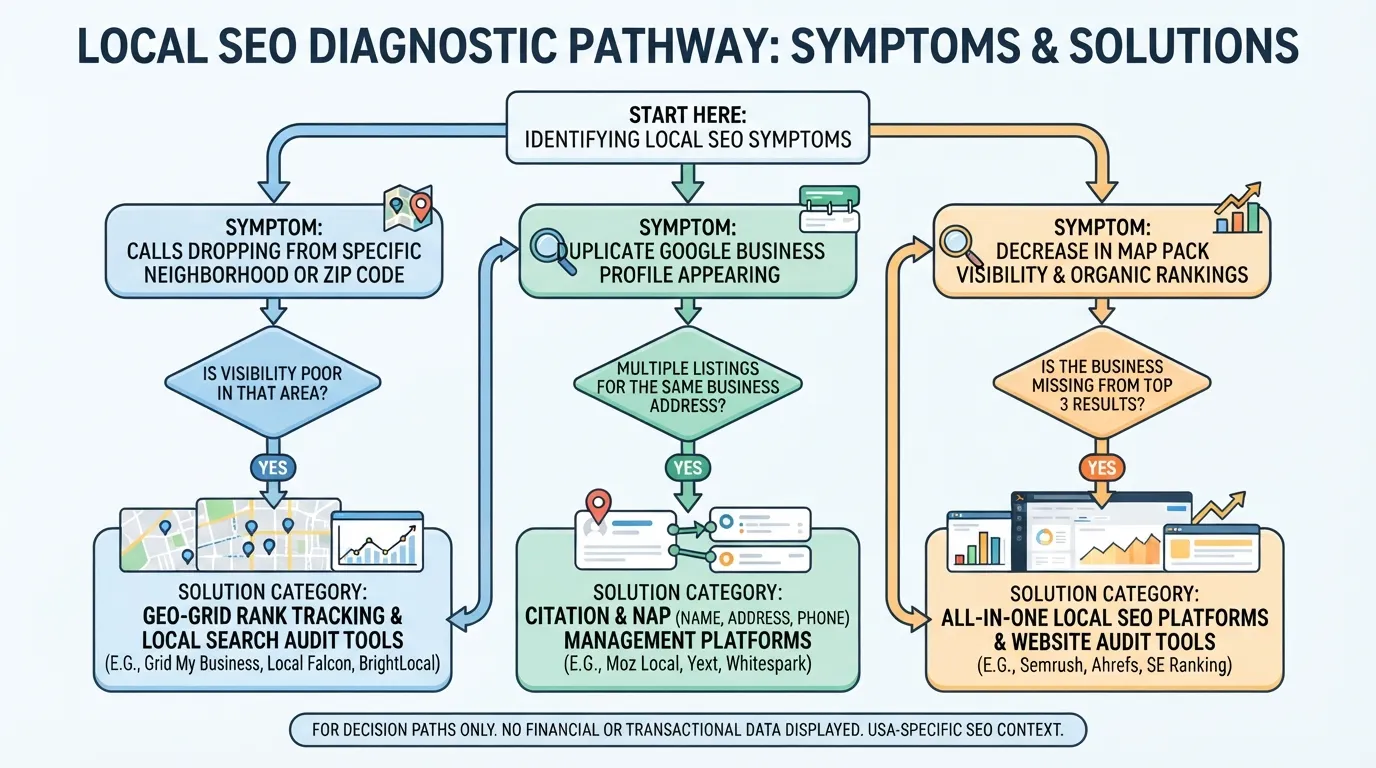
Start from what you are seeing, not from a tool list.
What you notice
Likely cause
Tool category to check first
Calls are down in one neighborhood
Weak visibility in that part of the service area
Geo-grid rank tracking
Listings show different addresses or phone numbers
Inconsistent citations or duplicate listings
Citation audit and distribution
Reviews go unanswered for weeks
No review workflow or alerts
Review monitoring
Map pack rank is poor but organic rank looks fine
Maps and organic results diverge
Rank tracking that separates Maps from organic
If the symptom is geographic, do not buy a citation tool first. Citations rarely fix a neighborhood gap on their own. A grid test shows where the gap is. Then you decide whether it needs a service page, a category change or more local citations in that zone.
A Step-by-Step Setup Checklist
Work through these five steps in order. Each produces a record that the next step uses.
Step 1: Audit your Google Business Profile and fix missing fields. Check the primary and secondary categories, service area, hours, description and services list. Note every blank field. A profile with an empty service area or a generic category will underperform before any other work begins.
Step 2: Run a citation audit and fix NAP inconsistencies. Compare your business name, address and phone number across directories and your website. Log every mismatch, including abbreviations such as “St” against “Street” and old phone numbers. Mark duplicates for merging or removal. Local citation management is easier when you keep one master record of these details.
Step 3: Set up review monitoring with response targets. Connect the platforms where customers leave reviews and set alerts. Choose a target you can keep, such as replying to every review within 48 hours, and track average response time each month.
Step 4: Run a baseline geo-grid scan across your service area. Define your real boundary (a metro, county or set of ZIP codes) and place a grid of search points across it. Scan once before you change anything and save the heatmap as your reference point. Keyword research should come first, so you scan the terms customers actually use. A local seo baseline taken this way gives you a reference that later scans can be compared against.
Step 5: Re-test monthly and log changes. Run the same grid each month and record each change, such as a new service page, a corrected category or a citation fix. A change that lifts one zone but leaves another flat tells you where to focus next. Keeping this log helps you see whether the tool is genuinely showing improvement or simply reporting noise, and it can help you decide whether a given search results change reflects your own work.
Conclusion: Match Tools to the Questions You Need Answered
The core lesson of this guide is that a local SEO tool should measure where you rank across your whole service area, not at one point. A single average can look healthy while your northern customers never see your listing. In the test clinic, a 34% overall Share of Local Voice hid a 70% core and a sub-10% northern gap, so start from a geo-grid test before comparing features.
Your starting stack depends on budget and footprint:
One location, tight budget: Whitespark’s modular approach, buying the Local Platform at $1 per location monthly and adding modules as needed.
One location, wants everything in one place: BrightLocal’s one-location Grow plan at $59 monthly, with annual billing lowering the effective cost.
Several locations: Price per location carefully, since Reputation Builder starts at $199 per location and multiplies quickly across a portfolio.
Your next step is concrete. Run a geo-grid scan of your own service area this week, using the same grid for a baseline and a follow-up check. That picture of where you genuinely rank is the one worth optimizing for.
Frequently Asked Questions
Which local SEO tool is best for a single-location business?
For one location, BrightLocal’s Grow plan at $59 per month is a practical starting point. It bundles citations, reviews and reporting in one dashboard, and annual billing lowers the effective monthly cost. Pricing changes and depends on billing term, so confirm the current figure on BrightLocal’s pricing page before you buy. If you would rather pay only for what you use, Whitespark’s modular stack lets you buy the Local Platform at $1 per location monthly and add modules as needed.
How much should a small business spend on local SEO tools?
It depends on how you buy. All-in-one platforms charge one fixed fee, which suits owners who want simplicity. Modular stacks can cost less at the start but add up as you buy more modules. Reputation Builder starts at $199 per location, so treat it as a serious add-on. Start with the one job that is failing, then add tools. Prices are checked against vendor pages and can change.
What is geo-grid rank tracking?
Geo-grid rank tracking places a grid of search points over your service area and records your position from each one. A single-point check shows one result from one location. A grid shows where you appear strongly and where you are effectively invisible, which an average score can hide.
Do citations still matter for local rankings?
Yes. Search engines compare your name, address and phone number across directories to judge whether your business is real and consistent. Conflicting or duplicate listings weaken trust in your profile. Audit your listings regularly and fix any mismatches.
How often should I check my local rankings?
Check monthly and log results so you can compare trends over time. Run an extra check after a major change, such as a new service area, a category edit, a move or a sudden drop in calls from one neighborhood.
About the author
Tom Koh
Tom is the CEO of MediaOne, a leading digital marketing agency. He is a business-experienced SEO consultant as well as a Google Gold Search Expert serving the international community. He has consulted for MNCs like Canon, Maybank, Capitaland, SingTel, ST Engineering, WWF, Cambridge University, as well as Government organisations like Enterprise Singapore, Ministry of Law, National Galleries, NTUC, e2i, SingHealth. His articles are published and referenced in CNA, Straits Times, MoneyFM, Financial Times, Yahoo! Finance, Hubspot, Zendesk, CIO Advisor. Under his stewardship, MediaOne has won dozens of prestigious digital marketing awards.
Your website has 150 published articles. Some attract consistent organic traffic, others haven’t generated a meaningful visit in months, and several cover nearly identical…
Writing a good advertisement sounds simple until you have to create 15 different headlines, stay within character limits, communicate your product’s benefits, and make…
Verifiability matters more than speed when publishing AI-generated content. An AI content generator turns a short brief into draft copy, and its usefulness depends…