SEO Audit
Free White Label SEO Audit Tool: What Agencies Actually Get
You’ve found a potential SEO client, reviewed their website, and identified several problems worth fixing. Now you need a professional audit report that explains…
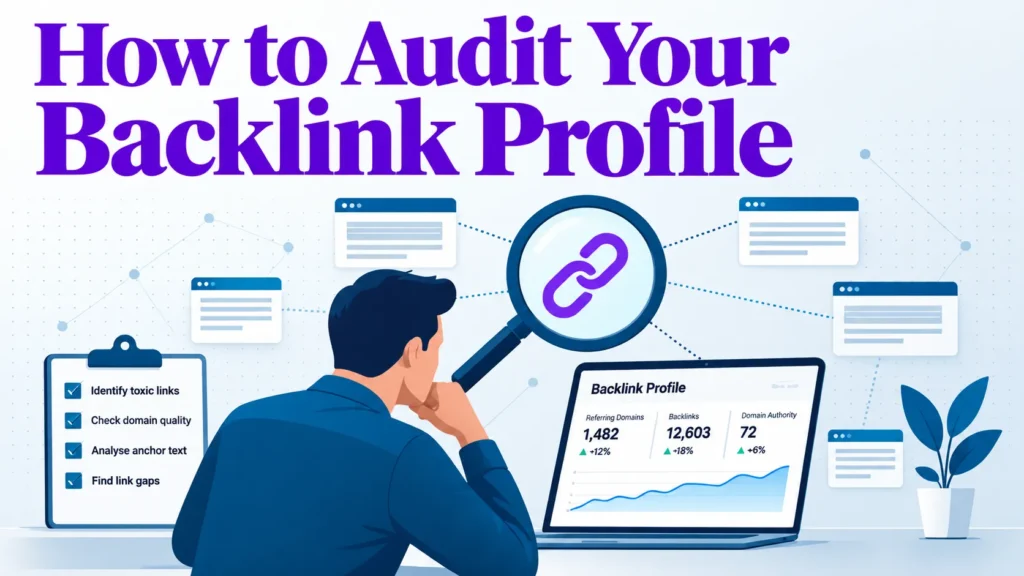
A backlink audit is only worth doing if it ends in a decision. This guide shows how to audit your backlink profile step by step, so every referring link gets a clear verdict: keep, monitor, replace, or disavow.
Most audits stop at data collection. You export a list of linking domains, sort it by an authority score, and end up with a spreadsheet and no next step. This guide treats the audit as a decision process. Pull data from several sources, separate natural anchor patterns from risky ones, and recover links you have already lost. If you are new to the wider toolkit, the seo tools overview is a useful starting point.
Many marketers treat link building as growth and auditing as housekeeping. That order can cost money. If you keep adding links to a profile you have never examined, you cannot tell which existing links help, which do nothing, and which might hurt. An audit gives you that picture before you spend more on outreach.
A backlink audit answers three questions. Which links carry real value, meaning they sit on pages people read and click? Which carry risk, such as paid placements, link network members, or sitewide footer links with exact-match anchors? Which valuable links have disappeared because a page was removed, a URL changed, or a redesign dropped the link?
The export is only a list. The audit turns it into decisions. For each referring link, you should be able to say keep, monitor, pursue replacement, or disavow, and explain why in one sentence. If a report does not get you there, it is a dashboard, not an audit.
A useful test is whether a link would plausibly send a visitor to your site. Referral traffic is a rough but honest signal of editorial endorsement. A link from a local newspaper article about a Chicago restaurant group, which readers click, is worth more than a directory listing nobody follows. Authority scores estimate influence but do not show whether a link is seen or used, so start from the page and its context rather than from a metric.
A routine check is a light, recurring review. You look at new referring domains, lost domains, and sudden shifts in anchor text. Its job is to catch problems while they are small, and most sites should run it far more often than a full audit.
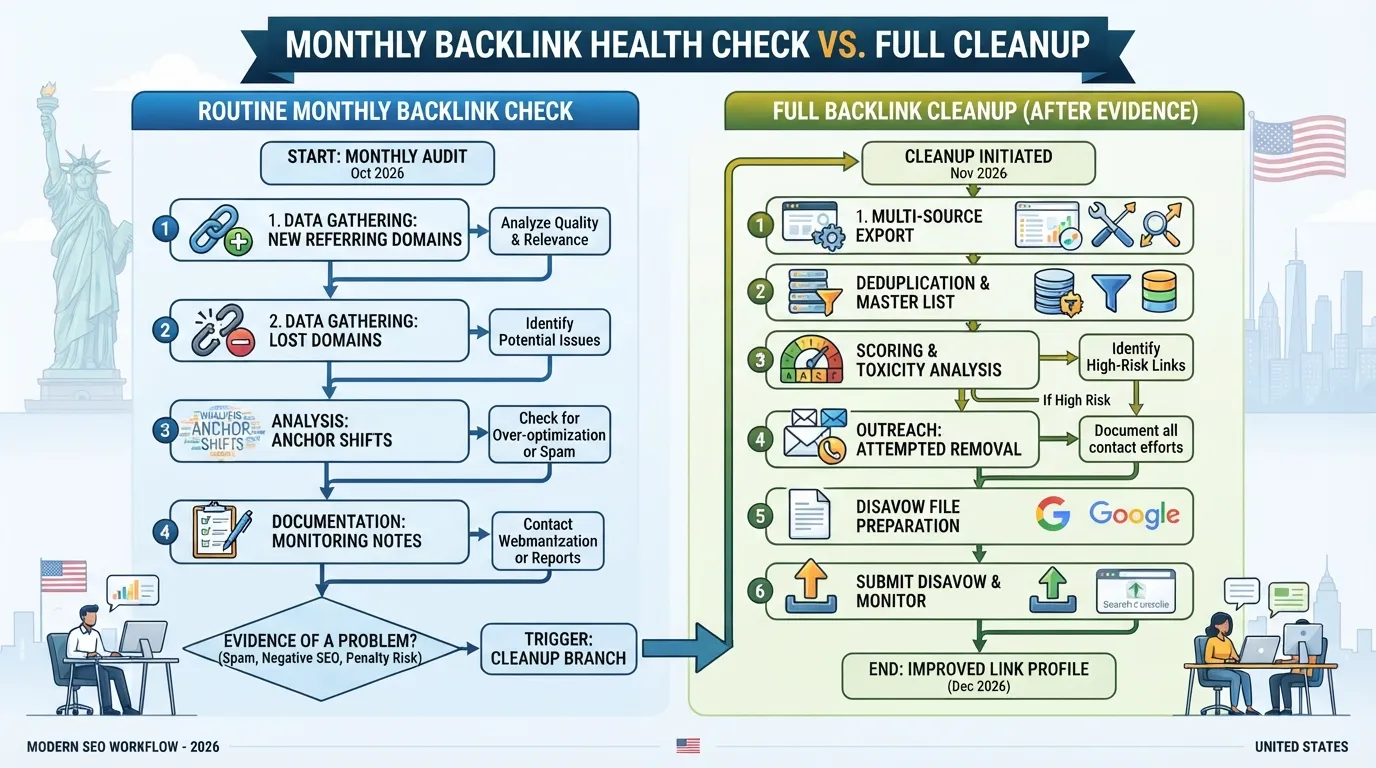
A full cleanup is a deep, one-off project. Run one after a traffic drop you cannot explain, after a site migration, after acquiring a domain with a messy history, or after a previous agency built links nobody vetted. It involves pulling data from several sources, deduplicating referring domains, scoring each link, attempting removal outreach, and only then considering a disavow file.
The mistake to avoid is treating every routine check as a cleanup. Disavowing links without evidence of a problem can remove links that were helping you. Keep the two activities separate in your calendar and reporting. A routine check ends with monitoring notes, and a full cleanup ends with a documented set of decisions.
A backlink audit is only as reliable as its data. No single link index sees the whole web, and each has gaps, delays and duplicates. The goal of this stage is one clean list of referring domains you trust enough to act on.
Start with at least one dedicated link index. Most US marketers use a commercial crawler such as Ahrefs, Semrush or Moz, because they keep historical data and show when a link was first and last seen. Each index crawls a different slice of the web, so counts will never match exactly. Pick one as your primary source for consistency and treat the others as checks.
Compare sources on three points: how far back their history goes, how often they refresh, and whether they export lost links as well as live ones. Lost links matter later, so a tool that shows only current links leaves you with an incomplete picture. Each provider’s metrics are proprietary and differ between tools, so never mix scores from two platforms in one column.
The table below compares the four sources most often used for this work. Confirm current coverage in each product, as plans and features change.
| Source | Historical data | Refresh rate | Lost-link coverage | Best use |
|---|---|---|---|---|
| Ahrefs | Long history of first and last seen dates | Frequent crawls, varies by plan | Yes, lost links are exportable | Primary index for breadth and history |
| Semrush | Historical backlink data available | Varies by plan | Yes, lost links are reported | Primary index or cross-check |
| Moz | Historical link data available | Varies by plan | Limited compared with the others | Cross-check against a primary index |
| Google Search Console | Limited to links Google has found | Updated by Google on its own schedule | Does not list lost links directly | Free baseline of what Google counts |
Google Search Console is a free tool from Google. Its Links report lists external links to your site that Google has found, which makes it a useful baseline for what the search engine itself counts. Export the top linking sites and the top linked pages.
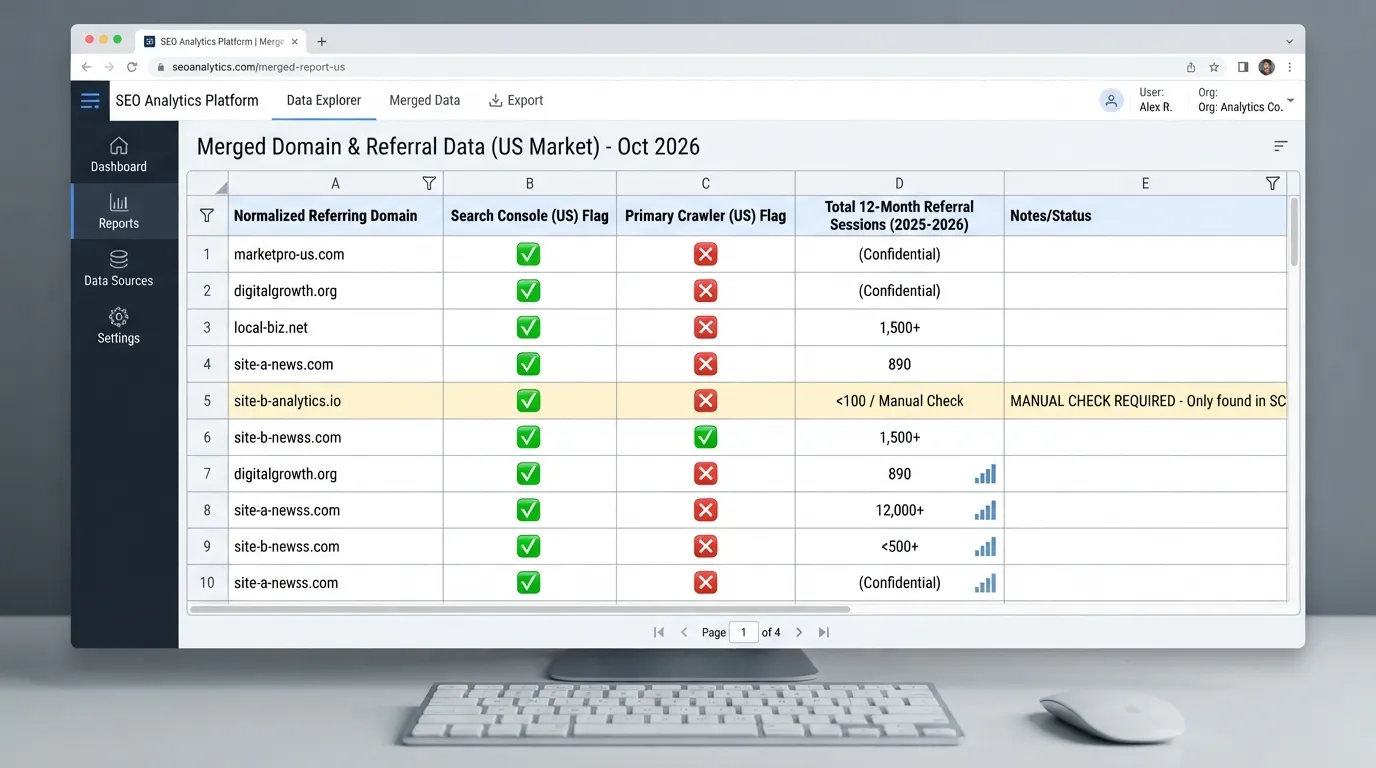
Third-party crawlers add breadth and history. Your analytics tool adds what most audits skip: referral traffic. A link that sends no visits and sits on a page nobody reads is a different decision from one that brings steady sessions, even if both look alike in a metrics table.
Follow these steps to merge the sources:
Deduplicating by domain rather than by URL keeps the analysis on the question that matters: how many distinct sites link to you, and what each one contributes. When you audit how to audit backlink profile data for a client, this merged list is the foundation everything else depends on.
Record the state of your profile before you disavow, reach out or remove anything. Without a baseline you cannot tell whether a later change helped or hurt, and you will have no answer if rankings move.
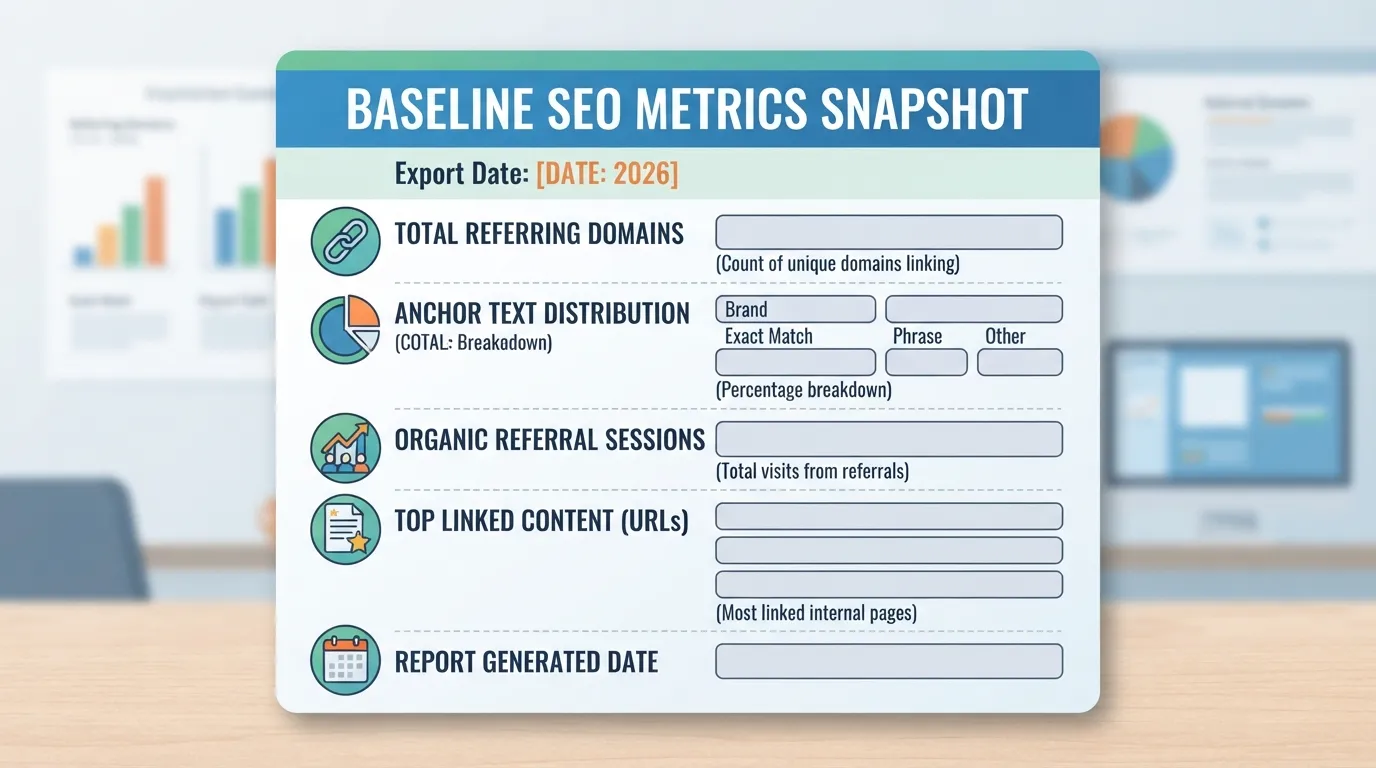
Capture the following and save each with its export date:
| Metric | Source | Frequency |
|---|---|---|
| Total referring domains and live backlinks | Primary crawler | Every audit |
| Referring domains by source | Search Console, primary crawler, combined | Every audit |
| Anchor text split (branded, naked URL, generic, exact-match) | Primary crawler | Every audit |
| Referral sessions from linking domains, last 12 months | Analytics | Every audit |
| Organic landing pages with the most external links | Primary crawler and Search Console | Every audit |
Store the baseline in a spreadsheet with a dated tab. Re-run the same exports at each audit so the comparison is like for like. When you return to this data during monitoring, the baseline shows whether the profile is growing in healthy ways or drifting.
Most backlink audits stop at data collection. The usual routine is to export the list, sort by domain authority, flag low scores, and start a disavow file. That wastes effort. A third-party metric shows how a site looks from the outside, not whether a link is worth keeping. When you audit a backlink profile properly, judge each link on two questions: could it send a real visitor to your site, and does it reflect a genuine editorial choice?
Third-party metrics such as domain authority are proprietary, and each tool calculates them differently. The same site can score differently across platforms. Google does not fully disclose how it handles links, so the thresholds in this guide are the author’s working rules, not documented Google policy. Treat metrics as prompts for review, not verdicts.
Start with relevance. Is the linking page connected to your business, and does the link sit inside the editorial body? A Chicago restaurant group mentioned in a local food blog’s review of its neighborhood has a link that makes sense to readers. The same group receiving a link from a payday loan directory does not.
Placement matters as much as topic. A link in body copy usually carries more meaning than one in a footer, sidebar, or author bio. Note where each link appears, and whether the page is an article, a resource, a directory entry, or a page built mainly to hold links.
Authority is the third signal, and it is one input, not a verdict. A Texas HVAC contractor listed in a state contractors association directory may have a modest authority score yet still be a legitimate, relevant link. Use authority to set your review order, not to decide the outcome alone.
Red flags tend to fall into a few recognizable patterns:
No single signal proves manipulation. A link with one flag deserves a closer look. A link with several flags needs a decision. Check the linking page itself, not just the domain, because a credible domain can host a thin page that exists only to sell links.
The Link Triage Matrix scores each referring link on two axes:
Crossing the two axes gives four actions: keep, monitor, investigate, or disavow.
| Quadrant | Relevance | Risk | Action |
|---|---|---|---|
| Keep and nurture | High | Low | Protect the link, maintain the relationship, and seek similar placements |
| Keep and monitor | Low | Low | Leave in place and recheck at the next audit |
| Investigate and replace | High | High | Review the page, then seek a cleaner editorial link to the same content |
| Disavow or request removal | Low | High | Attempt removal first; disavow only if removal fails |
Worked example 1: a link to keep. An audit of a regional accounting firm’s export returns this row: a local business association article on small-firm tax planning, with one link in body copy. Relevance is high and risk is low, so the quadrant is keep and nurture. The link is protected, and the firm maintains the relationship with the association.
Worked example 2: a decision that reverses the default. A second row shows a page on a financial site that looks risky at first glance. It carries a repeated exact-match anchor for “tax accountant,” appearing in body copy of a well-written industry post about payroll deadlines. The default reading of a repeated exact-match anchor is high risk, which would point to an investigate-and-replace action. Here, the audit reverses that default. The page is on-topic and editorial, the anchor is attached to a genuine recommendation, and the link has held for three years without a change in the linking site’s template. Relevance is high and risk is downgraded to low, so the quadrant becomes keep and monitor. The reason for the reversal is that risk signals describe how a link was obtained, and the page itself shows an editorial choice. Without that evidence, the anchor alone would have triggered a needless replacement effort.
Worked example 3: a removal case. A third row is an unlabeled “sponsored resources” page on an unrelated site, linking from a sitewide footer. Relevance is low and risk is high, so the quadrant is disavow or request removal. Send a removal request first, then disavow only if removal fails.
Apply the matrix to each link:
Keep this checklist in the same spreadsheet as your export so the decision stays with the data.
Detecting link-network clusters: Sort referring domains by the IP address or hosting provider shown in your link tool. Look for groups of unrelated domains sharing one IP block, one theme template, and similar anchor text. Open two or three pages from each group. If they contain thin content and mostly outbound links, mark the cluster high risk and review it as a unit.
Anchor text is one of the most misread signals in a backlink audit. A high share of keyword-matched anchors does not automatically mean over-optimization. The better test is to compare your distribution against your own history and a natural baseline.
A natural profile usually includes branded anchors (your business name), naked URLs (the bare web address), and generic phrases such as “click here” or “this guide.” Exact-match commercial anchors also appear, especially when a business is named in a directory or review. Use the mix of branded, naked-URL, and generic anchors as your reference, then look for shifts.
Overusing exact-match anchors, or repeating the same anchor across many links, can raise red flags and lead to penalties. On your own export, use this triage rule: if one exact-match commercial anchor accounts for more than 5% of your total referring links, review every link using it before deciding anything. Below that band, check the trend rather than the single share. This 5% figure is a rule of thumb set by the author to prompt review, not a published Google limit, and no named expert or dated study supports it. Test it against your own history before relying on it.
An audit only pays off when it ends in a decision. Once every referring link has a place in the triage matrix, each one falls into one of four actions: keep and nurture, keep and monitor, investigate and replace, or disavow or request removal. This section covers the last two actions, plus the recovery and upkeep steps most guides skip. A sound how to audit backlink profile process finishes here, with a clear record of what you changed and why.
The disavow tool in Google Search Console lets you ask Google to ignore specific links pointing at your site. It is a blunt instrument, and most sites never need it. Google’s guidance on manual actions explains when a site-level penalty applies and how to request reconsideration.
Our working view is that most disavow files do more harm than good. A file built from a generic spam score tends to catch natural links along with manipulative ones, and each wrongly disavowed link removes a signal you may have earned. Google states that it generally ignores unnatural links it does not count against a site, so a large file is often unnecessary. This is the author’s practice, not a documented rule, and Google does not fully disclose how it weighs links.
Use the disavow tool when:
Do not use the disavow tool when:
A practical sequence for a link you want removed:
Worked example: one link, one decision. An audit flags a referring page on a forum signature list. It has a high spam score, an exact-match anchor for a money term, and no referral traffic in twelve months. The triage matrix places it in the “investigate” quadrant. You send one removal request, no reply comes after the follow-up, so you add the domain to the disavow file and log the decision.
Second example: a decision that reverses the default. The same audit flags a relevant industry blog that uses a long-tail anchor. On paper it resembles a risk, since the link came from a site with a modest spam score. Yet it sends steady referral visits and sits in editorial copy. The default for an unknown domain might be “investigate,” but here the evidence reverses it to “keep and nurture.” The reason is that traffic and editorial placement are direct evidence of value, while a spam score is only a guess. Acting on the guess would cost you a link that was working.
Pure link-volume clean-ups without a clear reason are the most common mistake. Disavowing a domain that has quietly sent referral visits for years loses that traffic as well as the link signal.
Current links are only half the picture. Links that have disappeared, or that point at pages now returning a 404 error, are often the cheapest gains available, because the editor already chose to link to you once.
To find them:
Step-by-step lost-link recovery:
When you contact a site about a lost or broken link, be specific. Name the page on their site, the URL it used to link to, and the live URL that now serves the same content. A short, precise request gets a reply far more often than a general note asking for a link.
A one-off audit goes stale quickly. The schedule below is this writer’s own working practice, not a published standard: run a full audit quarterly, with a lighter monthly check on new and lost referring domains. Sites that acquire links actively, or that have had a penalty, may need monthly full reviews until the profile settles.
Track these metrics between audits:
| Metric | What to record | What a change may mean |
|---|---|---|
| New referring domains | Count and list, with triage quadrant | Growth from outreach, or a sudden spike worth checking for spam |
| Lost referring domains | Count and list, with reason if known | Page removals, site closures, or your own redirect errors |
| Anchor text distribution | Share of branded, naked URL, generic, and exact-match anchors | A jump in exact-match anchors can signal manipulation |
| Disavowed domains | Running list with dates | Confirms what you have told Google to ignore |
| Links to recovered pages | Count of restored or redirected targets | Shows whether recovery work is paying off |
A simple reporting template for each cycle:
Keep the template short. Its purpose is to record decisions, so the next audit can see what was done and why.
A backlink audit earns its keep only when it ends in a decision. Exporting a list of referring domains and sorting it by domain authority feels productive, but it rarely tells you which links to keep, which to fix, and which to leave alone. Knowing how to audit a backlink profile means turning that export into a decision for each link.
Score every referring domain on two questions. Could the link send a real reader to your site? Does it reflect a genuine editorial endorsement? Then place each domain in a quadrant of the Link Triage Matrix. Keep and nurture links that score high on relevance and low on risk. Monitor low-relevance, low-risk links without spending effort on them. Investigate high-relevance links that show risk signals. Reserve disavowal for low-relevance, high-risk links that show clear manipulation.
Here is a worked example that reverses the default action. A referring domain was a regional business directory. Its relevance was high because it sat in the right industry. Its risk was elevated because the same exact-match anchor appeared on dozens of unrelated pages. The default would be to disavow it. The team did not. They asked the directory to update the listing with the brand name, and the link stayed. A second domain, a link farm with no topical link to the site, scored low on relevance and high on risk. That one went onto the disavow list after outreach failed.
The triage rule is a judgment, not a formula. The directory had no obvious problem beyond its anchor, so the team gave it the benefit of the doubt. A link farm with no topical connection has no such case to make.
Most disavow files cause more harm than they prevent. Google has said it generally discounts links it considers unnatural rather than penalizing the site for them. A reflexive disavow file can therefore remove links that were quietly helping, and the cost of that mistake is often larger than the risk it was meant to remove. Attempt removal outreach first, and reserve the disavow tool for clear manipulation or a manual action. Google does not fully disclose how it weighs links, so treat any of these rules as practice, not guaranteed behavior.
No single link index sees the whole web. Combine exports, remove duplicate domains, and set a baseline before you change anything.
Finally, make the audit recurring. Track new referring domains, lost domains, and shifts in anchor distribution between reviews. Recheck lost and broken-page links too, since winning back a link you already earned is often the cheapest gain available. For broader context on the tooling side of this work, see our guide to seo tools. If you want a clearer picture of what an audit platform reports, read our overview of the seo audit tool.
Most US marketers should run a full backlink audit once or twice a year and a lighter check each quarter. Sites that earn links quickly, run large outreach campaigns, or recently changed domains or migrated pages should audit monthly for the first few months. Between audits, watch for spikes in new referring domains, sudden drops in referring domains, and shifts in your anchor text mix. Those signals show that something has changed. Let your link profile’s pace set the schedule.
Usually not. Google’s systems generally discount links they judge to be unnatural, so most low-quality links cause no harm, and removing them rarely helps. Disavow only when you have clear evidence of manipulation, such as links you or a previous agency paid for. You can also disavow when Google has issued a manual action for unnatural links in Search Console. Even then, try to get the links removed through outreach first. Disavowing good links by mistake can cost you rankings, so treat it as a last resort.
No single tool covers every link, so the best setup combines at least two sources. Google Search Console is a free tool from Google, and it shows the links Google has found to your site. That makes it the authoritative baseline. Pair it with one or two third-party link indexes, which crawl the web more broadly and show different referring domains. Ahrefs, Semrush and Moz are widely used options, and each has its own index coverage. Third-party metrics are proprietary and differ between tools, so compare trends within one tool rather than matching numbers across tools. Merge and remove duplicate domains before you score anything. For a broader overview of options, see our seo tools guide.
Indirectly, yes. An audit does not add links by itself. It shows you which links are worth keeping, which are lost and worth reclaiming, and which have become risky. Recovering a lost editorial link from a page that still exists, or fixing a broken link pointing to a dead page, can restore value quickly. Removing clearly manipulative links can reduce a risk that might otherwise hold you back. The gains come from the decisions the audit leads to, not from the report itself. If you want a clearer view of how audit tools surface these issues, read our guide to the seo audit tool.
A healthy profile is dominated by branded anchors (your company or domain name), naked URLs (the bare web address), and generic phrases such as “click here” or “this site.” Exact-match anchors that repeat across many unrelated sites are the pattern most likely to draw attention. No universal percentage counts as safe, so use your own profile as the baseline. In our own practice, we treat any single exact-match anchor above about 5% of a profile as a prompt to check where it came from. That threshold is a rule of thumb, not an industry standard. Compare your current mix with the mix you had before any link campaign, and with the mix of competitors ranking for your terms. A sudden jump in exact-match anchors you did not earn naturally is the pattern to investigate.

Tom is the CEO of MediaOne, a leading digital marketing agency. He is a business-experienced SEO consultant as well as a Google Gold Search Expert serving the international community. He has consulted for MNCs like Canon, Maybank, Capitaland, SingTel, ST Engineering, WWF, Cambridge University, as well as Government organisations like Enterprise Singapore, Ministry of Law, National Galleries, NTUC, e2i, SingHealth. His articles are published and referenced in CNA, Straits Times, MoneyFM, Financial Times, Yahoo! Finance, Hubspot, Zendesk, CIO Advisor. Under his stewardship, MediaOne has won dozens of prestigious digital marketing awards.
Run a free Digimetrics audit across SEO, AI search, content and technical health, and get a plan you can act on today.
Start free →You’ve found a potential SEO client, reviewed their website, and identified several problems worth fixing. Now you need a professional audit report that explains…
Your website has hundreds of pages, organic traffic is declining, and you’re not sure what’s causing the problem. Is Google struggling to crawl important…
The best SEO software for a small business is not necessarily the product with the most features. It is the tool that tells you…