SEO Audit
Free White Label SEO Audit Tool: What Agencies Actually Get
You’ve found a potential SEO client, reviewed their website, and identified several problems worth fixing. Now you need a professional audit report that explains…

To share an SEO audit report with developers, turn each finding into a ticket with a clear symptom, reproducible evidence, a root cause hypothesis, a pass or fail test and a named owner. Then give clients a summary of the same rows. This guide covers structuring the report, converting findings into tickets, prioritizing against sprint capacity and confirming fixes shipped.
Many SEO audit reports are admired and then left alone. The analysis is often sound. The gap is the handoff. A report without owners, reproducible evidence or a clear definition of “fixed” gets filed, not fixed.
Before you start, review the SEO audit tool and SEO tools you will use to gather evidence.
Audit reports often stall because they lack owners, not findings. A forty-page audit can sit in a shared drive for a quarter while its problems stay live. The report may be accurate, but it was not written for the person who has to change the code.
The gap between a finding and a shipped change is where most of the value disappears. A finding says what is wrong. A shipped change also requires knowing where the problem lives, what the correct state looks like, and how to confirm it is done. Reports usually supply only the first. Agency Dashboard’s SEO audit analysis reports that 72% of websites fail at least one critical technical factor, so teams often hand developers lists long enough to feel overwhelming.
Developers tend to stall in three places:
Clients read differently. Executives look for the business consequence and the decision they must make. When the summary is a list of technical codes, they cannot judge urgency. When traffic does not move immediately, the audit is judged a failure rather than an incomplete cycle.
A report gets fixed more reliably when each finding becomes a ticket with evidence, a root cause hypothesis, a pass or fail test and a named owner. Without those four elements, the report is a reading exercise.
The most common mistake is a single audit document written for everyone at once. The developer skims past the executive summary, the executive stops at the third table of crawl data, and nobody owns the fixes. Start by deciding who is reading each part.
A developer needs to know exactly what is broken, where, and how to prove it is fixed: URLs, observed behavior, suspected cause, and a checkable condition. An executive needs the business effect, the number of affected pages, and the decision required. A robots.txt error that blocks a directory is a line item for engineering and a risk statement for leadership.
Keep the executive summary on the first page, under one screen, with three to five findings. Each should state the issue, the share of the site affected, the likely effect on organic traffic or leads, and the ask.
For example: “Critical technical errors are preventing 40% of our key service pages from being indexed by Google, leading to an estimated loss of organic leads.” This illustrative sentence gives an executive the scale and the consequence without crawl jargon.
Use one template for every audit so readers learn where to look:
Store the template in a shared folder so every audit starts from the same skeleton.
An audit checks whether search engines can reach a website, index its pages, load them quickly for real visitors, and whether each page earns its target keyword. A good SEO audit tool can surface dozens of issues in one crawl, but the raw list is not yet a task. Each finding needs rewriting as something a developer can reproduce, fix and verify. This is how to share an SEO audit report with developers so that the findings lead to action. A clear report for clients can then show which findings matter most, and a health score gives the overall picture without replacing the detail.
Sort findings under three questions: can search engines find the page, do they index it, and does the page deserve to rank? Crawl, indexation and speed issues usually sit with engineering. Titles, headings and content gaps sit with marketing. Technical SEO issues such as broken links and redirect chains often span both teams, so label them with an owner before they go into the queue.
Name the affected URL or pattern, the observed behavior and the evidence in every finding. “Some pages are slow” cannot be fixed. “The product template at /shop/ takes 4.8 seconds to reach largest contentful paint in field data” can.
Crawlability problems stop search engines reaching a page. Indexation problems stop a reachable page entering the index. Tickets that blur the two waste engineering time.
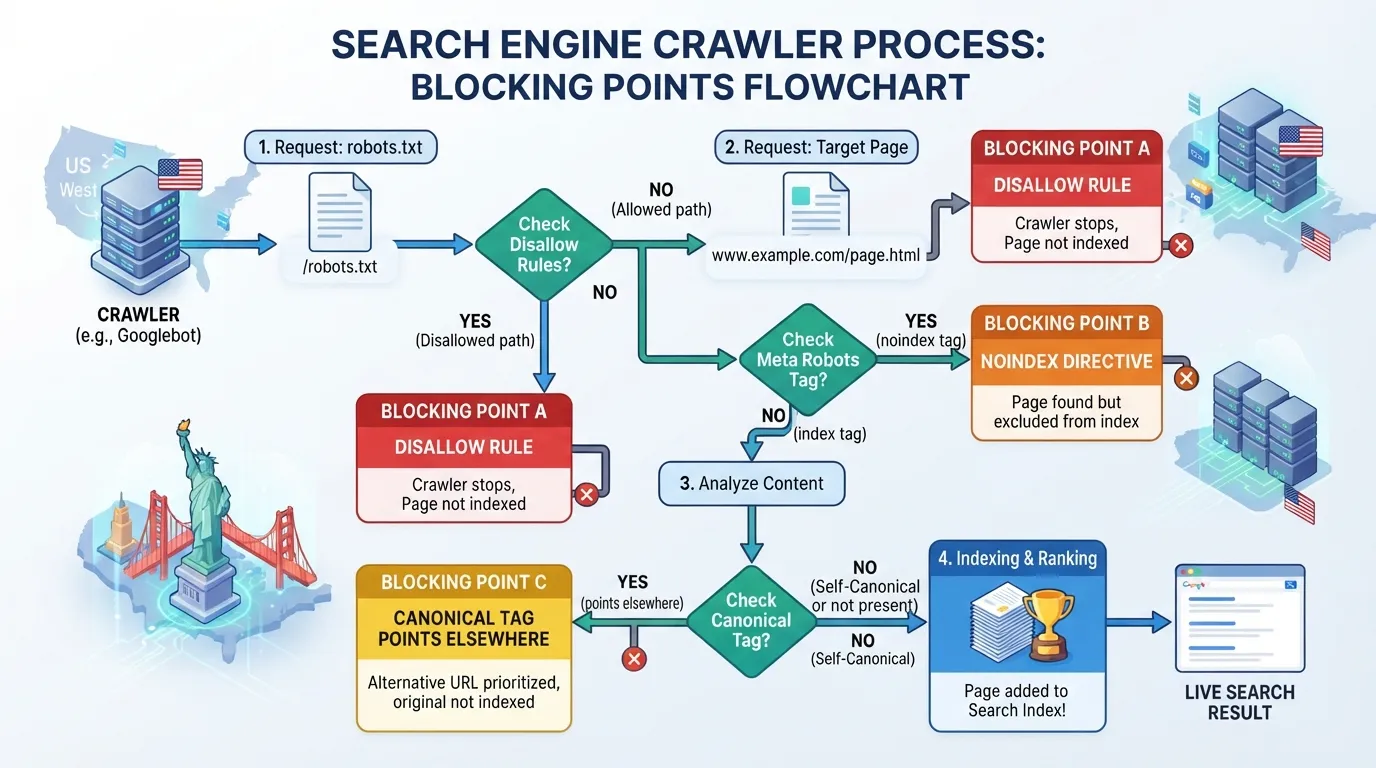
The most common crawlability ticket is a blocked or broken path. According to the same source, 25% of websites have crawlability issues from poor internal linking and robots.txt errors alone. Name the responsible rule, such as a Disallow line matching a folder that holds live product pages. Confirm the fix with the robots.txt report documentation.
For indexation, the usual causes are a noindex directive, a canonical tag pointing elsewhere, or a redirect chain. Use the URL Inspection tool and record the reported status so the developer can match the signature.
Speed findings land best when tied to user behavior. The same source notes that 53% of users abandon a site that takes more than three seconds to load, and reports a 24% increase in engagement for sites that meet Core Web Vitals standards.
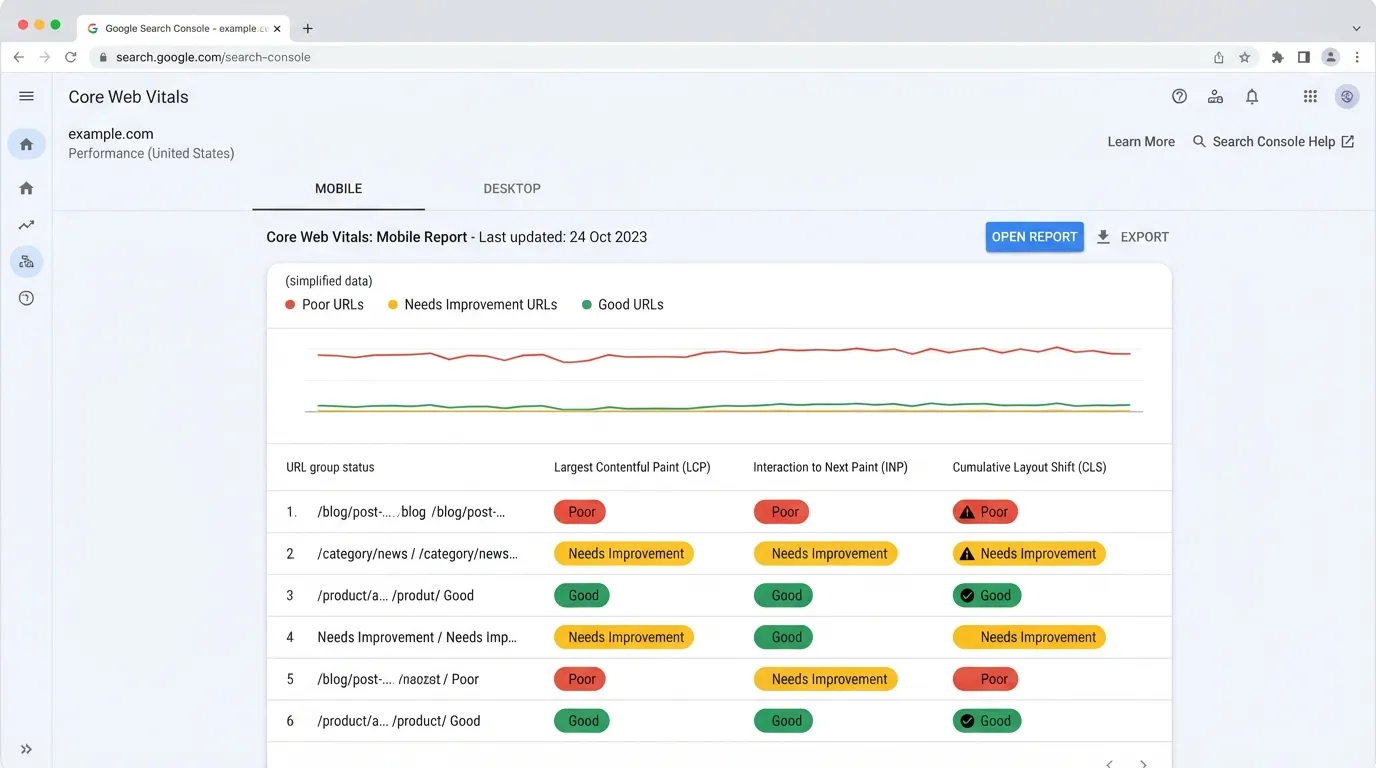
Write these tickets against field data where possible, since a crawler’s lab score can differ from real experience. Name the metric, the template, the current value and the target. Link the failing URL’s PageSpeed Insights report so the developer can open the same diagnostic.
On-page fixes are easy to hand over because they are usually text or template changes. They are also easy to over-report. A list of 400 missing meta descriptions with no prioritization teaches the developer to ignore the whole list. Missing title tags on key templates are the exception worth raising first.
Group findings by template and business value. A missing title on a high-traffic category template is one ticket, not 200. According to the same source, on-page signals account for 19% of organic local ranking factors, so fix local landing page titles before lower-value blog posts. Where internal links or a backlink profile point to a weak page, raise that page’s priority.
Every on-page ticket should state where the copy comes from, who approves it and what counts as done, so the developer does not have to guess whether a placeholder title is acceptable.
Every audit produces more findings than a team can ship in one sprint. If they all arrive with the same weight, the developer fixes whatever is easiest, and the most valuable change waits. Prioritization turns a list into a queue.
Score each finding on two questions: how much organic value does fixing it unlock, and how much engineering work does it take? The impact estimate should rest on evidence: pages affected, traffic or conversions attached to those pages, or whether the issue blocks indexation entirely.
Score impact from 1 to 5 and effort from 1 to 5. Then sort by impact vs. effort score, which is impact divided by effort. High-impact, low-effort items go first. High-impact, high-effort items become a scheduled project with a named owner, not a backlog item that quietly ages.
The ratio is a judgement call, not a formal method. Use it to order work, then adjust based on what you know about the site.
Speed deserves attention. The Core Web Vitals program from Google defines the thresholds that matter. Place the 53% abandonment figure from Agency Dashboard’s SEO audit guide next to the finding so the developer sees the stakes. Confirm that figure against its original source before relying on it.
Place each finding in one of four quadrants:
| Quadrant | Typical finding | Action |
|---|---|---|
| High impact, low effort | Stray noindex on key templates, broken canonical tags | Ship this sprint |
| High impact, high effort | Crawl budget problems from faceted navigation | Schedule as a project with a date |
| Low impact, low effort | Missing alt text on a handful of images | Batch into a routine task |
| Low impact, high effort | Rewriting legacy meta descriptions across an archive | Deprioritize or drop |
Attach the quadrant to each row of the handoff matrix so the developer sees the ranking and the reason for it. For a two-week sprint, commit only the top three to five items and state what is excluded. Developers already carry commitments, so the conversation is about trade-offs.
Cut-off rules help decide between the next sprint and a scheduled project. A finding with an impact score of 4 and an effort score of 2 gives a ratio of 2.0, so it goes into the next sprint. A finding with an impact score of 5 and an effort score of 4 gives 1.25, so it becomes a scheduled project with a date. Set the cut-off where your team’s sprint capacity runs out.
Revisit the matrix after each re-crawl. Effort estimates often shift once an engineer reads the template code, and an item that looked cheap can touch shared components. A health score for the site, tracked across crawls, shows whether the queue is shrinking.
A client-facing report has one job: help a non-technical decision-maker understand what is broken, what it costs and what they should approve. Most findings belong in the engineering backlog, not in front of the client. Treat the client report as a summary of the same findings, written for the client’s business profile rather than the developer’s.
Group findings into three buckets: issues blocking revenue, issues limiting growth and housekeeping. Keep the technical cause out of the headline and put the business effect first. For example: “Critical technical errors are preventing 40% of our key service pages from being indexed by Google, leading to an estimated loss of organic leads.”
Use numbers the client can check: a percentage of key pages, a count of affected URLs, or a trend in Google Search Console impressions. Where you cite outside benchmarks, attribute them. Agency Dashboard’s audit guidance reports that 72% of websites fail at least one critical technical factor, which shows the problem is common. Verify the figure before use.
Finish each bucket with an approval ask: approve the fix, approve the scope or accept the risk.
Convert the matrix into the client version in four steps:
Build the client deck in Google Slides or Looker Studio and share a link, which keeps the client on the current version. Aim for roughly one slide per bucket, plus a summary and a next-steps slide. Link the full engineering backlog for clients who want depth. Where a reseller delivers the report under its own brand, a white label version keeps the same structure with the agency’s branding.
Delivery cadence and feedback loop: send the client report at the close of each sprint, not only at the end of the audit. After each send, ask which findings the client wants explained in more depth, and log those questions to see which business effects need a clearer proof point. Track the links the client clicks through to the backlog, since they show where the client wants more content or detail, and check the technical SEO items they ask about most.
An audit report that lists problems is a diagnosis, not a work order. Each finding has to become a ticket a developer can pick up, reproduce and close without a follow-up question. The gap between “the report says this is broken” and “the ticket is in the sprint” is usually a missing field, not missing effort. A well-structured local seo audit or seo audit report for clients should therefore convert each finding into a complete ticket, not a summary bullet.
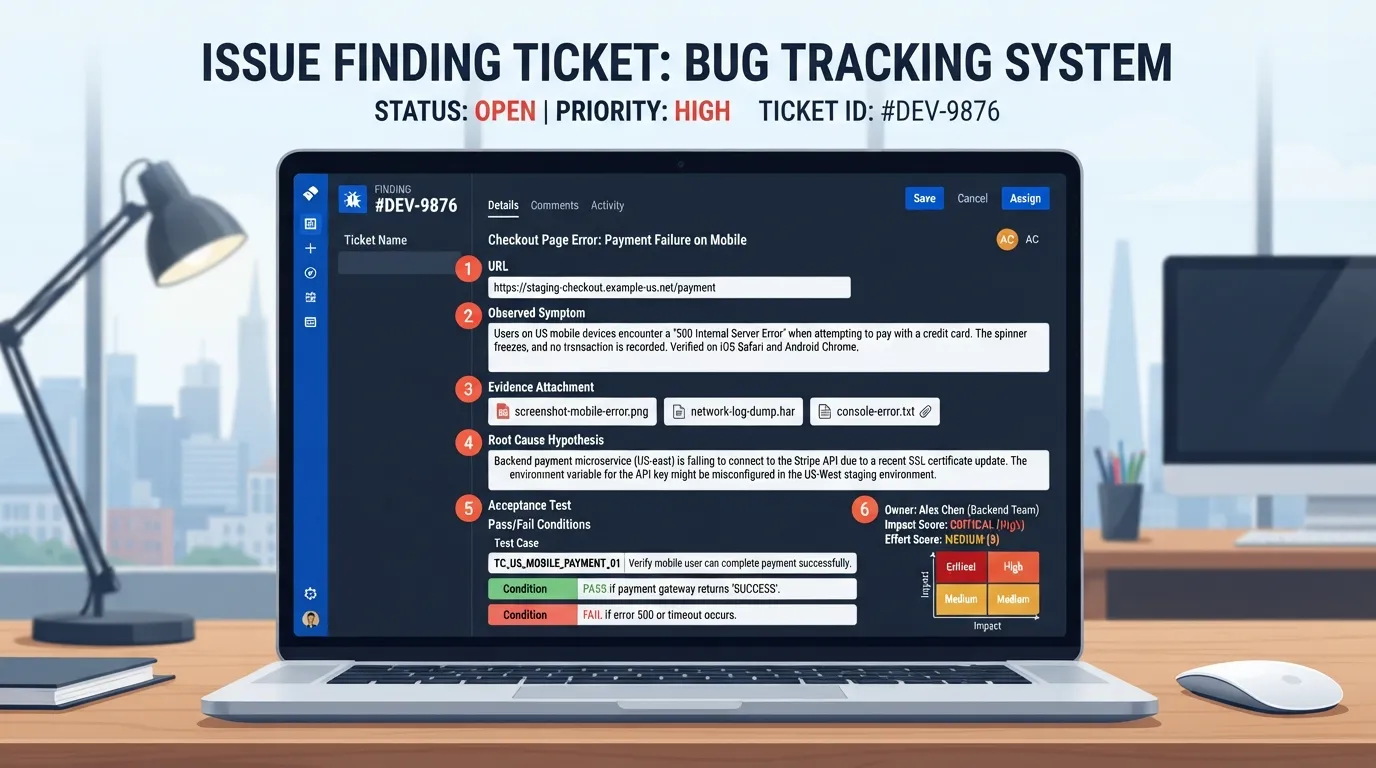
This guide recommends a Finding-to-Ticket Handoff Matrix, a format suggested for this process rather than an established industry method. Each finding becomes one row with five fields:
Worked example. Take the finding that critical technical errors are preventing 40% of key service pages from being indexed. This is an illustrative example, not a measured result, and the figure comes from this sample audit wording. The Symptom is service pages missing from Google’s index. The Evidence is the URL export and a screenshot. The root cause hypothesis is a noindex tag or a canonical pointing elsewhere. The acceptance test is a clean re-crawl and a passing URL Inspection result for every listed page. The owner is the template team, scored at impact 5 and effort 2. Each row can be pasted into Jira, Asana, Linear or GitHub Issues without rewriting.
Reproduction steps matter as much as evidence. A developer should be able to load the URL, view the source or headers and see the same problem, without installing anything or reading the full audit. If a step needs a specific user agent, a logged-out session or a particular crawl setting, write it into the ticket.
A written ticket still benefits from a short live handoff. Book a fifteen-minute walkthrough with the developer or engineering lead, covering only the top-scoring rows, with specific URLs, evidence and the acceptance test rather than SEO basics. Keep the walkthrough tied to the website pages that matter most to revenue.
Send the matrix before the call so the developer arrives with questions, then agree which items enter the next sprint. A high-impact fix often collides with committed work, so negotiate scope in the meeting. Trading a lower-impact ticket for a higher one is normal, and far better than an unscheduled fix that never ships.
Schedule the follow-up check at the same time, two weeks out. Re-crawl the affected URLs, confirm each acceptance test and log the result against its row. A ticket marked done but failing its test goes back to the backlog with the new evidence attached.
A developer will fix an SEO finding when it arrives as a ticket they can start on the same day. That means an owner, a URL list, reproduction steps and a test that defines done. The Finding-to-Ticket Handoff Matrix provides this structure for every item in the seo audit report.
After a fix ships, re-crawl the affected URLs, confirm the acceptance test passes and report the change in the format of the original findings. Large sites and frequently changing e-commerce catalogues benefit from monthly full audits, according to Agency Dashboard, though verify that figure against its source. Schedule these checks before the next sprint begins.
Turn each finding into a ticket in the tracker developers already use, such as Jira, Asana, Linear or GitHub Issues. Each ticket needs the affected URLs, evidence from Google Search Console or a crawl export, a root cause hypothesis, and a pass or fail acceptance test. Then walk the developer through the top items in a short call. Do not send the full PDF and ask for fixes.
A report for clients should answer three questions: what is wrong, what it costs in traffic or leads, and what happens next. Open with a short summary of overall website health and the three to five issues that matter most. Follow with the plan, owners and expected timing, then a progress section showing fixed items and re-crawl results. Keep technical detail in an appendix.
Score each finding on impact and effort, then sort into four groups: high impact and low effort first, high impact and high effort next, low impact and low effort as quick wins, and the rest last. Impact should reflect how many URLs are affected and how much organic traffic or revenue they carry. Effort should come from the developer, not the SEO.
Send the full audit only as reference material. Developers should receive a ticket queue with one row per finding and the evidence attached. The summary belongs with the client, who needs the business case rather than crawl data. Both audiences should draw from the same underlying rows so every figure in the summary traces back to a ticket a developer can check.
Run a full audit at onboarding, then on a schedule matching how fast the site changes. Quarterly is a common starting point, with more frequent checks for sites with heavy content changes. Between full audits, re-crawl only the URLs tied to open tickets to confirm each fix shipped.

Tom is the CEO of MediaOne, a leading digital marketing agency. He is a business-experienced SEO consultant as well as a Google Gold Search Expert serving the international community. He has consulted for MNCs like Canon, Maybank, Capitaland, SingTel, ST Engineering, WWF, Cambridge University, as well as Government organisations like Enterprise Singapore, Ministry of Law, National Galleries, NTUC, e2i, SingHealth. His articles are published and referenced in CNA, Straits Times, MoneyFM, Financial Times, Yahoo! Finance, Hubspot, Zendesk, CIO Advisor. Under his stewardship, MediaOne has won dozens of prestigious digital marketing awards.
Run a free Digimetrics audit across SEO, AI search, content and technical health, and get a plan you can act on today.
Start free →You’ve found a potential SEO client, reviewed their website, and identified several problems worth fixing. Now you need a professional audit report that explains…
Your website has hundreds of pages, organic traffic is declining, and you’re not sure what’s causing the problem. Is Google struggling to crawl important…
The best SEO software for a small business is not necessarily the product with the most features. It is the tool that tells you…