SEO Audit
Free White Label SEO Audit Tool: What Agencies Actually Get
You’ve found a potential SEO client, reviewed their website, and identified several problems worth fixing. Now you need a professional audit report that explains…
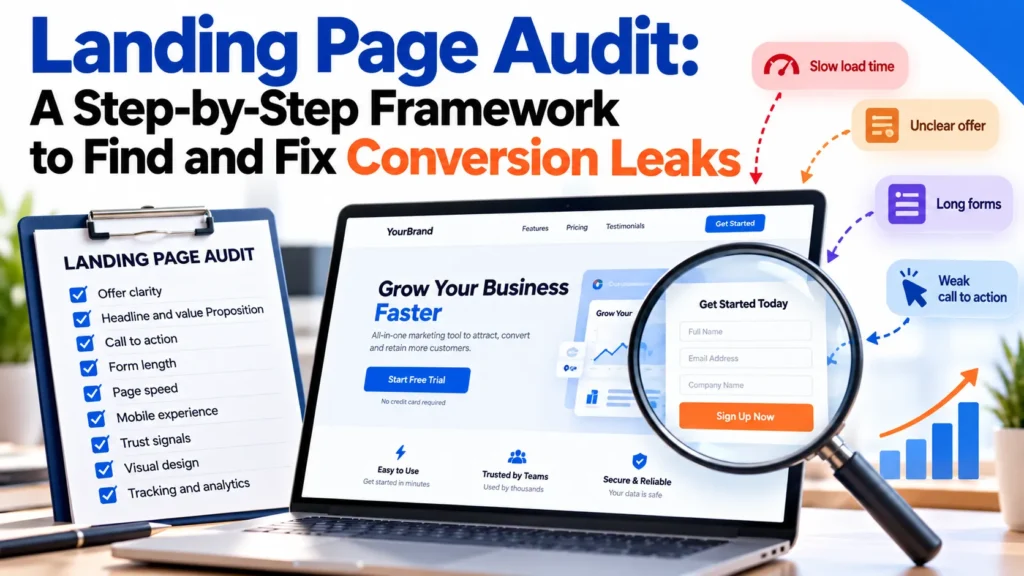
A landing page audit is a structured review that identifies where a landing page loses visitors, such as slow load times, unclear offers, and overly long forms. Run one before spending more on traffic so your marketing budget reaches more potential converters. The audit works in five stages: set a baseline, run a 5-second test, review the checklist, prioritize findings by impact and effort, then test and document each fix. Many teams start with a free audit template and reusable tools to keep the process consistent across pages.
The core question for every page is simple: at which decision stage does a stranger leave, and why? Unclear offers need clarity. Visitors who understand the offer but do not act need a clearer next step. Visitors who stall need a shorter path. Audit in that order, and rank fixes by how much traffic they touch rather than by how many problems you list.
A paid landing page campaign with a 2.1% form-submission rate over four weeks shows what a completed audit produces. In the 5-second test, the headline named the company but not the outcome. The fix was one clear line naming the outcome, tested against the original baseline. The example is illustrative, not a named client result.
Most underperforming landing pages need a few well-chosen fixes, not a rebuild. Redesigns often stem from frustration rather than evidence, and they can replace working elements along with broken ones. A landing page audit keeps what works while you fix what is actually leaking conversions, and it gives you the best starting point for understanding where your search traffic drops off.
Losses cluster around slow load times, unclear offers, long forms and competing calls to action. Speed is easy to test before design work begins, though its effect varies by traffic, device and page type. Page speed and form length issues often surface first in a free audit.
Audit first when traffic is steady and the conversion gap is unexplained. Rebuild only when the offer has changed, or you can’t fix the structure. A landing page audit reveals where you stand at a fraction of a redesign’s cost. Check your marketing content first, since clearer messaging often closes the gap without structural change.
Most audit guides hand you a long list and leave you to guess where to start. The process below runs in five stages, and the order matters. If you jump straight to a checklist, you will fix whatever is easiest to see, not whatever costs you the most conversions.
Pick one conversion goal, such as form submits or trial sign-ups, and record its current rate over a stable period. Without a baseline, you cannot tell whether a fix worked. Note the load time too. Boldive’s landing page audit guide reports an average drop in conversion rate of 4.42% per additional second between seconds 0 and 5, which is one source to verify before you rely on it.
Show the page to someone unfamiliar with it for five seconds, then ask what it offers and what they should do next. If they cannot answer both, fix the headline and call to action first, since visitors read the messaging before anything else on the page. Start with a clear message, because it shapes how visitors judge every other element and helps them quickly decide whether the landing page has the right information for them. Ask the same question of your other landing pages, since a free offer that is hard to understand will underperform wherever it appears.
Walk through the offer, CTA, form, trust signals, copy and technical items. Record every finding, but act on none yet. Review images too, since oversized or slow-loading ones often hurt both speed and conversions. Use analytics and SEO tools to flag technical difficulties that may also affect search visibility across the whole site, not just this one page. Review the page content and any free resources it links to as well, since weak copy anywhere in that path lowers conversions.
Worked example: the 5-second test flags a headline that names the company but not the outcome. The finding is added to the list as “unclear offer, high impact.” Stage 4 scores it as high impact and low effort, since it requires only a copy change. Stage 5 then tests the rewritten headline against the baseline and records the result in the audit log.
This is where most audits fall short. Score each finding on two axes:
A vague headline is high impact and low effort, so fix it this week. A slow hero image that requires re-compression and re-hosting is high impact and high effort, so please schedule it.
| Impact | Effort | Action |
|---|---|---|
| High | Low (under an hour of copy or settings) | Fix this week |
| High | High (more than a day of developer time) | Schedule and hand off |
| Low | Any | Log, do not act |
Change one high-priority item at a time, measure it against the baseline, and record the result. Keep the audit log so the next review is based on evidence rather than memory. Note which pages and copy drove the strongest results, so the lessons carry into future marketing work.
Worked example, continued: the rewritten headline runs against the baseline for a stable period. The log records the new conversion rate, the date, and whether the headline alone explains the change. Only then does the team move to the next high-priority item.
Most landing pages lose visitors before they understand the offer. If a visitor can’t say what you sell and why it matters to them, they won’t convert. The first audit question is simple: can a stranger tell what the page offers within five seconds?
Test the headline and subheadline against one question: does the page name the outcome the visitor wants, in their words? Vague claims such as “innovative solutions” fail. Concrete offers such as “Start my free trial” or “Save 20% on your subscription” pass. Boldive’s landing page audit guide gives these as CTA examples. Keep the headline’s messaging consistent with the language your target audience already uses, and state the offer clearly enough that a first-time visitor needs no further reading to understand it.
Show the page to 15 to 20 target users for five seconds, then hide it. Ask what the product is, who it is for and what they should do next. If many cannot answer, the offer is unclear. Record each answer in your audit checklist so you can easily compare issues across rounds, and track each round’s results against the previous one.
Each page should have one primary goal and one call to action. Pass threshold: one primary CTA on the page. If the page asks for a demo, a download and a newsletter sign-up at once, visitors may choose none. Repeat the one CTA where intent peaks and remove the rest. List non-essential links in the audit and remove or reposition them below the fold to keep the page focused on a single goal.
These three elements are often reviewed together, but each needs its own check.
Please request only the fields necessary to act on the lead. Pass threshold: no more fields than the lead needs, and no placeholder used in place of a label. Every field should carry a visible label that stays after someone starts typing. Before: nine fields, with a placeholder reading “Enter your details”. After: three visible labels (name, work email, and company) and a submit button reading “Get my quote”. Error messages should name the exact field and say how to fix it.
Multi-step forms can help when the required information is long. Boldive’s guide for auditing landing pages suggests testing this format if research shows eight fields are needed, with the easiest details first. Treat it as a hypothesis to measure against your single-step baseline.
Place social proof next to the claim it supports, usually just before the form or buy button. Before: a logo wall at the top of the page and nothing near the button. After: a named customer result beside the CTA. To gather the proof, ask recent customers for a specific outcome in their own words, then place that quote beside the claim it supports. Keep trust signals specific and verifiable rather than generic badges.
Most visitors scan before they read. Test whether the headline, subheads and bolded phrases make the argument on their own. Replace generic lines such as “we deliver quality” with what the visitor actually gets, for example “a written quote within one working day”, stated only where your offer confirms it. Keep the copy on each page consistent with the rest of your site.
Confirm the page speaks to the audience your market research identified. Collect the exact words your audience uses from customer interviews, support tickets, reviews and search terms, then reflect those words in the headline. The offer, headline and imagery should match the ad that brought the visitor in. A mismatch is one of the cheapest conversion leaks to fix.
Every image, video or chart should show something the text cannot, such as the product in use or a real result. Decorative stock photography adds weight without persuasion. Pass threshold: each image earns its place and loads quickly on mobile. Use tools such as a page speed tester to check load time before you publish.
Start with speed. Use a page speed tester such as Google PageSpeed Insights to record the current result before any change. Google’s research shows that a one-second delay in page load time can reduce conversions by 7%, which is why speed belongs at the top of the checklist. Boldive’s guide for auditing landing pages puts the drop at an average of 4.42% per extra second between seconds 0 and 5, but that figure comes from a single source, so verify it against your own traffic before you rely on it. Check current thresholds in Google’s Core Web Vitals documentation.
Check the page on a phone. Confirm the CTA is within thumb reach, the text is readable without zooming, and forms work on a small screen. Free mobile-friendly testing tools can flag common layout problems before visitors encounter them, and they help you catch issues on the devices your visitors actually use.
Confirm search engines can access and read the page. HubSpot notes that JavaScript-dependent content can delay crawling or go undiscovered if rendering fails. Verify that the main content and links appear in the HTML and that robots.txt does not block the landing page. A developer should handle these checks and resolve any issues they identify since fixing crawl and rendering problems early helps the page convert the visitors it attracts.
A landing page audit earns its place when it leads to a decision. Implement the one or two changes most likely to move a conversion metric, measure the result, and repeat. Log each outcome so the next audit is based on evidence.
Rank findings using the impact and effort grid in Stage 4. Please prioritise high-impact, low-effort items this week and schedule the remaining items accordingly.
Revisit the audit when the offer changes, traffic sources shift, or a metric drops without an obvious cause.
A proper audit can take 40 to 60 hours, or 2 to 6 weeks, depending on the size of the site. A focused audit of one page is much shorter, and the five-second test and audit checklist take an hour or two. Technical checks such as load speed and mobile rendering add time if a developer must investigate.
A marketer who owns the conversion goal should lead it. After you address the first three audit goals, bring in a developer or IT team, as HubSpot advises in its website audit guide. Their job is to confirm rendering, speed and tracking, not to rewrite the messaging.
Audit your website a few times a year, and review any page driving paid traffic or a key campaign after any major change to the offer, form, or template. You can review pages with stable traffic twice a year, or whenever the conversion rate drops without a clear cause.
You need your analytics platform, a heatmap or session recording tool, and a page speed tester such as Google PageSpeed Insights. A spreadsheet is enough for the priority grid and audit log.
No. A landing page audit focuses on one page’s conversion path: offer, call to action, form and trust signals. As HubSpot describes it, an SEO audit reviews technical and on-page SEO, off-page SEO, and backlinks across a site. The two overlap on load speed but answer different questions.
Start with high-impact, low-effort items such as a clearer headline, a shorter form or a single call to action. Schedule high-impact, high-effort fixes like load-time work next, and log low-impact findings without acting on them. Two or three fixes at a time is a sensible default.

Tom is the CEO of MediaOne, a leading digital marketing agency. He is a business-experienced SEO consultant as well as a Google Gold Search Expert serving the international community. He has consulted for MNCs like Canon, Maybank, Capitaland, SingTel, ST Engineering, WWF, Cambridge University, as well as Government organisations like Enterprise Singapore, Ministry of Law, National Galleries, NTUC, e2i, SingHealth. His articles are published and referenced in CNA, Straits Times, MoneyFM, Financial Times, Yahoo! Finance, Hubspot, Zendesk, CIO Advisor. Under his stewardship, MediaOne has won dozens of prestigious digital marketing awards.
Run a free Digimetrics audit across SEO, AI search, content and technical health, and get a plan you can act on today.
Start free →You’ve found a potential SEO client, reviewed their website, and identified several problems worth fixing. Now you need a professional audit report that explains…
Your website looks fine. The pages load, the navigation works, and visitors can contact your business. But does that mean your website is healthy?…
Your website has 150 published articles. Some attract consistent organic traffic, others haven’t generated a meaningful visit in months, and several cover nearly identical…