SEO Audit
Free White Label SEO Audit Tool: What Agencies Actually Get
You’ve found a potential SEO client, reviewed their website, and identified several problems worth fixing. Now you need a professional audit report that explains…
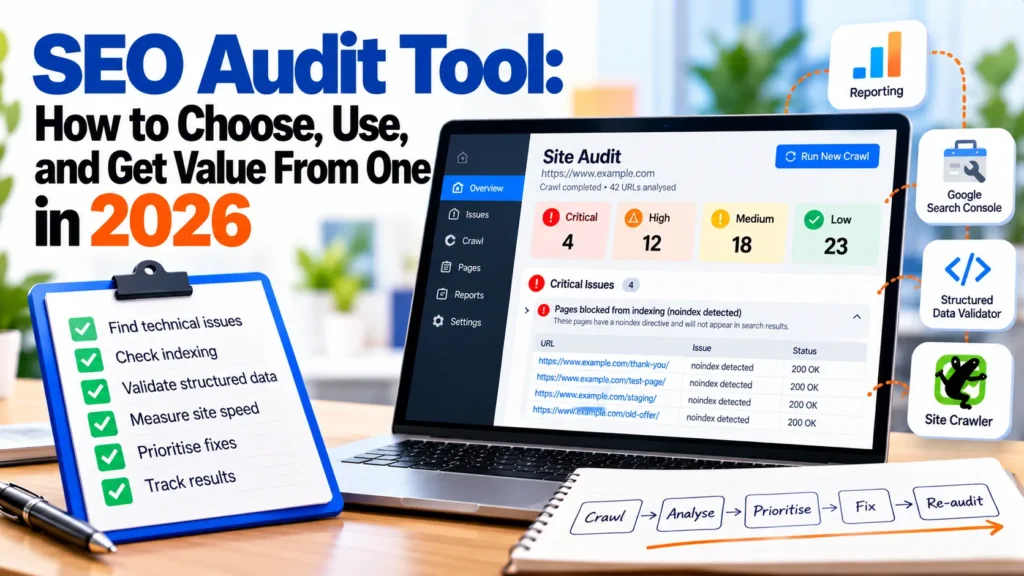
An SEO audit tool crawls your website and flags technical problems that can hold back search rankings. Choose one based on the decisions it must support: how many URLs you crawl, which issues you will act on, and how often you re-run it. Most small teams do well with one crawler and one reporting tool.
Unnoticed problems such as redirect chains, duplicate title tags, or pages dropped from the index can cost rankings for months. The workflow around the tool determines results.
An SEO audit tool crawls a website and reads each page like a search engine bot, then flags problems that could affect how the site appears in search. The crawler follows links from a starting URL until it has mapped the site or reached its URL limit.
Rule checks test each page against conditions such as a missing title tag, a 404 response, or a canonical tag pointing somewhere unexpected. A canonical tag tells search engines which version of a page to treat as the main one. Each failed condition becomes an issue with a type, a severity and a list of affected URLs.
HubSpot’s overview of SEO analysis tools groups the market into five categories:
| Category | What it answers | Typical examples |
|---|---|---|
| Site audit tools | Is the site technically healthy? | Screaming Frog SEO Spider, WebSite Auditor, OnCrawl |
| Keyword research tools | What are people searching for? | Semrush, Ahrefs |
| Rank tracking tools | Where do my pages rank over time? | SE Ranking, Semrush |
| All-in-one suites | Can one platform cover most tasks? | Semrush, Moz Pro, Raven Tools |
| AEO and AI visibility tools | Do AI answer engines mention my brand? | Newer, less standardised products |
Only site audit tools directly find technical faults. Most teams build a stack from multiple categories.
The checks that matter most are broken internal links (4xx or 5xx responses), redirect chains, duplicate title tags and meta descriptions, missing or invalid structured data, and slow server response. Structured data is code that describes a page’s content to search engines, such as recipes or products.
Vendors advertise large check counts. SE Ranking’s website audit tool runs 115+ checks, and Ahrefs Webmaster Tools, a free option for sites you own, scans for 100+ common SEO issues. A large count is not the same as useful coverage.
Most crawls produce far more flags than a team can fix, so triage is the real skill. Work through a crawl in this order:
When comparing tools, filter by severity and ignore the headline count. Please run this triage on a sample crawl before committing to a tool. Suppose a 2,000-page catalogue returns 340 flags: if 12 are noindex tags on category pages, those 12 matter more than the other 328 combined.
Many buying decisions for SEO audit software go wrong at the same point: teams compare check counts. One platform advertises 110+ technical difficulties (MainWP), but a longer list is not a better fit. The useful question is which SEO audit tool produces the decisions you will actually make and whether it helps your marketing team act on them. A strong SEO audit tool turns raw crawl data into a short list of fixes that move rankings, and each analysis should end in a clear next step.
Score every candidate on five axes before you compare prices:
Pricing is the last filter. Check whether you pay per seat, per crawl or per URL. Free tiers typically cap crawling at 500 URLs. One vendor’s paid tier starts at $171 a month for 100K crawl pages (Shane Barker). Please confirm the current prices on the vendor’s site before budgeting.
Site audit tools are the category most teams need first. They crawl your pages and surface broken links, redirect chains, duplicate titles and missing structured data. Standard practice is to run a full seo audit at least once a quarter, with a lighter crawl after each major release.
When to use a desktop crawler: a single analyst auditing a site under the free cap. Screaming Frog SEO Spider’s free version runs on your desktop and is capped at 500 URLs (Seosly).
Use a cloud crawler when URL counts are large, or several people need the same results. OnCrawl lets you crawl 10 million URLs per month (Seosly). The trade-off is a subscription cost.
Site audit tools cannot judge intent. A crawler can report that a page is marked noindex, but it can’t say whether it should rank, so pair the crawl with search performance data and a technical SEO review by someone who understands your business goals. Tools that have been in production for years still need human judgement on top.
These tools show what to target and where you rank. Use them after an audit has cleared the technical blockers, since a page Google cannot index will not benefit from keyword work.
All-in-one suites bundle a crawler, keyword tools, rank tracking and reporting under one login. Platforms such as Semrush fall into this group. Their crawlers are often less capable than dedicated ones, and growing teams usually outgrow a suite’s crawler first. Compare the suite’s crawl analysis against a dedicated seo audit tool before committing.
AEO and AI visibility tools claim to measure how your brand appears in AI-generated answers. The category is new, and the evidence behind its measurements is thin. Vendors share no standard method for counting AI citations, so two tools can report different visibility for the same page. Ask how each vendor samples answers, and do not treat these tools as a replacement for a site audit or a broader analysis of search performance.
Free SEO audit tools cannot fully replace paid crawlers for large or complex websites, but they can identify many of the technical difficulties affecting smaller sites. The key is understanding what each tool does best and where it falls short. A practical starting point is to combine a free website crawler, such as Screaming Frog SEO Spider, with Google Search Console for indexing and search performance data, and PageSpeed Insights for website speed analysis. The best SEO audit tool is not necessarily the one with the most features, but the one that identifies actionable problems relevant to your website. Combined with other SEO tools for ongoing monitoring and keyword research, this approach helps businesses prioritise fixes based on technical severity, search demand, and potential traffic impact. Regular SEO audits also help detect emerging issues, validate completed fixes, and maintain website performance over time.
Search Console shows what Google itself sees. Its indexing reports list pages that are indexed, excluded or erroring. Its Core Web Vitals report groups URLs by real-user performance, and its performance data shows clicks and impressions by query and page. Google documents each report in its Search Console help.
Verify your site, then submit your XML sitemap under the Sitemaps report. Check these reports first:
Search Console reports are only on Google and lag behind live changes. Confirm findings before acting. Teams running an on-page SEO review should start here.
The Rich Results Test checks whether structured data markup is correctly implemented and eligible for rich results in Google Search. Google’s structured data documentation explains which properties each result type needs. It validates markup only, so pair it with a crawler for site-wide diagnosis. Errors block eligibility, while warnings usually mean a recommended property is missing.
PageSpeed Insights gives a page a score from 0 to 100, based on page load time, server response time, and time to interact. Treat a score below 50 as a priority, 50 to 89 as needing work, and 90 or above as healthy. Check the field data first, since it reflects real users, then use the lab diagnostics to find the cause.
A desktop crawler finds problems across every linked page, which Search Console cannot do. Screaming Frog’s SEO Spider has a free version capped at 500 URLs that runs locally. WebSite Auditor also offers a free tier capped at 500 URLs. A crawler starts at your homepage, follows internal links and records the status and content of each URL it reaches. Pages with no internal links pointing to them stay hidden from that process.
The cap decides fit. A 300-page brochure site fits comfortably, while a 2,000-URL e-commerce store does not. Product variants, filtered category pages and paginated URLs inflate totals quickly, so count them from your sitemap or Search Console’s indexed count.
Ahrefs Webmaster Tools is free for verified site owners. It monitors overall site health, scans for 100+ common SEO issues and gives fix advice. That suits ongoing monitoring rather than deep one-off audits.
Free website audit reports give a quick score and a list of surface issues, such as missing meta descriptions or slow images. They cannot show crawl depth, internal link structure, server log behaviour or how Google renders JavaScript. Confirm each finding in Search Console or a crawler before acting. This approach keeps the audit focused on what affects crawling and indexing.
Free tools stop being enough when URL count, the number of people acting on results, and the need to compare audits over time grow. The free Screaming Frog and WebSite Auditor tiers both stop at 500 URLs. A catalogue of 2,000 products, plus category and filter pages, exceeds that limit in a single crawl.
Move to a paid platform when any of these apply:
If none apply, a free stack will serve you well. If two or more apply, a paid plan usually costs less than the hours spent stitching free exports together.
Vendors charge per seat, per crawl, or per URL or project. Confirm current plans on each vendor’s pricing page, because tier limits change without notice.
| Tool | Crawl capacity | Price point (USD) | Key differentiator |
|---|---|---|---|
| Screaming Frog SEO Spider | Up to 500 URLs free, desktop | Free | Deep technical crawl on your own machine |
| WebSite Auditor | Free up to 500 URLs, paid above | Free, then paid | Content and on-page recommendations |
| OnCrawl | 10 million URLs every month | Paid | Very large-scale cloud crawling |
| Raven Tools | Entry-level plan, crawl pages included | From $49 per month | Reporting and client dashboards |
| Ahrefs Webmaster Tools | 100+ common issues monitored | Free | Health monitoring with fix advice |
The $49 monthly figure for Raven Tools is a reference point, not a quote. Higher tiers typically add capacity and features such as log file analysis and JavaScript rendering, so ask each vendor which feature sits in which tier.
Cloud crawlers exist because desktop software runs out of memory when you have a high number of URLs. OnCrawl allows you to crawl 10 million URLs every month. Consider a cloud crawler when:
Below those thresholds, a desktop crawler is faster to set up, cheaper and easier to inspect.
Paid platforms earn their price mainly through reporting:
Before buying, export one sample report and show it to the person who will act on it. Ask them to identify the top three fixes within a minute. If they cannot name three fixes, the report is just decoration, however polished it looks.
The best SEO audit tool depends on who uses it and how often. Score each candidate on crawl capacity, issue coverage, rich-result validation, reporting cadence and cost per audit, then weight those scores by site and team size. Original tools often stop fitting as sites grow, so teams revisit their SEO tools regularly.
Start free. The free version of Screaming Frog crawls up to 500 URLs, which is enough for small sites and spot checks. Add Search Console for indexing status, Google’s Rich Results Test for structured data, and PageSpeed Insights for speed scores on key templates. Free tools can also help you build a basic keyword research habit without any subscription, and they are a sensible way to run your first SEO audits on a small website.
Upgrade when the site grows beyond 500 URLs, or you need scheduled crawls. Raven Tools starts at $49 a month.
An in-house team usually needs a site crawler, Search Console and a rank tracker. Avoid a full suite, since you pay for seats and features you rarely use. Many in-house marketers also run their own social media and digital marketing reporting, so a tool that exports cleanly into shared dashboards saves time.
Export the crawler report and count the issues that block indexing or rich results. A short, stable list means a mid-tier crawler plus Search Console is enough. A long list that grows after every release means you need scheduled crawls, a named owner for each issue type, and audit findings that feed regular reviews of your SEO tools.
Agencies need reporting capacity, multi-client management and white-label output. This scenario is where a paid suite pays for itself. An SEO audit tool that runs audits across many domains from one login can save more staff time than the subscription costs. Platforms like Semrush bundle crawling, rank tracking, and reporting under one login, and agencies that have used this setup for years tend to value that consolidation.
Consider the price per seat and per crawl in relation to your client count. If an audit takes more than an hour of analyst time per client each month, automation is worth paying for. Check that the crawl limit covers your largest client, since a 2,000-URL e-commerce site will exceed most free allowances.
Match the symptom to the category before you buy:
| Symptom or goal | Tool category | Example from the sources |
|---|---|---|
| Pages not indexed or missing from results | Search Console | Coverage and indexing reports |
| Structured data not producing rich results | Validator | Google’s Rich Results Test |
| Slow pages | Speed diagnostics | PageSpeed Insights (0 to 100 score) |
| Broken links, redirect chains, duplicate titles at scale | Site crawler | Screaming Frog, OnCrawl |
| Thin content across hundreds of pages | Crawler plus content analysis | Crawl export combined with a content review |
| Rankings falling for target terms | Rank tracker | Keyword position history |
This framework assumes you diagnose the symptom correctly. Many teams see a traffic drop and buy a crawler when the real cause is an indexing exclusion visible in Search Console. Check Search Console first.
An SEO audit tool helps only when you triage, fix, and recheck problems. The right choice depends on use case, team size and audit frequency.
Start free with Google Search Console, a desktop crawler capped at 500 URLs and Google’s Rich Results Test. Add paid capacity only when the site outgrows the crawl cap or the team needs scheduled reports. Re-audit after every migration.
Run a full crawl monthly for an active site, or quarterly for a stable one. Audit after any migration, redesign, CMS update or sudden traffic drop.
For small sites, often yes. Screaming Frog SEO Spider’s free version and WebSite Auditor’s free tier both cap crawling at 500 URLs. Ahrefs Webmaster Tools is a free option that scans for 100+ common issues. Upgrade when you outgrow the cap or need scheduled reports. Confirm current limits on each vendor’s site.
Pair a site crawler for structural problems, Google Search Console for indexing and performance, and a rank tracker to measure fixes. Add Google’s Rich Results Test to validate structured data.
Many integrate with Google Analytics and Google Search Console. Check the integration list before buying. A crawler that exports clean CSV files can often do the same job.
Only partly. Audit tools check crawlability, indexing and structured data, which AI answer engines rely on. They do not measure whether a model cites your pages, so track citations and referral traffic yourself.

Tom is the CEO of MediaOne, a leading digital marketing agency. He is a business-experienced SEO consultant as well as a Google Gold Search Expert serving the international community. He has consulted for MNCs like Canon, Maybank, Capitaland, SingTel, ST Engineering, WWF, Cambridge University, as well as Government organisations like Enterprise Singapore, Ministry of Law, National Galleries, NTUC, e2i, SingHealth. His articles are published and referenced in CNA, Straits Times, MoneyFM, Financial Times, Yahoo! Finance, Hubspot, Zendesk, CIO Advisor. Under his stewardship, MediaOne has won dozens of prestigious digital marketing awards.
Run a free Digimetrics audit across SEO, AI search, content and technical health, and get a plan you can act on today.
Start free →You’ve found a potential SEO client, reviewed their website, and identified several problems worth fixing. Now you need a professional audit report that explains…
Your website has hundreds of pages, organic traffic is declining, and you’re not sure what’s causing the problem. Is Google struggling to crawl important…
The best SEO software for a small business is not necessarily the product with the most features. It is the tool that tells you…