SEO Audit
Ahrefs SEO Audit Tool: Features, Free Limits, Pricing & Alternatives
Your website has hundreds of pages, organic traffic is declining, and you’re not sure what’s causing the problem. Is Google struggling to crawl important…
You’ve found a potential SEO client, reviewed their website, and identified several problems worth fixing. Now you need a professional audit report that explains those findings and shows why your agency is qualified to help.
The problem? Most free SEO audit tools either limit the number of pages you can check or export reports with someone else’s logo.
Some let you run the audit for free but charge for branded PDFs. Others provide unbranded reports without offering the recurring monitoring and client management features agencies need.
So, is there a genuinely free white label SEO audit tool?
Yes, some services offer free, unbranded exports that agencies can customise. However, fully branded reporting, scheduled audits, multiple client projects, and more comprehensive technical analysis often come with paid subscriptions.
The important distinction is between running an SEO audit for free and delivering an automated report under your agency’s branding.
This guide explains what free white-label SEO audit tools actually provide, which limitations matter, what a professional client report should contain, and how Digimetrics helps agencies build repeatable SEO reporting workflows.
A white label SEO audit tool analyses a website and allows an agency to present the findings under its own brand.
Instead of sending a generic report carrying the software provider’s logo, the agency can deliver a document that reflects its identity and services.
Depending on the platform, white-label functionality may include:
Not every white-label platform supports all these features.
Some only remove the provider’s branding. Others allow deeper customisation and automated reporting.
The technical audit itself may remain identical regardless of branding.
White labelling changes how the findings are presented, not necessarily how the website is analysed.
For agencies, the real value comes from combining useful SEO findings with a consistent, professional reporting experience.
Yes, but you need to understand what “free” includes.
There are several common pricing models.
| Access Model | What You Get | Main Limitation |
|---|---|---|
| Permanently free audit | Basic SEO analysis without payment | May limit checks or reporting |
| Free unbranded export | Report without the provider’s logo | May require manual agency branding |
| Free trial | Temporary access to auditing features | Access ends or requires payment |
| Free branded preview | Sample or limited branded report | May restrict exports or usage |
| Paid white-label reporting | Branded client reports and additional capabilities | Subscription required |
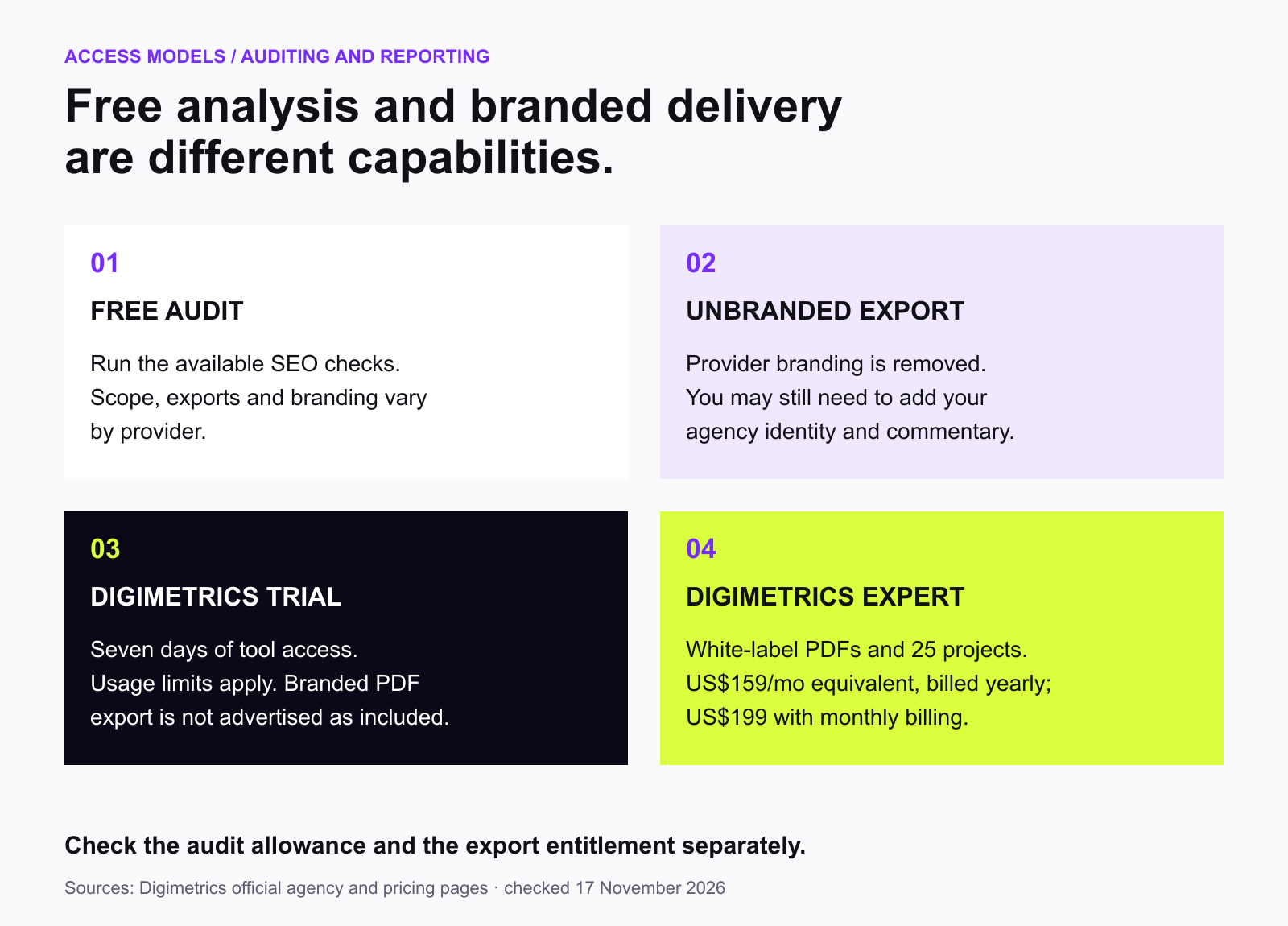
For example, SEO Inspector Hub advertises free SEO audits with unbranded PDF and Word exports.
That makes it relevant for agencies needing an occasional report without committing to a subscription.
However, an unbranded export is not always equivalent to a configurable white-label reporting system.
You may still need to add your logo, prepare a written summary, and manage reports manually.
Digimetrics takes a different approach.
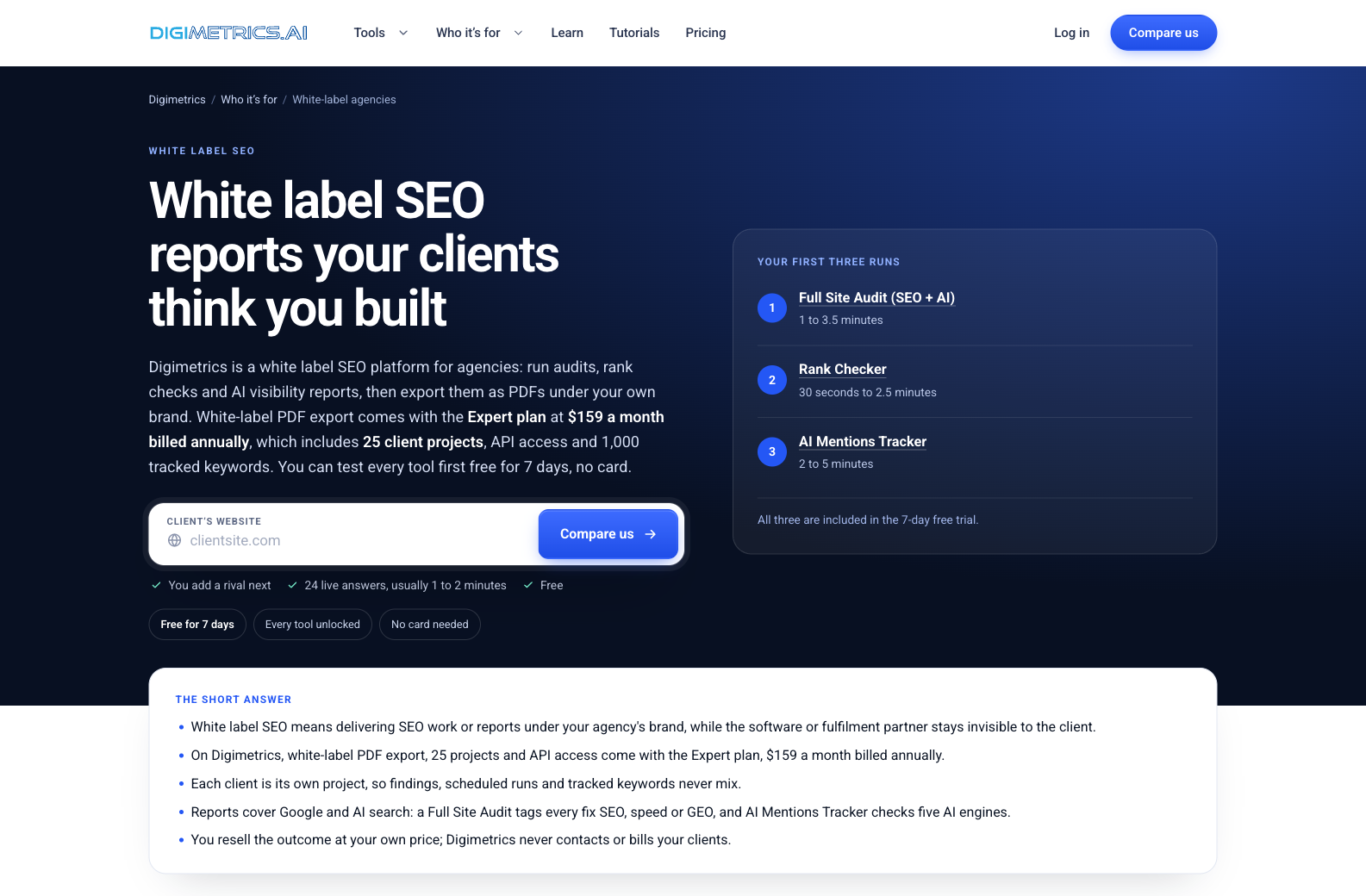
Its Full Site Audit is available during a seven-day free trial, while automated white-label PDF export is offered through the Expert subscription.
This model is better suited to agencies evaluating a wider reporting workflow before paying for branded exports.
These terms are often used interchangeably, but they describe different capabilities.
A free SEO audit focuses on diagnosing website problems.
A white-label report focuses on presenting the findings under your business identity.
| Capability | Free SEO Audit | White Label SEO Audit |
|---|---|---|
| Identify technical SEO issues | Yes | Yes |
| Review website health | Depends on tool | Depends on tool |
| Show affected pages | Depends on tool | Depends on tool |
| Generate PDF report | Sometimes | Usually |
| Remove software branding | Not guaranteed | Expected |
| Add agency branding | Not guaranteed | Supported to varying degrees |
| Manage multiple clients | Often limited | Common in agency plans |
| Schedule recurring reports | Sometimes | Common in paid plans |
| Deliver under agency identity | Not necessarily | Main purpose |
Imagine you run a small SEO consultancy.
A potential client asks why their website receives little organic traffic.
You use a free crawler and discover broken internal links, slow landing pages, and indexing problems.
Those findings are useful regardless of which tool produced them.
But sending a technical export containing hundreds of unexplained warnings may not help the client understand what to do.
A better report explains the most important problems, the affected business outcomes, and the recommended fixes.
Branding makes the report look like part of your agency’s service. Clear interpretation makes it valuable.
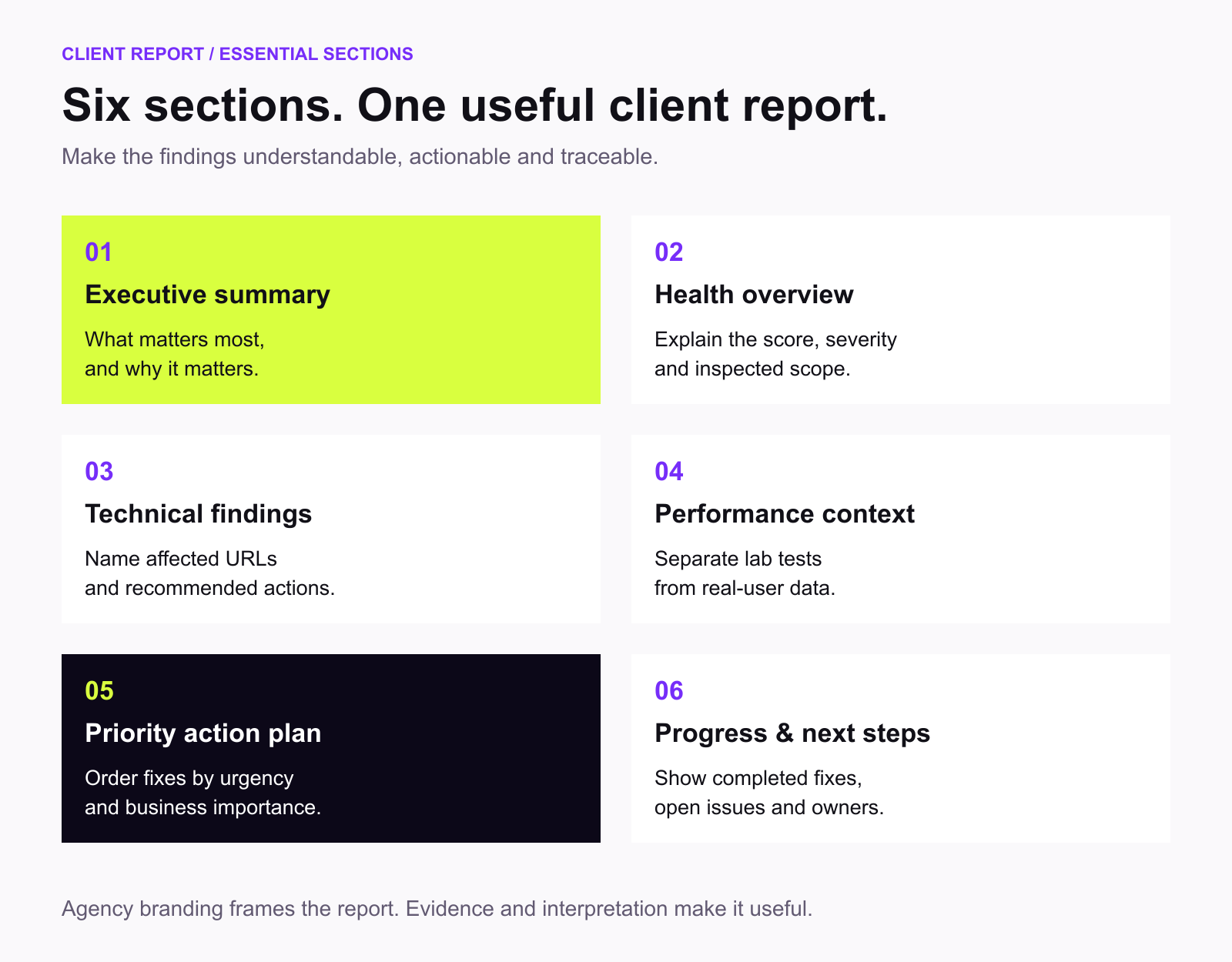
A professional report should help the client understand the condition of their website and the work required to improve it.
That means going beyond a technical checklist.
Start with a short explanation of the website’s current condition.
Identify the most important findings and explain why they matter.
For example, an executive summary might explain that several important service pages cannot be indexed and that mobile loading performance requires investigation.
Avoid opening the report with a long collection of technical warnings.
Include a summary of the site’s technical condition.
Depending on the tool, this might involve a health score, number of detected issues, and breakdown by severity.
Explain what the score represents.
A score of 82 out of 100 is not a Google ranking factor or a prediction of traffic growth.
Cover problems affecting search accessibility and website structure.
Relevant areas include crawling, indexability, internal linking, canonical tags, redirects, metadata, and structured data.
Each important finding should identify the affected URLs and the recommended action.
Include relevant page-speed and Core Web Vitals information.
Where possible, distinguish between laboratory testing and actual user-experience data.
Explain how performance problems could affect visitors rather than presenting scores without context.
Organise recommended fixes by urgency and expected impact.
For instance, an accidental noindex directive on a valuable landing page may be more important than missing optional metadata across several old articles.
For recurring clients, show what changed since the previous report.
Identify completed fixes, outstanding problems, and upcoming priorities.
This helps clients understand what the agency has accomplished instead of receiving the same audit every month.
The best option depends on how your agency intends to use it.
A freelancer preparing occasional prospecting audits has different requirements from an agency managing 25 recurring clients.
Some platforms allow unlimited website checks but restrict exports.
Others provide a limited number of audits per month.
A free trial may also include usage limits.
Review both the auditing allowance and the reporting features before selecting a tool.
Ask whether the platform supports your own logo and report identity.
Also verify whether third-party branding remains in the footer.
A report described as white label may still contain vendor attribution under certain plans.
A professional-looking PDF is only useful if the underlying analysis is reliable.
Check whether the tool identifies affected URLs, distinguishes issue severity, and provides understandable recommendations.
Avoid treating every warning as equally important.
If you manage several websites, separate projects can make reporting easier.
You should be able to distinguish client data and avoid accidentally mixing findings from different accounts.
Recurring reports can consume significant time when prepared manually.
Scheduled audits, reusable reporting workflows, and export capabilities may justify a paid subscription for agencies with ongoing contracts.
A free tool may be inexpensive in subscription fees but require substantial manual work.
A paid platform may reduce reporting effort, but only if its features suit your actual workflow.
Compare cost, report quality, usage limits, and the time needed to deliver a useful client report.
Digimetrics provides SEO auditing, rank checking, backlink analysis, and AI visibility tools within one marketing workspace.
Its agency offering is designed around producing SEO reports that can be delivered under your own brand.
The platform separates website analysis from white-label exporting.
New users can try its auditing tools during a seven-day free trial, while the Expert plan adds branded PDF reporting.
| Capability | How Agencies Can Use It |
|---|---|
| Full Site Audit (SEO + AI) | Assess website health and identify prioritised fixes |
| Technical SEO Crawler | Investigate technical problems and affected pages |
| Rank Checker | Review keyword positions |
| Backlink Checker | Investigate backlinks and referring domains |
| AI Mentions Tracker | Measure brand mentions and citations in AI answers |
| White-label PDF export | Deliver reports under your agency’s brand on Expert |
| Separate client projects | Organise websites and reporting |
| Scheduled tool runs | Support recurring monitoring |
| API access | Support additional reporting integrations on Expert |
Rather than treating an SEO audit as a one-time checklist, agencies can use these capabilities to support prospecting, onboarding, and ongoing client reporting.
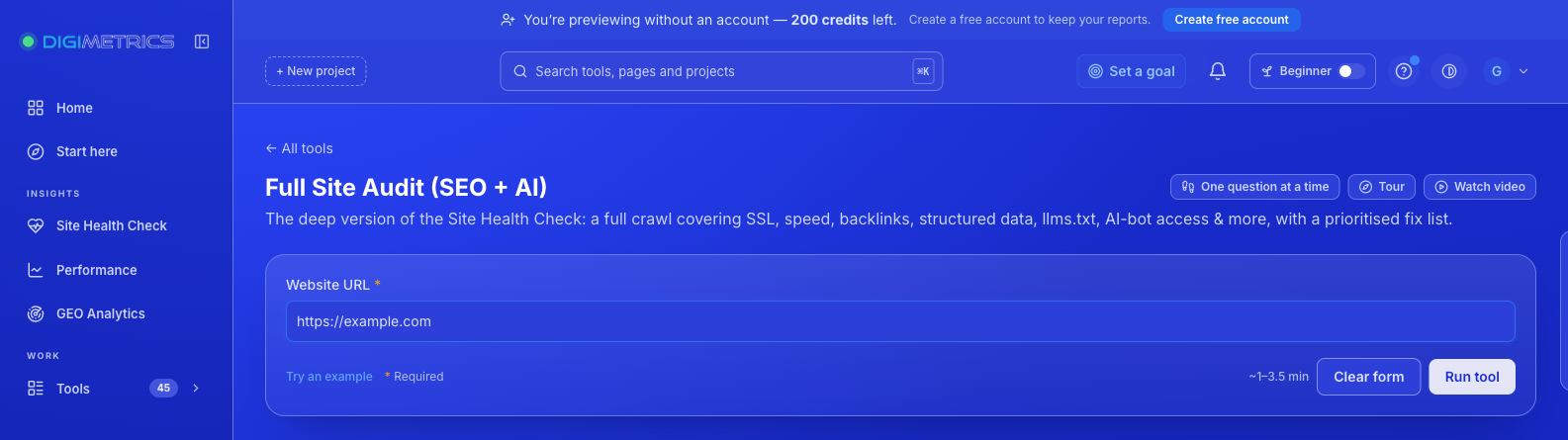
The Digimetrics Full Site Audit evaluates a website and returns a health score out of 100.
The report includes relevant authority and backlink indicators alongside a prioritised list of findings tagged SEO, speed, or GEO.
Each recommendation explains the issue and identifies its priority.
A typical run takes approximately 1 to 3.5 minutes.
This makes it useful for agencies preparing an initial assessment before a client meeting.
However, the results should still be reviewed by an SEO specialist before being converted into a commercial proposal.
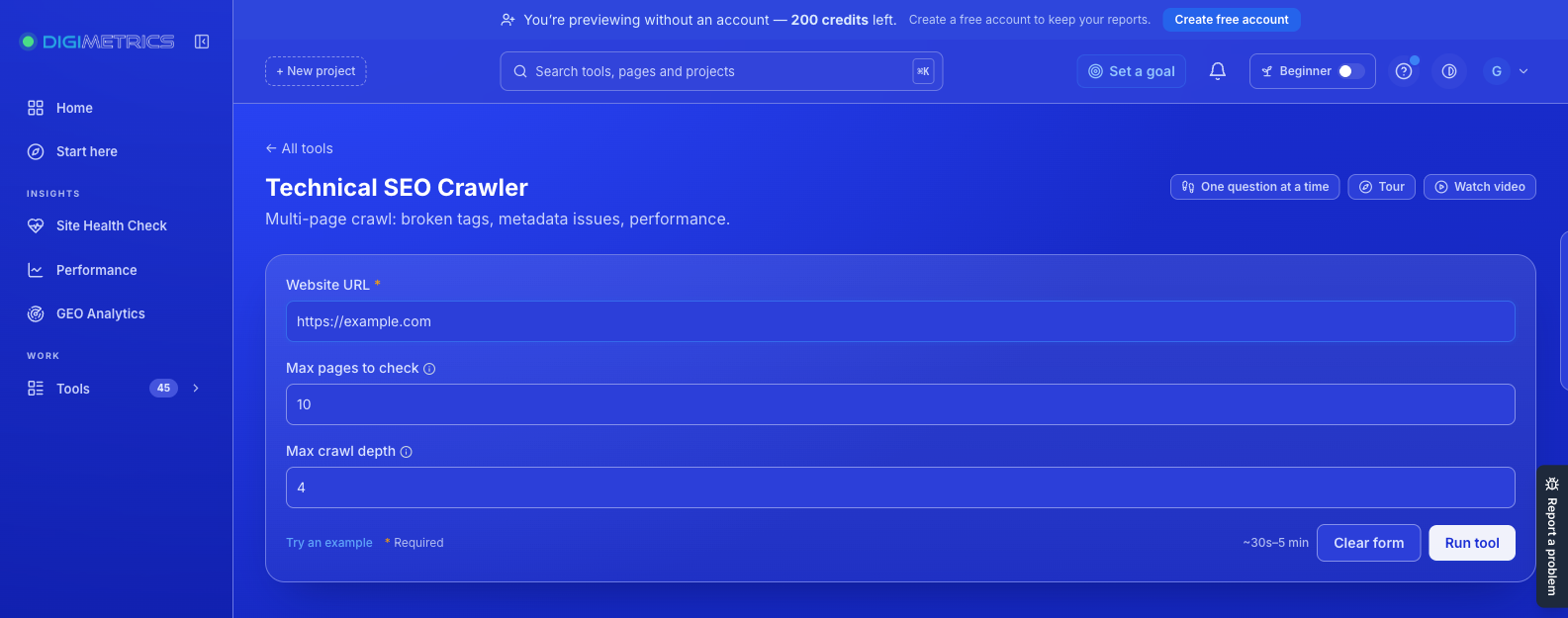
For more detailed technical investigation, Digimetrics provides a Technical SEO Crawler.
It examines website pages and lists detected issues with affected-page counts and high, medium, or low severity levels.
Agencies can configure page count and crawl depth to investigate the appropriate section of a website.
This provides additional information when a general health report identifies a problem requiring closer examination.
Clients increasingly want to understand whether AI assistants mention their brands when customers ask for recommendations.
Digimetrics’ AI Mentions Tracker evaluates selected buyer questions across five AI engines.
It reports brand mentions, sentiment, citations, position, and cited sources.
These findings can complement traditional SEO reporting, although they should not be interpreted as guaranteed future AI visibility or traffic.
For agencies offering GEO or AI search consulting, this provides another diagnostic perspective.
Digimetrics offers a seven-day free trial, with no credit card required.
The trial includes access to its SEO auditing and other marketing tools, subject to applicable usage limits.
However, white-label PDF export is a paid Expert-plan feature.
The official pricing page lists the following plans.
| Plan | Annual Billing, Monthly Equivalent | Monthly Billing | Projects | White-Label PDF Export |
|---|---|---|---|---|
| Free trial | $0 for seven days | — | 1 | Not advertised as a free-trial entitlement |
| Starter | $31 | $39 | 3 | No |
| Pro | $87 | $109 | 10 | No |
| Expert | $159 | $199 | 25 | Yes |
All prices are in USD. Annual rates are billed yearly.
The Expert plan also includes 6,000 monthly credits, API access, 1,000 tracked keywords, and additional scheduling capacity.
You can review the current allowances and billing terms on the Digimetrics pricing page.
The Expert plan is most relevant when an agency needs branded reports for recurring client work.
For example, an agency managing ten clients may want to prepare monthly website audits, track rankings, and present findings consistently.
Separate client projects and PDF exports can support that workflow.
A freelancer auditing only one or two sites occasionally may prefer a simpler approach.
The most appropriate plan depends on the number of clients, reporting frequency, and how much time the platform actually saves.
A practical agency workflow begins with gathering evidence and ends with a report the client can understand.
Set up a project for the website you want to assess.
Separate projects help keep data, audits, and reporting organised by client.
Enter the client’s website into Digimetrics Full Site Audit.
Review the health score and prioritised findings.
Pay particular attention to important commercial pages and issues affecting crawlability, indexing, or usability.
Use Technical SEO Crawler or other relevant tools when a finding requires more detail.
For example, a crawl problem affecting an important service page should be confirmed before being presented as a major business risk.
Depending on the engagement, use rank tracking, backlink analysis, or AI visibility findings to provide additional context.
Avoid adding metrics solely to make the report longer.
Every section should support a useful conclusion.
Organise the findings by priority.
Explain each issue in plain language, identify the likely consequences, and recommend a practical action.
Separate immediate technical fixes from longer-term SEO opportunities.
With the Expert plan’s white-label PDF capability, agencies can deliver reports under their own branding.
Review the exported document before sending it.
The agency remains responsible for the accuracy of its conclusions and any additional claims included in the report.
Consider a hypothetical web design agency offering SEO services to local businesses.
A potential client owns a dental clinic website and reports that its organic enquiries have declined.
The agency runs an initial audit.
The results indicate several potential problems.
| Finding | Potential Business Impact | Recommended Action |
|---|---|---|
Important service page marked noindex |
Page may be excluded from search | Investigate and correct directive |
| Broken internal links | Users and crawlers may encounter dead ends | Repair relevant links |
| Slow mobile landing page | Visitors may experience delays | Investigate performance bottlenecks |
| Missing or unclear service information | Visitors may struggle to assess the offering | Improve relevant content |
| Low visibility for selected AI buyer questions | Brand may be absent from sampled answers | Review relevant sources and content |
These are illustrative findings, not results from an actual Digimetrics audit.
A weak proposal might describe the website as having dozens of SEO errors and promise dramatically improved rankings after fixing them.
A stronger proposal would explain the few issues that matter most.
For example, the agency could prioritise verifying the indexing problem, fixing important navigation links, and improving mobile performance.
It could then propose a scoped remediation project with measurable verification steps.
The branded report supports the conversation, but the quality of the recommendations is what makes the proposal credible.
White-label software can reduce the cost of preparing reports, but the software fee is only one part of delivering an SEO service.
Agencies also spend time reviewing results, investigating technical issues, communicating with clients, and preparing recommendations.
Your pricing should account for that work.
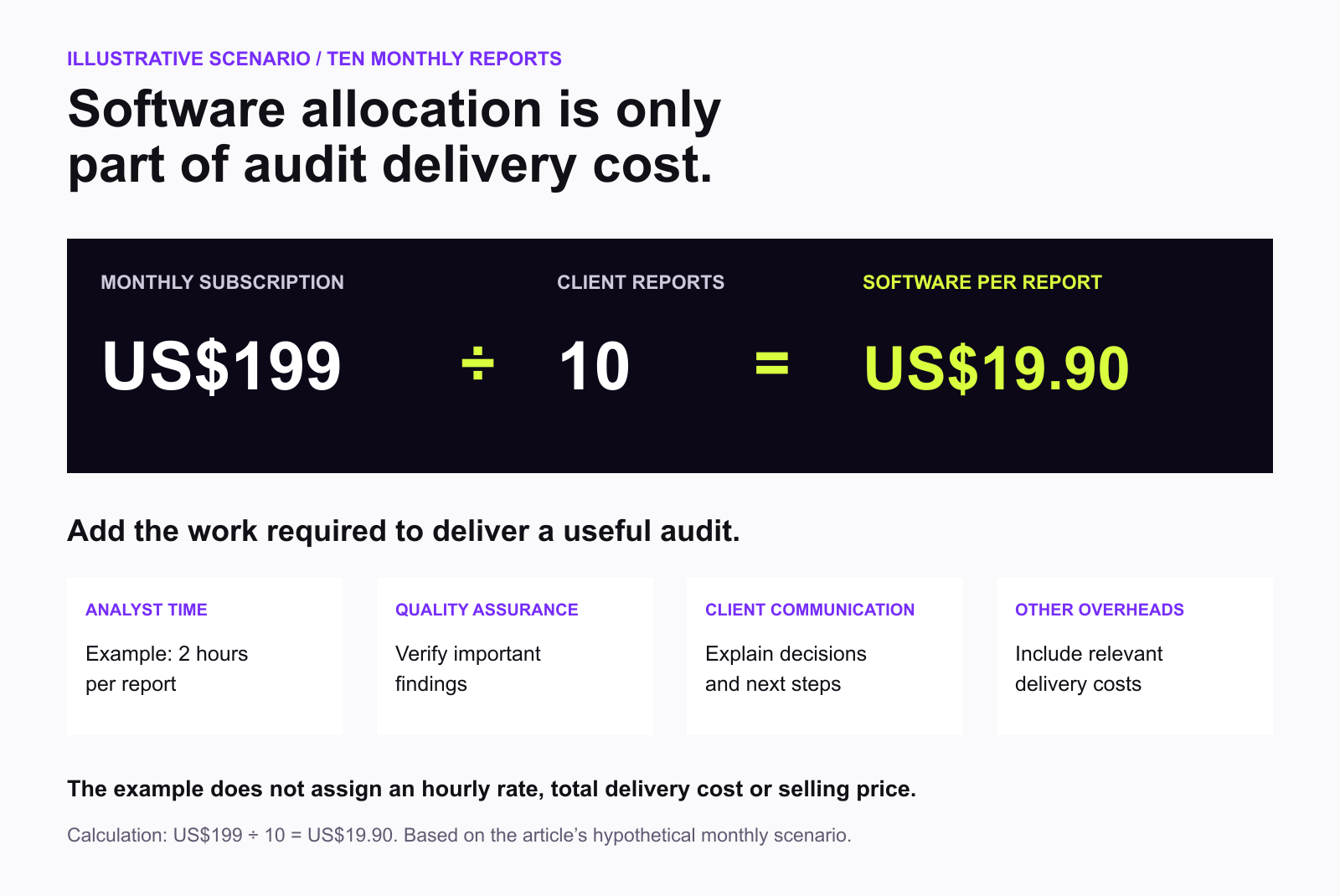
Suppose an agency pays $199 monthly for a reporting platform and prepares ten client reports during the month.
The subscription allocation would be:
$199 ÷ 10 = $19.90 per report.
This is only a software-cost allocation, not the total cost of providing the audit.
You would also need to account for analyst time, quality assurance, client communication, and other overheads.
If the agency spends two hours reviewing and presenting each report, those labour costs may be considerably more important than the subscription allocation.
There is no universal price for an SEO audit.
A brief diagnostic report is not equivalent to a detailed technical engagement covering thousands of URLs, JavaScript rendering, crawl analysis, and implementation planning.
Before pricing the service, define:
A report should be priced according to the work and expertise involved, not simply because the software can generate a PDF.
Clients rarely need hundreds of warnings presented without context.
A useful report identifies the most important problems and explains what to do next.
White-label branding doesn’t justify exaggerating what an audit measures.
Be clear about crawl scope, data limitations, and findings that require verification.
An SEO health score is a diagnostic metric created by the auditing platform.
It is not a direct Google ranking factor.
Some automated warnings represent minor improvements or legitimate technical choices.
Review them before including them in the final recommendations.
An SEO audit cannot guarantee rankings, traffic, or revenue.
It helps identify conditions that may require improvement.
Recurring clients should receive more than repeated snapshots.
Explain which fixes were implemented, what remains unresolved, and how relevant performance measures have changed.
A free white label SEO audit tool can be useful when you’re starting an agency, preparing occasional client proposals, or testing a reporting workflow before committing to a subscription.
However, free auditing and white-label reporting are not always the same thing.
Some tools provide free unbranded exports. Others allow free website checks but reserve branded reports, recurring audits, and client management for paid subscriptions.
For agencies that need more than an occasional PDF, the real question is whether the platform helps deliver consistent, useful reporting at a sustainable cost.
Digimetrics offers a seven-day trial of its SEO auditing tools and a dedicated Expert plan for white-label reporting.
Its combination of website audits, technical checks, keyword tracking, backlink analysis, and AI visibility monitoring gives agencies several ways to investigate client performance.
The strongest white-label SEO report isn’t the one with the most charts or the most impressive health score. It’s the one that clearly explains what’s wrong, why it matters, and what the client should do next.
Spend less time moving between disconnected SEO tools and more time helping clients understand their opportunities.
With Digimetrics, agencies can run SEO audits, investigate technical issues, track rankings, and evaluate AI visibility within one workspace.
Start by testing the tools through the seven-day free trial, then explore the Expert plan when you need white-label PDF reporting and additional client capacity.
Explore Digimetrics White-Label SEO Reporting to see how the platform fits your agency’s workflow.
Try the tools free for seven days. No credit card required. White-label PDF export requires the Expert plan.
Yes, some providers offer free unbranded SEO audit exports. However, fully configurable branded reporting and recurring agency features are frequently restricted to paid plans.
Some tools allow free unbranded PDFs or documents that you can customise. Check whether the export contains vendor logos, watermarks, or other restrictions.
Digimetrics offers a seven-day free trial with its tools available within usage limits. Its white-label PDF export capability belongs to the paid Expert plan.
The Expert plan costs $159 per month when billed annually or $199 with monthly billing. It includes white-label PDF exports, 25 projects, API access, and additional reporting allowances.
Yes. Digimetrics supports white-label PDF reporting on the Expert plan, allowing agencies to deliver reports under their own branding.
Yes. Its AI Mentions Tracker measures brand mentions, sentiment, citations, and position across five AI engines using selected buyer questions.
The underlying analysis may be similar. White-label reporting changes the presentation, allowing an agency to deliver reports under its own identity.
Yes. Agencies can use initial audits to identify genuine problems and introduce relevant services. The findings should be accurate, useful, and presented without misleading guarantees.
Not necessarily. Digimetrics offers multiple projects within its subscriptions. The Expert plan includes 25 projects, allowing agencies to organise different client websites within one account.
Monthly reporting is a practical starting point for many ongoing engagements. Technical audits may also be appropriate after migrations, redesigns, or major website changes.

Tom is the CEO of MediaOne, a leading digital marketing agency. He is a business-experienced SEO consultant as well as a Google Gold Search Expert serving the international community. He has consulted for MNCs like Canon, Maybank, Capitaland, SingTel, ST Engineering, WWF, Cambridge University, as well as Government organisations like Enterprise Singapore, Ministry of Law, National Galleries, NTUC, e2i, SingHealth. His articles are published and referenced in CNA, Straits Times, MoneyFM, Financial Times, Yahoo! Finance, Hubspot, Zendesk, CIO Advisor. Under his stewardship, MediaOne has won dozens of prestigious digital marketing awards.
Run a free Digimetrics audit across SEO, AI search, content and technical health, and get a plan you can act on today.
Start free →Your website has hundreds of pages, organic traffic is declining, and you’re not sure what’s causing the problem. Is Google struggling to crawl important…
The best SEO software for a small business is not necessarily the product with the most features. It is the tool that tells you…
The best SEO tool stack helps an agency deliver better work without wasting money or hours switching between dashboards. This practical guide explains which…