Content
Free AI Content Generator: Create SEO Content With AI
You have a blog post to publish, three social media updates to prepare, and a paid advertising campaign that needs fresh copy. Each task…
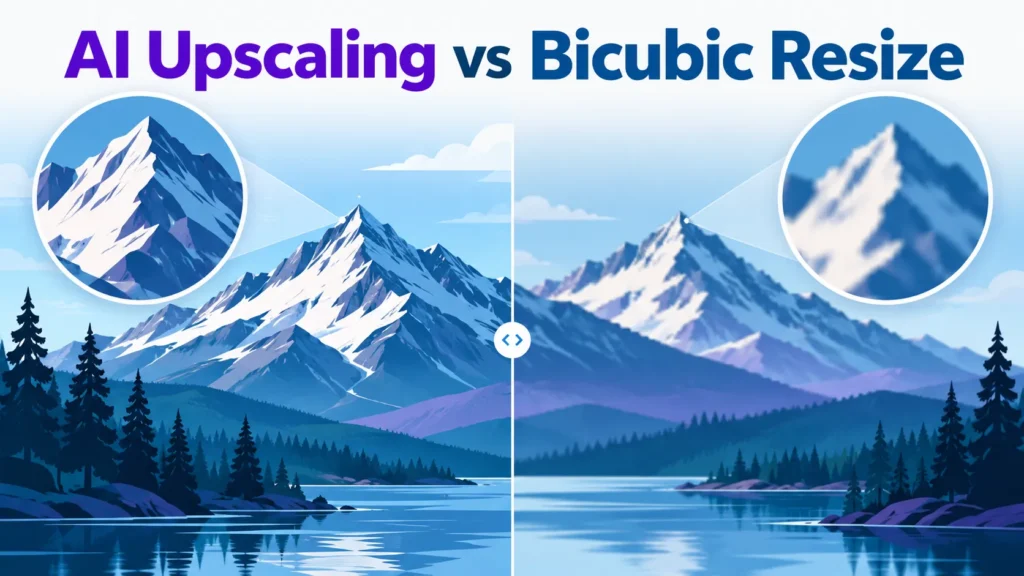
Enlarging a small image can leave it soft or blocky. Bicubic resizing uses interpolation to compute new pixels from the existing ones and stays faithful to the original. AI upscaling predicts detail that was never captured. Neither method is right for every image, so test your own crop before you commit.
One-line rule: if the file must match the original, use bicubic. If it only has to look right at a large size, test AI upscaling on a crop first.
| Content | Enlargement | Recommended method |
|---|---|---|
| Photos, skies, gradients | Under 400% | Bicubic |
| Text, faces, fine texture | Over 400% | AI upscaling, after a crop test |
| Evidence, product, legal | Any | Bicubic only |
When a source has fewer pixels than the screen, software must estimate the missing values. NVIDIA notes that 4K TVs can muddy visuals when they stretch lower-resolution images.
Standard definition is 480p, HD is 720p or 1080p, and 4K has far more pixels. As NVIDIA puts it, 1080p has only a quarter of 4K’s pixels, so older content must be enlarged.
Bilinear estimates each new pixel from its four nearest source pixels. It is fast but looks soft. Bicubic uses the 16 nearest neighbours and fits a smoother curve, giving crisper results in Photoshop and Affinity Photo, with sharpness that varies by tool. Kernels vary, so two tools both labelled “bicubic” may not match. The Keys kernel with a = -0.5 is softer than a = -0.75, which sharpens more and can add more halo. Select the same resampling method and image size in each tool before comparing results, so the best settings are compared fairly.
Bicubic handles gradients well but can distort hard edges with faint halos. The halos come from the kernel’s negative lobes, which push values past the edge. At an N×100% enlargement, artifacts cover an N×N block of output pixels, so 400% shows 4×4 px blocks. At around 1000%, the blocks blur into the image, though results depend on the editor and source.
Take one test image and enlarge the same crop with bicubic and with an AI model. At 100% zoom, check one hard edge in each result. Pass the bicubic result if the edge shows no halo wider than one source pixel. Pass the AI result if the edge is clean without invented texture that changes the object. Record edge error or PSNR so the result is measured, not judged by eye.
AI upscaling replaces bicubic’s fixed rules with a neural network trained on matched low- and high-resolution images. It predicts plausible edges and textures for new pixels, while bicubic only smooths existing ones.
The trade-off is fidelity. AI-synthesized detail suits family photos and streamed shows, not evidence or medical imaging. Upscalers can also introduce artifacts, so results should be checked before important use.
For living rooms, NVIDIA notes AI upscaling makes HD content from HBO, Hulu, Netflix, Prime Video and YouTube look sharper on 4K TVs, at up to 30 frames per second in real time.
Use one check per step. Each step gives you one result to verify.
AI upscaling and bicubic resizing solve different problems. Bicubic preserves original pixels for modest enlargements. AI upscaling adds plausible detail for large prints viewed up close. Check results at 100% zoom before you commit.
No. AI upscaling suits soft sources viewed large, such as a 1080p stream on a 4K TV. Bicubic suits archival, forensic or product photos because it invents no detail.
No. Bicubic keeps existing sharpness and looks soft at large enlargements.

Tom is the CEO of MediaOne, a leading digital marketing agency. He is a business-experienced SEO consultant as well as a Google Gold Search Expert serving the international community. He has consulted for MNCs like Canon, Maybank, Capitaland, SingTel, ST Engineering, WWF, Cambridge University, as well as Government organisations like Enterprise Singapore, Ministry of Law, National Galleries, NTUC, e2i, SingHealth. His articles are published and referenced in CNA, Straits Times, MoneyFM, Financial Times, Yahoo! Finance, Hubspot, Zendesk, CIO Advisor. Under his stewardship, MediaOne has won dozens of prestigious digital marketing awards.
Run a free Digimetrics audit across SEO, AI search, content and technical health, and get a plan you can act on today.
Start free →You have a blog post to publish, three social media updates to prepare, and a paid advertising campaign that needs fresh copy. Each task…
Writing a blog post isn’t usually the hardest part of content marketing. The real work happens before and after the first draft. You need…
Your website has 150 published articles. Some attract consistent organic traffic, others haven’t generated a meaningful visit in months, and several cover nearly identical…