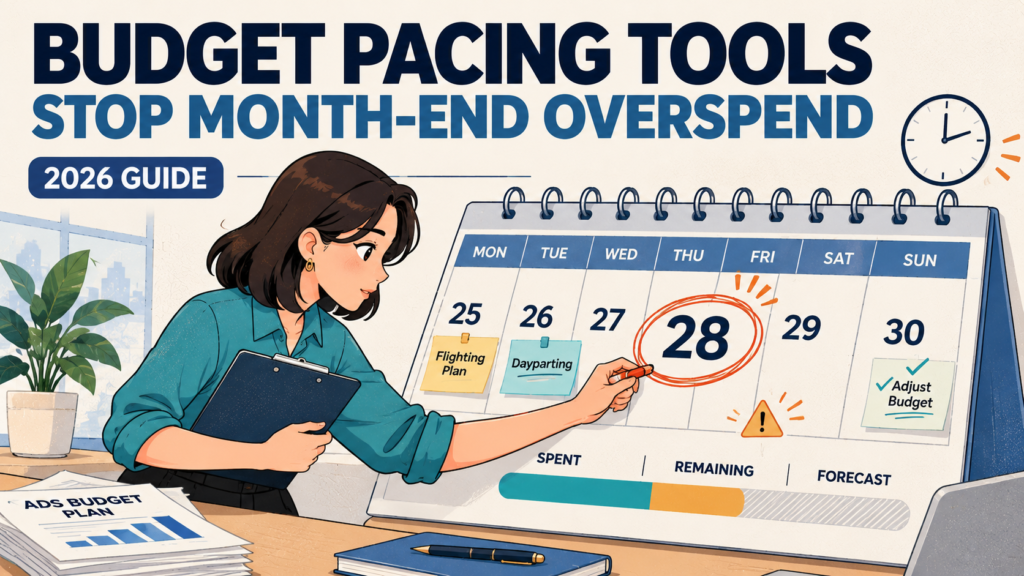
It’s the 28th of the month. Your client approved a $30,000 advertising budget, and your campaigns have already spent $28,200. Google Ads is still running, Meta has several active ad sets, and nobody has checked the combined spend since Monday.
The campaigns may be performing well, but that doesn’t change the problem: there’s only $1,800 left for the final three days, and the accounts are currently spending more than that remaining allowance can support.
This is exactly the situation budget pacing tools are supposed to prevent.
A useful pacing tool doesn’t simply tell you how much you’ve spent. It compares actual spending with an approved budget, forecasts what will happen if delivery continues, and warns you early enough to make a controlled adjustment.
More advanced platforms can redistribute budgets, apply spending safeguards, or pause campaigns when a defined limit is reached. Others focus on monitoring and reporting, leaving the actual changes to the marketer.
Those differences matter because budget pacing, budget optimisation, and hard spending limits aren’t the same thing.
A dashboard showing that you’re 95% through your monthly budget is useful. A forecast explaining that you’ll exceed the approved amount by Friday is better. But neither guarantees that spending will stop at precisely the right moment.
This guide compares seven budget pacing solutions, including native Google Ads controls, dedicated PPC automation, multi-channel reporting, and enterprise budget management. We’ll explain how to calculate pacing, prevent month-end surprises, manage flighting and dayparting, and evaluate automation without creating new risks.
Editorial note: This article evaluates documented capabilities and practical workflows. We have not conducted an identical-account benchmark across these seven solutions, so the recommendations are based on use-case suitability rather than fabricated testing scores or claimed savings.
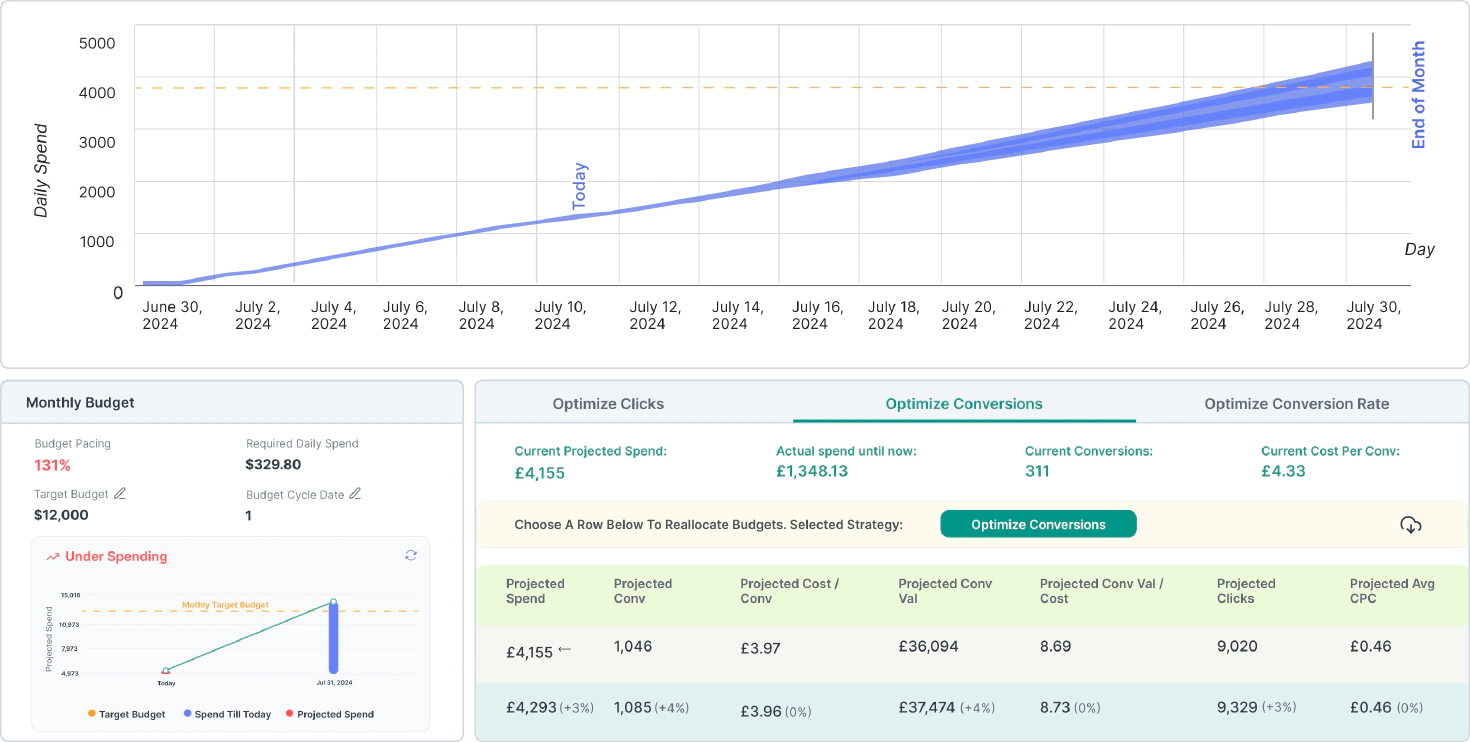
Budget pacing compares actual spending with an approved spending plan. You need both cumulative spend and a forward-looking projection to identify overspend early.
Optmyzr is a strong starting point for PPC agencies that need dedicated budget monitoring and automation. It documents budget monitors, alerts, forecasts, and automated adjustments.
Shape, part of NinjaCat, focuses on managing advertising budgets across accounts and platforms. Its automation can help with pacing, but data freshness and integration failures still matter.
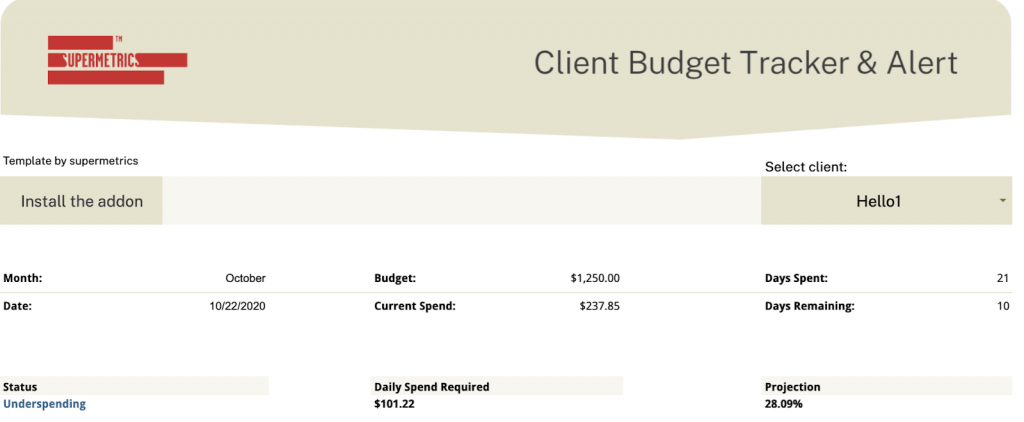
Supermetrics is useful when you want a custom, cross-channel pacing dashboard. It connects advertising data to Google Sheets and reporting tools, but reporting alone doesn’t enforce spending limits.
Bïrch is worth evaluating for rule-driven advertising automation, particularly when budget adjustments, pausing, and schedules need more flexibility than native platform rules.
Marin and Skai are more relevant to large advertisers managing portfolio-level spending, where budget allocation and efficiency targets are part of the same operational workflow.
Google Ads’ average daily budget is not a strict daily cap. Most campaigns may spend up to twice that amount on a given day, subject to Google’s applicable spending limits.
Start with alerts and forecasts before enabling automatic budget changes. A mistaken rule can interrupt profitable campaigns or increase spending when the underlying data is incomplete.
What Is Budget Pacing in Paid Advertising?
Budget pacing is the process of tracking advertising spend against a target over a defined period.
For example, if a company allocates $30,000 for a 30-day campaign, a simple linear spending plan would average $1,000 per day.
By the end of day 15, the expected cumulative spending would be $15,000. If the campaigns have already spent $19,000, they’re ahead of that simple plan.
However, that doesn’t automatically mean something is wrong.
The company may have planned to spend more during a promotional launch, or demand may be stronger at the beginning of the month. Budget pacing needs to account for those decisions rather than automatically treating every departure from an even daily target as a problem.
Budget Pacing vs. Budget Optimisation
These are related but separate activities.
Activity
Main Question
Example
Budget monitoring
How much have we spent?
$24,500 spent this month
Budget pacing
Are we spending according to plan?
Spend is 8% ahead of the scheduled target
Spend forecasting
What happens if the current trend continues?
Projected month-end spend is $32,000
Budget optimisation
Where should the remaining money go?
Shift approved budget toward a more efficient campaign
Budget enforcement
How do we prevent a limit from being exceeded?
Pause eligible campaigns when an approved threshold is reached
The distinction is important when choosing software.
A reporting tool may calculate an accurate pacing forecast but never change a campaign. An automation tool may modify budgets and pause ads but still rely on delayed platform data.
Neither should be described as a guaranteed hard spending cap unless the mechanism and limitations genuinely support that claim.
The 28th-Day Problem: How to Calculate Overspend Before It Happens
Consider a 30-day advertising month.
The approved budget is $30,000. At the beginning of the 28th, you’ve spent $28,200 through the previous 27 days, and the average spending over the last week is $1,200 per day.
Here’s what the numbers show.
Budget Metric
Amount
Approved monthly budget
$30,000
Spend through day 27
$28,200
Budget used
94%
Linear planned spend through day 27
$27,000
Remaining budget
$1,800
Days remaining
3
Recent average daily spend
$1,200
Projected final spend at recent pace
$31,800
Projected overspend
$1,800
Remaining daily allowance
$600
This is a hypothetical example, not an actual advertising account or tool benchmark.
The Four Budget Pacing Formulas You Need
1. Budget utilisation
Budget utilisation = Actual spend ÷ Approved budget × 100
In this example:
$28,200 ÷ $30,000 × 100 = 94%
2. Linear target utilisation
Linear target utilisation = Elapsed days ÷ Total days × 100
27 ÷ 30 × 100 = 90%
The account has used 94% of its budget when a linear plan would have used 90%, putting it four percentage points ahead of the scheduled cumulative target.
3. Forecasted final spending
Projected month-end spend = Spend to date + (Recent daily spend × Remaining days)
$28,200 + ($1,200 × 3) = $31,800
At the current run rate, the account is heading toward an $1,800 overspend.
4. Remaining daily allowance
Remaining daily allowance = Remaining approved budget ÷ Remaining days
$1,800 ÷ 3 = $600 per day
This is the average remaining allowance across all covered campaigns, not necessarily the correct daily budget setting for any individual advertising platform.
Google Ads, Meta, and other systems have their own delivery rules, billing behaviour, and timing constraints.
The next step is to determine which campaigns can safely reduce spending, whether any spending is already committed or unreported, and how much buffer is needed for reporting delays.
7 Budget Pacing Tools Compared
These products solve different parts of the problem. Some monitor spending, some automate changes, and others help distribute budgets across a large advertising portfolio.
Tool
Best For
Budget Monitoring
Automated Budget Actions
Main Limitation
Google Ads native controls
Single-platform advertisers
Native reports and rules
Rules and eligible budget controls
Doesn’t manage cross-channel budgets
Optmyzr
PPC agencies and performance teams
Monitors, forecasts, alerts
Budget adjustments, pauses, reallocation
Requires configuration and relevant plan access
Shape by NinjaCat
Agencies managing many client budgets
Cross-platform budget pacing
Pacing and pause workflows
Dependent on publisher data freshness
Supermetrics
Custom budget dashboards
Multi-source reporting
Requires external automation
Reporting doesn’t directly stop spend
Bïrch
Rule-based campaign automation
Performance conditions and alerts
Pauses, schedules, budget changes
Rules can conflict or react to incomplete data
Marin
Large cross-channel advertisers
Strategy-based pacing
Portfolio allocation and pauses
More complex implementation
Skai Budget Navigator
Enterprise budget planning
Forecasts, pacing, alerts
Portfolio-level budget optimisation
Enterprise-oriented platform and contract
Pricing and eligibility should be verified directly because plan tiers, automation capabilities, and platform support can change. The table describes vendor-documented functionality, not measured comparative accuracy.
1. Google Ads Native Budget Controls: Best Free Starting Point
Best for: Advertisers primarily operating on Google Ads.
Software cost: Included within Google Ads.
Before buying another subscription, it’s worth understanding the controls already available in Google Ads.
Google provides campaign budgets, shared budgets, budget reporting, automated rules, scripts, and certain budget types designed for specific campaign objectives.
For straightforward accounts, these may be sufficient to identify spending problems and make controlled changes.
Automated rules can send email notifications when specified spending conditions are met, change eligible budgets, and pause or enable campaigns according to configured conditions.
Google Ads scripts provide further reporting and automation options.
The Important Limitation: Daily Budgets Aren’t Daily Hard Caps
Google’s documentation states that, for most campaigns, spending can reach twice the average daily budget on a particular day.
Its applicable monthly charging limit is generally based on 30.4 times the average daily budget, although changes during the month affect the calculation.
For example, setting an average daily budget of $100 doesn’t necessarily stop the campaign after exactly $100 in spending that day.
Campaigns using eligible total-budget arrangements can behave differently, while account-level budgets are available in specific billing configurations, including monthly invoicing.
Automation Timing Matters
Google also notes that automated rules scheduled for a particular time can run up to two hours later.
That is a meaningful limitation if an account has only a small spending buffer remaining.
Best use: A smaller Google Ads account needing budget reports, spending alerts, and carefully reviewed automation.
Main limitation: Google Ads doesn’t automatically coordinate its spending with Meta, LinkedIn, TikTok, or other advertising platforms.
Verdict: Start here when your requirements are simple. Don’t purchase a separate platform merely to recreate budget reports that Google Ads already provides.
2. Optmyzr: Best for PPC Budget Pacing and Automation
Best for: Agencies and in-house teams managing multiple PPC accounts.
Optmyzr offers dedicated budget management functionality designed to help advertisers monitor spending, forecast outcomes, and manage budgets across supported advertising platforms.
Its budget management toolkit includes Budget Monitors, a Budget Dashboard, Spend Projection, optimisation tools, and automation workflows.
These capabilities make Optmyzr a particularly relevant option when monthly pacing is a recurring operational task.
Where Optmyzr Stands Out
Optmyzr supports monitoring against weekly, monthly, and quarterly targets.
Teams can configure budget monitors for complete accounts or selected campaign groups and receive alerts when spending moves outside defined thresholds.
Its reporting tools also provide projections based on spending history and recent account activity.
For automation, Optmyzr documents features for adjusting budgets, redistributing allocations, and pausing campaigns after selected spending thresholds are reached.
Some of these functions require higher plan tiers.
Day-of-Week Pacing and Uneven Spending
One useful addition in Optmyzr’s 2026 documentation is budget automation supporting different pacing strategies.
Advertisers can configure even pacing, day-of-week weighting, day-of-week weighting with minimums, or front-loaded spending.
This is useful for businesses that generate different levels of demand on weekdays and weekends.
An account that intentionally spends more on Friday and Saturday shouldn’t be flagged simply because it is above a linear target on Saturday morning.
What to Watch For
Optmyzr’s own documentation notes that its Reach Target Monthly Spend script isn’t compatible with Google Ads campaign total budgets.
Automated budget changes also depend on the campaign types and supported platform actions.
Before using the product to enforce financial limits, confirm the eligible campaigns, rule frequency, and handling of delayed spending data.
Best use: Teams that need a dedicated operational layer for forecasts, budget alerts, and approved automated adjustments.
Main limitation: Advanced automation requires careful setup and shouldn’t be treated as protection from every form of overspend.
Verdict: One of the first dedicated platforms to evaluate when budget pacing has become a substantial, recurring PPC management task.
3. Shape by NinjaCat: Best for Multi-Client Budget Management
Best for: Agencies managing advertising budgets across multiple clients and publishers.
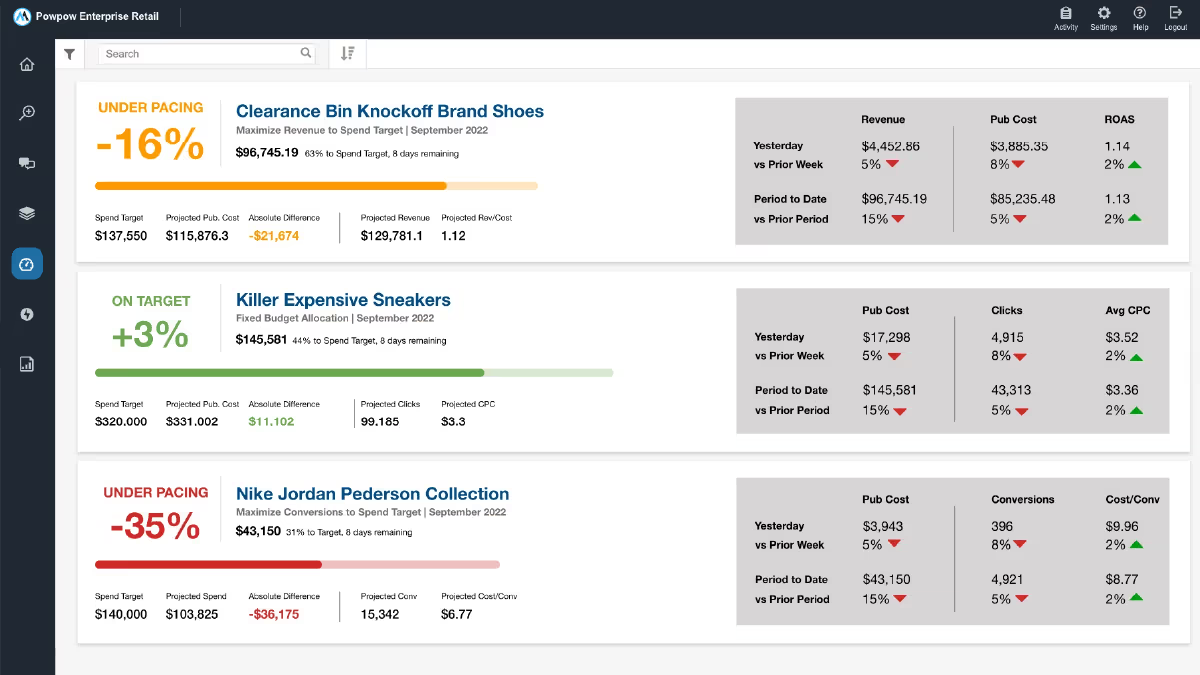
Shape, which joined NinjaCat in 2022, was built around budget pacing and spending management.
Its budget workflow includes monitoring, spending projections, and automation intended to reduce manual account adjustments.
For an agency managing many client accounts, the central appeal is being able to organise approved budget targets separately from individual platform-level daily budget settings.
Where Shape Stands Out
Shape’s historical feature set includes AutoPilot and Cruise Control, which support budget enforcement and pacing workflows.
Its integration with the wider NinjaCat environment also provides reporting and client-management possibilities.
This makes the product worth considering when several advertising accounts share a client’s approved budget.
For example, a client might authorise $20,000 across Google Ads and Microsoft Advertising rather than separate, unrelated limits for each platform.
A central pacing system can help monitor that combined commitment.
A Real Limitation: Data Freshness
Shape provides a particularly useful reminder that automation depends on source data.
In a published incident report, NinjaCat described how Google Ads API limitations caused delayed spend updates in Shape. During the incident, pacing and automated pausing could act on data that was behind the actual spending activity.
The company documented remediation, including changes to its API requests, throttling detection, and retry behaviour.
This doesn’t establish the product’s current reliability relative to competitors. It does illustrate why a third-party budget automation tool cannot always guarantee an exact financial stop.
What to Verify
Ask Shape or NinjaCat about supported publishers, data-refresh intervals, pause latency, integration-error alerts, and how the platform behaves when data becomes stale.
For strict client budgets, those questions matter more than the appearance of the pacing dashboard.
Best use: Agencies with many client accounts and recurring budget commitments.
Main limitation: Automation remains dependent on publisher APIs and the freshness of the underlying spending information.
Verdict: Relevant for agencies needing centralised budget management, but test the operational safeguards before enabling automatic enforcement.
4. Supermetrics: Best for Custom Cross-Channel Pacing Dashboards
Best for: Teams that want consolidated spending visibility without delegating budget changes to a third-party automation system.
Supermetrics connects advertising and analytics data with destinations such as Google Sheets, Excel, Looker Studio, and other reporting environments.
It offers budget pacing templates and documentation for monitoring spend across advertising platforms.
Its main advantage is flexibility.
Rather than using a fixed pacing interface, marketers can build reporting around their specific fiscal calendars, client targets, campaign groups, and cost definitions.
Where Supermetrics Stands Out
Supermetrics’ budget pacing templates can combine spending data from sources such as Google Ads, Meta Ads, LinkedIn Ads, Microsoft Advertising, and TikTok Ads.
A team can calculate cumulative spending, remaining budget, projected month-end cost, and channel-level contribution in one spreadsheet.
Scheduled refreshes reduce the need to export advertising reports manually.
This is useful when the organisation already relies on Google Sheets or Looker Studio and wants to preserve its current reporting workflow.
The Main Limitation
Supermetrics primarily moves and organises data.
A conditional-formatting warning in Google Sheets doesn’t directly pause a Meta campaign or reduce a Google Ads budget.
If the team needs automated enforcement, it must use a separate compatible system.
Refresh schedules also matter. A dashboard updated each morning may be adequate for financial oversight but insufficient as the only safeguard for a fast-spending campaign.
Best use: Cross-channel budget reporting, finance reconciliation, and custom pacing calculations.
Main limitation: No inherent guarantee that a detected overspend will trigger action inside the advertising platform.
Verdict: A strong option when reporting flexibility matters more than direct campaign control.
5. Bïrch: Best for Rule-Based Campaign Budget Automation
Best for: Advertisers who want flexible rules for pausing, scheduling, and changing budgets.
Bïrch, formerly Revealbot, focuses on automating paid advertising actions through configurable rules.
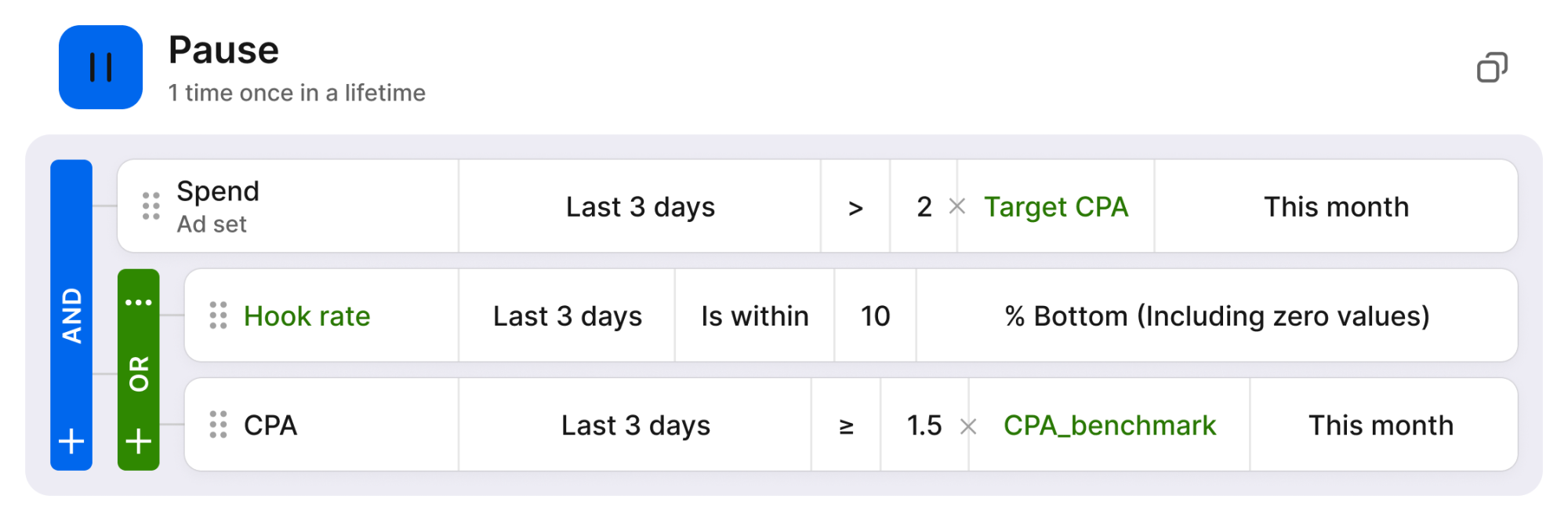
Its documentation includes pausing, starting, increasing budgets, decreasing budgets, and setting budgets based on defined performance conditions.
It also supports dayparting workflows that turn eligible campaigns or ad sets on and off at scheduled times.
Where Bïrch Stands Out
The flexibility comes from combining conditions and actions.
An advertiser might want to pause a campaign when spending reaches a defined amount, send an alert when performance changes, or limit when certain ads are active.
These can be useful safeguards, particularly for teams managing large numbers of paid social campaigns.
However, a rule that automatically reduces a budget based on poor recent CPA is doing something different from a rule that protects a fixed monthly spending cap.
The first is performance optimisation. The second is financial control.
They should have different approval requirements.
What to Watch For
Bïrch documents that budget-modifying tasks can behave differently depending on rule frequency.
When multiple budget-changing tasks use a once-per-day limit, only one can modify the budget of a given item during that day. Other frequencies can permit additional changes.
That creates a potential source of conflicts if rules aren’t designed carefully.
For example, an automated scaling rule and a budget protection rule shouldn’t repeatedly undo one another.
Best use: Teams with clearly defined rule-based automation requirements.
Main limitation: Flexible automation creates the risk of overlapping actions, particularly when performance data is delayed or the rules target different objectives.
Verdict: Worth evaluating for custom advertising automation, provided the team maintains a documented rule hierarchy and tests changes before activating them.
6. Marin: Best for Cross-Channel Budget Pacing at Scale
Best for: Large agencies and advertisers managing substantial budgets across multiple platforms.
Marin offers budget pacing as part of a wider advertising management platform.
Its budget workflow is organised around Strategies, which can group campaigns from several accounts or advertising publishers under a shared spending objective.
This is useful when the company’s financial budget doesn’t align neatly with the structure of individual advertising accounts.
It also describes the ability to apply daily spending caps within its supported workflows, helping advertisers account for platform behaviour such as Google’s daily overdelivery.
A business can use Strategies to organise budgets by product line, region, funnel stage, or client.
The system can then evaluate spending against the defined Strategy target rather than forcing the team to monitor every campaign independently.
What to Watch For
More automation creates more responsibility for defining how competing goals should be handled.
Suppose a campaign is achieving strong ROAS but has already consumed nearly all of a fixed monthly budget.
A system optimising efficiency might prefer to increase spending, while the finance requirement may prohibit any additional expenditure.
The business must decide which constraint takes precedence.
Implementation can also involve more work than connecting a basic pacing spreadsheet.
Best use: Organisations coordinating large advertising portfolios with shared financial and performance targets.
Main limitation: More extensive implementation and contract evaluation than simpler pacing tools.
Verdict: A relevant enterprise option when budget control and cross-channel allocation need to operate together.
7. Skai Budget Navigator: Best for Enterprise Spending Forecasts and Allocation
Best for: Enterprise advertisers coordinating portfolio budgets alongside automated bidding.
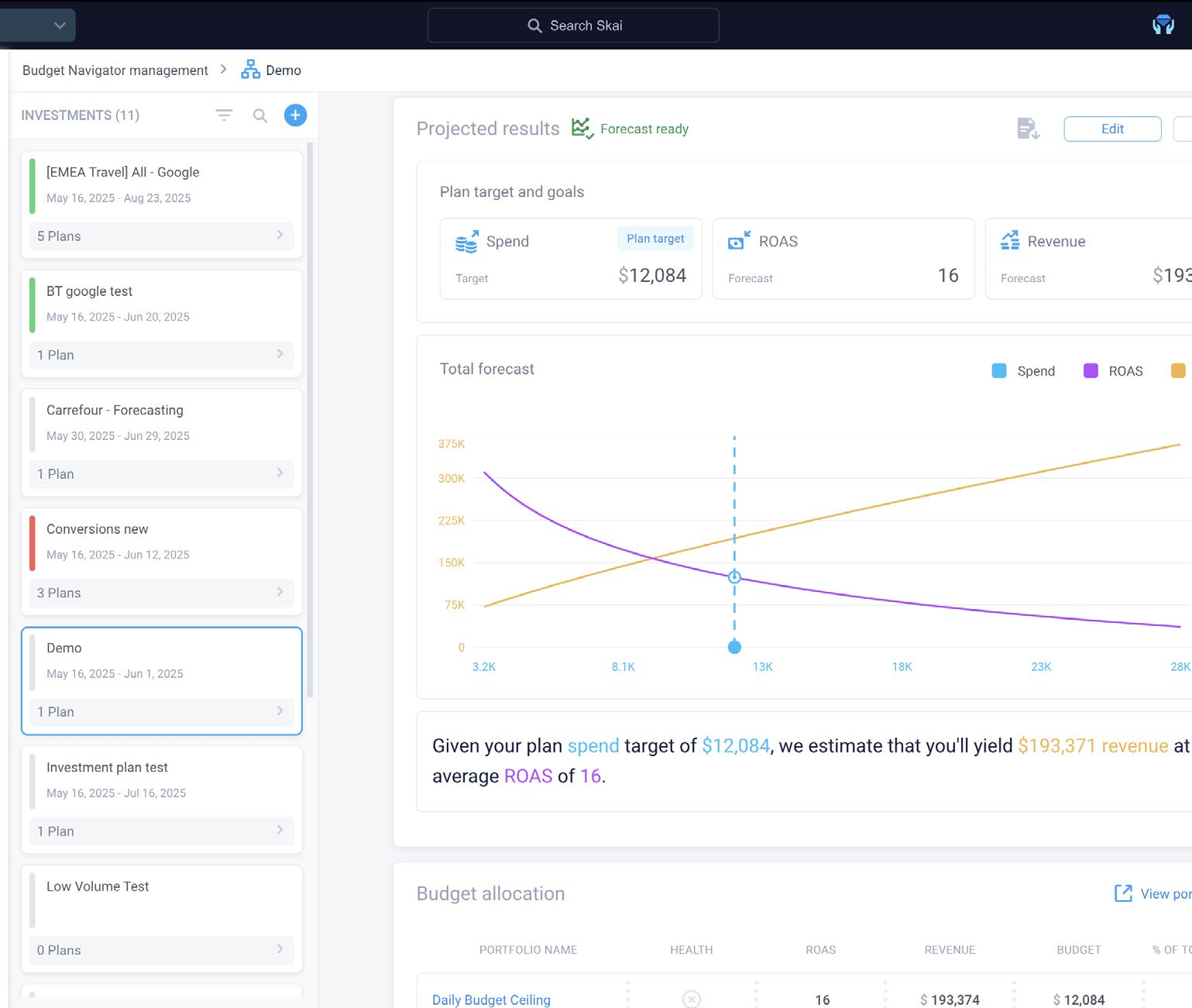
Skai Budget Navigator is designed for advertising budget planning, forecasting, and allocation.
Its capabilities include estimating spending outcomes, modelling different investment scenarios, monitoring pacing, and adjusting allocations according to performance objectives.
Skai also documents integration with Google Smart Bidding workflows.
Where Skai Stands Out
Budget Navigator is particularly useful for organisations that want to manage financial targets at a portfolio level.
For example, a retailer may need to allocate spending between product categories while keeping overall investment within an approved amount.
A travel company may face significant seasonal variations in demand, making a simple daily average an inadequate spending plan.
Skai’s forecasting and allocation features are designed to account for those broader decisions.
Its documentation describes automated forecasting updates and controls for monitoring progress toward budget goals.
What to Watch For
Forecasting and allocation optimisation aren’t equivalent to a guaranteed financial hard stop.
The business still needs appropriate controls, access permissions, and escalation rules.
It’s also important to establish whether the platform’s optimisation objective reflects the business’s actual definition of profitability.
A model pursuing revenue growth may recommend different allocations from one protecting contribution margin.
Best use: Enterprise advertising portfolios where financial planning, forecasting, and allocation decisions are closely connected.
Main limitation: Greater operational complexity and a broader enterprise product scope than many smaller advertisers need.
Verdict: A strong candidate for organisations needing portfolio planning as well as day-to-day budget pacing.
Which Budget Pacing Tool Should You Choose?
The best solution depends on the number of accounts, advertising channels, budget constraints, and how much automation your team actually wants.
Your Situation
Start With
One Google Ads account with a simple monthly budget
Google Ads native controls
PPC agency managing multiple search accounts
Optmyzr
Agency overseeing many approved client budgets
Shape by NinjaCat
Marketing team requiring custom cross-channel reports
Supermetrics
Paid social team needing custom schedule and budget rules
Bïrch
Large multi-channel operation with shared budget goals
Marin
Enterprise team modelling investment scenarios
Skai Budget Navigator
These are workflow recommendations, not independently measured rankings.
If you already have a reliable dashboard, well-tested rules, and clear financial controls, another subscription may offer limited value.
Before switching, identify which part of the current workflow is failing: data collection, forecasting, alerting, decision-making, or enforcement.
Flighting vs. Dayparting: Why They Affect Budget Pacing
The original challenge of budget pacing becomes more complicated when campaigns aren’t intended to spend evenly throughout the month.
Two scheduling concepts matter here: flighting and dayparting.
Flighting: Control Which Days a Campaign Runs
Flighting is the practice of running advertising during selected periods rather than continuously.
For example, an ecommerce business may have a $30,000 monthly advertising budget but intend to spend most of it during a seven-day promotion.
A linear pacing model would flag that campaign as severely overspending early in the month, even if it followed the approved plan perfectly.
The correct benchmark is the scheduled cumulative spending curve.
A promotion might allocate 15% of the budget before launch, 65% during the event, and 20% afterward.
The pacing system should compare actual spending with that approved distribution rather than assuming each calendar day deserves an equal amount.
Dayparting: Control Which Hours Ads Run
Dayparting limits advertising delivery to selected times of day.
A B2B lead-generation campaign may run more heavily during business hours, while an ecommerce advertiser may prioritise evenings when customers are more likely to purchase.
Dayparting can also reduce spending during periods when a business cannot handle incoming enquiries.
However, scheduling ads for fewer hours does not automatically reduce the month’s spending limit proportionally.
Google explicitly explains that ad scheduling doesn’t change its monthly spending-limit calculation in the same way that many advertisers might expect.
A campaign can still attempt to spend the relevant monthly amount across the available scheduled periods.
The practical rule: Update the pacing model and applicable budget controls whenever flighting or dayparting changes. A delivery schedule is not a substitute for an approved financial spending limit.
Five Rules That Make Budget Automation Safer
Automation is most valuable when it identifies and handles predictable problems without creating new ones.
The following safeguards are practical starting points.
Rule 1: Alert Before the Budget Becomes Critical
Don’t wait until spending reaches 100% of the approved budget.
Define warning thresholds based on projected month-end spending and remaining headroom.
For example, an agency might notify the account manager when projected spending exceeds the approved target by 3%, require review at 5%, and restrict further adjustments at a higher threshold.
Those percentages are illustrative. Appropriate thresholds depend on account size, data latency, and how much the platform can spend before a rule takes effect.
A fast-spending account may require tighter controls.
Rule 2: Use Separate Monitoring and Enforcement Rules
The rule that identifies a pacing problem should not necessarily be the same rule that modifies spending.
A monitoring rule can calculate the forecast and send a warning.
An enforcement rule can apply a specific, approved response once the conditions have been validated.
Separating these functions makes it easier to investigate mistakes and determine why a campaign was changed.
Rule 3: Check Data Freshness Before Taking Action
A pacing calculation is only as current as the spending data behind it.
If one platform refreshed two hours ago and another hasn’t updated since yesterday, the combined total can be misleading.
Include data freshness as a condition for important automated decisions where supported.
When a source stops updating, the system should alert the responsible person rather than silently assuming the spend is zero or unchanged.
For high-risk budgets, define a documented fallback procedure when data becomes unavailable.
Rule 4: Protect Against Conflicting Rules
A budget-increase rule and a budget-cap rule can interfere with each other.
For example, one automation might raise the daily budget because conversion performance appears strong, while another reduces the budget because the account is overspending.
Define which rule takes precedence, restrict repeated changes, and maintain a clear history of automated actions.
Changes affecting approved spending limits should generally have stricter controls than routine performance alerts.
Rule 5: Require Approval for Material Changes
Not every budget action needs manual approval, but large financial changes often should.
A reasonable policy might allow small adjustments within a documented range while requiring approval for increases that could materially change monthly spending.
The exact limits depend on the organisation.
What matters is that the software follows financial authority rather than treating every automated optimisation suggestion as permission to spend more.
How to Build a Budget Pacing Dashboard
A useful pacing dashboard should help the team answer five questions quickly.
How much has been spent against the approved budget?
How much should have been spent by this point?
What is the projected end-of-period spending?
Which campaigns or channels are causing the difference?
What action, if any, is required?
A simple dashboard can begin with the following fields.
Field
What It Shows
Approved budget
Financial limit for the period
Actual spend
Cumulative publisher-reported spending
Planned spend to date
Target spending under the agreed flight plan
Pacing variance
Difference between actual and planned spend
Recent daily run rate
Typical spending over a defined recent period
Projected final spend
Estimated period-end spending
Remaining budget
Approved budget minus actual spending
Days remaining
Time before the budget period ends
Data freshness
Time since the last successful source refresh
Recommended action
Investigate, adjust, or maintain the current plan
These fields can be implemented in Google Sheets, Looker Studio, Excel, or a dedicated budget management platform.
A simple pacing dashboard often relies on the average spending since the start of the month.
That calculation is useful but may miss recent changes.
Consider displaying both:
Full-period average forecast: Spending to date divided by elapsed days, multiplied across the full period.
Recent-run-rate forecast: Spending to date plus the recent daily average multiplied by remaining days.
The first provides longer-term context. The second is often more sensitive to recent changes in campaign delivery.
Neither should replace a planned-flight forecast when the campaign intentionally allocates different amounts across dates.
Include Committed and Delayed Spending
Some campaign costs may not yet be fully reflected in the latest report.
For strict financial management, it may be appropriate to reserve a buffer for reporting delays, spend already incurred but not yet processed, and other known obligations.
Using the earlier example, the account has $1,800 remaining.
If the team deliberately reserves $180 as a precautionary buffer, the operational allowance becomes $1,620, or an average of $540 per remaining day.
That buffer is an illustrative policy choice, not a standard percentage required by an advertising platform.
The appropriate reserve depends on how quickly the source data arrives and the business’s tolerance for budget variance.
How to Evaluate Budget Pacing Software Properly
A useful tool evaluation should measure how quickly the software helps identify and resolve a meaningful budget problem.
Feature counts alone don’t reveal this.
Run a Controlled Spend-Variance Test
Use historical spending data from an account with known budget changes, spending spikes, and campaign schedules.
Define the approved budget and expected spending plan before importing the data.
Then evaluate whether the platform identifies the same periods of over- and under-pacing.
If the tool uses proprietary forecasts, compare its predictions against the known actual final spending rather than relying on its dashboard labels.
Test the First Useful Action
Start from the initial account connection and record the time required to:
Set an approved spending target.
Import or connect the appropriate spend data.
Detect a known pacing problem.
Identify the campaigns causing it.
Create a useful alert or recommended response.
This distinguishes a tool that can display spending from one that helps the team respond.
Test Alert and Automation Delays
For controlled tests, measure how long it takes the system to recognise a spending condition and deliver an alert.
Where possible, also test the delay between an approved automation trigger and the resulting platform change.
Use a sandbox, supported test environment, or carefully controlled low-risk account.
Do not deliberately overspend a live client account to test software.
Test Failure Handling
Disconnect a source, simulate a missing refresh where supported, or review historical integration errors.
Determine whether the product identifies stale data, warns the account manager, and prevents inappropriate actions.
This is particularly important for products marketed as automatic spending protection.
A useful system should make failure visible rather than continue operating under the assumption that its last known spending number is current.
Measure the Cost of Resolved Problems
The software’s monthly price is not the only cost.
Track staff time saved, reporting work avoided, meaningful budget incidents detected, and any manual work introduced by maintaining the tool.
For example, if a $200 monthly subscription saves four hours of work valued at $40 per hour, the time benefit is $160. The software would still need to justify the remaining $40 through additional operational value.
These figures are illustrative, not measured vendor outcomes.
The more important question is whether the tool prevents sufficiently costly errors or improves the team’s workflow enough to justify its total operating expense.
Common Budget Pacing Mistakes
Treating the Daily Budget as a Strict Daily Cap
This is especially dangerous on platforms where actual daily spending can vary around the average budget setting.
Check the publisher’s spending rules before constructing the pacing model.
Changing Budgets Too Frequently
Repeated adjustments can introduce operational instability, complicate forecasting, and interfere with automated bidding.
The fact that a budget can be changed every hour doesn’t mean it should be.
Use reasonable review intervals and make changes when the forecast or business requirement justifies them.
Chasing Spend Targets Without Considering Performance
Underspending isn’t always a failure.
If demand is weak or qualified conversions are unavailable at an acceptable cost, forcing the account to spend every dollar may reduce profitability.
Budget pacing tools should help the team understand the difference between unnecessary underspend and responsible restraint.
Letting Conversion Delay Distort Budget Decisions
Advertising costs may be reported before the resulting conversions are fully attributed.
That can make recent performance look worse than it is.
Avoid using a very short conversion window to automatically cut spending unless the metric and attribution delay are suitable for that decision.
Ignoring Client Budget Changes
A client might reduce the authorised budget halfway through the month.
The pacing system should record the new approved amount, effective date, and any financial commitments that already exist.
Continuing to forecast against the previous budget can make a serious overspend look harmless.
Failing to Reconcile Spend Across Platforms
Google Ads, Meta, and other publishers may use different time zones, currencies, attribution definitions, and reporting schedules.
Combine spending only after those differences have been addressed.
Where financial accuracy matters, reconcile the publisher-reported costs against applicable billing data and the client’s agreed reporting method.
A Practical Month-End Budget Pacing Checklist
The final week of the month deserves additional attention because there’s less time to correct errors.
When
What to Check
Recommended Response
Days 1–7
Approved budgets and initial delivery
Confirm targets, sources, and campaign setup
Days 8–14
Run rate versus planned spend
Investigate meaningful pacing changes
Days 15–21
Forecast and campaign efficiency
Review possible reallocations
Days 22–25
Remaining budget and end-of-month projection
Validate spending plan with account owner
Days 26–27
Data freshness, active campaigns, pending changes
Increase review frequency where needed
Day 28
Remaining headroom versus projected final spend
Apply approved safeguards before limits become critical
Final days
Actual costs, late reporting, and account status
Reconcile, document decisions, and close the period
For larger accounts or businesses with unusual demand patterns, checks may need to occur more frequently.
The important principle is that the system should become more sensitive to spending risk as the available budget buffer decreases.
Final Verdict: Good Pacing Tools Prevent Surprises, Not Just Overspend
The most useful budget pacing tool is not necessarily the one with the most sophisticated forecast or the greatest number of automation options.
It’s the product that gives your team sufficient warning, accurate context, and dependable controls before spending becomes a problem.
Google Ads native features may be enough for smaller accounts. Optmyzr is worth evaluating when dedicated PPC monitoring, forecasting, and automation become recurring tasks, while Shape by NinjaCat is relevant for agencies responsible for many client budgets.
Supermetrics suits teams that want flexible cross-channel reporting without handing over campaign control. Bïrchprovides rule-driven automation, while Marin and Skai address more complex portfolio spending and allocation requirements.
Whatever platform you choose, distinguish monitoring from enforcement.
An automated alert can warn that you’re about to exceed the budget. A script or campaign rule may reduce spending. But neither should be described as an absolute guarantee without considering platform delivery rules, refresh delays, and execution timing.
The ideal workflow is straightforward:
Set the budget → Define the spending plan → Monitor actual costs → Forecast the outcome → Investigate deviations → Apply approved actions → Reconcile the result.
If that process works reliably, you shouldn’t discover on the 28th that you’ve already spent the money intended for the 30th.
Frequently Asked Questions
What Is the Best Budget Pacing Tool for Google Ads?
Optmyzr is a strong dedicated option to evaluate because it provides budget monitoring, forecasts, alerts, and automation for supported PPC workflows.
However, advertisers with simpler requirements should begin with Google Ads’ native budget reports, automated rules, and scripts before purchasing another subscription.
Can Google Ads Spend More Than My Daily Budget?
Yes. For most campaigns, Google Ads may spend up to twice the average daily budget on a particular day, subject to its applicable billing limits.
The monthly spending limit is generally based on 30.4 times the average daily budget, although budget changes and certain campaign types affect the calculation.
Can Budget Pacing Software Guarantee That I Never Overspend?
Not universally.
Third-party tools depend on source data, supported platform actions, and automation execution timing.
A delayed data refresh or platform API problem can prevent a system from acting at the exact moment a spending threshold is reached.
Use eligible native spending-limit mechanisms where available and maintain appropriate monitoring and operational safeguards.
What Is the Difference Between Budget Pacing and Dayparting?
Budget pacing measures how spending progresses against a defined budget.
Dayparting controls which hours a campaign is scheduled to run.
The two can work together, but restricting delivery to certain hours doesn’t automatically guarantee the account will remain within a monthly financial limit.
What Is Flighting in Paid Advertising?
Flighting means scheduling advertising during defined periods, with some days or weeks receiving more spending than others.
It is commonly used for promotions, seasonal campaigns, product launches, and campaigns tied to specific events.
A flighted campaign should be evaluated against its planned spending curve rather than a simple equal daily allocation.
What Is a Good Budget Pacing Percentage?
There is no universal percentage.
For a campaign designed to spend evenly across a 30-day month, roughly 50% budget utilisation at the end of day 15 would match the linear target.
However, seasonal campaigns, promotions, and other intentional spending patterns may require very different targets.
Is Supermetrics a Budget Automation Tool?
Supermetrics is primarily a data integration and reporting platform.
It can help build budget pacing dashboards and calculate spending variances across multiple advertising channels.
Direct changes to campaigns generally require separate advertising platform controls or compatible automation.
Should I Pause Ads When 90% of My Budget Is Used?
Not automatically.
If 90% of the budget is used on the final day, the situation may be acceptable. If it is used halfway through the month, the account probably needs investigation.
Consider the remaining time, approved spending plan, forecast, data freshness, and campaign performance before deciding whether to pause or reduce spending.
How Often Should I Check Budget Pacing?
The appropriate frequency depends on spending volume and how quickly the account can consume its remaining budget.
A small account may be adequately managed with daily reporting, while a large or fast-spending portfolio may need more frequent monitoring and automated alerts.
As the budget period approaches its end, increasing the review frequency can help detect problems before the remaining allowance is exhausted.
Editorial Methodology and Disclosure
This article compares publicly documented budget management capabilities and explains practical evaluation methods. It does not assign measured accuracy rankings or claim original cross-platform automation testing.
Product features, eligibility, pricing, and publisher behaviour may change. Verify the current requirements before enabling budget-modifying automation.
Disclosure: DigitalMarketingTools.ai is sponsored by Digimetrics.ai, developed by MediaOne. No Digimetrics product is ranked or promoted in this comparison.
About the author
Tom Koh
Tom is the CEO of MediaOne, a leading digital marketing agency. He is a business-experienced SEO consultant as well as a Google Gold Search Expert serving the international community. He has consulted for MNCs like Canon, Maybank, Capitaland, SingTel, ST Engineering, WWF, Cambridge University, as well as Government organisations like Enterprise Singapore, Ministry of Law, National Galleries, NTUC, e2i, SingHealth. His articles are published and referenced in CNA, Straits Times, MoneyFM, Financial Times, Yahoo! Finance, Hubspot, Zendesk, CIO Advisor. Under his stewardship, MediaOne has won dozens of prestigious digital marketing awards.
Your website has 150 published articles. Some attract consistent organic traffic, others haven’t generated a meaningful visit in months, and several cover nearly identical…
Writing a good advertisement sounds simple until you have to create 15 different headlines, stay within character limits, communicate your product’s benefits, and make…
Verifiability matters more than speed when publishing AI-generated content. An AI content generator turns a short brief into draft copy, and its usefulness depends…