
KEYWORD RESEARCH
Which keywords can you actually win?
Digimetrics Keyword Analysis is a keyword research tool that returns monthly search volume, keyword difficulty, cost per click and search intent for up to 25 keywords per run. It takes about a minute, and every new account can try it free for 7 days with no card.
- About a minute
- Free for 7 days
- No card needed
WHAT YOU GET BACK
The easiest win, highlighted.
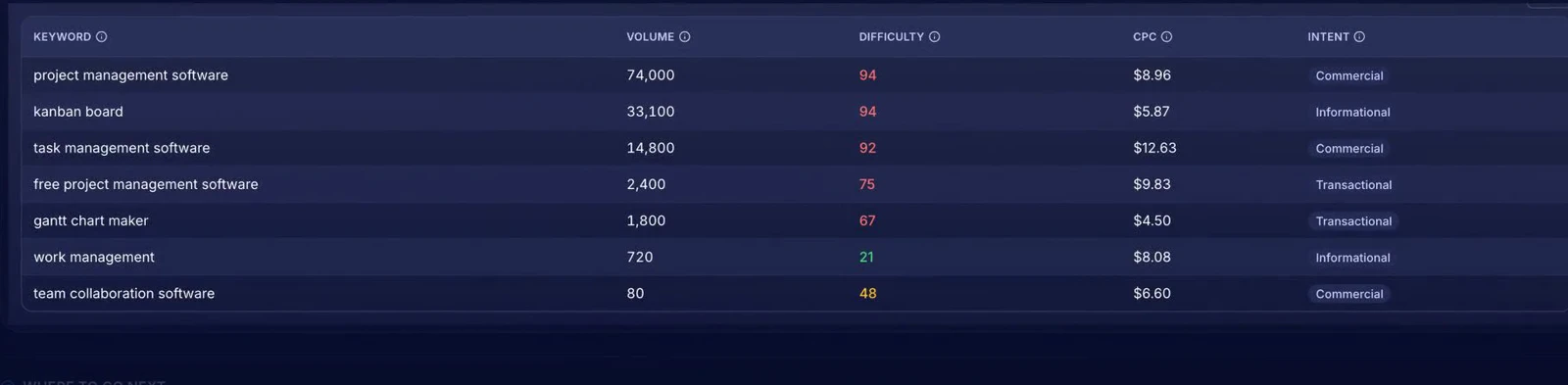
- 720Searches a monthSample keyword: “work management”.
- 21DifficultyGreen means page one is within reach.
- $8.08Cost per clickWhat advertisers pay, a clue to how valuable the searcher is.
- 94Too hard for nowSample: “project management software”, 74,000 searches, difficulty 94.
Four ways in.
Check a list of keywords, grow a few seeds into new ideas, see what any site already ranks for, or pull the keywords out of a page. Add your website and every keyword can get a time-to-rank estimate too.
HOW IT WORKS
Three steps. About a minute.
- 1
Add up to 25 keywords
Or start from seeds, a competitor’s site, or a page.
- 2
Pick the market
Country and language. A panel spells out exactly what the run will do before you spend anything.
- 3
Pick your winners
One row per keyword: volume, difficulty, cost per click and intent (learn, compare or buy).
Included on every plan, and free to try for 7 days.
IF YOU’VE EVER ASKED
One run answers these.
- “Which keywords should I target?”
- “How hard is it to rank for this keyword?”
- “How many people search for this?”
- “What keywords does my competitor rank for?”
THE OLD WAY VS. ONE RUN
Stop doing this by hand.
| Doing it yourself | With Keyword Analysis |
|---|---|
| A separate monthly keyword tool | Included with every other tool |
| Chase the biggest numbers | Volume weighed against difficulty |
| Guess the intent | Learn, compare or buy, labelled |
| Wonder how long it will take | Time-to-rank estimate per keyword |
WHO USES IT
Built for the people asking this question.



Digimetrics helps me turn technical marketing data into insights I can actually use in sales conversations. I can spot opportunities faster, explain them clearly to prospects, and build a stronger case for action.
 Christina TanChief Sales Orchestrator, Sales Symphony
WHAT TO RUN NEXT
Three tools people open after this one.
What should the best keyword research tool for SEO show you?
Four numbers per keyword: how many people search it, how hard page one is, what advertisers pay per click and why people search. Volume alone sends you after keywords you cannot win.
Most people start with the biggest number in the list. That is usually the wrong choice for a small or new site, because the highest-volume terms tend to have the hardest page one. A useful keyword difficulty checker sits right beside the volume, so you can trade a little traffic for a real chance of ranking.
Keyword Analysis puts all four signals on one row. Difficulty is colour-coded (green means within reach), CPC hints at how much a visitor is worth to a business, and intent tells you whether the searcher wants to learn, compare or buy. In the official tutorial's sample (fictional brand Brightpath), “work management” came out at 720 searches a month with difficulty 21, the easiest win in the list. If any of these terms are new to you, our glossary explains search volume and search intent in a sentence each.
| Signal | What it answers | How to use it |
|---|---|---|
| Volume | How many people search this each month? | Is it worth a page at all? |
| Difficulty | How hard is page one? | Can my site win it this year? |
| CPC | What do advertisers pay per click? | Is this searcher likely to buy? |
| Intent | Learn, compare or buy? | Should this be a guide, a comparison or a product page? |
How do I find low-competition keywords my small website can rank for?
Start from seeds, sort by difficulty, and keep the green rows with clear intent. Then check how long each one would take for your own domain before you write anything.
Low-competition keywords are rarely the head terms. They are the longer, more specific phrases real buyers type: a service plus a city, a product plus a use, a problem phrased as a question. Use the grow seeds into new ideas mode with two or three words that describe what you sell, and the tool expands them into related searches with the same four signals.
Next, add your website so each keyword gets a time-to-rank estimate. For a deeper forecast, run Time to Rank, which weighs your site's authority against the keyword's difficulty. In the tutorial sample, the same “work management” keyword was forecast to reach page one in 2 to 3 months. Our guide on how to do keyword research walks through the whole method.
- Pick keywords with green difficulty and a volume that would matter to your business.
- Prefer buy or compare intent for money pages, learn intent for guides.
- Group close variants onto one page instead of writing a page for each.
- Check where you rank today with Rank Checker before you choose.
Looking for a Google Keyword Planner alternative with keyword difficulty?
Google Keyword Planner is built for advertisers: its Competition column measures how many advertisers bid on a keyword, not how hard it is to rank organically. Keyword Analysis adds an organic difficulty score next to volume and CPC.
Keyword Planner is free and useful for ad budgets, but its competition figure is about paid ads. That is why so many people searching for a keyword research tool google offers end up needing a second tool for SEO difficulty.
Keyword Analysis covers both views in one table: CPC for buyer value, difficulty for organic ranking. When the list grows into a plan, Keyword Strategy Builder groups everything a site ranks for into topics and pillar pages, and Keyword Mapping assigns each keyword to the page that should rank for it.
Comparing paid suites too? See how we stack up as a Semrush alternative.
QUESTIONS PEOPLE ASK
Frequently asked questions
Still unsure? Email support@digimetrics.ai and a person will reply.
What is the best keyword research tool for a small business?
The best keyword research tool for a small business shows difficulty next to volume, so you pick keywords you can actually win, and returns results fast. Keyword Analysis returns volume, difficulty, CPC and intent for up to 25 keywords in about a minute.
Is there a free keyword research tool?
Yes. Every new Digimetrics account is free for 7 days with no credit card, and every tool is unlocked, so you can check your keyword lists and try the other tools too.
How many keywords can I check at once?
Up to 25 per run, and each run takes about a minute. You can also start from a few seeds, a competitor's domain or a single page URL instead of a list.
Is this a keyword search volume checker too?
Yes. Every row shows the monthly search volume for your chosen market and language, alongside difficulty, cost per click and intent.
What does keyword difficulty mean?
It is how hard it is to reach page one of Google for that keyword. Green means within reach for most sites; read the keyword difficulty entry for how it is judged.
Can I see what keywords a competitor ranks for?
Yes. Choose the mode that shows what any site already ranks for and enter their domain. To compare positions head to head, use Competitors Identifier.
What should I do after picking keywords?
Check where you rank today with Rank Checker, forecast the timeline with Time to Rank, then improve or write the page. AI Content Generator turns a chosen keyword into a draft graded out of 100.
Which keywords can you actually win?
Find out in about a minute. Try it free for 7 days. No card needed.